
Android ListView的使用(三)
前两节关于ListView的,已经使用了ArrayAdapter,SimpleAdapter了,两个比较基本的适配器
这里来用一个用的最多的一个适配器BaseAdapter。
还是先上效果图。大概和微博首页差不多的
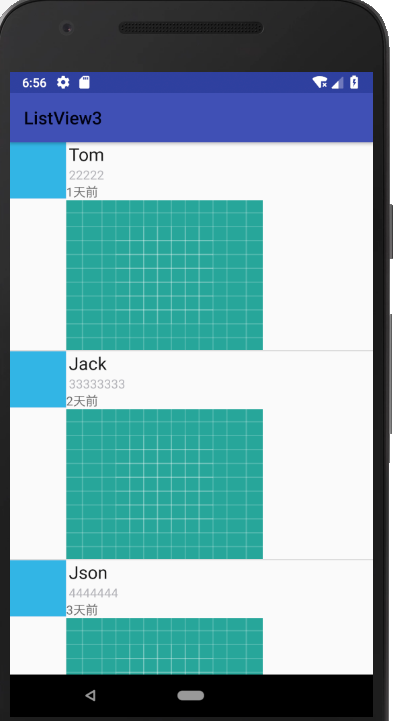
上代码:创建主页面 activity_main.xml
<?xml version="1.0" encoding="utf-8"?>

<android.support.constraint.ConstraintLayout xmlns:android="http://schemas.android.com/apk/res/android"

    xmlns:app="http://schemas.android.com/apk/res-auto"

    xmlns:tools="http://schemas.android.com/tools"

    android:layout_width="match_parent"

    android:layout_height="match_parent"

    tools:context=".MainActivity">

    <ListView

        android:id="@+id/list_item"

        android:layout_width="match_parent"

        android:layout_height="match_parent" />

</android.support.constraint.ConstraintLayout>
创建 ListView 要显示的内容页面:listview_item.xml
<?xml version="1.0" encoding="utf-8"?>

<LinearLayout xmlns:android="http://schemas.android.com/apk/res/android"

    xmlns:app="http://schemas.android.com/apk/res-auto"

    xmlns:tools="http://schemas.android.com/tools"

    android:layout_width="match_parent"

    android:layout_height="match_parent"

    android:orientation="horizontal">

    <ImageView

        android:id="@+id/imageView"

        android:layout_width="64dp"

        android:layout_height="64dp"

        app:srcCompat="@android:color/holo_blue_light" />

    <!-- 定义一个竖直方向的LinearLayout,把QQ呢称与说说的文本框设置出来 -->

    <LinearLayout

        android:id="@+id/new_line"

        android:layout_width="match_parent"

        android:layout_height="wrap_content"

        android:orientation="vertical">

        <TextView

            android:id="@+id/name"

            android:layout_width="wrap_content"

            android:layout_height="wrap_content"

            android:paddingLeft="8px"

            android:textColor="#1D1D1C"

            android:textSize="20sp" />

        <TextView

            android:id="@+id/says"

            android:layout_width="wrap_content"

            android:layout_height="wrap_content"

            android:paddingLeft="8px"

            android:textColor="#B4B4B9"

            android:textSize="14sp" />

        <TextView

            android:id="@+id/times"

            android:layout_width="match_parent"

            android:layout_height="wrap_content"

            android:text="TextView"

            android:textSize="14sp"/>

        <ImageView

            android:id="@+id/image"

            android:layout_width="223dp"

            android:layout_height="170dp"

            app:srcCompat="@drawable/ic_launcher_background" />

    </LinearLayout>

</LinearLayout>
创建一个dto类:
package action.sun.com.listview3;

public class Animal {

    private String aName;

    private String aSpeak;

    private int aIcon;

    private  String time;

    private  int Image;

    public Animal(String aName, String aSpeak, int aIcon,String atime,int aImage) {

        this.aName = aName;

        this.aSpeak = aSpeak;

        this.aIcon = aIcon;

        this.time = atime;

        this.Image = aImage;

    }

    public String getaName() {

        return aName;

    }

    public String getaSpeak() {

        return aSpeak;

    }

    public int getaIcon() {

        return aIcon;

    }

    public String getTime() {

        return time;

    }

    public int getaImage() {

        return Image;

    }

    public void setaName(String aName) {

        this.aName = aName;

    }

    public void setaSpeak(String aSpeak) {

        this.aSpeak = aSpeak;

    }

    public void setaIcon(int aIcon) {

        this.aIcon = aIcon;

    }

    public void setTime(String time) {

        this.time = time;

    }

    public void setImage(int Image) {

        this.Image = Image;

    }

}
创建一个适配器:
package action.sun.com.listview3;

import android.content.Context;

import android.view.LayoutInflater;

import android.view.View;

import android.view.ViewGroup;

import android.widget.BaseAdapter;

import android.widget.ImageView;

import android.widget.TextView;

import java.util.LinkedList;

public class AnimalAdapter extends BaseAdapter {

    private LinkedList<Animal> mData;

    private Context mContext;

    public AnimalAdapter(LinkedList<Animal> mData, Context mContext) {

        this.mData = mData;

        this.mContext = mContext;

    }

    //listview 总数

    @Override

    public int getCount() {

        return mData.size();

    }

    @Override

    public Object getItem(int i) {

        return null;

    }

    @Override

    public long getItemId(int i) {

        return i;

    }

    // 视图

    @Override

    public View getView(int i, View view, ViewGroup viewGroup) {

        view = LayoutInflater.from(mContext).inflate(R.layout.listview_item,viewGroup,false);

        ImageView img_icon = (ImageView) view.findViewById(R.id.imageView);

        TextView txt_aName = (TextView) view.findViewById(R.id.name);

        TextView txt_aSpeak = (TextView) view.findViewById(R.id.says);

        TextView txt_times = (TextView) view.findViewById(R.id.times);

        ImageView txt_image = (ImageView) view.findViewById(R.id.image);

        img_icon.setBackgroundResource(mData.get(i).getaIcon());

        txt_aName.setText(mData.get(i).getaName());

        txt_aSpeak.setText(mData.get(i).getaSpeak());

        txt_times.setText(mData.get(i).getTime());

        txt_image.setBackgroundResource(mData.get(i).getaImage());

        return view;

    }

}
主类MainActivity:
package action.sun.com.listview3;

import android.content.Context;

import android.support.v7.app.AppCompatActivity;

import android.os.Bundle;

import android.widget.ListView;

import java.util.LinkedList;

import java.util.List;

public class MainActivity extends AppCompatActivity {

    private List<Animal> mData = null;

    private Context mContext;

    private AnimalAdapter mAdapter = null;

    private ListView list_animal;

    @Override

    protected void onCreate(Bundle savedInstanceState) {

        super.onCreate(savedInstanceState);

        setContentView(R.layout.activity_main);

        mContext = MainActivity.this;

        list_animal = (ListView) findViewById(R.id.list_item);

        mData = new LinkedList<Animal>();

        mData.add(new Animal("Tom", "22222", R.mipmap.ic_launcher,"1天前",R.drawable.ic_launcher_background));

        mData.add(new Animal("Jack", "33333333", R.mipmap.ic_launcher,"2天前",R.drawable.ic_launcher_background));

        mData.add(new Animal("Json", "4444444", R.mipmap.ic_launcher,"3天前",R.drawable.ic_launcher_background));

        mData.add(new Animal("Kumi", "1121313", R.mipmap.ic_launcher,"4天前",R.drawable.ic_launcher_background));

        mData.add(new Animal("Timi", "88888", R.mipmap.ic_launcher,"5天前",R.drawable.ic_launcher_background));

        mAdapter = new AnimalAdapter((LinkedList<Animal>) mData, mContext);

        list_animal.setAdapter(mAdapter);

    }

}
代码完毕,运行即可。
Android ListView的使用(三)的更多相关文章
- Android实训案例(三)——实现时间轴效果的ListView,加入本地存储,实现恋爱日记的效果!
Android实训案例(三)--实现时间轴效果的ListView,加入本地存储,实现恋爱日记的效果! 感叹离春节将至,也同时感叹时间不等人,一年又一年,可是我依然是android道路上的小菜鸟,这篇讲 ...
- android ListView 属性
android:divider="#fffff" 分割线颜色 android:dividerHeight="1px" 分割线高度 divider 分割线-去掉分 ...
- 【腾讯Bugly干货分享】Android ListView与RecyclerView对比浅析--缓存机制
本文来自于腾讯bugly开发者社区,非经作者同意,请勿转载,原文地址:http://dev.qq.com/topic/5811d3e3ab10c62013697408 作者:黄宁源 一,背景 Recy ...
- Android ListView 常用技巧
Android ListView 常用技巧 Android TextView 常用技巧 1.使用ViewHolder提高效率 ViewHolder模式充分利用了ListView的视图缓存机制,避免了每 ...
- Android listview addHeaderView 和 addFooterView 详解
addHeaderView()方法:主要是向listView的头部添加布局addFooterView()方法:主要是向listView的底部添加布局 需要注意的是添加布局的时候应该添加从父容器开始添加 ...
- Android -----listView的属性大全
http://www.cnblogs.com/zhengbeibei/archive/2013/03/29/2988814.html 01 <?xml version="1.0 ...
- Adroid 总结--android ListView美化,个性化更改的属性
首先是stackFromBottom属性,这只该属性之后你做好的列表就会显示你列表的最下面,值为true和falseandroid:stackFromBottom="true" ...
- Android ListView OnItemLongClick和OnItemClick事件内部细节分享以及几个比较特别的属性
本文转自 http://blog.sina.com.cn/s/blog_783ede030101bnm4.html 作者kiven 辞职3,4个月在家休息,本以为楼主要程序员逆袭,结果失败告终继续码农 ...
- 【转】android ListView 几个重要属性
android ListView 几个重要属性 分类: Android2012-03-08 19:25 19324人阅读 评论(5) 收藏 举报 listviewandroid活动javalistnu ...
- Android ListView无法触发ItemClick事件
Android ListView无法触发ItemClick事件 开发中很常见的一个问题,项目中的listview不仅仅是简单的文字,常常需要自己定义listview,自己的Adapter去继承Base ...
随机推荐
- Python读文本文件中文乱问题
file_object = open('thefile.txt')try: all_the_text = file_object.read().decode("gb2312")fi ...
- python 视频 图像帧提取
import cv2 vidcap = cv2.VideoCapture('005.avi') success,image = vidcap.read() count = 0 success = Tr ...
- maven配置src/resources默认目录
在maven工程中,我们会将配置文件放到,src/main/resources 下面,例如 我们需要确认resource 下的文件 编译之后存放的位置 它编译的路径直接位于classes下面,这个 ...
- appium 重新启动apk
在旧版本的appium,重新启动apk,调用startActivity方法可以随意启动一个app,并传入一个package name 和启动activity name的名称.语句如下: driver. ...
- 硬盘内部硬件结构和工作原理详解[zz]
一般硬盘正面贴有产品标签,主要包括厂家信息和产品信息,如商标.型号.序列号.生产日期.容量.参数和主从设置方法等.这些信息是正确使用硬盘的基本依据,下面将逐步介绍它们的含义. 硬盘主要由盘体.控制电路 ...
- Objective-C 位运算符
转自:http://www.yiibai.com/objective_c/objective_c_bitwise_operators.html 下表中列出了支持Objective-C语言的位运算符.假 ...
- mingw环境添加mysql开发库
今天碰巧要用到mysql进行开发,在windows的mingw平台. 0.下载mysql http://cdn.mysql.com/Downloads/MySQL-5.1/mysql-noinstal ...
- SSH框架整合开发具体解释(个人笔记)
一.创建数据库并设置编码. A) create database oa default character set utf8. 二.MyEclipseproject A) 在Myeclipse里创建w ...
- 我的IT之路2013(二)
严寒即将过去,温暖的春天正在向我们招手,欢呼吧,在迎接新的开始的同时,不要忘了回顾一下过去的这一年,总结一下过去的这一年有什么得失. 英语学习 13年下半年,最大的变化就是有很大一部分时间用来学英语. ...
- [Windows Azure] Building worker role A (email scheduler) for the Windows Azure Email Service application - 4 of 5.
Building worker role A (email scheduler) for the Windows Azure Email Service application - 4 of 5. T ...