
greendao数据库初次使用的配置及多表关联的初始化
1.在工程外层(Project)的build.gradle中添加依赖
 buildscript {

     repositories {

         jcenter()

     }

     dependencies {

         classpath 'com.android.tools.build:gradle:2.3.2'

         //GreenDao3依赖

         classpath 'org.greenrobot:greendao-gradle-plugin:3.2.1'

     }

 }
2.在项目(Module,也就是app内层)的build.gradle中添加依赖
 apply plugin: 'com.android.application'

 //使用greendao

 apply plugin: 'org.greenrobot.greendao'

 android {

     compileSdkVersion

     buildToolsVersion "23.0.2"

     defaultConfig {

         applicationId "com.handsome.didi"

         minSdkVersion

         targetSdkVersion

         versionCode

         versionName "1.0"

     }

     //greendao配置

     greendao {

18         //版本号,升级时可配置

19         schemaVersion 1

20     }

     buildTypes {

         release {

             minifyEnabled false

             proguardFiles getDefaultProguardFile('proguard-android.txt'), 'proguard-rules.pro'

         }

     }

 }

 dependencies {

     compile fileTree(include: ['*.jar'], dir: 'libs')

     testCompile 'junit:junit:4.12'

     compile 'com.android.support:appcompat-v7:23.1.1'

     //greendao依赖

     compile 'org.greenrobot:greendao:3.2.0'

 }
到这里就配置成功了,同步编译(Sync Project)之后没毛病的话就可以往下创建bean类了。
 @Entity

 public class Shop{

     //不能用int

     @Id(autoincrement = true)

     private Long id;

     //商品名称

     @Unique

     private String name;

     //商品价格

     @Property(nameInDb = "price")

     private String price;

 }
这里创建了一个“商品”的实体类,(PS:主键是Long型,不是long哟)然后选择build——>make project,此时会自动为shop类生成构造方法和set、get方法,还有就是greendao操作的重要部分: DaoMaster、DaoSession、DAOS类,但是初次生成并不在src目录下,而是在这里
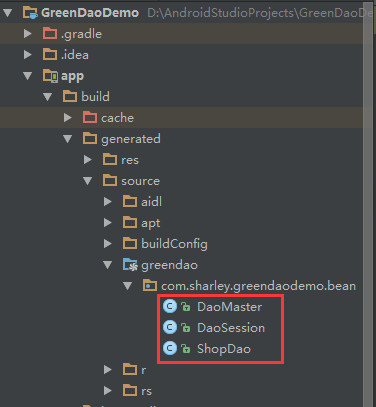
如果你想把它放入其他目录方便操作或查看的话,则在build.gradle刚刚配置的地方再加上几句
     greendao {

         //版本号,升级时可配置

         schemaVersion

        //文件目录

         targetGenDir 'src/main/java'

        //包名路径

         daoPackage 'com.sharley.greendaodemo.greendao'

     }
这样它就会自动移植过来了,复制到指定位置
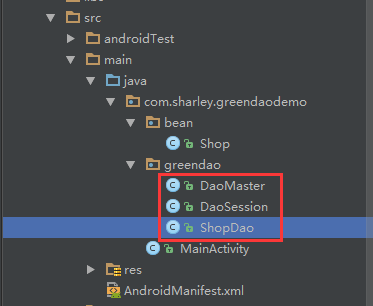
下面示例说明一下多表关联中的一对多的情况
比如我再新建一个实体类user,用户与商品之间成立关联关系,一个用户可购买多个商品,那么在user类中加入ToMany设置。
 @Entity

 public class User {

     @Id(autoincrement = true)

     private Long id;

     private String name;

     @ToMany(referencedJoinProperty = "sid")

     private List<Shop> shops;

 }
在shop类中再额外添加一个字段,即一对多时的外主键,注意一定要与user类的id相同
private Long sid;
make project后,user类除了之前说的方法之外还会额外生成一个getShops的方法
     /** Used to resolve relations */

     @Generated(hash = )

     private transient DaoSession daoSession;

     /** Used for active entity operations. */

     @Generated(hash = )

     private transient UserDao myDao;

     /**

      * To-many relationship, resolved on first access (and after reset).

      * Changes to to-many relations are not persisted, make changes to the target entity.

      */

     @Generated(hash = )

     public List<Shop> getShops() {

         if (shops == null) {

             final DaoSession daoSession = this.daoSession;

             if (daoSession == null) {

                 throw new DaoException("Entity is detached from DAO context");

             }

             ShopDao targetDao = daoSession.getShopDao();

             List<Shop> shopsNew = targetDao._queryUser_Shops(id);

             synchronized (this) {

                 if (shops == null) {

                     shops = shopsNew;

                 }

             }

         }

         return shops;

     }
然后,差不多就酱。
参考:http://blog.csdn.net/qq_30379689/article/details/54410838#comments
greendao数据库初次使用的配置及多表关联的初始化的更多相关文章
- Android数据库高手秘籍(三)——使用LitePal升级表
转载请注明出处:http://blog.csdn.net/guolin_blog/article/details/39151617 在上一篇文章中,我们学习了LitePal的基本使用方法,体验了使用框 ...
- SQL Server 2016的数据库范围内的配置
SQL Server 2016真的让人眼前一亮.几天前微软就提供了RCO(候选发布版)版本的下载.我已经围观了一圈RCO版本,其中一个最拽的功能是数据库范围内的配置(Database Scoped C ...
- [转] Linux学习之CentOS(十三)--CentOS6.4下Mysql数据库的安装与配置
from: http://www.cnblogs.com/xiaoluo501395377/archive/2013/04/07/3003278.html 如果要在Linux上做j2ee开发,首先得 ...
- Linux学习之CentOS--CentOS6.4下Mysql数据库的安装与配置【转】
如果要在Linux上做j2ee开发,首先得搭建好j2ee的开发环境,包括了jdk.tomcat.eclipse的安装(这个在之前的一篇随笔中已经有详细讲解了Linux学习之CentOS(七)--C ...
- Linux学习之CentOS(十三)--CentOS6.4下Mysql数据库的安装与配置
原文:http://www.cnblogs.com/xiaoluo501395377/archive/2013/04/07/3003278.html 如果要在Linux上做j2ee开发,首先得搭建好j ...
- SSD Cloud Hosting–Linode-Mysql数据库的安装与配置
接着上一篇的话题:SSD Cloud Hosting - Linode的配置和部署,搭建Java环境 8.Mysql数据库的安装与配置 安装 检查yum里边有没有mysql: yum list|gre ...
- Linux学习之CentOS6下Mysql数据库的安装与配置
转自:http://www.cnblogs.com/xiaoluo501395377/archive/2013/04/07/3003278.html 如果要在Linux上做j2ee开发,首先得搭建好j ...
- Linux CentOS6.4下Mysql数据库的安装与配置
一.mysql简介 说到数据库,我们大多想到的是关系型数据库,比如mysql.oracle.sqlserver等等,这些数据库软件在windows上安装都非常的方便,在Linux上如果要安装数据库,咱 ...
- CentOS6.4/6.7下Mysql数据库的安装与配置(转载)
通过RPM方式 给centos 安装mysql 最好有光盘,呵呵,网络也可以下载rpm安装包,不过文件较大. 1 挂载光盘 mount /dev/cdrom /mnt/cdrom/mount: b ...
随机推荐
- Android应用一般上架流程
Android App上架所需文件 上架准备 App文件: 1. 安装包 2. 应用商标:图片格式KB. 3. 应用截图(4~6张):图片格式JPG或者PNG.图片大小480*800,且每张大小一致 ...
- ios获取文件的MD5值
一般我们在使用http或者socket上传或者下载文件的时候,经常会在完成之后经行一次MD5值得校验(尤其是在断点续传的时候用的更 多),校验MD5值是为了防止在传输的过程当中丢包或者数据包被篡改,在 ...
- vue.js 首屏优化
我们以 vue-cli 工具为例,使用 vue-router 搭建SPA应用,UI框架选用 element-ui , ajax方案选用 axios, 并引入 vuex ,使用 vuex-router- ...
- 最新Windows下c++读写锁SRWLock介绍
https://blog.csdn.net/MoreWindows/article/details/7650574 https://blog.csdn.net/chenzhjlf/article/de ...
- mingw环境添加mysql开发库
今天碰巧要用到mysql进行开发,在windows的mingw平台. 0.下载mysql http://cdn.mysql.com/Downloads/MySQL-5.1/mysql-noinstal ...
- [AWS vs Azure] 云计算里AWS和Azure的探究(2.1)
云计算里AWS和Azure的探究(2.1) ——Amazon EC2 和 WindowsAzure Virtual Machine 刚发表了就发现Amazon的价格下降了,第一代Linux的EC2价格 ...
- git push remote error解决办法
通常在用git clone了remote端(服务器)的git仓库后,再进行了自己一系列修改后,会将自己测试后稳定的状态push到remote端,以更新源仓库,使 其他人在pull的时候得到自己的修改. ...
- spring boot guava cache 缓存学习
http://blog.csdn.net/hy245120020/article/details/78065676 ****************************************** ...
- js实现类似qq表情(插入图片以及获取光标的效果)
<!doctype html><html style="height:100%"><head><meta charset="ut ...
- LeetCode: Construct Binary Tree from Preorder and Inorder Traversal 解题报告
Construct Binary Tree from Preorder and Inorder Traversal Given preorder and inorder traversal of a ...