
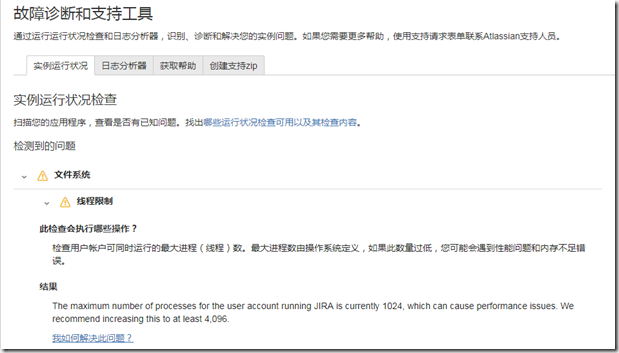
The maximum number of processes for the user account running is currently , which can cause performance issues. We recommend increasing this to at least 4096.
[root@localhost ~]# vi /etc/security/limits.conf
# /etc/security/limits.conf
#
#Each line describes a limit for a user in the form:
#
#<domain> <type> <item> <value>
#
#Where:
#<domain> can be:
# - a user name
# - a group name, with @group syntax
# - the wildcard *, for default entry
# - the wildcard %, can be also used with %group syntax,
# for maxlogin limit
#
#<type> can have the two values:
# - "soft" for enforcing the soft limits
# - "hard" for enforcing hard limits
#
#<item> can be one of the following:
# - core - limits the core file size (KB)
# - data - max data size (KB)
# - fsize - maximum filesize (KB)
# - memlock - max locked-in-memory address space (KB)
# - nofile - max number of open file descriptors
# - rss - max resident set size (KB)
# - stack - max stack size (KB)
# - cpu - max CPU time (MIN)
# - nproc - max number of processes
# - as - address space limit (KB)
# - maxlogins - max number of logins for this user
# - maxsyslogins - max number of logins on the system
# - priority - the priority to run user process with
# - locks - max number of file locks the user can hold
# - sigpending - max number of pending signals
# - msgqueue - max memory used by POSIX message queues (bytes)
# - nice - max nice priority allowed to raise to values: [-20, 19]
# - rtprio - max realtime priority
#
#<domain> <type> <item> <value>
#
#* soft core 0
#* hard rss 10000
#@student hard nproc 20
#@faculty soft nproc 20
#@faculty hard nproc 50
#ftp hard nproc 0
#@student - maxlogins 4
# Add by Weiru.Quan on 2018-01-01.
jira soft nofile 4096
jira hard nofile 8192
jira soft nproc 4096
jira hard nproc 8192
"/etc/security/limits.conf" 56L, 1979C written
# ========================================================================================
Health Check: Thread Limit
Related content
- Performance Troubleshooting Tools - Best Practice
- Testing disk access speed for a Java application
- Application Links Troubleshooting Guide
- Database Troubleshooting and How-to Guides
- Troubleshooting slow MySQL performance
- Enabling MySQL slow query logs
This Knowledge Base article was written specifically for the Atlassian Server platform. Due to the Restricted functions in Atlassian Cloud apps, the contents of this article cannot be applied to Atlassian Cloud applications.
About the Health Check
This health check looks at the maximum number of processes (threads) the user account running JIRA or Confluence can run at the same time. The maximum processes is defined by the operating system, and often defaults to 1024 which is too low for Atlassian applications running at scale. If it is too low you may experience performance issues and out of memory errors such as Confluence crashes and throws 'OutOfMemory: unable to create new native thread' error.
Understanding the Results
Icon
Result
What this means

The number of processes for the user account running <Application> is sufficient. The recommended maximum processes is 4096.
The Health Check has passed and the user running JIRA or Confluence can create an appropriate number of threads.

The maximum number of processes for the user account running <Application> is currently <number>, which can cause performance issues. We recommend increasing this to at least 4096.
The health check has failed. The user running JIRA or Confluence cannot create an appropriate number of threads which can can cause performance issues that are hard to detect, and ultimately crash the application with an OutOfMemoryError.

We couldn't determine the maximum number of processes for the user account running <Application>. We recommend this be set to at least 4096.
The health check was not able to determine the maximum number of processes. If you are experiencing out of behaviour as described in Confluence crashes and throws 'OutOfMemory: unable to create new native thread' error you should manually check this maximum is adequate.
Resolution
We recommend setting the maximum running user processes and number of opened files permanently, the way you do this is operating system specific.
In most Linux distributions this can be set temporarily using ulimit or permanently using limits.conf(e.g. Ubuntu, RedHat) by adding the following:
confluence soft nofile 4096
confluence hard nofile 8192
confluence soft nproc 4096
confluence hard nproc 8192

Replace confluence with the user that runs your instance of JIRA or Confluence.
Last modified on Mar 2, 2017
The maximum number of processes for the user account running is currently , which can cause performance issues. We recommend increasing this to at least 4096.的更多相关文章
- ORA-00020: maximum number of processes (40) exceeded模拟会话连接数满
问题描述:在正式生产环境中,有的库建的process和session连接数目设置的较小,导致后期满了无法连接.因为正式库无法进行停库修改,只能释放连接,做个测试模拟 1. 修改现有最大会话与进程连接数 ...
- ORA-00020:maximum number of processes (150) exceeded
异常的含义 超过最大的进程数 我们使用下面的语句可以查看与进程(process)的相关参数: 如上所示,这里的最大进程数是150. 问题可能存在的原因 1.应用程序在使用数据库连接池时,使用完成后没有 ...
- ORA-00020: maximum number of processes (xxxx) exceeded 报错解决方法
转自:http://blog.51cto.com/lee90/1788124 今天java开发在连接线上的oracle大量导数据,一会提示连接不上数据库了.我本地用sqldeveloper也连接不上. ...
- ORA-00020: maximum number of processes (300) exceeded
SQL> select count(*) from v$session; COUNT(*)---------- 98 SQL> select count(*) from v$process ...
- Oracle 错误 maximum number of processes(150) exceeded 解决办法
网上很多同行应该都遇到过这个问题,百度一搜 千篇一律的处理办法,就是加大进程数. 但是我这边情况不一样,因为我的Oracle 11g是早上刚装的,跟本没人用,我用PLSQL链接照样说不能链接. 我就在 ...
- ORA-00020: maximum number of processes (800) exceeded
[oracle@db04-1 ~]$ sqlplus -prelim / as sysdba SQL*Plus: Release 11.2.0.3.0 Production on 星期四 8月 31 ...
- ORA-00018: maximum number of sessions exceeded 超出最大会话数
ORA-00018: maximum number of sessions exceededORA-00018: 超出最大会话数 Cause: All session state obje ...
- Linux Increase The Maximum Number Of Open Files / File Descriptors (FD)
How do I increase the maximum number of open files under CentOS Linux? How do I open more file descr ...
- iOS---The maximum number of apps for free development profiles has been reached.
真机调试免费App ID出现的问题The maximum number of apps for free development profiles has been reached.免费应用程序调试最 ...
随机推荐
- PHP中的魔术方法和关键字
PHP中的魔术方法总结 :__construct, __destruct , __call, __callStatic,__get, __set, __isset, __unset , __sleep ...
- js过滤检测敏感词汇
html: <textarea rows="10" cols="100" id="myDiv"></textarea> ...
- 用LR录制文件下载并随机产生文件名
用LR录制文件下载并随机产生文件名 {H.IY:X.Tn0 8h&~-D|6fV0Action()51Testing软件测试网GE$nV}s,R{51Testing软件测试网 }9sUS'q ...
- Selenium--testNG下载地址
TestNG - http://beust.com/eclipse http://testng.org/doc/eclipse.html http://testng.org/doc/seleniu ...
- PHP库函数积累,持续更新
1. gethostbyname($server_name) 作用:根据给定的域名获取对应的ip 示例:echo gethostbyname("www.baidu.com"); 2 ...
- 树论讲解——最近公共祖先(lca)
最近公共祖先?! 有人肯定要问:什么是最近公共祖先???!! 好那我们现在就来说说什么是最近公共祖先吧! 最近公共祖先有一个好听的名字叫——lca 这是一种算法,这个算法基于并查集和深度优先搜索.算法 ...
- Eclipse酷炫项目、最新趋势介绍
作为Eclipse基金组织的执行董事,我需要经常审阅每一个新提交的Eclipse项目协议书.作为Eclipse的一分子,我很乐意与加入我们团队的新开发人员互动.这也是我工作中的乐趣之一.2013年,我 ...
- hdu 1069 动规 Monkey and Banana
Monkey and Banana Time Limit:1000MS Memory Limit:32768KB 64bit IO Format:%I64d & %I64u ...
- Appium robotframework-appium (ios 客户端测试)环境搭建
一. 简介 1.1摘要 本人测试新人,最近在搞ios客户端的自动化,准备采用robotframework-appium来实现自动化测试,一边学习一边总结,此安装说明文档是基于mac系统10.11版本, ...
- 【UOJ 179】 #179. 线性规划 (单纯形法)
http://uoj.ac/problem/179 补充那一列修改方法: 对于第i行: $$xi=bi-\sum Aij*xj$$ $$=bi-\sum_{j!=e} Aij*xj-Aie*xe ...