
Cucumber(一): Preparation
Every time I wrote some code in ruby and executed our cucumber features I craved for something similar in Java. I knew that there were several BDD frameworks for Java like JBehave, JDave, and EasyB, but none of them was right for me: either it used another language - like groovy -, had some unnecessary dependencies, or was hard to integrate with eclipse. A couple of weeks ago, I was looking for something in the source code of cucumber and found out that Aslak Hellesøy - author of cucumber - is working on a pure Java based implementation. It hasn’t been released yet, but I decided to give it a try and see what it can do.
The Basics
If you are not familiar with the BDD concept I recommend to read Dan North’s article before continuing. BDD means Behavior Driven Development, and in a nutshell, it means that you specify on a higher level, in a readable form, how the system is supposed to work. Programmers tend to call BDD the big brother of TDD, because TDD works on a class level, and BDD on the system level, but this isn’t 100 percent true: for me TDD defines what an entity - system or class - should exactly do, and BDD defines how it should work. There is a tiny difference, but it is recognizable.
Let’s see a very simple example:
Feature: simple text munger kata

Scenario: Do nothing with a two-letter word

  Given I have an instance of my class

   When I call my method with "an"

   Then I receive "
The snippet above is self-explanatory: what my feature is supposed to do is described in Gherkinlanguage.
The Test Classes
When I try out a new framework, I use a Kata exercise. This time, I’ll try to implement a simple version of the famous text munger kata. Given an input sentence, modify it in the following way: in each word keep the first and the last letter, but the rest shall be returned in reverse order - in the original kata the rest should be randomized. For example:
In: And the spice must flow
Out: And the scipe msut folw
As you can see, it will be simple, because my goal is to learn how to use cucumber under Java - I’ll refer to it as cucumber-jvm -, not to finish the kata exercise properly. Enough talking, let’s take out our eclipse and start working.
The first thing is to save the feature above into a .feature file where cucumber can find it. I’ll use the standard directory layout and create a simple_text_munger.feature file with the content above in src/test/resources:

 Every feature should have its own
 .feature file. A feature may have multiple scenarios, and every scenario may have multiple steps. A step can be used in different scenarios and even across different features. This is not cucumber-jvm specific, this is how cucumber organizes its files.
Having a single .feature file has no use. Somehow the system should interpret this file and execute the referenced steps:
SimpleTextMunger_Test.java
package com.zsoltfabok.blog;

import cucumber.junit.Cucumber;

import cucumber.junit.Feature;

import org.junit.runner.RunWith;

@RunWith(Cucumber.class)

@Cucumber.Options(features = "classpath:simple_text_munger.feature")

public class SimpleTextMunger_Test {

}
Java is not a dynamic language like ruby and it cannot “execute” a plain .feature file: it requires a wrapper file which loads the feature and executes it. Based on the examples ofcucumber-jvm, let’s name this file after the .feature and use the _Test suffix. The underscore differentiates the file from a regular Test file (update: after writing a couple of more features, I felt more comfortable with the Feature suffix, but for this example I kept the _Test in order keep the consistency between the posts and the source code). There is no need to put anything into the body of the wrapper class.
In cucumber, every ”sentence” is considered as a step which needs to be implemented. For example:
SimpleTextMungerStepsdef.java
import cucumber.annotation.en.Given;

import cucumber.annotation.en.Then;

import cucumber.annotation.en.When;

public class SimpleTextMungerStepsdef {

  @Given("^I have an instance of my class$")

  public void I_have_an_instance_of_my_class() {

    // Express the Regexp above with the code you wish you had

  }

  @Then("^I receive \"([^\"]*)\"$")

  public void I_receive_(String arg1) {

    // Express the Regexp above with the code you wish you had

  }

  @When("^I call my method with \"([^\"]*)\"$")

  public void I_call_my_method_with_(String arg1) {

    // Express the Regexp above with the code you wish you had

  }

}
Exactly like in cucumber, cucumber-jvm maps each ”sentence” to a step. When I run my .feature, it will call the proper step method. If a step definition cannot be found, cucumber-jvmwill generate it for you and write it to the console. Mind the Stepdef suffix in the name of the class. It is not mandatory - everything works without it, because cucumber-jvm finds the definitions using reflection -, but it looks like a reasonable convention.
Compiling
The test classes are in place, let’s run the test cases. We’ll need the jar files of cucumber-jvm. They can be installed with maven, but since I’m not a huge fan of maven, and I need something easy to use for this example, I’m going with ivy. You can download and set the dependencies using the command line or the ivyDE eclipse plugin:
blog.cucumberjvm % ivy

...

  confs: [compile, test]

  found junit#junit;4.10 in public

  found org.hamcrest#hamcrest-core;1.1 in public

  found info.cukes#cucumber-java;1.0.14 in public

  found info.cukes#cucumber-core;1.0.14 in public

  found info.cukes#cucumber-jvm-deps;1.0.3 in public

  found info.cukes#gherkin;2.11.2 in public

  found info.cukes#gherkin-jvm-deps;1.0.2 in public

  found info.cukes#cucumber-junit;1.0.14 in public

:: resolution report :: resolve 519ms :: artifacts dl 26ms

  ---------------------------------------------------------------------

  |                  |            modules            ||   artifacts   |

  |       conf       | number| search|dwnlded|evicted|| number|dwnlded|

  ---------------------------------------------------------------------

  |      compile     |   8   |   0   |   0   |   0   ||   14  |   0   |

  |       test       |   8   |   0   |   0   |   0   ||   14  |   0   |

  ---------------------------------------------------------------------

blog.cucumberjvm %
Run the First Test
No compilation errors, let’s run the SimpleTextMunger_Test as a JUnit test. It looks good to me:
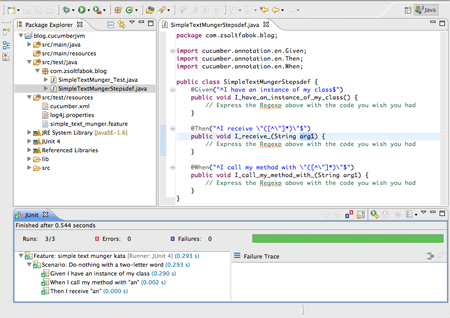
In the next post I’m going to continue with more scenarios and see how the cucumber-jvmhandles tables in a .feature file. Until then, you can find the source for this post under the episode_1 branch of the repository on github. Stay tuned!
Cucumber(一): Preparation的更多相关文章
- Windows建立Cucumber和Ruby测试环境
1. 下载安装Ruby1.9.3, 不要用RubyInstall 一键安装,下载zip然后解压到c:\Ruby193 (不要用2.0,用2.0安装不成功,不要怪我) 2. 环境变量配置RUBY_HOM ...
- Cucumber测试驱动开发
Cucumber是一种BDD实践开发工具,属于敏捷开发的组成部分. 在敏捷开发中,对用户进行需求分析时,不是像传统的P&D的开发方式,首先编写大量的用户需求分析文档,而是通过一个个 ...
- Ruby Cucumber环境
1.http://rubyinstaller.org/downloads 下载rubyinstaller以及developmentkit(注意版本号要对应) 2.安装rubyinstaller以及解压 ...
- Cucumber语法及测试用例<一>
工作原因,最近一直在研究cucumber的 语法以及它和java之间的关系.鉴于是初学者且代码基础薄弱,我开始摸索前行,感谢分享博客且也在一路前行的人儿们. 1.基本语法为:此处举例两种区别一看即知- ...
- cucumber:环境安装
1.安装RubyInstallerhttp://rubyinstaller.org/downloads/注意:安装目录结构不要太深安装完成后在命令行运行: ruby –v 可以查看是否安装成功2.安装 ...
- Cucumber命令行接口
1. cucumber的命令行选项 首先查看命令行选项.和其它命令行工具一样,cucumber提供了—help选项.下面是cucumber帮助的一个缩减版本: $ cucumber --help -r ...
- Cucumber
http://www.ibm.com/developerworks/library/a-automating-ria/ Cucumber is a testing framework that hel ...
- cucumber learning : http://www.cnblogs.com/puresoul/category/340832.html
link Generate cucumber report by json website Sample as json file for cucumber report: [ { "key ...
- Cucumber 入门一
(转自:http://www.cnblogs.com/jarodzz/archive/2012/07/02/2573014.html) 第一次看到Cucumber和BDD(Behavior Drive ...
随机推荐
- 【bzoj1688】[USACO2005 Open]Disease Manangement 疾病管理
题目描述 Alas! A set of D (1 <= D <= 15) diseases (numbered 1..D) is running through the farm. Far ...
- Markdown简单语法
Content 标题大小 斜体和加粗 分割线 有序列表和无序列表 链接 代码框 标题大小 在字体下方加上-和=分别表示一级标题和二级标题,例如: 一级标题 --- 二级标题 === 或者使用#的个数表 ...
- HTTP Status 500 - The absolute uri: http://java.sun.com/jsp/jstl/core cannot be resolved in either web.xml or the jar files deployed with this application 错误
解决方法链接:http://stackoverflow.com/questions/17709076/http-status-500-the-absolute-uri-http-java-sun-co ...
- toast组件小结
简介:toast是"吐司"的意思,它属于android杂项组件,是一个简单的消息提示框,类似于javascript中的alert. 作用 显示文本 显示图片 显示图文 3.常用方法 ...
- web项目中各种路径的获取
以工程名为/DemoWeb为例: 访问的jsp为:http://localhost:8080/DemoWeb/test/index.jsp 1 JSP中获得当前应用的相对路径和绝对路径 (1)得到工程 ...
- jquery中on绑定事件
之前项目中动态创建的标签元素 在绑定事件的时候 都是无效 无论如何都不能触发 eg:在页面加载完成之后 再由脚本动态创建的<div>元素 在绑定事件的时候 例如click事件 ...
- CC2540串口输出调试功能
可以用printf()做串口打印输出 这个功能非常简单,首先在工程管理下的preprocessor把串口打开HAL_UART=TRUE. 然后看我的npi.c文件,多了什么自己琢磨,懒点的就直接复制吧 ...
- Ruby数组
Ruby数组是有序的,任何对象的整数索引的集合.每个数组中的元素相关联,并提取到的一个索引.下标与C或Java相似,从0开始.负数索引假设数组末尾,也就是说-1表示最后一个元素的数组索引,-2是数组中 ...
- 文件描述符、文件表项指针、inode节点的关系
内核使用3种数据结构表示打开的文件,他们之间的关系决定了在文件共享方面一个进程对另一个进程的影响. (1) 每个进程在进程表中都有一个纪录项,纪录项中包含一张打开文件描述符表,每个文件描述符各占一项, ...
- idea Error:java: Compilation failed: internal java compiler error
idea 遇到Error:java: Compilation failed: internal java compiler error 是提示说你当前使用的编译器jdk版本不对. 按住Ctrl+Alt ...