
Clickhouse副本表以及分布式表简单实践
集群配置:
192.168.0.106 node3

192.168.0.101 node2

192.168.0.103 node1
zookeeper配置忽略,自行实践!
node1配置:
<?xml version="1.0"?>

<yandex>

    <logger>

        <!-- Possible levels: https://github.com/pocoproject/poco/blob/develop/Foundation/include/Poco/Logger.h#L105 -->

        <level>trace</level>

        <log>/var/log/clickhouse-server/clickhouse-server.log</log>

        <errorlog>/var/log/clickhouse-server/clickhouse-server.err.log</errorlog>

        <size>1000M</size>

        <count>10</count>

        <!-- <console>1</console> --> <!-- Default behavior is autodetection (log to console if not daemon mode and is tty) -->

    </logger>

    <!--display_name>production</display_name--> <!-- It is the name that will be shown in the client -->

    <http_port>8123</http_port>

    <tcp_port>9000</tcp_port>

    <!-- For HTTPS and SSL over native protocol. -->

    <!--

    <https_port>8443</https_port>

    <tcp_port_secure>9440</tcp_port_secure>

    -->

    <!-- Used with https_port and tcp_port_secure. Full ssl options list: https://github.com/ClickHouse-Extras/poco/blob/master/NetSSL_OpenSSL/include/Poco/Net/SSLManager.h#L71 -->

    <openSSL>

        <server> <!-- Used for https server AND secure tcp port -->

            <!-- openssl req -subj "/CN=localhost" -new -newkey rsa:2048 -days 365 -nodes -x509 -keyout /etc/clickhouse-server/server.key -out /etc/clickhouse-server/server.crt -->

            <certificateFile>/etc/clickhouse-server/server.crt</certificateFile>

            <privateKeyFile>/etc/clickhouse-server/server.key</privateKeyFile>

            <!-- openssl dhparam -out /etc/clickhouse-server/dhparam.pem 4096 -->

            <dhParamsFile>/etc/clickhouse-server/dhparam.pem</dhParamsFile>

            <verificationMode>none</verificationMode>

            <loadDefaultCAFile>true</loadDefaultCAFile>

            <cacheSessions>true</cacheSessions>

            <disableProtocols>sslv2,sslv3</disableProtocols>

            <preferServerCiphers>true</preferServerCiphers>

        </server>

        <client> <!-- Used for connecting to https dictionary source -->

            <loadDefaultCAFile>true</loadDefaultCAFile>

            <cacheSessions>true</cacheSessions>

            <disableProtocols>sslv2,sslv3</disableProtocols>

            <preferServerCiphers>true</preferServerCiphers>

            <!-- Use for self-signed: <verificationMode>none</verificationMode> -->

            <invalidCertificateHandler>

                <!-- Use for self-signed: <name>AcceptCertificateHandler</name> -->

                <name>RejectCertificateHandler</name>

            </invalidCertificateHandler>

        </client>

    </openSSL>

    <!-- Default root page on http[s] server. For example load UI from https://tabix.io/ when opening http://localhost:8123 -->

    <!--

    <http_server_default_response><![CDATA[<html ng-app="SMI2"><head><base href="http://ui.tabix.io/"></head><body><div ui-view="" class="content-ui"></div><script src="http://loader.tabix.io/master.js"></script></body></html>]]></http_server_default_response>

    -->

    <!-- Port for communication between replicas. Used for data exchange. -->

    <interserver_http_port>9009</interserver_http_port>

    <!-- Hostname that is used by other replicas to request this server.

         If not specified, than it is determined analoguous to 'hostname -f' command.

         This setting could be used to switch replication to another network interface.

      -->

    <!--

    <interserver_http_host>example.yandex.ru</interserver_http_host>

    -->

    <!-- Listen specified host. use :: (wildcard IPv6 address), if you want to accept connections both with IPv4 and IPv6 from everywhere. -->

    <!-- <listen_host>::</listen_host> -->

    <!-- Same for hosts with disabled ipv6: -->

    <!-- <listen_host>0.0.0.0</listen_host> -->

    <!-- Default values - try listen localhost on ipv4 and ipv6: -->

    <!--

    <listen_host>::1</listen_host>

    -->

	  <listen_host>0.0.0.0</listen_host>

    <!-- Don't exit if ipv6 or ipv4 unavailable, but listen_host with this protocol specified -->

    <!-- <listen_try>0</listen_try> -->

    <!-- Allow listen on same address:port -->

    <!-- <listen_reuse_port>0</listen_reuse_port> -->

    <!-- <listen_backlog>64</listen_backlog> -->

    <max_connections>4096</max_connections>

    <keep_alive_timeout>3</keep_alive_timeout>

    <!-- Maximum number of concurrent queries. -->

    <max_concurrent_queries>100</max_concurrent_queries>

    <!-- Set limit on number of open files (default: maximum). This setting makes sense on Mac OS X because getrlimit() fails to retrieve

         correct maximum value. -->

    <!-- <max_open_files>262144</max_open_files> -->

    <!-- Size of cache of uncompressed blocks of data, used in tables of MergeTree family.

         In bytes. Cache is single for server. Memory is allocated only on demand.

         Cache is used when 'use_uncompressed_cache' user setting turned on (off by default).

         Uncompressed cache is advantageous only for very short queries and in rare cases.

      -->

    <uncompressed_cache_size>8589934592</uncompressed_cache_size>

    <!-- Approximate size of mark cache, used in tables of MergeTree family.

         In bytes. Cache is single for server. Memory is allocated only on demand.

         You should not lower this value.

      -->

    <mark_cache_size>5368709120</mark_cache_size>

    <!-- Path to data directory, with trailing slash. -->

    <path>/var/lib/clickhouse/</path>

    <!-- Path to temporary data for processing hard queries. -->

    <tmp_path>/var/lib/clickhouse/tmp/</tmp_path>

    <!-- Directory with user provided files that are accessible by 'file' table function. -->

    <user_files_path>/var/lib/clickhouse/user_files/</user_files_path>

    <!-- Path to configuration file with users, access rights, profiles of settings, quotas. -->

    <users_config>users.xml</users_config>

    <!-- Default profile of settings. -->

    <default_profile>default</default_profile>

    <!-- System profile of settings. This settings are used by internal processes (Buffer storage, Distibuted DDL worker and so on). -->

    <!-- <system_profile>default</system_profile> -->

    <!-- Default database. -->

    <default_database>default</default_database>

    <!-- Server time zone could be set here.

         Time zone is used when converting between String and DateTime types,

          when printing DateTime in text formats and parsing DateTime from text,

          it is used in date and time related functions, if specific time zone was not passed as an argument.

         Time zone is specified as identifier from IANA time zone database, like UTC or Africa/Abidjan.

         If not specified, system time zone at server startup is used.

         Please note, that server could display time zone alias instead of specified name.

         Example: W-SU is an alias for Europe/Moscow and Zulu is an alias for UTC.

    -->

    <!-- <timezone>Europe/Moscow</timezone> -->

    <!-- You can specify umask here (see "man umask"). Server will apply it on startup.

         Number is always parsed as octal. Default umask is 027 (other users cannot read logs, data files, etc; group can only read).

    -->

    <!-- <umask>022</umask> -->

    <!-- Configuration of clusters that could be used in Distributed tables.

         https://clickhouse.yandex/docs/en/table_engines/distributed/

      -->

    <remote_servers>

    <ck-daxin>

	<shard>

            <replica>

                <host>node1</host>

                <port>9000</port>

            </replica>

        </shard>

			<shard>

            <replica>

                <host>node2</host>

                <port>9000</port>

            </replica>

        </shard>

			<shard>

            <replica>

                <host>node3</host>

                <port>9000</port>

            </replica>

        </shard>

	</ck-daxin>

    </remote_servers>

    <!-- If element has 'incl' attribute, then for it's value will be used corresponding substitution from another file.

         By default, path to file with substitutions is /etc/metrika.xml. It could be changed in config in 'include_from' element.

         Values for substitutions are specified in /yandex/name_of_substitution elements in that file.

      -->

    <!-- ZooKeeper is used to store metadata about replicas, when using Replicated tables.

         Optional. If you don't use replicated tables, you could omit that.

         See https://clickhouse.yandex/docs/en/table_engines/replication/

    <zookeeper incl="zookeeper-servers" optional="true" />

	   -->

	<!-- ZK  -->

	<zookeeper>

	  <node index="1">

		<host>node1</host>

		<port>2181</port>

	  </node>

	</zookeeper>

    <!-- Substitutions for parameters of replicated tables.

          Optional. If you don't use replicated tables, you could omit that.

         See https://clickhouse.yandex/docs/en/table_engines/replication/#creating-replicated-tables

  -->

   <macros>

    <shard>01</shard>

    <replica>node1</replica>

   </macros>

    <!-- Reloading interval for embedded dictionaries, in seconds. Default: 3600. -->

    <builtin_dictionaries_reload_interval>3600</builtin_dictionaries_reload_interval>

    <!-- Maximum session timeout, in seconds. Default: 3600. -->

    <max_session_timeout>3600</max_session_timeout>

    <!-- Default session timeout, in seconds. Default: 60. -->

    <default_session_timeout>60</default_session_timeout>

    <!-- Sending data to Graphite for monitoring. Several sections can be defined. -->

    <!--

        interval - send every X second

        root_path - prefix for keys

        hostname_in_path - append hostname to root_path (default = true)

        metrics - send data from table system.metrics

        events - send data from table system.events

        asynchronous_metrics - send data from table system.asynchronous_metrics

    -->

    <!--

    <graphite>

        <host>localhost</host>

        <port>42000</port>

        <timeout>0.1</timeout>

        <interval>60</interval>

        <root_path>one_min</root_path>

        <hostname_in_path>true</hostname_in_path>

        <metrics>true</metrics>

        <events>true</events>

        <asynchronous_metrics>true</asynchronous_metrics>

    </graphite>

    <graphite>

        <host>localhost</host>

        <port>42000</port>

        <timeout>0.1</timeout>

        <interval>1</interval>

        <root_path>one_sec</root_path>

        <metrics>true</metrics>

        <events>true</events>

        <asynchronous_metrics>false</asynchronous_metrics>

    </graphite>

    -->

    <!-- Query log. Used only for queries with setting log_queries = 1. -->

    <query_log>

        <!-- What table to insert data. If table is not exist, it will be created.

             When query log structure is changed after system update,

              then old table will be renamed and new table will be created automatically.

        -->

        <database>system</database>

        <table>query_log</table>

        <!--

            PARTITION BY expr https://clickhouse.yandex/docs/en/table_engines/custom_partitioning_key/

            Example:

                event_date

                toMonday(event_date)

                toYYYYMM(event_date)

                toStartOfHour(event_time)

        -->

        <partition_by>toYYYYMM(event_date)</partition_by>

        <!-- Interval of flushing data. -->

        <flush_interval_milliseconds>7500</flush_interval_milliseconds>

    </query_log>

    <!-- Uncomment if use part_log

    <part_log>

        <database>system</database>

        <table>part_log</table>

        <flush_interval_milliseconds>7500</flush_interval_milliseconds>

    </part_log>

    -->

    <!-- Parameters for embedded dictionaries, used in Yandex.Metrica.

         See https://clickhouse.yandex/docs/en/dicts/internal_dicts/

    -->

    <!-- Path to file with region hierarchy. -->

    <!-- <path_to_regions_hierarchy_file>/opt/geo/regions_hierarchy.txt</path_to_regions_hierarchy_file> -->

    <!-- Path to directory with files containing names of regions -->

    <!-- <path_to_regions_names_files>/opt/geo/</path_to_regions_names_files> -->

    <!-- Configuration of external dictionaries. See:

         https://clickhouse.yandex/docs/en/dicts/external_dicts/

    -->

    <dictionaries_config>*_dictionary.xml</dictionaries_config>

    <!-- Uncomment if you want data to be compressed 30-100% better.

         Don't do that if you just started using ClickHouse.

      -->

    <compression incl="clickhouse_compression">

    <!--

        <!- - Set of variants. Checked in order. Last matching case wins. If nothing matches, lz4 will be used. - ->

        <case>

            <!- - Conditions. All must be satisfied. Some conditions may be omitted. - ->

            <min_part_size>10000000000</min_part_size>        <!- - Min part size in bytes. - ->

            <min_part_size_ratio>0.01</min_part_size_ratio>   <!- - Min size of part relative to whole table size. - ->

            <!- - What compression method to use. - ->

            <method>zstd</method>

        </case>

    -->

    </compression>

    <!-- Allow to execute distributed DDL queries (CREATE, DROP, ALTER, RENAME) on cluster.

         Works only if ZooKeeper is enabled. Comment it if such functionality isn't required. -->

    <distributed_ddl>

        <!-- Path in ZooKeeper to queue with DDL queries -->

        <path>/clickhouse/task_queue/ddl</path>

        <!-- Settings from this profile will be used to execute DDL queries -->

        <!-- <profile>default</profile> -->

    </distributed_ddl>

    <!-- Settings to fine tune MergeTree tables. See documentation in source code, in MergeTreeSettings.h -->

    <!--

    <merge_tree>

        <max_suspicious_broken_parts>5</max_suspicious_broken_parts>

    </merge_tree>

    -->

    <!-- Protection from accidental DROP.

         If size of a MergeTree table is greater than max_table_size_to_drop (in bytes) than table could not be dropped with any DROP query.

         If you want do delete one table and don't want to restart clickhouse-server, you could create special file <clickhouse-path>/flags/force_drop_table and make DROP once.

         By default max_table_size_to_drop is 50GB; max_table_size_to_drop=0 allows to DROP any tables.

         The same for max_partition_size_to_drop.

         Uncomment to disable protection.

    -->

    <!-- <max_table_size_to_drop>0</max_table_size_to_drop> -->

    <!-- <max_partition_size_to_drop>0</max_partition_size_to_drop> -->

    <!-- Example of parameters for GraphiteMergeTree table engine -->

    <graphite_rollup_example>

        <pattern>

            <regexp>click_cost</regexp>

            <function>any</function>

            <retention>

                <age>0</age>

                <precision>3600</precision>

            </retention>

            <retention>

                <age>86400</age>

                <precision>60</precision>

            </retention>

        </pattern>

        <default>

            <function>max</function>

            <retention>

                <age>0</age>

                <precision>60</precision>

            </retention>

            <retention>

                <age>3600</age>

                <precision>300</precision>

            </retention>

            <retention>

                <age>86400</age>

                <precision>3600</precision>

            </retention>

        </default>

    </graphite_rollup_example>

    <!-- Directory in <clickhouse-path> containing schema files for various input formats.

         The directory will be created if it doesn't exist.

      -->

    <format_schema_path>/var/lib/clickhouse/format_schemas/</format_schema_path>

    <!-- Uncomment to disable ClickHouse internal DNS caching. -->

    <!-- <disable_internal_dns_cache>1</disable_internal_dns_cache> -->

</yandex>
node2:
<?xml version="1.0"?>

<yandex>

    <logger>

        <!-- Possible levels: https://github.com/pocoproject/poco/blob/develop/Foundation/include/Poco/Logger.h#L105 -->

        <level>trace</level>

        <log>/var/log/clickhouse-server/clickhouse-server.log</log>

        <errorlog>/var/log/clickhouse-server/clickhouse-server.err.log</errorlog>

        <size>1000M</size>

        <count>10</count>

        <!-- <console>1</console> --> <!-- Default behavior is autodetection (log to console if not daemon mode and is tty) -->

    </logger>

    <!--display_name>production</display_name--> <!-- It is the name that will be shown in the client -->

    <http_port>8123</http_port>

    <tcp_port>9000</tcp_port>

    <!-- For HTTPS and SSL over native protocol. -->

    <!--

    <https_port>8443</https_port>

    <tcp_port_secure>9440</tcp_port_secure>

    -->

    <!-- Used with https_port and tcp_port_secure. Full ssl options list: https://github.com/ClickHouse-Extras/poco/blob/master/NetSSL_OpenSSL/include/Poco/Net/SSLManager.h#L71 -->

    <openSSL>

        <server> <!-- Used for https server AND secure tcp port -->

            <!-- openssl req -subj "/CN=localhost" -new -newkey rsa:2048 -days 365 -nodes -x509 -keyout /etc/clickhouse-server/server.key -out /etc/clickhouse-server/server.crt -->

            <certificateFile>/etc/clickhouse-server/server.crt</certificateFile>

            <privateKeyFile>/etc/clickhouse-server/server.key</privateKeyFile>

            <!-- openssl dhparam -out /etc/clickhouse-server/dhparam.pem 4096 -->

            <dhParamsFile>/etc/clickhouse-server/dhparam.pem</dhParamsFile>

            <verificationMode>none</verificationMode>

            <loadDefaultCAFile>true</loadDefaultCAFile>

            <cacheSessions>true</cacheSessions>

            <disableProtocols>sslv2,sslv3</disableProtocols>

            <preferServerCiphers>true</preferServerCiphers>

        </server>

        <client> <!-- Used for connecting to https dictionary source -->

            <loadDefaultCAFile>true</loadDefaultCAFile>

            <cacheSessions>true</cacheSessions>

            <disableProtocols>sslv2,sslv3</disableProtocols>

            <preferServerCiphers>true</preferServerCiphers>

            <!-- Use for self-signed: <verificationMode>none</verificationMode> -->

            <invalidCertificateHandler>

                <!-- Use for self-signed: <name>AcceptCertificateHandler</name> -->

                <name>RejectCertificateHandler</name>

            </invalidCertificateHandler>

        </client>

    </openSSL>

    <!-- Default root page on http[s] server. For example load UI from https://tabix.io/ when opening http://localhost:8123 -->

    <!--

    <http_server_default_response><![CDATA[<html ng-app="SMI2"><head><base href="http://ui.tabix.io/"></head><body><div ui-view="" class="content-ui"></div><script src="http://loader.tabix.io/master.js"></script></body></html>]]></http_server_default_response>

    -->

    <!-- Port for communication between replicas. Used for data exchange. -->

    <interserver_http_port>9009</interserver_http_port>

    <!-- Hostname that is used by other replicas to request this server.

         If not specified, than it is determined analoguous to 'hostname -f' command.

         This setting could be used to switch replication to another network interface.

      -->

    <!--

    <interserver_http_host>example.yandex.ru</interserver_http_host>

    -->

    <!-- Listen specified host. use :: (wildcard IPv6 address), if you want to accept connections both with IPv4 and IPv6 from everywhere. -->

    <!-- <listen_host>::</listen_host> -->

    <!-- Same for hosts with disabled ipv6: -->

    <!-- <listen_host>0.0.0.0</listen_host> -->

    <!-- Default values - try listen localhost on ipv4 and ipv6: -->

    <!--

    <listen_host>::1</listen_host>

    -->

	  <listen_host>0.0.0.0</listen_host>

    <!-- Don't exit if ipv6 or ipv4 unavailable, but listen_host with this protocol specified -->

    <!-- <listen_try>0</listen_try> -->

    <!-- Allow listen on same address:port -->

    <!-- <listen_reuse_port>0</listen_reuse_port> -->

    <!-- <listen_backlog>64</listen_backlog> -->

    <max_connections>4096</max_connections>

    <keep_alive_timeout>3</keep_alive_timeout>

    <!-- Maximum number of concurrent queries. -->

    <max_concurrent_queries>100</max_concurrent_queries>

    <!-- Set limit on number of open files (default: maximum). This setting makes sense on Mac OS X because getrlimit() fails to retrieve

         correct maximum value. -->

    <!-- <max_open_files>262144</max_open_files> -->

    <!-- Size of cache of uncompressed blocks of data, used in tables of MergeTree family.

         In bytes. Cache is single for server. Memory is allocated only on demand.

         Cache is used when 'use_uncompressed_cache' user setting turned on (off by default).

         Uncompressed cache is advantageous only for very short queries and in rare cases.

      -->

    <uncompressed_cache_size>8589934592</uncompressed_cache_size>

    <!-- Approximate size of mark cache, used in tables of MergeTree family.

         In bytes. Cache is single for server. Memory is allocated only on demand.

         You should not lower this value.

      -->

    <mark_cache_size>5368709120</mark_cache_size>

    <!-- Path to data directory, with trailing slash. -->

    <path>/var/lib/clickhouse/</path>

    <!-- Path to temporary data for processing hard queries. -->

    <tmp_path>/var/lib/clickhouse/tmp/</tmp_path>

    <!-- Directory with user provided files that are accessible by 'file' table function. -->

    <user_files_path>/var/lib/clickhouse/user_files/</user_files_path>

    <!-- Path to configuration file with users, access rights, profiles of settings, quotas. -->

    <users_config>users.xml</users_config>

    <!-- Default profile of settings. -->

    <default_profile>default</default_profile>

    <!-- System profile of settings. This settings are used by internal processes (Buffer storage, Distibuted DDL worker and so on). -->

    <!-- <system_profile>default</system_profile> -->

    <!-- Default database. -->

    <default_database>default</default_database>

    <!-- Server time zone could be set here.

         Time zone is used when converting between String and DateTime types,

          when printing DateTime in text formats and parsing DateTime from text,

          it is used in date and time related functions, if specific time zone was not passed as an argument.

         Time zone is specified as identifier from IANA time zone database, like UTC or Africa/Abidjan.

         If not specified, system time zone at server startup is used.

         Please note, that server could display time zone alias instead of specified name.

         Example: W-SU is an alias for Europe/Moscow and Zulu is an alias for UTC.

    -->

    <!-- <timezone>Europe/Moscow</timezone> -->

    <!-- You can specify umask here (see "man umask"). Server will apply it on startup.

         Number is always parsed as octal. Default umask is 027 (other users cannot read logs, data files, etc; group can only read).

    -->

    <!-- <umask>022</umask> -->

    <!-- Configuration of clusters that could be used in Distributed tables.

         https://clickhouse.yandex/docs/en/table_engines/distributed/

      -->

    <remote_servers>

    <ck-daxin>

	            <!-- 数据分片1  -->

	<shard>

            <replica>

                <host>node1</host>

                <port>9000</port>

            </replica>

        </shard>

			<shard>

            <replica>

                <host>node2</host>

                <port>9000</port>

            </replica>

        </shard>

			<shard>

            <replica>

                <host>node3</host>

                <port>9000</port>

            </replica>

        </shard>

	</ck-daxin>

    </remote_servers>

    <!-- If element has 'incl' attribute, then for it's value will be used corresponding substitution from another file.

         By default, path to file with substitutions is /etc/metrika.xml. It could be changed in config in 'include_from' element.

         Values for substitutions are specified in /yandex/name_of_substitution elements in that file.

      -->

    <!-- ZooKeeper is used to store metadata about replicas, when using Replicated tables.

         Optional. If you don't use replicated tables, you could omit that.

         See https://clickhouse.yandex/docs/en/table_engines/replication/

    <zookeeper incl="zookeeper-servers" optional="true" />

	   -->

	<!-- ZK  -->

	<zookeeper>

	  <node index="1">

		<host>node1</host>

		<port>2181</port>

	  </node>

	</zookeeper>

    <!-- Substitutions for parameters of replicated tables.

          Optional. If you don't use replicated tables, you could omit that.

         See https://clickhouse.yandex/docs/en/table_engines/replication/#creating-replicated-tables

  -->

   <macros>

    <shard>02</shard>

    <replica>node2</replica>

   </macros>

    <!-- Reloading interval for embedded dictionaries, in seconds. Default: 3600. -->

    <builtin_dictionaries_reload_interval>3600</builtin_dictionaries_reload_interval>

    <!-- Maximum session timeout, in seconds. Default: 3600. -->

    <max_session_timeout>3600</max_session_timeout>

    <!-- Default session timeout, in seconds. Default: 60. -->

    <default_session_timeout>60</default_session_timeout>

    <!-- Sending data to Graphite for monitoring. Several sections can be defined. -->

    <!--

        interval - send every X second

        root_path - prefix for keys

        hostname_in_path - append hostname to root_path (default = true)

        metrics - send data from table system.metrics

        events - send data from table system.events

        asynchronous_metrics - send data from table system.asynchronous_metrics

    -->

    <!--

    <graphite>

        <host>localhost</host>

        <port>42000</port>

        <timeout>0.1</timeout>

        <interval>60</interval>

        <root_path>one_min</root_path>

        <hostname_in_path>true</hostname_in_path>

        <metrics>true</metrics>

        <events>true</events>

        <asynchronous_metrics>true</asynchronous_metrics>

    </graphite>

    <graphite>

        <host>localhost</host>

        <port>42000</port>

        <timeout>0.1</timeout>

        <interval>1</interval>

        <root_path>one_sec</root_path>

        <metrics>true</metrics>

        <events>true</events>

        <asynchronous_metrics>false</asynchronous_metrics>

    </graphite>

    -->

    <!-- Query log. Used only for queries with setting log_queries = 1. -->

    <query_log>

        <!-- What table to insert data. If table is not exist, it will be created.

             When query log structure is changed after system update,

              then old table will be renamed and new table will be created automatically.

        -->

        <database>system</database>

        <table>query_log</table>

        <!--

            PARTITION BY expr https://clickhouse.yandex/docs/en/table_engines/custom_partitioning_key/

            Example:

                event_date

                toMonday(event_date)

                toYYYYMM(event_date)

                toStartOfHour(event_time)

        -->

        <partition_by>toYYYYMM(event_date)</partition_by>

        <!-- Interval of flushing data. -->

        <flush_interval_milliseconds>7500</flush_interval_milliseconds>

    </query_log>

    <!-- Uncomment if use part_log

    <part_log>

        <database>system</database>

        <table>part_log</table>

        <flush_interval_milliseconds>7500</flush_interval_milliseconds>

    </part_log>

    -->

    <!-- Parameters for embedded dictionaries, used in Yandex.Metrica.

         See https://clickhouse.yandex/docs/en/dicts/internal_dicts/

    -->

    <!-- Path to file with region hierarchy. -->

    <!-- <path_to_regions_hierarchy_file>/opt/geo/regions_hierarchy.txt</path_to_regions_hierarchy_file> -->

    <!-- Path to directory with files containing names of regions -->

    <!-- <path_to_regions_names_files>/opt/geo/</path_to_regions_names_files> -->

    <!-- Configuration of external dictionaries. See:

         https://clickhouse.yandex/docs/en/dicts/external_dicts/

    -->

    <dictionaries_config>*_dictionary.xml</dictionaries_config>

    <!-- Uncomment if you want data to be compressed 30-100% better.

         Don't do that if you just started using ClickHouse.

      -->

    <compression incl="clickhouse_compression">

    <!--

        <!- - Set of variants. Checked in order. Last matching case wins. If nothing matches, lz4 will be used. - ->

        <case>

            <!- - Conditions. All must be satisfied. Some conditions may be omitted. - ->

            <min_part_size>10000000000</min_part_size>        <!- - Min part size in bytes. - ->

            <min_part_size_ratio>0.01</min_part_size_ratio>   <!- - Min size of part relative to whole table size. - ->

            <!- - What compression method to use. - ->

            <method>zstd</method>

        </case>

    -->

    </compression>

    <!-- Allow to execute distributed DDL queries (CREATE, DROP, ALTER, RENAME) on cluster.

         Works only if ZooKeeper is enabled. Comment it if such functionality isn't required. -->

    <distributed_ddl>

        <!-- Path in ZooKeeper to queue with DDL queries -->

        <path>/clickhouse/task_queue/ddl</path>

        <!-- Settings from this profile will be used to execute DDL queries -->

        <!-- <profile>default</profile> -->

    </distributed_ddl>

    <!-- Settings to fine tune MergeTree tables. See documentation in source code, in MergeTreeSettings.h -->

    <!--

    <merge_tree>

        <max_suspicious_broken_parts>5</max_suspicious_broken_parts>

    </merge_tree>

    -->

    <!-- Protection from accidental DROP.

         If size of a MergeTree table is greater than max_table_size_to_drop (in bytes) than table could not be dropped with any DROP query.

         If you want do delete one table and don't want to restart clickhouse-server, you could create special file <clickhouse-path>/flags/force_drop_table and make DROP once.

         By default max_table_size_to_drop is 50GB; max_table_size_to_drop=0 allows to DROP any tables.

         The same for max_partition_size_to_drop.

         Uncomment to disable protection.

    -->

    <!-- <max_table_size_to_drop>0</max_table_size_to_drop> -->

    <!-- <max_partition_size_to_drop>0</max_partition_size_to_drop> -->

    <!-- Example of parameters for GraphiteMergeTree table engine -->

    <graphite_rollup_example>

        <pattern>

            <regexp>click_cost</regexp>

            <function>any</function>

            <retention>

                <age>0</age>

                <precision>3600</precision>

            </retention>

            <retention>

                <age>86400</age>

                <precision>60</precision>

            </retention>

        </pattern>

        <default>

            <function>max</function>

            <retention>

                <age>0</age>

                <precision>60</precision>

            </retention>

            <retention>

                <age>3600</age>

                <precision>300</precision>

            </retention>

            <retention>

                <age>86400</age>

                <precision>3600</precision>

            </retention>

        </default>

    </graphite_rollup_example>

    <!-- Directory in <clickhouse-path> containing schema files for various input formats.

         The directory will be created if it doesn't exist.

      -->

    <format_schema_path>/var/lib/clickhouse/format_schemas/</format_schema_path>

    <!-- Uncomment to disable ClickHouse internal DNS caching. -->

    <!-- <disable_internal_dns_cache>1</disable_internal_dns_cache> -->

</yandex>
node3:
<?xml version="1.0"?>

<yandex>

    <logger>

        <!-- Possible levels: https://github.com/pocoproject/poco/blob/develop/Foundation/include/Poco/Logger.h#L105 -->

        <level>trace</level>

        <log>/var/log/clickhouse-server/clickhouse-server.log</log>

        <errorlog>/var/log/clickhouse-server/clickhouse-server.err.log</errorlog>

        <size>1000M</size>

        <count>10</count>

        <!-- <console>1</console> --> <!-- Default behavior is autodetection (log to console if not daemon mode and is tty) -->

    </logger>

    <!--display_name>production</display_name--> <!-- It is the name that will be shown in the client -->

    <http_port>8123</http_port>

    <tcp_port>9000</tcp_port>

    <!-- For HTTPS and SSL over native protocol. -->

    <!--

    <https_port>8443</https_port>

    <tcp_port_secure>9440</tcp_port_secure>

    -->

    <!-- Used with https_port and tcp_port_secure. Full ssl options list: https://github.com/ClickHouse-Extras/poco/blob/master/NetSSL_OpenSSL/include/Poco/Net/SSLManager.h#L71 -->

    <openSSL>

        <server> <!-- Used for https server AND secure tcp port -->

            <!-- openssl req -subj "/CN=localhost" -new -newkey rsa:2048 -days 365 -nodes -x509 -keyout /etc/clickhouse-server/server.key -out /etc/clickhouse-server/server.crt -->

            <certificateFile>/etc/clickhouse-server/server.crt</certificateFile>

            <privateKeyFile>/etc/clickhouse-server/server.key</privateKeyFile>

            <!-- openssl dhparam -out /etc/clickhouse-server/dhparam.pem 4096 -->

            <dhParamsFile>/etc/clickhouse-server/dhparam.pem</dhParamsFile>

            <verificationMode>none</verificationMode>

            <loadDefaultCAFile>true</loadDefaultCAFile>

            <cacheSessions>true</cacheSessions>

            <disableProtocols>sslv2,sslv3</disableProtocols>

            <preferServerCiphers>true</preferServerCiphers>

        </server>

        <client> <!-- Used for connecting to https dictionary source -->

            <loadDefaultCAFile>true</loadDefaultCAFile>

            <cacheSessions>true</cacheSessions>

            <disableProtocols>sslv2,sslv3</disableProtocols>

            <preferServerCiphers>true</preferServerCiphers>

            <!-- Use for self-signed: <verificationMode>none</verificationMode> -->

            <invalidCertificateHandler>

                <!-- Use for self-signed: <name>AcceptCertificateHandler</name> -->

                <name>RejectCertificateHandler</name>

            </invalidCertificateHandler>

        </client>

    </openSSL>

    <!-- Default root page on http[s] server. For example load UI from https://tabix.io/ when opening http://localhost:8123 -->

    <!--

    <http_server_default_response><![CDATA[<html ng-app="SMI2"><head><base href="http://ui.tabix.io/"></head><body><div ui-view="" class="content-ui"></div><script src="http://loader.tabix.io/master.js"></script></body></html>]]></http_server_default_response>

    -->

    <!-- Port for communication between replicas. Used for data exchange. -->

    <interserver_http_port>9009</interserver_http_port>

    <!-- Hostname that is used by other replicas to request this server.

         If not specified, than it is determined analoguous to 'hostname -f' command.

         This setting could be used to switch replication to another network interface.

      -->

    <!--

    <interserver_http_host>example.yandex.ru</interserver_http_host>

    -->

    <!-- Listen specified host. use :: (wildcard IPv6 address), if you want to accept connections both with IPv4 and IPv6 from everywhere. -->

    <!-- <listen_host>::</listen_host> -->

    <!-- Same for hosts with disabled ipv6: -->

    <!-- <listen_host>0.0.0.0</listen_host> -->

    <!-- Default values - try listen localhost on ipv4 and ipv6: -->

    <!--

    <listen_host>::1</listen_host>

    -->

	  <listen_host>0.0.0.0</listen_host>

    <!-- Don't exit if ipv6 or ipv4 unavailable, but listen_host with this protocol specified -->

    <!-- <listen_try>0</listen_try> -->

    <!-- Allow listen on same address:port -->

    <!-- <listen_reuse_port>0</listen_reuse_port> -->

    <!-- <listen_backlog>64</listen_backlog> -->

    <max_connections>4096</max_connections>

    <keep_alive_timeout>3</keep_alive_timeout>

    <!-- Maximum number of concurrent queries. -->

    <max_concurrent_queries>100</max_concurrent_queries>

    <!-- Set limit on number of open files (default: maximum). This setting makes sense on Mac OS X because getrlimit() fails to retrieve

         correct maximum value. -->

    <!-- <max_open_files>262144</max_open_files> -->

    <!-- Size of cache of uncompressed blocks of data, used in tables of MergeTree family.

         In bytes. Cache is single for server. Memory is allocated only on demand.

         Cache is used when 'use_uncompressed_cache' user setting turned on (off by default).

         Uncompressed cache is advantageous only for very short queries and in rare cases.

      -->

    <uncompressed_cache_size>8589934592</uncompressed_cache_size>

    <!-- Approximate size of mark cache, used in tables of MergeTree family.

         In bytes. Cache is single for server. Memory is allocated only on demand.

         You should not lower this value.

      -->

    <mark_cache_size>5368709120</mark_cache_size>

    <!-- Path to data directory, with trailing slash. -->

    <path>/var/lib/clickhouse/</path>

    <!-- Path to temporary data for processing hard queries. -->

    <tmp_path>/var/lib/clickhouse/tmp/</tmp_path>

    <!-- Directory with user provided files that are accessible by 'file' table function. -->

    <user_files_path>/var/lib/clickhouse/user_files/</user_files_path>

    <!-- Path to configuration file with users, access rights, profiles of settings, quotas. -->

    <users_config>users.xml</users_config>

    <!-- Default profile of settings. -->

    <default_profile>default</default_profile>

    <!-- System profile of settings. This settings are used by internal processes (Buffer storage, Distibuted DDL worker and so on). -->

    <!-- <system_profile>default</system_profile> -->

    <!-- Default database. -->

    <default_database>default</default_database>

    <!-- Server time zone could be set here.

         Time zone is used when converting between String and DateTime types,

          when printing DateTime in text formats and parsing DateTime from text,

          it is used in date and time related functions, if specific time zone was not passed as an argument.

         Time zone is specified as identifier from IANA time zone database, like UTC or Africa/Abidjan.

         If not specified, system time zone at server startup is used.

         Please note, that server could display time zone alias instead of specified name.

         Example: W-SU is an alias for Europe/Moscow and Zulu is an alias for UTC.

    -->

    <!-- <timezone>Europe/Moscow</timezone> -->

    <!-- You can specify umask here (see "man umask"). Server will apply it on startup.

         Number is always parsed as octal. Default umask is 027 (other users cannot read logs, data files, etc; group can only read).

    -->

    <!-- <umask>022</umask> -->

    <!-- Configuration of clusters that could be used in Distributed tables.

         https://clickhouse.yandex/docs/en/table_engines/distributed/

      -->

    <remote_servers>

    <ck-daxin>

	            <!-- 数据分片1  -->

	<shard>

            <replica>

                <host>node1</host>

                <port>9000</port>

            </replica>

        </shard>

			<shard>

            <replica>

                <host>node2</host>

                <port>9000</port>

            </replica>

        </shard>

			<shard>

            <replica>

                <host>node3</host>

                <port>9000</port>

            </replica>

        </shard>

	</ck-daxin>

    </remote_servers>

    <!-- If element has 'incl' attribute, then for it's value will be used corresponding substitution from another file.

         By default, path to file with substitutions is /etc/metrika.xml. It could be changed in config in 'include_from' element.

         Values for substitutions are specified in /yandex/name_of_substitution elements in that file.

      -->

    <!-- ZooKeeper is used to store metadata about replicas, when using Replicated tables.

         Optional. If you don't use replicated tables, you could omit that.

         See https://clickhouse.yandex/docs/en/table_engines/replication/

    <zookeeper incl="zookeeper-servers" optional="true" />

	   -->

	<!-- ZK  -->

	<zookeeper>

	  <node index="1">

		<host>node1</host>

		<port>2181</port>

	  </node>

	</zookeeper>

    <!-- Substitutions for parameters of replicated tables.

          Optional. If you don't use replicated tables, you could omit that.

         See https://clickhouse.yandex/docs/en/table_engines/replication/#creating-replicated-tables

  -->

   <macros>

    <shard>03</shard>

    <replica>node3</replica>

   </macros>

    <!-- Reloading interval for embedded dictionaries, in seconds. Default: 3600. -->

    <builtin_dictionaries_reload_interval>3600</builtin_dictionaries_reload_interval>

    <!-- Maximum session timeout, in seconds. Default: 3600. -->

    <max_session_timeout>3600</max_session_timeout>

    <!-- Default session timeout, in seconds. Default: 60. -->

    <default_session_timeout>60</default_session_timeout>

    <!-- Sending data to Graphite for monitoring. Several sections can be defined. -->

    <!--

        interval - send every X second

        root_path - prefix for keys

        hostname_in_path - append hostname to root_path (default = true)

        metrics - send data from table system.metrics

        events - send data from table system.events

        asynchronous_metrics - send data from table system.asynchronous_metrics

    -->

    <!--

    <graphite>

        <host>localhost</host>

        <port>42000</port>

        <timeout>0.1</timeout>

        <interval>60</interval>

        <root_path>one_min</root_path>

        <hostname_in_path>true</hostname_in_path>

        <metrics>true</metrics>

        <events>true</events>

        <asynchronous_metrics>true</asynchronous_metrics>

    </graphite>

    <graphite>

        <host>localhost</host>

        <port>42000</port>

        <timeout>0.1</timeout>

        <interval>1</interval>

        <root_path>one_sec</root_path>

        <metrics>true</metrics>

        <events>true</events>

        <asynchronous_metrics>false</asynchronous_metrics>

    </graphite>

    -->

    <!-- Query log. Used only for queries with setting log_queries = 1. -->

    <query_log>

        <!-- What table to insert data. If table is not exist, it will be created.

             When query log structure is changed after system update,

              then old table will be renamed and new table will be created automatically.

        -->

        <database>system</database>

        <table>query_log</table>

        <!--

            PARTITION BY expr https://clickhouse.yandex/docs/en/table_engines/custom_partitioning_key/

            Example:

                event_date

                toMonday(event_date)

                toYYYYMM(event_date)

                toStartOfHour(event_time)

        -->

        <partition_by>toYYYYMM(event_date)</partition_by>

        <!-- Interval of flushing data. -->

        <flush_interval_milliseconds>7500</flush_interval_milliseconds>

    </query_log>

    <!-- Uncomment if use part_log

    <part_log>

        <database>system</database>

        <table>part_log</table>

        <flush_interval_milliseconds>7500</flush_interval_milliseconds>

    </part_log>

    -->

    <!-- Parameters for embedded dictionaries, used in Yandex.Metrica.

         See https://clickhouse.yandex/docs/en/dicts/internal_dicts/

    -->

    <!-- Path to file with region hierarchy. -->

    <!-- <path_to_regions_hierarchy_file>/opt/geo/regions_hierarchy.txt</path_to_regions_hierarchy_file> -->

    <!-- Path to directory with files containing names of regions -->

    <!-- <path_to_regions_names_files>/opt/geo/</path_to_regions_names_files> -->

    <!-- Configuration of external dictionaries. See:

         https://clickhouse.yandex/docs/en/dicts/external_dicts/

    -->

    <dictionaries_config>*_dictionary.xml</dictionaries_config>

    <!-- Uncomment if you want data to be compressed 30-100% better.

         Don't do that if you just started using ClickHouse.

      -->

    <compression incl="clickhouse_compression">

    <!--

        <!- - Set of variants. Checked in order. Last matching case wins. If nothing matches, lz4 will be used. - ->

        <case>

            <!- - Conditions. All must be satisfied. Some conditions may be omitted. - ->

            <min_part_size>10000000000</min_part_size>        <!- - Min part size in bytes. - ->

            <min_part_size_ratio>0.01</min_part_size_ratio>   <!- - Min size of part relative to whole table size. - ->

            <!- - What compression method to use. - ->

            <method>zstd</method>

        </case>

    -->

    </compression>

    <!-- Allow to execute distributed DDL queries (CREATE, DROP, ALTER, RENAME) on cluster.

         Works only if ZooKeeper is enabled. Comment it if such functionality isn't required. -->

    <distributed_ddl>

        <!-- Path in ZooKeeper to queue with DDL queries -->

        <path>/clickhouse/task_queue/ddl</path>

        <!-- Settings from this profile will be used to execute DDL queries -->

        <!-- <profile>default</profile> -->

    </distributed_ddl>

    <!-- Settings to fine tune MergeTree tables. See documentation in source code, in MergeTreeSettings.h -->

    <!--

    <merge_tree>

        <max_suspicious_broken_parts>5</max_suspicious_broken_parts>

    </merge_tree>

    -->

    <!-- Protection from accidental DROP.

         If size of a MergeTree table is greater than max_table_size_to_drop (in bytes) than table could not be dropped with any DROP query.

         If you want do delete one table and don't want to restart clickhouse-server, you could create special file <clickhouse-path>/flags/force_drop_table and make DROP once.

         By default max_table_size_to_drop is 50GB; max_table_size_to_drop=0 allows to DROP any tables.

         The same for max_partition_size_to_drop.

         Uncomment to disable protection.

    -->

    <!-- <max_table_size_to_drop>0</max_table_size_to_drop> -->

    <!-- <max_partition_size_to_drop>0</max_partition_size_to_drop> -->

    <!-- Example of parameters for GraphiteMergeTree table engine -->

    <graphite_rollup_example>

        <pattern>

            <regexp>click_cost</regexp>

            <function>any</function>

            <retention>

                <age>0</age>

                <precision>3600</precision>

            </retention>

            <retention>

                <age>86400</age>

                <precision>60</precision>

            </retention>

        </pattern>

        <default>

            <function>max</function>

            <retention>

                <age>0</age>

                <precision>60</precision>

            </retention>

            <retention>

                <age>3600</age>

                <precision>300</precision>

            </retention>

            <retention>

                <age>86400</age>

                <precision>3600</precision>

            </retention>

        </default>

    </graphite_rollup_example>

    <!-- Directory in <clickhouse-path> containing schema files for various input formats.

         The directory will be created if it doesn't exist.

      -->

    <format_schema_path>/var/lib/clickhouse/format_schemas/</format_schema_path>

    <!-- Uncomment to disable ClickHouse internal DNS caching. -->

    <!-- <disable_internal_dns_cache>1</disable_internal_dns_cache> -->

</yandex>
建表语句,三个节点都执行一遍:
CREATE TABLE emp

(

    EventDate DateTime,

    CounterID UInt32,

    UserID UInt32

) ENGINE = ReplicatedMergeTree('/clickhouse/tables/{shard}/emp', '{replica}')

PARTITION BY toYYYYMM(EventDate)

ORDER BY (CounterID, EventDate, intHash32(UserID))

SAMPLE BY intHash32(UserID)

CREATE TABLE emp_all (

    EventDate DateTime,

    CounterID UInt32,

    UserID UInt32

) ENGINE = Distributed('ck-daxin', 'default', 'emp', UserID) ;
节点1执行:
insert into emp_all values ('2018-01-01 01:01:01',1,1);
节点2执行:
insert into emp_all values ('2018-02-02 02:02:02',2,2);
节点3执行:
insert into emp_all values ('2018-03-03 03:03:03',3,3);
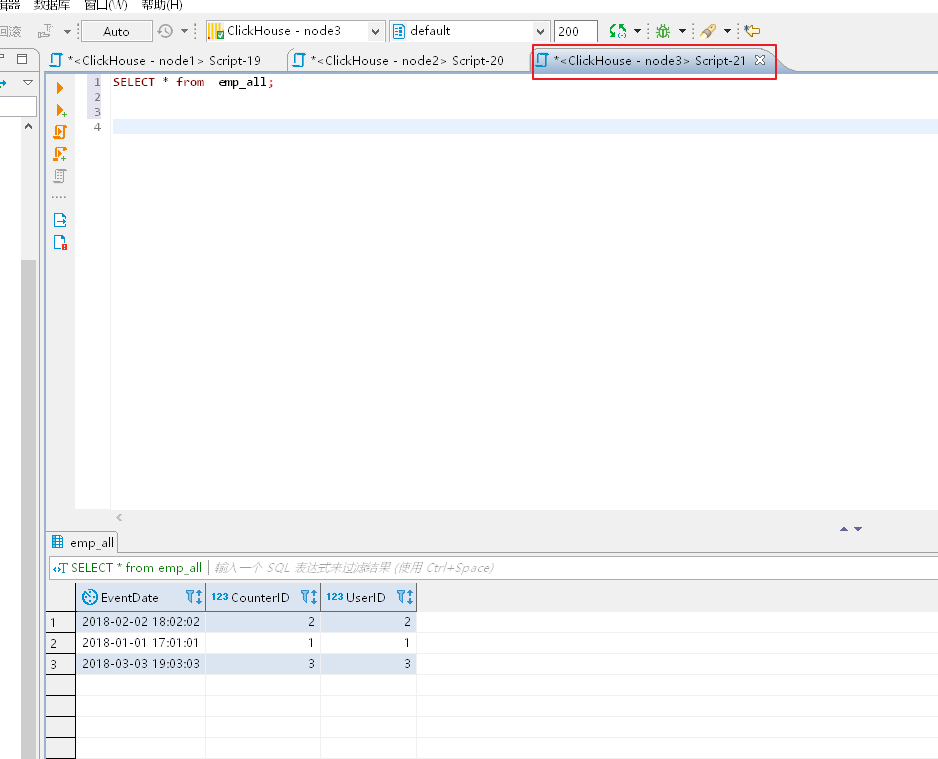
最终任意节点查询,本文节点3查询分布式表:
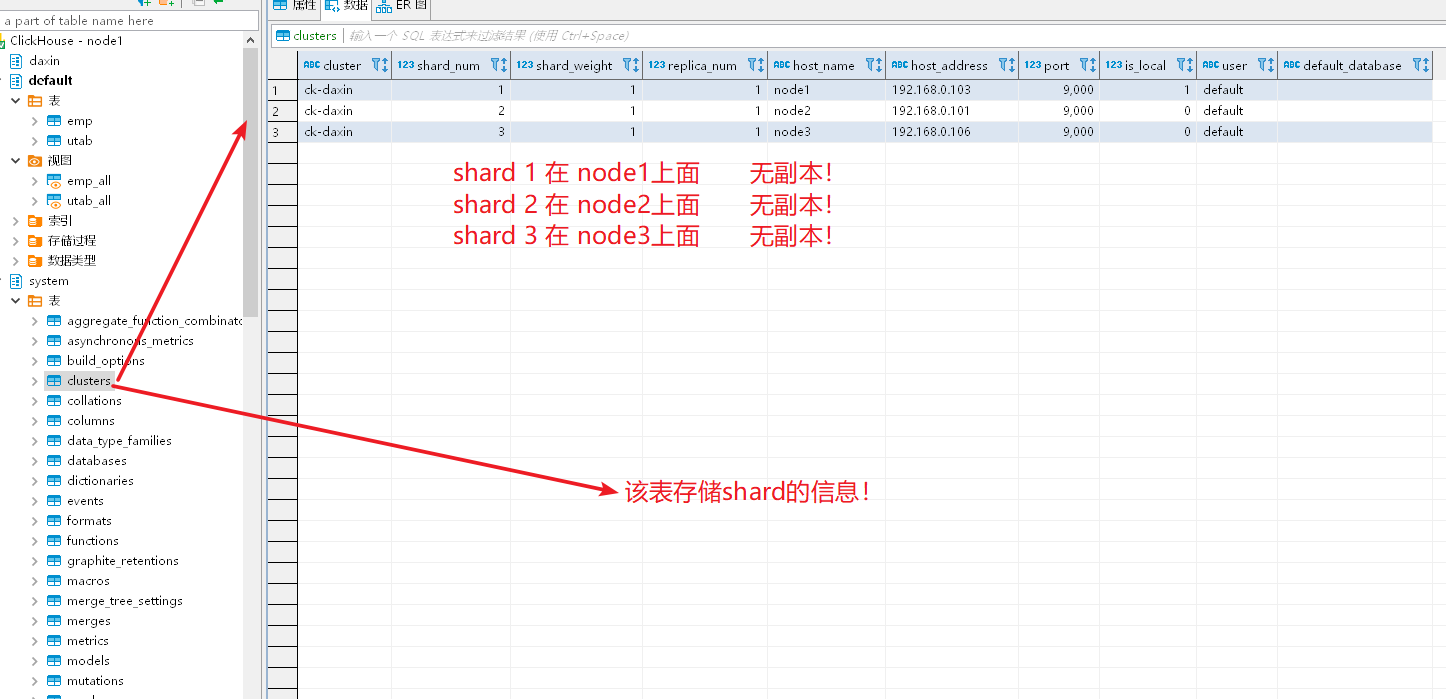
查询单个节点的本地表,只有本地部分数据!!!
Clickhouse副本表以及分布式表简单实践的更多相关文章
- ZooKeeper分布式锁简单实践
ZooKeeper分布式锁简单实践 在分布式解决方案中,Zookeeper是一个分布式协调工具.当多个JVM客户端,同时在ZooKeeper上创建相同的一个临时节点,因为临时节点路径是保证唯一,只要谁 ...
- Clickhouse 分布式表&本地表 &ClickHouse实现时序数据管理和挖掘
一.CK 分布式表和本地表 (1)CK是一个纯列式存储的数据库,一个列就是硬盘上的一个或多个文件(多个分区有多个文件),关于列式存储这里就不展开了,总之列存对于分析来讲好处更大,因为每个列单独存储,所 ...
- Clickhouse 分布式表&本地表
CK 分布式表和本地表 ck的表分为两种: 分布式表 一个逻辑上的表, 可以理解为数据库中的视图, 一般查询都查询分布式表. 分布式表引擎会将我们的查询请求路由本地表进行查询, 然后进行汇总最终返回给 ...
- Citus 分布式 PostgreSQL 集群 - SQL Reference(创建和修改分布式表 DDL)
创建和分布表 要创建分布式表,您需要首先定义表 schema. 为此,您可以使用 CREATE TABLE 语句定义一个表,就像使用常规 PostgreSQL 表一样. CREATE TABLE ht ...
- 分布式 PostgreSQL 集群(Citus),分布式表中的分布列选择最佳实践
确定应用程序类型 在 Citus 集群上运行高效查询要求数据在机器之间正确分布.这因应用程序类型及其查询模式而异. 大致上有两种应用程序在 Citus 上运行良好.数据建模的第一步是确定哪些应用程序类 ...
- Citus 分布式 PostgreSQL 集群 - SQL Reference(查询分布式表 SQL)
如前几节所述,Citus 是一个扩展,它扩展了最新的 PostgreSQL 以进行分布式执行.这意味着您可以在 Citus 协调器上使用标准 PostgreSQL SELECT 查询进行查询. Cit ...
- atitit.编辑表单的实现最佳实践dwr jq easyui
atitit.编辑表单的实现最佳实践dwr jq easyui 1. 提交表单 1 2. 表单验证 1 3. 数据保存使用meger方式取代save&update方式 1 3.1. Filte ...
- 微服务、分库分表、分布式事务管理、APM链路跟踪性能分析演示项目
好多年没发博,最近有时间整理些东西,分享给大家. 所有内容都在github项目liuzhibin-cn/my-demo中,基于SpringBoot,演示Dubbo微服务 + Mycat, Shardi ...
- 在 Kubernetes 上快速测试 Citus 分布式 PostgreSQL 集群(分布式表,共置,引用表,列存储)
准备工作 这里假设,你已经在 k8s 上部署好了基于 Citus 扩展的分布式 PostgreSQL 集群. 查看 Citus 集群(kubectl get po -n citus),1 个 Coor ...
随机推荐
- JavaAndroid开发部分API
JavaAndroid开发中的部分系统API 四大组件,都需要在清单文件中配置 Activity: 用来提供一个能让用户操作并与之交互的界面 onCreate(): 自动调用的方法, 在其中加载布局显 ...
- ajax 跨域请求解决方案
1.为什么出现跨域: 前端和后端同一个项目下,ajax请求的地址是localhost同一个端口是话,是不会出现跨域问题的,所以相反前端和后端分开时,ajax请求的地址或者端口不是跟后台相同时就会出现跨 ...
- JS动态创建元素
动态添加标签,可从服务器获取标签文本,然后加载到指定div中,可用于权限控制. 1.添加标签字符串方式 var str='<div>5555555555555555555555555555 ...
- js 每到达5次换一行
function getYourString(s) { var res = ''; var length = s.length; for (var i = 0, j = 1; i < lengt ...
- iOS----------关于UDID和UUID的一些理解
一.UDID(Unique Device Identifier) UDID是Unique Device Identifier的缩写,中文意思是设备唯一标识. 在很多需要限制一台设备一个账号的应用中经 ...
- 自动化测试 接口自动化及UI自动化测试平台设计演示
接口自动化及UI自动化测试平台设计演示 by:授客 QQ:1033553122 欢迎加入全国软件测试交流qq群:7156436 大家好,我是授客. 本视频意在分享个人,基于Python,Djan ...
- (jQuery插件)autocomplete插件的简单例子
1.引入相应的js和css,我用到的时候是在jquery-ui的js里面整合的,ui的css 2.先在html上写一个input <input id="tags" class ...
- java--反射机制总结
一.什么是Java反射机制? JAVA反射机制是在运行状态中,对于任意一个类,都能够知道这个类的所有属性和方法:对于任意一个对象,都能够调用它的任意一个方法:这种动态获取的以及动态调用对象的方法的功能 ...
- Nginx 安装与部署配置以及Nginx和uWSGI开机自启
下载 官方网站:https://nginx.org/en/download.html Windows下安装 安装 下载后解压(切记不能含有中文路径!!),文件结构如图(我解压的路径就有中文,记得拷贝放 ...
- LeetCode题解之Clone Graph
1.题目描述 2.问题分析 要遍历图,然后标记没有被复制的节点. 3.代码 class Solution { private: unordered_map<Node*, Node*> m; ...