
Python开发【第三篇】:函数&读写文件
三元运算
三元运算,是条件语句的简单的写法。如果条件为真,则返回值1,否则,返回值2。
ret = 值1 if 条件 else 值2
深浅拷贝
对于数字(int)和字符串(str)而言,赋值、深拷贝、浅拷贝都无意义,因为内存地址指向同一个。
import copy
# ######### 数字、字符串 #########
n1 = 123
# n1 = "i am a student"
print(id(n1))
# ## 赋值 ##
n2 = n1
print(id(n2))
# ## 浅拷贝 ##
n2 = copy.copy(n1)
print(id(n2))

# ## 深拷贝 ##
n3 = copy.deepcopy(n1)
print(id(n3))
对于字典、元祖、列表 而言,进行赋值、浅拷贝和深拷贝时,其内存地址的变化是不同的。
(1)赋值,只是创建一个变量,该变量指向原来内存地址;
(2)浅拷贝,在内存中只额外创建第一层数据;
(3)深拷贝,在内存中将所有的数据重新创建一份(排除最后一层,即:python内部对字符串和数字的优化)。
函数
在学习函数之前,写代码一直是面向过程编程,即:代码执行顺序从上到下,一段代码执行所需的功能,频繁涉及到重复内容。
为了更好的代码重用性和可读性,出现了函数和面向对象。
- 函数式:将某功能代码封装到函数中,日后便无需重复编写,仅调用函数即可
- 面向对象:对函数进行分类和封装,让开发“更快更好更强...”
def 函数名(参数):

    ...
    函数体
    ...
    返回值
函数的定义主要有如下要点:
- def:表示函数的关键字
- 函数名:函数的名称,日后根据函数名调用函数
- 函数体:函数中进行一系列的逻辑计算
- 参数:为函数体提供数据
- 返回值:当函数执行完毕后,可以给调用者返回数据。
内置函数
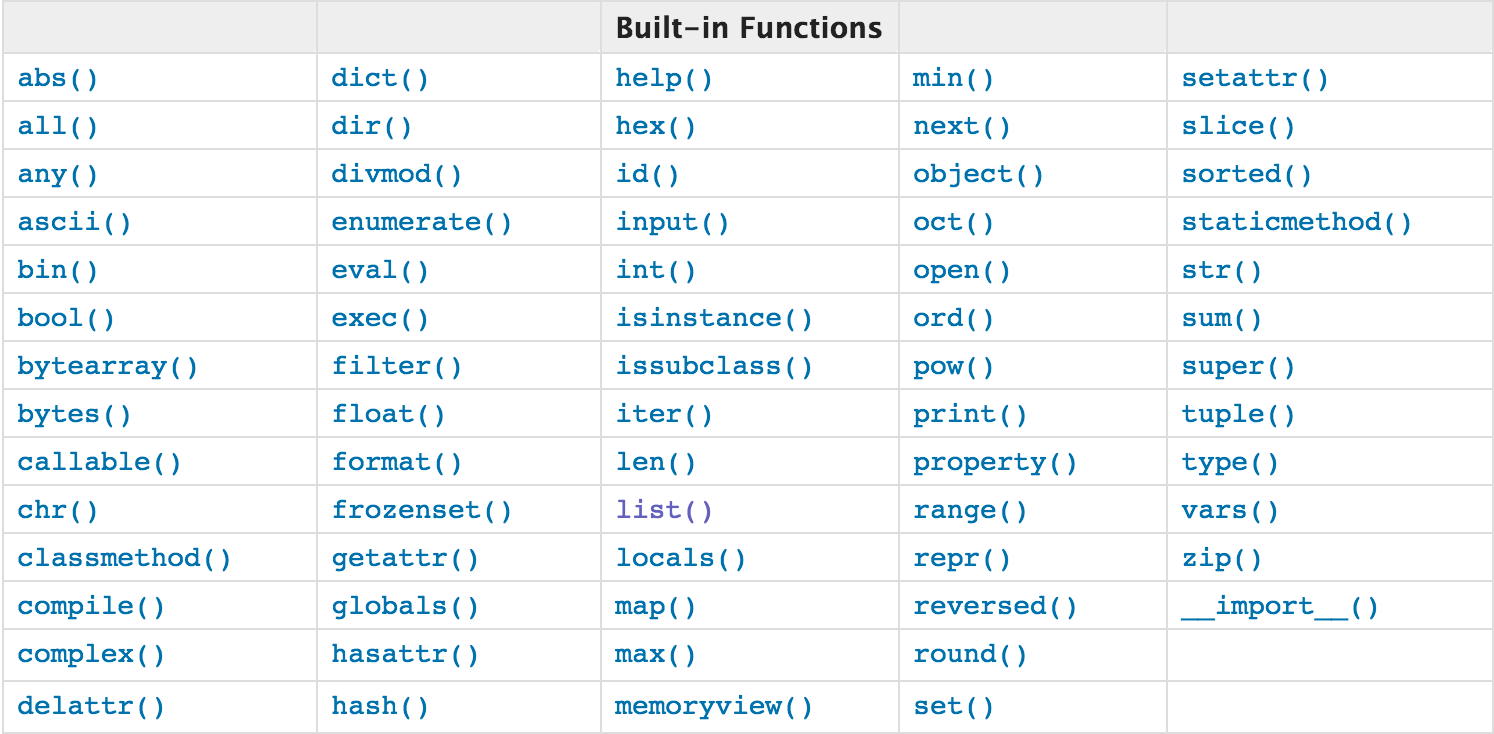
查看详细内容:点这里!
open函数,该函数用于文件处理
操作文件时,一般需要经历如下步骤:
- 打开文件
- 操作文件
一、打开文件:f = open("文件路径","打开模式")
打开文件的模式有:
- r ,只读模式【默认】
- w,只写模式【不可读;不存在则创建;存在则清空内容;】
- x, 只写模式【不可读;不存在则创建,存在则报错】
- a, 追加模式【可读; 不存在则创建;存在则只追加内容;】
"+" 表示可以同时读写某个文件
- r+, 读写【可读,可写】
- w+,写读【可读,可写】
- x+ ,写读【可读,可写】
- a+, 写读【可读,可写】
"b"表示以字节的方式操作
- rb 或 r+b
- wb 或 w+b
- xb 或 w+b
- ab 或 a+b
注:以b方式打开时,读取到的内容是字节类型,写入时也需要提供字节类型
二、操作
class TextIOWrapper(_TextIOBase):
    """
    Character and line based layer over a BufferedIOBase object, buffer.

    encoding gives the name of the encoding that the stream will be
    decoded or encoded with. It defaults to locale.getpreferredencoding(False).

    errors determines the strictness of encoding and decoding (see
    help(codecs.Codec) or the documentation for codecs.register) and
    defaults to "strict".

    newline controls how line endings are handled. It can be None, '',
    '\n', '\r', and '\r\n'.  It works as follows:

    * On input, if newline is None, universal newlines mode is
      enabled. Lines in the input can end in '\n', '\r', or '\r\n', and
      these are translated into '\n' before being returned to the
      caller. If it is '', universal newline mode is enabled, but line
      endings are returned to the caller untranslated. If it has any of
      the other legal values, input lines are only terminated by the given
      string, and the line ending is returned to the caller untranslated.

    * On output, if newline is None, any '\n' characters written are
      translated to the system default line separator, os.linesep. If
      newline is '' or '\n', no translation takes place. If newline is any
      of the other legal values, any '\n' characters written are translated
      to the given string.

    If line_buffering is True, a call to flush is implied when a call to
    write contains a newline character.
    """
    def close(self, *args, **kwargs): # real signature unknown
        关闭文件
        pass

    def fileno(self, *args, **kwargs): # real signature unknown
        文件描述符
        pass

    def flush(self, *args, **kwargs): # real signature unknown
        刷新文件内部缓冲区
        pass

    def isatty(self, *args, **kwargs): # real signature unknown
        判断文件是否是同意tty设备
        pass

    def read(self, *args, **kwargs): # real signature unknown
        读取指定字节数据
        pass

    def readable(self, *args, **kwargs): # real signature unknown
        是否可读
        pass

    def readline(self, *args, **kwargs): # real signature unknown
        仅读取一行数据
        pass

    def seek(self, *args, **kwargs): # real signature unknown
        指定文件中指针位置
        pass

    def seekable(self, *args, **kwargs): # real signature unknown
        指针是否可操作
        pass

    def tell(self, *args, **kwargs): # real signature unknown
        获取指针位置
        pass

    def truncate(self, *args, **kwargs): # real signature unknown
        截断数据,仅保留指定之前数据
        pass

    def writable(self, *args, **kwargs): # real signature unknown
        是否可写
        pass

    def write(self, *args, **kwargs): # real signature unknown
        写内容
        pass

    def __getstate__(self, *args, **kwargs): # real signature unknown
        pass

    def __init__(self, *args, **kwargs): # real signature unknown
        pass

    @staticmethod # known case of __new__
    def __new__(*args, **kwargs): # real signature unknown
        """ Create and return a new object.  See help(type) for accurate signature. """
        pass

    def __next__(self, *args, **kwargs): # real signature unknown
        """ Implement next(self). """
        pass

    def __repr__(self, *args, **kwargs): # real signature unknown
        """ Return repr(self). """
        pass

    buffer = property(lambda self: object(), lambda self, v: None, lambda self: None)  # default

    closed = property(lambda self: object(), lambda self, v: None, lambda self: None)  # default

    encoding = property(lambda self: object(), lambda self, v: None, lambda self: None)  # default

    errors = property(lambda self: object(), lambda self, v: None, lambda self: None)  # default

    line_buffering = property(lambda self: object(), lambda self, v: None, lambda self: None)  # default

    name = property(lambda self: object(), lambda self, v: None, lambda self: None)  # default

    newlines = property(lambda self: object(), lambda self, v: None, lambda self: None)  # default

    _CHUNK_SIZE = property(lambda self: object(), lambda self, v: None, lambda self: None)  # default

    _finalizing = property(lambda self: object(), lambda self, v: None, lambda self: None)  # default
三、管理上下文
为了避免打开文件后忘记关闭,可以通过管理上下文,即:
with open('log','r') as f:

    ...
如此方式,当with代码块执行完毕时,内部会自动关闭并释放文件资源。
在Python 2.7 及以后,with又支持同时对多个文件的上下文进行管理,即:
with open('log1') as obj1, open('log2') as obj2:
    pass
lambda表达式
学习条件运算时,对于简单的 if else 语句,可以使用三元运算来表示。
对于简单的函数,也存在一种简便的表示方式,即:lambda表达式。
# 普通条件语句
if 1 == 1:
    name = 'wupeiqi'
else:
    name = 'alex'

# 三元运算
name = 'wupeiqi' if 1 == 1 else 'alex'

# ###################### 普通函数 ######################
# 定义函数(普通方式)
def func(arg):
    return arg + 1

# 执行函数
result = func(123)

# ###################### lambda ######################

# 定义函数(lambda表达式)
my_lambda = lambda arg : arg + 1

# 执行函数
result = my_lambda(123)
递归
利用函数编写如下数列:
斐波那契数列指的是这样一个数列 0, 1, 1, 2, 3, 5, 8, 13, 21, 34, 55, 89, 144, 233,377,610,987,1597,2584,4181,6765,10946,17711,28657,46368...
def func(arg1,arg2):
    if arg1 == 0:
        print arg1, arg2
    arg3 = arg1 + arg2
    print arg3
    func(arg2, arg3)

func(0,1)
Python开发【第三篇】:函数&读写文件的更多相关文章
- Python开发第三篇
函数 一.函数参数传值 形参:函数在定义的时候给定的参数 实参:函数在运行时赋给的参数: def func(i):#i为定义时的参数,为形参 pass func(name)#name为运行时的参数,为 ...
- Python开发【第二篇】:初识Python
Python开发[第二篇]:初识Python Python简介 Python前世今生 python的创始人为吉多·范罗苏姆(Guido van Rossum).1989年的圣诞节期间,吉多·范罗苏 ...
- Python开发【第一篇】:目录
本系列博文包含 Python基础.前端开发.Web框架.缓存以及队列等,希望可以给正在学习编程的童鞋提供一点帮助!!! Python开发[第一篇]:目录 Python开发[第二篇]:初识Python ...
- Python开发【第一篇】:目录
本系列博文包含Python基础.前端开发.Web框架.缓存以及队列等,希望可以给正在学习Python编程的朋友们提供一点帮助! .Python开发[第一篇]:目录 .Python开发[第二篇]:初始P ...
- Python【第三篇】文件操作、字符编码
一.文件操作 文件操作分为三个步骤:文件打开.操作文件.关闭文件,但是,我们可以用with来管理文件操作,这样就不需要手动来关闭文件. 实现原理: import contextlib @context ...
- 第五篇:使用无缓冲IO函数读写文件
前言 本文介绍使用无缓冲IO函数进行文件读写. 所谓的无缓冲是指该IO函数通过调用系统调用实现,其实系统调用内部的读写实现也是使用了缓冲技术的. 读写步骤 1. 打开文件 open 函数 2. 读写文 ...
- python数据挖掘第三篇-垃圾短信文本分类
数据挖掘第三篇-文本分类 文本分类总体上包括8个步骤.数据探索分析->数据抽取->文本预处理->分词->去除停用词->文本向量化表示->分类器->模型评估.重 ...
- Python基础第三篇
一.collections系列 Counter是对字典类型的补充,用于追踪值的出现次数,具备字典的所有功能 + 自己的功能 1.计数器Counter import collections a='aba ...
- python day5 lambda,内置函数,文件操作,冒泡排序以及装饰器
目录 python day 5 1. 匿名函数lambda 2. python的内置函数 3. python文件操作 4. 递归函数 5. 冒泡排序 6. 装饰器 python day 5 2019/ ...
随机推荐
- 【转载】ASP.NET自定义404和500错误页面
在ASP.NET网站项目实际上线运行的过程中,有时候在运行环境下会出现400错误或者500错误,这些错误默认的页面都不友好,比较简单单调,其实我们可以自行设置这些错误所对应的页面,让这些错误跳转到我们 ...
- centos 安装sbt
1.yum install sbt 2.如果不行,则 curl https://bintray.com/sbt/rpm/rpm > bintray-sbt-rpm.repo sudo mv bi ...
- 解码 id_token
简介 id_token是一个特殊的token,在Microsoft Graph的认证和授权过程中颁发,它包含了已认证用户的一些信息.本文将介绍如何通过实例理解id_token,并且演示了如何解码. 准 ...
- Linux学习笔记之如何挂载数据盘
一.引入 双11在阿里云买了一台服务器(Linux操作系统,版本:CentOS7.04),配置就是20G的系统盘和40G的数据盘,可是问题来了,当系统初始化登录进去之后,输入:free -h命令并不能 ...
- ubuntu中subline无法使用搜狗输入法
今天使用subline编写python程序,发现在ubuntu下无法调用搜狗输入法输入中文,结果一番搜索发现github上的sublime-text-imfix项目能修复此问题,项目地址是:https ...
- js操作css样式,null和undefined的区别?
1.js操作css的样式 div.style.width="100px"在div标签内我们添加了一个style属性,并设定了width值.这种写法会给标签带来大量的style属性, ...
- overall error
Overall error is same with total error in math.
- Java 注解原理
下面来看看Java中注解是如何实现的 创建注解类Inter: 创建测试类Test: 在程序第二句设置断点,可以看到: 可以看到,注解的实例是一个动态代理类的对象. 要想查看这个动态代理类,可以在代码中 ...
- elementUI 设置input的只读或禁用
只读:readonly 在data里定义:readonly: true, 然后在input框里加上readonly就可以了. 禁用:disabled 在data里定义:edit: true, 然后在i ...
- [新特性]PeopleTools8.54+:PeopleSoft Application Engine新特性
PeopleTools 8.54 的Application Engine 已经被更新,特别是在AE跟踪设置中有了更多的选项,本文将帮助您了解8.54的新AE特性以及如何使用这些特性. AE trace ...