
spring mvc 数据格式化
web.xml
<web-app xmlns="http://xmlns.jcp.org/xml/ns/javaee"

         xmlns:xsi="http://www.w3.org/2001/XMLSchema-instance"

         xsi:schemaLocation="http://xmlns.jcp.org/xml/ns/javaee http://xmlns.jcp.org/xml/ns/javaee/web-app_3_1.xsd"

         version="3.1">

    <servlet>

        <servlet-name>springmvc</servlet-name>

        <servlet-class>org.springframework.web.servlet.DispatcherServlet</servlet-class>

        <init-param>

            <param-name>contextConfigLocation</param-name>

            <param-value>/WEB-INF/services.xml</param-value>

        </init-param>

        <load-on-startup></load-on-startup>

    </servlet>

    <servlet-mapping>

        <servlet-name>springmvc</servlet-name>

        <url-pattern>/</url-pattern>

    </servlet-mapping>

</web-app>
services.xml
<?xml version="1.0" encoding="UTF-8"?>

<beans xmlns="http://www.springframework.org/schema/beans"

       xmlns:xsi="http://www.w3.org/2001/XMLSchema-instance"

       xmlns:context="http://www.springframework.org/schema/context"

       xmlns:mvc="http://www.springframework.org/schema/mvc" xmlns:p="http://www.springframework.org/schema/p"

       xsi:schemaLocation="http://www.springframework.org/schema/beans

                http://www.springframework.org/schema/beans/spring-beans.xsd http://www.springframework.org/schema/context http://www.springframework.org/schema/context/spring-context.xsd http://www.springframework.org/schema/mvc http://www.springframework.org/schema/mvc/spring-mvc.xsd">

    <context:component-scan base-package="org.mythsky.springmvcdemo"></context:component-scan>

    <!--<bean class="org.springframework.web.servlet.mvc.method.annotation.RequestMappingHandlerMapping"></bean>-->

    <!--<bean class="org.springframework.web.servlet.mvc.method.annotation.RequestMappingHandlerAdapter"></bean>-->

    <bean class="org.springframework.web.servlet.view.InternalResourceViewResolver">

        <property name="prefix" value="/WEB-INF/views/"></property>

        <property name="suffix" value=".jsp"></property>

    </bean>

    <mvc:annotation-driven></mvc:annotation-driven>

</beans>
这里一定要注意被注释的部分,否则运行后会报400错误
Product.java
package org.mythsky.springmvcdemo.model;

import org.springframework.format.annotation.DateTimeFormat;

import org.springframework.format.annotation.NumberFormat;

import java.io.Serializable;

import java.util.Date;

public class Product implements Serializable {

    @DateTimeFormat(pattern = "yyyy-MM-dd")

    private Date createDate;

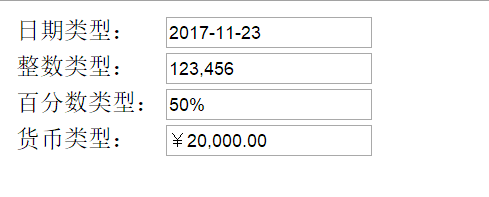
    @NumberFormat(style = NumberFormat.Style.NUMBER,pattern = "#,###")

    private int total;

    @NumberFormat(style = NumberFormat.Style.PERCENT)

    private double discount;

    @NumberFormat(style = NumberFormat.Style.CURRENCY)

    private double money;

    public Product() {

//        super();

    }

    public Date getCreateDate() {

        return createDate;

    }

    public void setCreateDate(Date createDate) {

        this.createDate = createDate;

    }

    public int getTotal() {

        return total;

    }

    public void setTotal(int total) {

        this.total = total;

    }

    public double getDiscount() {

        return discount;

    }

    public void setDiscount(double discount) {

        this.discount = discount;

    }

    public double getMoney() {

        return money;

    }

    public void setMoney(double money) {

        this.money = money;

    }

}
大部分书里写这里必须要有无参构造函数,如果没有其他构造函数的话不写也行
ProductController.java
package org.mythsky.springmvcdemo.controller;

import org.apache.commons.logging.Log;

import org.apache.commons.logging.LogFactory;

import org.mythsky.springmvcdemo.model.Product;

import org.springframework.stereotype.Controller;

import org.springframework.ui.Model;

import org.springframework.web.bind.annotation.ModelAttribute;

import org.springframework.web.bind.annotation.RequestMapping;

@Controller

public class ProductController {

    private static final Log logger= LogFactory.getLog(ProductController.class);

    @RequestMapping(value = "/product")

    public String test(@ModelAttribute Product product, Model model){

        logger.info(product);

        model.addAttribute("product",product);

        return "showproduct";

    }

}
testForm.jsp
<%--

  Created by IntelliJ IDEA.

  User: mythsky

  Date: //

  Time: :

  To change this template use File | Settings | File Templates.

--%>

<%@ page contentType="text/html;charset=UTF-8" language="java" %>

<html>

<head>

    <title>FormmaterTest</title>

</head>

<body>

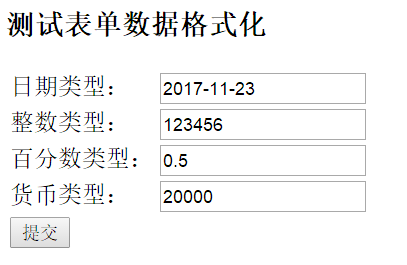
<h3>测试表单数据格式化</h3>

<form action="product" method="post">

    <table>

        <tr>

            <td><label>日期类型:</label></td>

            <td><input type="text" name="createDate"> </td>

        </tr>

        <tr>

            <td><label>整数类型:</label></td>

            <td><input type="text" name="total"> </td>

        </tr>

        <tr>

            <td><label>百分数类型:</label></td>

            <td><input type="text" name="discount"> </td>

        </tr>

        <tr>

            <td><label>货币类型:</label></td>

            <td><input type="text" name="money"> </td>

        </tr>

        <tr>

            <td><input type="submit" value="提交"> </td>

        </tr>

    </table>

</form>

</body>

</html>
showproduct.jsp
<%@ taglib prefix="form" uri="http://www.springframework.org/tags/form" %>

<%--

  Created by IntelliJ IDEA.

  User: mythsky

  Date: //

  Time: :

  To change this template use File | Settings | File Templates.

--%>

<%@ page contentType="text/html;charset=UTF-8" language="java" %>

<html>

<head>

    <title>测试表单数据格式化</title>

</head>

<body>

<form:form modelAttribute="product" method="post" action="">

    <table>

        <tr>

            <td>日期类型:</td>

            <td><form:input path="createDate"></form:input></td>

        </tr>

        <tr>

            <td><label>整数类型:</label></td>

            <td><form:input path="total"></form:input> </td>

        </tr>

        <tr>

            <td><label>百分数类型:</label></td>

            <td><form:input path="discount"></form:input> </td>

        </tr>

        <tr>

            <td><label>货币类型:</label></td>

            <td><form:input path="money"></form:input> </td>

        </tr>

    </table>

</form:form>

</body>

</html>
运行结果
实体类转换Json
@JsonFormat(timezone = "GMT+8", pattern = "yyyy-MM-dd HH:mm")

    private Date updateTime;
spring mvc 数据格式化的更多相关文章
- Spring mvc数据转换 格式化 校验(转载)
原文地址:http://www.cnblogs.com/linyueshan/p/5908490.html 数据绑定流程 1. Spring MVC 主框架将 ServletRequest 对象及目标 ...
- Hibernate Validation,Spring mvc 数据验证框架注解
1.@NotNull:不能为 Null,但是可以为Empty:用在基本数据类型上. @NotNull(message="{state.notnull.valid}", groups ...
- spring mvc 数据校验(bean实体注解实现)
spring mvc 数据校验 1.添加个jar (jar与一版本会冲突) <dependency> <groupId>com.fasterxml</groupId> ...
- Spring MVC 数据校验@Valid
先看看几个关键词 @Valid @Pattern @NotNull @NotBlank @Size BindingResult 这些就是Spring MVC的数据校验的几个注解. 那怎么用呢?往下看 ...
- JSR教程2——Spring MVC数据校验与国际化
SpringMVC数据校验采用JSR-303校验. • Spring4.0拥有自己独立的数据校验框架,同时支持JSR303标准的校验框架. • Spring在进行数据绑定时,可同时调用校验框架完成数据 ...
- spring mvc 数据回显
1.spring mvc自动将传入的pojo数据存入request域 request中的key是该pojo类名,首字母小写. JSP controller 第一次访问user.jsp 填写表单 点击提 ...
- Spring MVC 数据验证——validate编码方式
1.导入jar包 validation-api-1.0.0.GA.jar这是比較关键的一个jar包,主要用于解析注解@Valid. hibernate-validator-4.3.2.Final.ja ...
- 【代码总结】Spring MVC数据校验
1.实验介绍 --------------------------------------------------------------------------------------------- ...
- Spring MVC 数据验证——validate注解方式
1.说明 学习注解方式之前,应该先学习一下编码方式的spring注入.这样便于理解验证框架的工作原理.在出错的时候,也能更好的解决这个问题.所以本次博客教程也是基于编码方式.仅仅是在原来的基础加上注解 ...
随机推荐
- IE上如何设置input type=file的光标不闪烁
我们使用文件上传时,时常自定义图标,这时候通常会把input的透明度设置为0,但是在IE上使用时会出现光标闪烁问题 解决办法 css设置font-size为0
- IP和网段及子网掩码基础知识
IP地址由网络号和主机号两部分组成,网络号的最高位必须是"0",IP地址和子网掩码求"与"算出网络地址,只有网络地址相同才可直接通信,否则需要借助路由. 主机标 ...
- 用Kotlin写一个基于Spring Boot的RESTful服务
Spring太复杂了,配置这个东西简直就是浪费生命.尤其在没有什么并发压力,随便搞一个RESTful服务 让整个业务跑起来先的情况下,更是么有必要纠结在一堆的XML配置上.显然这么想的人是很多的,于是 ...
- day34(注解)
注解 注解和注释的区别: 注释:是给程序员看的. 注解:是给虚拟机识别的. 注解的作用: 1.代替配置文件 2.标识一个方法,代替一个特殊功能. JDK当中的提供的注解: 标识重写方法 @Overri ...
- FatMouse's Speed (hdu 1160)
#include <iostream> #include <cstdio> #include <cstring> #include <algori ...
- noip第34课作业
1. 信息加密 [问题描述] 在传递信息的过程中,为了加密,有时需要按一定规则将文本转换成密文发送出去.有一种加密规则是这样的:1. 对于字母字符,将其转换成其后的第3个字母.例如:A→D,a→ ...
- IOS绘图详解
http://blog.163.com/wkyuyang_001/blog/static/10802122820133190545227/
- 《mysql必知必会》学习_第七章_20180730_欢
第七章:数据过滤 P43 select prod_id,prod_price,prod_name from products where vend_id =1003 and prod_price &l ...
- Scala_对象
对象 单例对象 Scala并没有提供Java那样的静态方法或静态字段,但是,可以采用 object关键字实现单例对象,具备和Java静态方法同样的功能. 可以看出,单例对象的定义和类的定义很相似,明显 ...
- php email
项目中用到了发邮件的功能.代码很简单,但是其中碰到了一些奇怪的问题. smtp error: could not authenticate 163 ======================== 新 ...