
pygame系列_小球完全弹性碰撞游戏_源码下载
之前做了一个基于python的tkinter的小球完全碰撞游戏:
python开发_tkinter_小球完全弹性碰撞游戏_源码下载
今天利用业余时间,写了一个功能要强大一些的小球完全碰撞游戏:
游戏名称:
小球完全弹性碰撞
游戏规则:
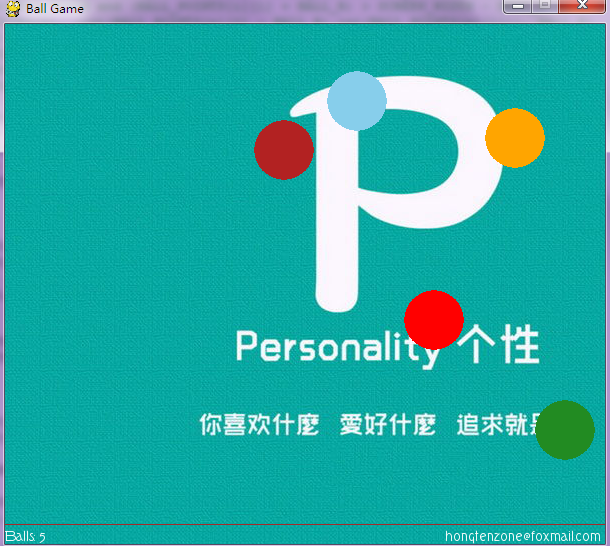
1.游戏初始化的时候,有5个不同颜色的小球进行碰撞
2.玩家可以通过在窗口中单击鼠标左键进行增加小球个数
3.玩家可以通过在窗口中单击鼠标右键进行删减小球个数
4.玩家可以通过键盘的方向键:上,右键进行对小球加速
5.玩家可以通过键盘的方向键:下,左键进行对小球减速
6.玩家可以按键盘:f键实现全屏显示
7.玩家可以按键盘:Esc键实现退出全屏操作
8.窗口左下角显示小球个数,右下角显示作者邮箱
先看看图:

=======================================================
源码部分:
=======================================================
 #pygame draw

 import pygame

 from pygame.locals import *

 from sys import exit

 from random import *

 '''

     游戏名称:

         小球完全弹性碰撞

     游戏规则:

         1.游戏初始化的时候,有5个不同颜色的小球进行碰撞

         2.玩家可以通过在窗口中单击鼠标左键进行增加小球个数

         3.玩家可以通过在窗口中单击鼠标右键进行删减小球个数

         4.玩家可以通过键盘的方向键:上,右键进行对小球加速

         5.玩家可以通过键盘的方向键:下,左键进行对小球减速

         6.玩家可以按键盘:f键实现全屏显示

         7.玩家可以按键盘:Esc键实现退出全屏操作

         8.窗口左下角显示小球个数,右下角显示作者邮箱

 '''

 __author__ = {'name' : 'Hongten',

               'mail' : 'hongtenzone@foxmail.com',

               'blog' : 'http://www.cnblogs.com/hongten',

               'version' : '1.0'}

 pygame.init()

 pygame.display.set_caption('Ball Game')

 SCREEN_WIDTH = 600

 SCREEN_HEIGHT = 500

 SPEED = 1

 SCREEN_DEFAULT_SIZE = (SCREEN_WIDTH, SCREEN_HEIGHT + 20)

 SCREEN_DEFAULT_COLOR = (255, 255 ,255)

 READY = 0

 screen = pygame.display.set_mode(SCREEN_DEFAULT_SIZE, 0, 32)

 screen.fill(SCREEN_DEFAULT_COLOR)

 bg = pygame.image.load('data\\image\\bg.jpg').convert()

 font = pygame.font.Font('data\\font\\TORK____.ttf', 14)

 balls = []

 BALL_R = 30

 BALL_COLORS = [(255,165,0),(255,0,0),(135,206,235),(178,34,34),(34,139,34)]

 BALL_POINTS = [[40, 40],[40, 300],[400, 200],[150, 150],[80, 400]]

 BALL_VELOCITY = [[1.5, 1.2],[1.4, -1.3],[-1.5, -1.1],[-1.2, 1.5],[1.3, 1.1]]

 for i in range(len(BALL_COLORS)):

     screen.fill(SCREEN_DEFAULT_COLOR)

     b = pygame.draw.circle(screen, BALL_COLORS[i], (int(BALL_POINTS[i][0]),int(BALL_POINTS[i][1])), BALL_R)

     balls.append(b)

 while 1:

     for event in pygame.event.get():

         if event.type ==  QUIT:

             exit()

         elif event.type == KEYDOWN:

             if event.key == K_UP:

                 SPEED += 0.1

             elif event.key == K_DOWN:

                 SPEED -= 0.1

             elif event.key == K_LEFT:

                 SPEED -= 0.1

             elif event.key == K_RIGHT:

                 SPEED += 0.1

             elif event.key == K_f:

                 pygame.display.set_mode(SCREEN_DEFAULT_SIZE, FULLSCREEN, 32)

             elif event.key == 27:

                 pygame.display.set_mode(SCREEN_DEFAULT_SIZE, 0, 32)

         elif event.type == MOUSEBUTTONDOWN:

             pressed_array = pygame.mouse.get_pressed()

             for index in range(len(pressed_array)):

                 if pressed_array[index]:

                     if index == 0:

                         c_color = (randint(0, 255), randint(0, 255), randint(0, 255))

                         x, y = (BALL_R+1, BALL_R+1)

                         c_r = randint(10, 100)

                         c_v = [randint(11, 19)* 0.1, randint(11, 19) * 0.1]

                         c = pygame.draw.circle(screen, c_color, (x, y), BALL_R)

                         BALL_COLORS.append(c_color)

                         BALL_POINTS.append([x, y])

                         BALL_VELOCITY.append(c_v)

                         balls.append(c)

                     elif index == 2:

                         if len(balls) > 1:

                             balls.pop(0)

                             BALL_COLORS.pop(0)

                             BALL_POINTS.pop(0)

                             BALL_VELOCITY.pop(0)

     #print(balls)

     for i in range(len(balls)):

         screen.blit(bg, (-300, -100))

         for n in range(len(balls)):

             '''

             if ((BALL_POINTS[i][0] - BALL_R) > 0 and (BALL_POINTS[i][0] - BALL_R) < BALL_R):

                 pygame.draw.circle(screen, BALL_COLORS[n], (int(BALL_POINTS[n][0] + BALL_R),int(BALL_POINTS[n][1])), BALL_R)

             elif ((BALL_POINTS[i][1] + BALL_R) < SCREEN_WIDTH and (BALL_POINTS[i][1] + BALL_R) > SCREEN_WIDTH - BALL_R):

                 pygame.draw.circle(screen, BALL_COLORS[n], (int(BALL_POINTS[n][0] - BALL_R),int(BALL_POINTS[n][1])), BALL_R)

             elif ((BALL_POINTS[i][1] - BALL_R) > 0 and (BALL_POINTS[i][1] - BALL_R) < BALL_R):

                 pygame.draw.circle(screen, BALL_COLORS[n], (int(BALL_POINTS[n][0]),int(BALL_POINTS[n][1] + BALL_R)), BALL_R)

             elif ((BALL_POINTS[i][1] + BALL_R) < SCREEN_HEIGHT and  (BALL_POINTS[i][1] + BALL_R) > SCREEN_HEIGHT - BALL_R):

                 pygame.draw.circle(screen, BALL_COLORS[n], (int(BALL_POINTS[n][0]),int(BALL_POINTS[n][1] - BALL_R)), BALL_R)

             '''

             pygame.draw.circle(screen, BALL_COLORS[n], (int(BALL_POINTS[n][0]),int(BALL_POINTS[n][1])), BALL_R)

         if ((((BALL_POINTS[i][0] - BALL_R) < 0) or ((BALL_POINTS[i][0] + BALL_R) > SCREEN_WIDTH))):

             BALL_VELOCITY[i][0] = -1 * BALL_VELOCITY[i][0]

         if ((((BALL_POINTS[i][1] - BALL_R) < 0) or ((BALL_POINTS[i][1] + BALL_R) > SCREEN_HEIGHT))):

             BALL_VELOCITY[i][1] = -1 * BALL_VELOCITY[i][1]

     for j in range(len(balls)):

         for k in range(len(balls)):

             b_x = (BALL_POINTS[j][0] - BALL_POINTS[k][0])**2

             b_y = (BALL_POINTS[j][1] - BALL_POINTS[k][1])**2

             b_r =(BALL_R*2)**2

             if (round((b_x + b_y), 2) <= round(b_r, 2)):

                 temp_x = BALL_VELOCITY[j][0]

                 temp_y = BALL_VELOCITY[j][1]

                 BALL_VELOCITY[j][0] = BALL_VELOCITY[k][0]

                 BALL_VELOCITY[j][1] = BALL_VELOCITY[k][1]

                 BALL_VELOCITY[k][0] = temp_x

                 BALL_VELOCITY[k][1] = temp_y

         BALL_POINTS[j][0] += SPEED * BALL_VELOCITY[j][0]

         BALL_POINTS[j][1] += SPEED * BALL_VELOCITY[j][1]

     pygame.draw.line(screen, (165,42,42),(0, SCREEN_HEIGHT), (SCREEN_WIDTH,SCREEN_HEIGHT))

     game_info = 'Balls: ' + str(len(balls))

     text = font.render(game_info, True, (255,255,255))

     author_info = font.render('hongtenzone@foxmail.com', True, (255,255,255))

     screen.blit(text, (0, SCREEN_HEIGHT+5))

     screen.blit(author_info, (SCREEN_WIDTH - 160, SCREEN_HEIGHT+5))

     pygame.display.update()
源码下载:http://files.cnblogs.com/hongten/pygame_pong_v1.0.zip
============================================
v1.1 Edit by Hongten
v1.1修改如下:
1.增加了背景音乐
2.增加小球的时候,会伴随音乐产生
3.窗口左下角显示小球个数,速度,以及最后一个小球的位置
============================================
 #pygame draw

 import pygame

 from pygame.locals import *

 from sys import exit

 from random import *

 '''

     游戏名称:

         小球完全弹性碰撞

     游戏规则:

         1.游戏初始化的时候,有5个不同颜色的小球进行碰撞

         2.玩家可以通过在窗口中单击鼠标左键进行增加小球个数

         3.玩家可以通过在窗口中单击鼠标右键进行删减小球个数

         4.玩家可以通过键盘的方向键:上,右键进行对小球加速

         5.玩家可以通过键盘的方向键:下,左键进行对小球减速

         6.玩家可以按键盘:f键实现全屏显示

         7.玩家可以按键盘:Esc键实现退出全屏操作

         8.窗口左下角显示小球个数,右下角显示作者邮箱

         v1.1修改如下:

         1.增加了背景音乐

         2.增加小球的时候,会伴随音乐产生

         3.窗口左下角显示小球个数,速度,以及最后一个小球的位置

 '''

 __author__ = {'name' : 'Hongten',

               'mail' : 'hongtenzone@foxmail.com',

               'blog' : 'http://www.cnblogs.com/hongten',

               'version' : '1.1'}

 if not pygame.font: print('Warning, fonts disabled')

 if not pygame.mixer: print('Warning, sound disabled')

 pygame.init()

 pygame.display.set_caption('Ball Game')

 SCREEN_WIDTH = 600

 SCREEN_HEIGHT = 500

 SPEED = 1

 SCREEN_DEFAULT_SIZE = (SCREEN_WIDTH, SCREEN_HEIGHT + 20)

 SCREEN_DEFAULT_COLOR = (255, 255 ,255)

 READY = 0

 screen = pygame.display.set_mode(SCREEN_DEFAULT_SIZE, 0, 32)

 screen.fill(SCREEN_DEFAULT_COLOR)

 bg = pygame.image.load('data\\image\\bg.jpg').convert()

 font = pygame.font.Font('data\\font\\TORK____.ttf', 14)

 new_sound = pygame.mixer.Sound('data\\sound\\new.wav')

 bg_sound = pygame.mixer.Sound('data\\sound\\bg.ogg')

 bg_sound.set_volume(0.5)

 bg_sound.play(-1)

 new_sound.set_volume(1.0)

 balls = []

 BALL_R = 30

 BALL_COLORS = [(255,165,0),(255,0,0),(135,206,235),(178,34,34),(34,139,34)]

 BALL_POINTS = [[40, 40],[40, 300],[400, 200],[150, 150],[80, 400]]

 BALL_VELOCITY = [[1.5, 1.2],[1.4, -1.3],[-1.5, -1.1],[-1.2, 1.5],[1.3, 1.1]]

 for i in range(len(BALL_COLORS)):

     screen.fill(SCREEN_DEFAULT_COLOR)

     b = pygame.draw.circle(screen, BALL_COLORS[i], (int(BALL_POINTS[i][0]),int(BALL_POINTS[i][1])), BALL_R)

     balls.append(b)

 while 1:

     for event in pygame.event.get():

         if event.type ==  QUIT:

             bg_sound.stop()

             exit()

         elif event.type == KEYDOWN:

             if event.key == K_UP:

                 SPEED += 0.1

             elif event.key == K_DOWN:

                 SPEED -= 0.1

             elif event.key == K_LEFT:

                 SPEED -= 0.1

             elif event.key == K_RIGHT:

                 SPEED += 0.1

             elif event.key == K_f:

                 pygame.display.set_mode(SCREEN_DEFAULT_SIZE, FULLSCREEN, 32)

             elif event.key == 27:

                 pygame.display.set_mode(SCREEN_DEFAULT_SIZE, 0, 32)

         elif event.type == MOUSEBUTTONDOWN:

             pressed_array = pygame.mouse.get_pressed()

             for index in range(len(pressed_array)):

                 if pressed_array[index]:

                     if index == 0:

                         new_sound.play(-1)

                         c_color = (randint(0, 255), randint(0, 255), randint(0, 255))

                         x, y = (BALL_R+1, BALL_R+1)

                         c_r = randint(10, 100)

                         c_v = [randint(11, 19)* 0.1, randint(11, 19) * 0.1]

                         c = pygame.draw.circle(screen, c_color, (x, y), BALL_R)

                         BALL_COLORS.append(c_color)

                         BALL_POINTS.append([x, y])

                         BALL_VELOCITY.append(c_v)

                         balls.append(c)

                     elif index == 2:

                         if len(balls) > 1:

                             balls.pop(0)

                             BALL_COLORS.pop(0)

                             BALL_POINTS.pop(0)

                             BALL_VELOCITY.pop(0)

         elif event.type == MOUSEBUTTONUP:

             new_sound.stop()

     #print(balls)

     for i in range(len(balls)):

         screen.blit(bg, (-300, -100))

         for n in range(len(balls)):

             '''

             if ((BALL_POINTS[i][0] - BALL_R) > 0 and (BALL_POINTS[i][0] - BALL_R) < BALL_R):

                 pygame.draw.circle(screen, BALL_COLORS[n], (int(BALL_POINTS[n][0] + BALL_R),int(BALL_POINTS[n][1])), BALL_R)

             elif ((BALL_POINTS[i][1] + BALL_R) < SCREEN_WIDTH and (BALL_POINTS[i][1] + BALL_R) > SCREEN_WIDTH - BALL_R):

                 pygame.draw.circle(screen, BALL_COLORS[n], (int(BALL_POINTS[n][0] - BALL_R),int(BALL_POINTS[n][1])), BALL_R)

             elif ((BALL_POINTS[i][1] - BALL_R) > 0 and (BALL_POINTS[i][1] - BALL_R) < BALL_R):

                 pygame.draw.circle(screen, BALL_COLORS[n], (int(BALL_POINTS[n][0]),int(BALL_POINTS[n][1] + BALL_R)), BALL_R)

             elif ((BALL_POINTS[i][1] + BALL_R) < SCREEN_HEIGHT and  (BALL_POINTS[i][1] + BALL_R) > SCREEN_HEIGHT - BALL_R):

                 pygame.draw.circle(screen, BALL_COLORS[n], (int(BALL_POINTS[n][0]),int(BALL_POINTS[n][1] - BALL_R)), BALL_R)

             '''

             pygame.draw.circle(screen, BALL_COLORS[n], (int(BALL_POINTS[n][0]),int(BALL_POINTS[n][1])), BALL_R)

         if ((((BALL_POINTS[i][0] - BALL_R) < 0) or ((BALL_POINTS[i][0] + BALL_R) > SCREEN_WIDTH))):

             BALL_VELOCITY[i][0] = -1 * BALL_VELOCITY[i][0]

         if ((((BALL_POINTS[i][1] - BALL_R) < 0) or ((BALL_POINTS[i][1] + BALL_R) > SCREEN_HEIGHT))):

             BALL_VELOCITY[i][1] = -1 * BALL_VELOCITY[i][1]

     for j in range(len(balls)):

         for k in range(len(balls)):

             b_x = (BALL_POINTS[j][0] - BALL_POINTS[k][0])**2

             b_y = (BALL_POINTS[j][1] - BALL_POINTS[k][1])**2

             b_r =(BALL_R*2)**2

             if (round((b_x + b_y), 2) <= round(b_r, 2)):

                 temp_x = BALL_VELOCITY[j][0]

                 temp_y = BALL_VELOCITY[j][1]

                 BALL_VELOCITY[j][0] = BALL_VELOCITY[k][0]

                 BALL_VELOCITY[j][1] = BALL_VELOCITY[k][1]

                 BALL_VELOCITY[k][0] = temp_x

                 BALL_VELOCITY[k][1] = temp_y

         BALL_POINTS[j][0] += round(SPEED, 1) * BALL_VELOCITY[j][0]

         BALL_POINTS[j][1] += round(SPEED, 1) * BALL_VELOCITY[j][1]

     pygame.draw.line(screen, (165,42,42),(0, SCREEN_HEIGHT), (SCREEN_WIDTH,SCREEN_HEIGHT))

     game_info = 'Balls: ' + str(len(balls)) + '     Speed: ' + str(round(SPEED, 2)) + '   LastBall: ' + str(round(BALL_POINTS[-1][0])) + ',' + str(round(BALL_POINTS[-1][1]))

     text = font.render(game_info, True, (255,255,255))

     author_info = font.render('hongtenzone@foxmail.com', True, (255,255,255))

     screen.blit(text, (0, SCREEN_HEIGHT+5))

     screen.blit(author_info, (SCREEN_WIDTH - 160, SCREEN_HEIGHT+5))

     pygame.display.update()
源码下载:http://files.cnblogs.com/hongten/pygame_pong_v1.1.rar
==================================================
Edit By Hongten
v1.2修改如下:
1.修改键盘方向键:左,右键为调节音量(0, 10)
2.在状态栏添加音量状态信息:数字和图形显示
==================================================
 #pygame draw

 import pygame

 from pygame.locals import *

 from sys import exit

 from random import *

 '''

     游戏名称:

         小球完全弹性碰撞

     游戏规则:

         1.游戏初始化的时候,有5个不同颜色的小球进行碰撞

         2.玩家可以通过在窗口中单击鼠标左键进行增加小球个数

         3.玩家可以通过在窗口中单击鼠标右键进行删减小球个数

         4.玩家可以通过键盘的方向键:上,右键进行对小球加速

         5.玩家可以通过键盘的方向键:下,左键进行对小球减速

         6.玩家可以按键盘:f键实现全屏显示

         7.玩家可以按键盘:Esc键实现退出全屏操作

         8.窗口左下角显示小球个数,右下角显示作者邮箱

         v1.1修改如下:

         1.增加了背景音乐

         2.增加小球的时候,会伴随音乐产生

         3.窗口左下角显示小球个数,速度,以及最后一个小球的位置

         v1.2修改如下:

         1.修改键盘方向键:左,右键为调节音量(0, 10)

         2.在状态栏添加音量状态信息:数字和图形显示

 '''

 __author__ = {'name' : 'Hongten',

               'mail' : 'hongtenzone@foxmail.com',

               'blog' : 'http://www.cnblogs.com/hongten',

               'version' : '1.2'}

 if not pygame.font: print('Warning, fonts disabled')

 if not pygame.mixer: print('Warning, sound disabled')

 pygame.init()

 pygame.display.set_caption('Ball Game')

 SCREEN_WIDTH = 600

 SCREEN_HEIGHT = 500

 SPEED = 1

 VOLUME = 5

 SCREEN_DEFAULT_SIZE = (SCREEN_WIDTH, SCREEN_HEIGHT + 20)

 SCREEN_DEFAULT_COLOR = (255, 255 ,255)

 READY = 0

 screen = pygame.display.set_mode(SCREEN_DEFAULT_SIZE, 0, 32)

 screen.fill(SCREEN_DEFAULT_COLOR)

 bg = pygame.image.load('data\\image\\bg.jpg').convert()

 font = pygame.font.Font('data\\font\\TORK____.ttf', 14)

 new_sound = pygame.mixer.Sound('data\\sound\\new.wav')

 bg_sound = pygame.mixer.Sound('data\\sound\\bg.ogg')

 bg_sound.set_volume(0.1 * VOLUME)

 bg_sound.play(-1)

 new_sound.set_volume(0.1 * VOLUME)

 balls = []

 BALL_R = 30

 BALL_COLORS = [(255,165,0),(255,0,0),(135,206,235),(178,34,34),(34,139,34)]

 BALL_POINTS = [[40, 40],[40, 300],[400, 200],[150, 150],[80, 400]]

 BALL_VELOCITY = [[1.5, 1.2],[1.4, -1.3],[-1.5, -1.1],[-1.2, 1.5],[1.3, 1.1]]

 VOLUME_POINTS = []

 VOLUME_POINTS_START = []

 VOLUME_RECT_COLORS = []

 for p in range(170, 250, 7):

     VOLUME_POINTS.append([SCREEN_WIDTH - p,SCREEN_HEIGHT + 20])

 for ps in range(175, 250, 7):

     VOLUME_POINTS_START.append([SCREEN_WIDTH - ps, SCREEN_HEIGHT])

     VOLUME_RECT_COLORS.append((randint(0, 255), randint(0, 255), randint(0, 255)))

 print(VOLUME_POINTS[-10])

 print(VOLUME_POINTS_START[-10])

 for i in range(len(BALL_COLORS)):

     screen.fill(SCREEN_DEFAULT_COLOR)

     b = pygame.draw.circle(screen, BALL_COLORS[i], (int(BALL_POINTS[i][0]),int(BALL_POINTS[i][1])), BALL_R)

     balls.append(b)

 while 1:

     for event in pygame.event.get():

         if event.type ==  QUIT:

             bg_sound.stop()

             exit()

         elif event.type == KEYDOWN:

             if event.key == K_UP:

                 SPEED += 0.1

             elif event.key == K_DOWN:

                 SPEED -= 0.1

             elif event.key == K_LEFT:

                 if VOLUME > 0:

                     VOLUME -= 1

             elif event.key == K_RIGHT:

                 if VOLUME <= 9:

                     VOLUME += 1

             elif event.key == K_f:

                 pygame.display.set_mode(SCREEN_DEFAULT_SIZE, FULLSCREEN, 32)

             elif event.key == 27:

                 pygame.display.set_mode(SCREEN_DEFAULT_SIZE, 0, 32)

         elif event.type == MOUSEBUTTONDOWN:

             pressed_array = pygame.mouse.get_pressed()

             for index in range(len(pressed_array)):

                 if pressed_array[index]:

                     if index == 0:

                         new_sound.play(-1)

                         c_color = (randint(0, 255), randint(0, 255), randint(0, 255))

                         x, y = (BALL_R+1, BALL_R+1)

                         c_r = randint(10, 100)

                         c_v = [randint(11, 19)* 0.1, randint(11, 19) * 0.1]

                         c = pygame.draw.circle(screen, c_color, (x, y), BALL_R)

                         BALL_COLORS.append(c_color)

                         BALL_POINTS.append([x, y])

                         BALL_VELOCITY.append(c_v)

                         balls.append(c)

                     elif index == 2:

                         if len(balls) > 1:

                             balls.pop(0)

                             BALL_COLORS.pop(0)

                             BALL_POINTS.pop(0)

                             BALL_VELOCITY.pop(0)

         elif event.type == MOUSEBUTTONUP:

             new_sound.stop()

     #print(balls)

     for i in range(len(balls)):

         screen.blit(bg, (-300, -100))

         #screen.fill(SCREEN_DEFAULT_COLOR)

         for n in range(len(balls)):

             '''

             if ((BALL_POINTS[i][0] - BALL_R) > 0 and (BALL_POINTS[i][0] - BALL_R) < BALL_R):

                 pygame.draw.circle(screen, BALL_COLORS[n], (int(BALL_POINTS[n][0] + BALL_R),int(BALL_POINTS[n][1])), BALL_R)

             elif ((BALL_POINTS[i][1] + BALL_R) < SCREEN_WIDTH and (BALL_POINTS[i][1] + BALL_R) > SCREEN_WIDTH - BALL_R):

                 pygame.draw.circle(screen, BALL_COLORS[n], (int(BALL_POINTS[n][0] - BALL_R),int(BALL_POINTS[n][1])), BALL_R)

             elif ((BALL_POINTS[i][1] - BALL_R) > 0 and (BALL_POINTS[i][1] - BALL_R) < BALL_R):

                 pygame.draw.circle(screen, BALL_COLORS[n], (int(BALL_POINTS[n][0]),int(BALL_POINTS[n][1] + BALL_R)), BALL_R)

             elif ((BALL_POINTS[i][1] + BALL_R) < SCREEN_HEIGHT and  (BALL_POINTS[i][1] + BALL_R) > SCREEN_HEIGHT - BALL_R):

                 pygame.draw.circle(screen, BALL_COLORS[n], (int(BALL_POINTS[n][0]),int(BALL_POINTS[n][1] - BALL_R)), BALL_R)

             '''

             pygame.draw.circle(screen, BALL_COLORS[n], (int(BALL_POINTS[n][0]),int(BALL_POINTS[n][1])), BALL_R)

         if ((((BALL_POINTS[i][0] - BALL_R) < 0) or ((BALL_POINTS[i][0] + BALL_R) > SCREEN_WIDTH))):

             BALL_VELOCITY[i][0] = -1 * BALL_VELOCITY[i][0]

         if ((((BALL_POINTS[i][1] - BALL_R) < 0) or ((BALL_POINTS[i][1] + BALL_R) > SCREEN_HEIGHT))):

             BALL_VELOCITY[i][1] = -1 * BALL_VELOCITY[i][1]

     for j in range(len(balls)):

         for k in range(len(balls)):

             b_x = (BALL_POINTS[j][0] - BALL_POINTS[k][0])**2

             b_y = (BALL_POINTS[j][1] - BALL_POINTS[k][1])**2

             b_r =(BALL_R*2)**2

             if (round((b_x + b_y), 2) <= round(b_r, 2)):

                 temp_x = BALL_VELOCITY[j][0]

                 temp_y = BALL_VELOCITY[j][1]

                 BALL_VELOCITY[j][0] = BALL_VELOCITY[k][0]

                 BALL_VELOCITY[j][1] = BALL_VELOCITY[k][1]

                 BALL_VELOCITY[k][0] = temp_x

                 BALL_VELOCITY[k][1] = temp_y

         BALL_POINTS[j][0] += round(SPEED, 1) * BALL_VELOCITY[j][0]

         BALL_POINTS[j][1] += round(SPEED, 1) * BALL_VELOCITY[j][1]

     pygame.draw.line(screen, (165,42,42),(0, SCREEN_HEIGHT), (SCREEN_WIDTH,SCREEN_HEIGHT))

     bg_sound.set_volume(0.1 * VOLUME)

     new_sound.set_volume(0.1 * VOLUME)

     pygame.draw.rect(screen,

                      (255, 255, 255),

                      Rect((VOLUME_POINTS_START[-1][0],

                            VOLUME_POINTS_START[-1][1]),

                           (VOLUME_POINTS[-10][0] - VOLUME_POINTS_START[-1][0],

                            20)))

     for v in range(VOLUME+1):

         if v > 0:

             pygame.draw.rect(screen,

                              VOLUME_RECT_COLORS[v],

                              Rect((VOLUME_POINTS_START[-v][0],

                                    VOLUME_POINTS_START[-v][1]),

                                   (VOLUME_POINTS[-v][0] - VOLUME_POINTS_START[-v][0],

                                    20)))

     game_info = 'Balls: ' + str(len(balls)) + '     Speed: ' + str(round(SPEED, 2)) + '   LastBall: ' + str(round(BALL_POINTS[-1][0])) + ',' + str(round(BALL_POINTS[-1][1]))

     text = font.render(game_info, True, (255,255,255))

     author_info = font.render('hongtenzone@foxmail.com', True, (255,255,255))

     volume_text = font.render('Volume: ' + str(VOLUME), True, (255, 255, 255))

     screen.blit(text, (0, SCREEN_HEIGHT+5))

     screen.blit(author_info, (SCREEN_WIDTH - 160, SCREEN_HEIGHT+5))

     screen.blit(volume_text, (SCREEN_WIDTH - 310, SCREEN_HEIGHT+5))

     pygame.display.update()
源码下载:http://files.cnblogs.com/hongten/pygame_pong_v1.2.zip
================================================
v1.3 Edity by Hongten
Change Chinese to English
================================================
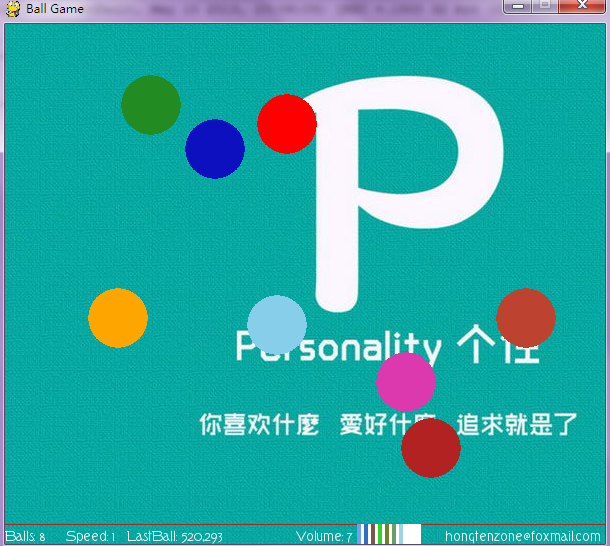
The View of the Game:
 #pygame draw

 import pygame

 from pygame.locals import *

 from sys import exit

 from random import *

 '''

     Game Name:

         Ball Perfectly Elastic Collision(BPEC)

     Rules or Description:

         1.There are five balls whth different color have elastic collision

           after the game loaded.

         2.The player can click the window with the LEFT mouse button

           and create the new ball,which with the different color,but

           sometimes maybe like other balls.

         3.The player can click teh window with RIGHT mouse button

           and minus a few balls.

         4.You can change all ball speed by pressing the UP and DOWN

           the keyboard direction key.

         5.Also you can change the background music by pressing the LEFT

           and RIGHT the keyboard direction key(volume:0-10).

         6.Maybe you want to full screen view,By pressing the F key

           and ESC key switch.

         7.Ball number,the speed,the volume,author E-mail is written

           in the status bar at the bottom.

 '''

 __version__ = '1.3'

 __author__ = {'name' : 'Hongten',

               'mail' : 'hongtenzone@foxmail.com',

               'blog' : 'http://www.cnblogs.com/hongten',

               'version' : __version__}

 if not pygame.font: print('Warning, fonts disabled')

 if not pygame.mixer: print('Warning, sound disabled')

 pygame.init()

 pygame.display.set_caption('Ball Game')

 SCREEN_WIDTH = 600

 SCREEN_HEIGHT = 500

 SPEED = 1

 VOLUME = 5

 SCREEN_DEFAULT_SIZE = (SCREEN_WIDTH, SCREEN_HEIGHT + 20)

 SCREEN_DEFAULT_COLOR = (255, 255 ,255)

 READY = 0

 screen = pygame.display.set_mode(SCREEN_DEFAULT_SIZE, 0, 32)

 screen.fill(SCREEN_DEFAULT_COLOR)

 bg = pygame.image.load('data\\image\\bg.jpg').convert()

 font = pygame.font.Font('data\\font\\TORK____.ttf', 14)

 new_sound = pygame.mixer.Sound('data\\sound\\new.wav')

 bg_sound = pygame.mixer.Sound('data\\sound\\bg.ogg')

 bg_sound.set_volume(0.1 * VOLUME)

 bg_sound.play(-1)

 new_sound.set_volume(0.1 * VOLUME)

 balls = []

 BALL_R = 30

 BALL_COLORS = [(255,165,0),(255,0,0),(135,206,235),(178,34,34),(34,139,34)]

 BALL_POINTS = [[40, 40],[40, 300],[400, 200],[150, 150],[80, 400]]

 BALL_VELOCITY = [[1.5, 1.2],[1.4, -1.3],[-1.5, -1.1],[-1.2, 1.5],[1.3, 1.1]]

 VOLUME_POINTS = []

 VOLUME_POINTS_START = []

 VOLUME_RECT_COLORS = []

 for p in range(170, 250, 7):

     VOLUME_POINTS.append([SCREEN_WIDTH - p,SCREEN_HEIGHT + 20])

 for ps in range(175, 250, 7):

     VOLUME_POINTS_START.append([SCREEN_WIDTH - ps, SCREEN_HEIGHT])

     VOLUME_RECT_COLORS.append((randint(0, 255), randint(0, 255), randint(0, 255)))

 for i in range(len(BALL_COLORS)):

     screen.fill(SCREEN_DEFAULT_COLOR)

     b = pygame.draw.circle(screen, BALL_COLORS[i], (int(BALL_POINTS[i][0]),int(BALL_POINTS[i][1])), BALL_R)

     balls.append(b)

 while 1:

     for event in pygame.event.get():

         if event.type ==  QUIT:

             bg_sound.stop()

             exit()

         elif event.type == KEYDOWN:

             if event.key == K_UP:

                 SPEED += 0.1

             elif event.key == K_DOWN:

                 SPEED -= 0.1

             elif event.key == K_LEFT:

                 if VOLUME > 0:

                     VOLUME -= 1

             elif event.key == K_RIGHT:

                 if VOLUME <= 9:

                     VOLUME += 1

             elif event.key == K_f:

                 pygame.display.set_mode(SCREEN_DEFAULT_SIZE, FULLSCREEN, 32)

             elif event.key == 27:

                 pygame.display.set_mode(SCREEN_DEFAULT_SIZE, 0, 32)

         elif event.type == MOUSEBUTTONDOWN:

             pressed_array = pygame.mouse.get_pressed()

             for index in range(len(pressed_array)):

                 if pressed_array[index]:

                     if index == 0:

                         new_sound.play(-1)

                         c_color = (randint(0, 255), randint(0, 255), randint(0, 255))

                         x, y = (BALL_R+1, BALL_R+1)

                         c_r = randint(10, 100)

                         c_v = [randint(11, 19)* 0.1, randint(11, 19) * 0.1]

                         c = pygame.draw.circle(screen, c_color, (x, y), BALL_R)

                         BALL_COLORS.append(c_color)

                         BALL_POINTS.append([x, y])

                         BALL_VELOCITY.append(c_v)

                         balls.append(c)

                     elif index == 2:

                         if len(balls) > 1:

                             balls.pop(0)

                             BALL_COLORS.pop(0)

                             BALL_POINTS.pop(0)

                             BALL_VELOCITY.pop(0)

         elif event.type == MOUSEBUTTONUP:

             new_sound.stop()

     #print(balls)

     for i in range(len(balls)):

         screen.blit(bg, (-300, -100))

         #screen.fill(SCREEN_DEFAULT_COLOR)

         for n in range(len(balls)):

             pygame.draw.circle(screen, BALL_COLORS[n], (int(BALL_POINTS[n][0]),int(BALL_POINTS[n][1])), BALL_R)

         if ((((BALL_POINTS[i][0] - BALL_R) < 0) or ((BALL_POINTS[i][0] + BALL_R) > SCREEN_WIDTH))):

             BALL_VELOCITY[i][0] = -1 * BALL_VELOCITY[i][0]

         if ((((BALL_POINTS[i][1] - BALL_R) < 0) or ((BALL_POINTS[i][1] + BALL_R) > SCREEN_HEIGHT))):

             BALL_VELOCITY[i][1] = -1 * BALL_VELOCITY[i][1]

     for j in range(len(balls)):

         for k in range(len(balls)):

             b_x = (BALL_POINTS[j][0] - BALL_POINTS[k][0])**2

             b_y = (BALL_POINTS[j][1] - BALL_POINTS[k][1])**2

             b_r =(BALL_R*2)**2

             if (round((b_x + b_y), 2) <= round(b_r, 2)):

                 temp_x = BALL_VELOCITY[j][0]

                 temp_y = BALL_VELOCITY[j][1]

                 BALL_VELOCITY[j][0] = BALL_VELOCITY[k][0]

                 BALL_VELOCITY[j][1] = BALL_VELOCITY[k][1]

                 BALL_VELOCITY[k][0] = temp_x

                 BALL_VELOCITY[k][1] = temp_y

         BALL_POINTS[j][0] += round(SPEED, 1) * BALL_VELOCITY[j][0]

         BALL_POINTS[j][1] += round(SPEED, 1) * BALL_VELOCITY[j][1]

     pygame.draw.line(screen, (165,42,42),(0, SCREEN_HEIGHT), (SCREEN_WIDTH,SCREEN_HEIGHT))

     bg_sound.set_volume(0.1 * VOLUME)

     new_sound.set_volume(0.1 * VOLUME)

     pygame.draw.rect(screen,

                      (255, 255, 255),

                      Rect((VOLUME_POINTS_START[-1][0],

                            VOLUME_POINTS_START[-1][1]),

                           (VOLUME_POINTS[-10][0] - VOLUME_POINTS_START[-1][0],

                            20)))

     for v in range(VOLUME+1):

         if v > 0:

             pygame.draw.rect(screen,

                              VOLUME_RECT_COLORS[v],

                              Rect((VOLUME_POINTS_START[-v][0],

                                    VOLUME_POINTS_START[-v][1]),

                                   (VOLUME_POINTS[-v][0] - VOLUME_POINTS_START[-v][0],

                                    20)))

     game_info = 'Balls: ' + str(len(balls)) + '     Speed: ' + str(round(SPEED, 2)) + '   LastBall: ' + str(round(BALL_POINTS[-1][0])) + ',' + str(round(BALL_POINTS[-1][1]))

     text = font.render(game_info, True, (255,255,255))

     author_info = font.render('hongtenzone@foxmail.com', True, (255,255,255))

     volume_text = font.render('Volume: ' + str(VOLUME), True, (255, 255, 255))

     screen.blit(text, (0, SCREEN_HEIGHT+5))

     screen.blit(author_info, (SCREEN_WIDTH - 160, SCREEN_HEIGHT+5))

     screen.blit(volume_text, (SCREEN_WIDTH - 310, SCREEN_HEIGHT+5))

     pygame.display.update()
源码下载:http://files.cnblogs.com/hongten/pygame_pong_v1.3.zip
========================================================
More reading,and english is important.
I'm Hongten
大哥哥大姐姐,觉得有用打赏点哦!多多少少没关系,一分也是对我的支持和鼓励。谢谢。
Hongten博客排名在100名以内。粉丝过千。
Hongten出品,必是精品。
E | hongtenzone@foxmail.com B | http://www.cnblogs.com/hongten
========================================================
pygame系列_小球完全弹性碰撞游戏_源码下载的更多相关文章
- pygame系列_小球完全弹性碰撞游戏
之前做了一个基于python的tkinter的小球完全碰撞游戏: 今天利用业余时间,写了一个功能要强大一些的小球完全碰撞游戏: 游戏名称: 小球完全弹性碰撞游戏规则: 1.游戏初始化的时候,有5个不同 ...
- python开发_tkinter_小球完全弹性碰撞游戏_源码下载
完成这个小球的完全弹性碰撞游戏灵感来自于: 下面是我花了一周下班时间所编写的一个小球完全弹性碰撞游戏: 游戏初始化状态: 最下面的游标和修改小球的移动速度 ====================== ...
- openlayers4 入门开发系列结合 echarts4 实现散点图(附源码下载)
前言 openlayers4 官网的 api 文档介绍地址 openlayers4 api,里面详细的介绍 openlayers4 各个类的介绍,还有就是在线例子:openlayers4 官网在线例子 ...
- leaflet-webpack 入门开发系列三地图分屏对比(附源码下载)
前言 leaflet-webpack 入门开发系列环境知识点了解: node 安装包下载webpack 打包管理工具需要依赖 node 环境,所以 node 安装包必须安装,上面链接是官网下载地址 w ...
- cesium 入门开发系列矢量瓦片加载展示(附源码下载)
前言 cesium 入门开发系列环境知识点了解:cesium api文档介绍,详细介绍 cesium 每个类的函数以及属性等等cesium 在线例子 内容概览 cesium 实现矢量瓦片加载效果 源代 ...
- [Java] SSH框架笔记_框架分析+环境搭建+实例源码下载
首先,SSH不是一个框架,而是多个框架(struts+spring+hibernate)的集成,是目前较流行的一种Web应用程序开源集成框架,用于构建灵活.易于扩展的多层Web应用程序. 集成SSH框 ...
- openlayers4 入门开发系列之聚合图篇(附源码下载)
前言 openlayers4 官网的 api 文档介绍地址 openlayers4 api,里面详细的介绍 openlayers4 各个类的介绍,还有就是在线例子:openlayers4 官网在线例子 ...
- openlayers4 入门开发系列之迁徙图篇(附源码下载)
前言 openlayers4 官网的 api 文档介绍地址 openlayers4 api,里面详细的介绍 openlayers4 各个类的介绍,还有就是在线例子:openlayers4 官网在线例子 ...
- openlayers4 入门开发系列之地图工具栏篇(附源码下载)
前言 openlayers4 官网的 api 文档介绍地址 openlayers4 api,里面详细的介绍 openlayers4 各个类的介绍,还有就是在线例子:openlayers4 官网在线例子 ...
随机推荐
- 作为一个有B格的前端工程师需要掌握的一些知识
如果说你3年还在不停地切页面的... 那么你对http协议的了解程度 你的原生的javascript的掌握程度 你的页面的优化的理念 你在写页面是否会有什么独特地技巧 你对ajax的get和post方 ...
- 基础知识点 关于 prototype __proto__
基础知识点 关于 prototype __proto__ 供js新手参考 JavaScript 的一些基础知识点: 在 JavaScript 中,所有对象 o 都拥有一个隐藏的原型对象(在 Fire ...
- 【转】用CornerStone配置SVN,HTTP及svn简单使用说明
已经安装了的小伙伴请直接看三步骤 一.下载地址 CornerStoneV2.6:http://pan.baidu.com/s/1qWEsEbM密码:www.macx.cn 二.安装破解方法 1.安装之 ...
- Raid 磁盘阵列
raid 原理与区别 raid0至少2块硬盘.吞吐量大,性能好,同时读写,但损坏一个就完蛋 raid1至少2块硬盘.相当镜像,一个存储,一个备份.安全性比较高.但是性能比0弱 raid5至少3块硬盘. ...
- Python基础教程-第3版(文字版) 超清文字-非扫描版 [免积分、免登录]
此处免费下载,无需账号,无需登录,无需积分.收集自互联网,侵权通知删除. 点击下载:Python基础教程-第3版 备用下载:Python基础教程-第3版
- Valid Parentheses & Longest Valid Parentheses
Valid Parentheses Given a string containing just the characters '(', ')', '{', '}', '[' and ']', det ...
- sublime text2快捷键
mac: command+option+f : 替换, find what: (.*) replace with:"$1": "1" 或者: data: ...
- DOM文档对象模型简介
DOM简介 DOM是W3C(万维网联盟)的标准 "W3C文档对象模型DOM是中立于平台和语言的接口,它允许程序和脚本动态地访问和更新文档的内容.结构.样式".W3C DOM ...
- wpf 千位符 格式化字符串
StringFormat={}{0:N2}}//格式话字符串,增加千位符,2保留小数点后2位 StringFormat={}{0:N0}}//格式话字符串,增加千位符,无小数点后
- oracle中循环读出一个表的信息插入到另外一个表中
declare cursor TAGENTMENUd is select * from TAGENTMENU where 1=1; -- 获取游标begin --遍历查询出的表 (注意 tn是整条记录 ...