
python---django请求-响应的生命周期(FBV和CBV含义)
Django请求的生命周期是指:当用户在访问该url路径是,在服务器Django后台都发生了什么。
客户端发送Http请求给服务端,Http请求是一堆字符串,其内容是: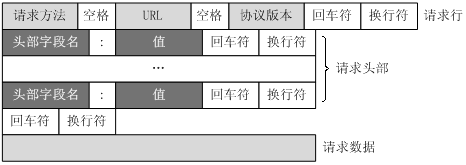
访问:http://crm.oldboy.com:8080/login.html,客户端发送Http请求
1.路由映射,匹配路由(从上到下,匹配到就停止),对应相应views中的业务函数
url(r'^login.html', views.login),
2.匹配成功后,执行views下的对应函数:(FBV)
def login(req):

    print('req.body',req.body)

    print("GET",req.GET)

    message=''

    if req.method == "POST":

        print(req.body)

        print(req.POST)

        user = req.POST.get("username")

        pwd = req.POST.get("password")

        count = models.Administrator.objects.filter(username=user,password=pwd).count()

        if count:

            red = redirect("/index.html")

            timeout = datetime.datetime.now()+datetime.timedelta(seconds=)

            red.set_cookie('username',user,expires=timeout)

            return red

        else:

            message = "用户名或密码错误"

    return render(req,"login.html",{'msg':message})
URL --> 函数 ====> FBV(Function-based views) 基于函数的视图
URL --> 类 ====> CBV (Class-based views) 基于类的视图
FBV:在Django中使用较多,在其他框架中多使用CBV,例如tornado,还有PHP的多种框架等
Django中CBV使用:
首先需要设置views中的类:
from django.views import View

class CBV(View):
   #根据请求头中的request method进行自动执行get和post

    def get(self,request):

        return render(request,"cbv_login.html")

    def post(self,request):

        return HttpResponse("<h1>cbv_post</h1>")
然后修改urls文件路由:
urlpatterns = [

    url(r"cbv",views.CBV.as_view())

]
模板文件:
<!DOCTYPE html>

<html lang="en">

<head>

    <meta charset="UTF-8">

    <title>Title</title>

</head>

<body>

<form action="/cbv" method="post">

    {% csrf_token %}

    <div>

        <label for="user">用户名:</label>

        <input type="text" id="user" name="username"/>

    </div>

    <div>

        <label for="pwd">密码:</label>

        <input type="password" id="pwd" name="password"/>

    </div>

    <div>

        <label></label>

        <input type="submit" value="登录">

        <label>{{ msg }}</label>

    </div>

</form>

</body>

</html>
cbv_login.html
使用url访问默认是get方式,显示cbv_login.html页面,提交页面,进入post页面,显示cbv_post数据
get还是post,是由于请求头中的Request Method:获取,从而找到对应方法。使用反射查找,来执行对应方法。
.由Request URL请求去获取路径,与urls进行匹配,找到对应的类

.由请求体得到:Request Method:GET

.获得类中方法

   方法名  =  getattr(对象,"GET")

   方法名()    #执行对应函数
源码查看:
@classonlymethod

    def as_view(cls, **initkwargs):

        """

        Main entry point for a request-response process.请求-响应的主入口点,在url解析时调用

        """

     for key in initkwargs:

     #cls.http_method_names:

     #[u'get', u'post', u'put', u'patch', u'delete', u'head', u'options', u'trace']

            if key in cls.http_method_names:

                raise TypeError("You tried to pass in the %s method name as a "

                                "keyword argument to %s(). Don't do that."

                                % (key, cls.__name__))

            if not hasattr(cls, key):

                raise TypeError("%s() received an invalid keyword %r. as_view "

                                "only accepts arguments that are already "

                                "attributes of the class." % (cls.__name__, key))

        #print(cls)  #<class 'app1.views.CBV'>

        def view(request, *args, **kwargs):

            self = cls(**initkwargs)  #实例化CBV对象

            if hasattr(self, 'get') and not hasattr(self, 'head'):

                self.head = self.get

            self.request = request

            #print(request)    <WSGIRequest: GET '/cbv'>

            #print(request.method)  GET

            self.args = args

            self.kwargs = kwargs

            return self.dispatch(request, *args, **kwargs)#调用dispatch方法,将<WSGIRequest: GET '/cbv'>传入

        view.view_class = cls

        view.view_initkwargs = initkwargs

        # take name and docstring from class

        update_wrapper(view, cls, updated=())

        # and possible attributes set by decorators

        # like csrf_exempt from dispatch

        update_wrapper(view, cls.dispatch, assigned=())

        return view

    def dispatch(self, request, *args, **kwargs):

        # Try to dispatch to the right method; if a method doesn't exist,

        # defer to the error handler. Also defer to the error handler if the

        # request method isn't on the approved list.

        if request.method.lower() in self.http_method_names:

            handler = getattr(self, request.method.lower(), self.http_method_not_allowed) #去调用对应的函数

        else:

            handler = self.http_method_not_allowed

        return handler(request, *args, **kwargs)
推荐:介绍——基于类的视图(class-based view)
3.业务处理
-----根据个人需求自定义
-----对于框架:基本操作是操作数据库
---pymysql (原生)
---SQLAlchemy
---Django中orm
-----响应内容:返回给用户的结果:响应头和响应体
我们写的HTTPResponse是写在响应体中
响应头的定制:
    def post(self,request):

        ret =  HttpResponse("<h1>post</h1>")
     #下面为设置请求头

        ret['h1'] ='v1'

        ret.set_cookie('c1','v1')

        ret.set_cookie('c2','v2')

        '''

        响应头:h1=v1

                cookies:c1=v1;c2=v2

        响应体:<h1>post</h1>

        请求头信息:

        Content-Length:

        Content-Type:text/html; charset=utf-

        Date:Wed,  Mar  :: GMT

        h1:v1

        Server:WSGIServer/0.1 Python/2.7.

        Set-Cookie:c2=v2; Path=/

        Set-Cookie:c1=v1; Path=/

        X-Frame-Options:SAMEORIGIN

        '''

        return ret
python---django请求-响应的生命周期(FBV和CBV含义)的更多相关文章
- python 全栈开发,Day84(django请求生命周期,FBV和CBV,ORM拾遗,Git)
一.django 请求生命周期 流程图: 1. 当用户在浏览器中输入url时,浏览器会生成请求头和请求体发给服务端请求头和请求体中会包含浏览器的动作(action),这个动作通常为get或者post, ...
- django请求生命周期,FBV和CBV,ORM拾遗,Git
一.django 请求生命周期 流程图: 1. 当用户在浏览器中输入url时,浏览器会生成请求头和请求体发给服务端请求头和请求体中会包含浏览器的动作(action),这个动作通常为get或者post, ...
- python+requests 请求响应文本出错返回“登录超时”
Python+requests请求响应:"msg":"登录过时" 1.出错原代码: import requests import json#页面按条件搜索返回相 ...
- python Django请求生命周期
首先我们知道HTTP请求及服务端响应中传输的所有数据都是字符串. 在Django中,当我们访问一个的url时,会通过路由匹配进入相应的html网页中. Django的请求生命周期是指当用户在浏览器上输 ...
- ASP.NET MVC5请求管道和生命周期
请求处理管道 请求管道是一些用于处理HTTP请求的模块组合,在ASP.NET中,请求管道有两个核心组件:IHttpModule和IHttpHandler.所有的HTTP请求都会进入IHttpHandl ...
- Django请求响应对象
请求与响应对象 HttpRequest HttpRequest存储了客户请求的相关参数和一些查询方法. path 请求页面的全路径,不包括域名-例如, "/hello/". met ...
- DRF对Django请求响应做了技术升级
Django视图是用来处理请求和响应的,Django默认是按Form和Template来设计的,如果要处理以JSON格式为主的RESTful API,那么就需要对Django请求和响应的处理代码进行优 ...
- jsp学习(1)jsp请求过程和生命周期
一.服务器处理jsp请求的过程: 以下步骤表明了 Web 服务器是如何使用JSP来创建网页的: 1.浏览器发送一个 HTTP 请求给服务器. 2.Web 服务器识别出这是一个对 JSP 网页的请求,并 ...
- Vue系列(二):发送Ajax、JSONP请求、Vue生命周期及实例属性和方法、自定义指令与过渡
上一篇:Vue系列(一):简介.起步.常用指令.事件和属性.模板.过滤器 一. 发送AJAX请求 1. 简介 vue本身不支持发送AJAX请求,需要使用vue-resource.axios等插件实现 ...
随机推荐
- PHP调用WCF提供的方法
一.准备工作 1.安装wampserver:过程略 2.配置wampserver: 2.1打开php.ini文件,去掉 ;extension=php_soap.dll 这里那个分号. 也有说把这个 ; ...
- NServiceBus VS MassTransit 从 stackoverflow.com 翻译而来,希望对这两个技术比较关心的同学有帮助
近段时间在看SOA,在国外网站有很多资料可以查看,本来在中文网站中找到一片关于这两个框架的对比介绍的可惜笔者没有认真翻译,只有花点时间自己翻译了一个版本,希望对技术界的朋友有所帮助. 我正纠结于NSe ...
- Activity猫的一生-故事解说Activity生命周期
大家好,关于Android中Activity的生命周期,网上大多数文章基本都是直接贴图.翻译API,比较笼统含糊不清. 我就用故事来说一说: 有个人叫User,TA养了几只猫,有只猫叫Activity ...
- Harbor私有镜像仓库无坑搭建
转载:https://k8s.abcdocker.com/kubernetes_harbor.html 一.介绍 Docker容器应用的开发和运行路不开可靠的镜像管理,虽然Docker官方也提供了公共 ...
- 机器学习英雄访谈录之 DL 自由职业者:Tuatini Godard
目录 机器学习英雄访谈录之 DL 自由职业者:Tuatini Godard 正文 对我的启发 机器学习英雄访谈录之 DL 自由职业者:Tuatini Godard Sanyam Bhutani 是 M ...
- 微软职位内部推荐-Service Engineer for Office365
微软近期Open的职位: Key Responsibilities: The Service Engineer in this team will be responsible for plannin ...
- python中eval方法的使用
eval函数就是实现list.dict.tuple与str之间的转化str函数把list,dict,tuple转为为字符串# 字符串转换成列表a = "[[1,2], [3,4], [5,6 ...
- PAT甲题题解-1109. Group Photo (25)-(模拟拍照排队)
题意:n个人,要拍成k行排队,每行 n/k人,多余的都在最后一排. 从第一排到最后一排个子是逐渐增高的,即后一排最低的个子要>=前一排的所有人 每排排列规则如下: 1.中间m/2+1为该排最高: ...
- Alpha答辩总结
[Alpha展示评审表格] 小组序号 小组名称 格式(20%) 内容(20%) PPT(20%) 演讲(20%) 答辩(20%) 总分 1 天机组 15 15 15 15 16 76 2 PMS 16 ...
- [转载] Activiti Tenant Id 字段释疑
TENANT_ID_ : 这个字段表示租户ID.可以应对多租户的设计. 转载自: http://www.cnblogs.com/yg_zhang/p/4201288.html http://www. ...