
《基于Nginx的中间件架构》学习笔记---4.nginx编译参数详细介绍
通过nginx -V查看编译时参数:
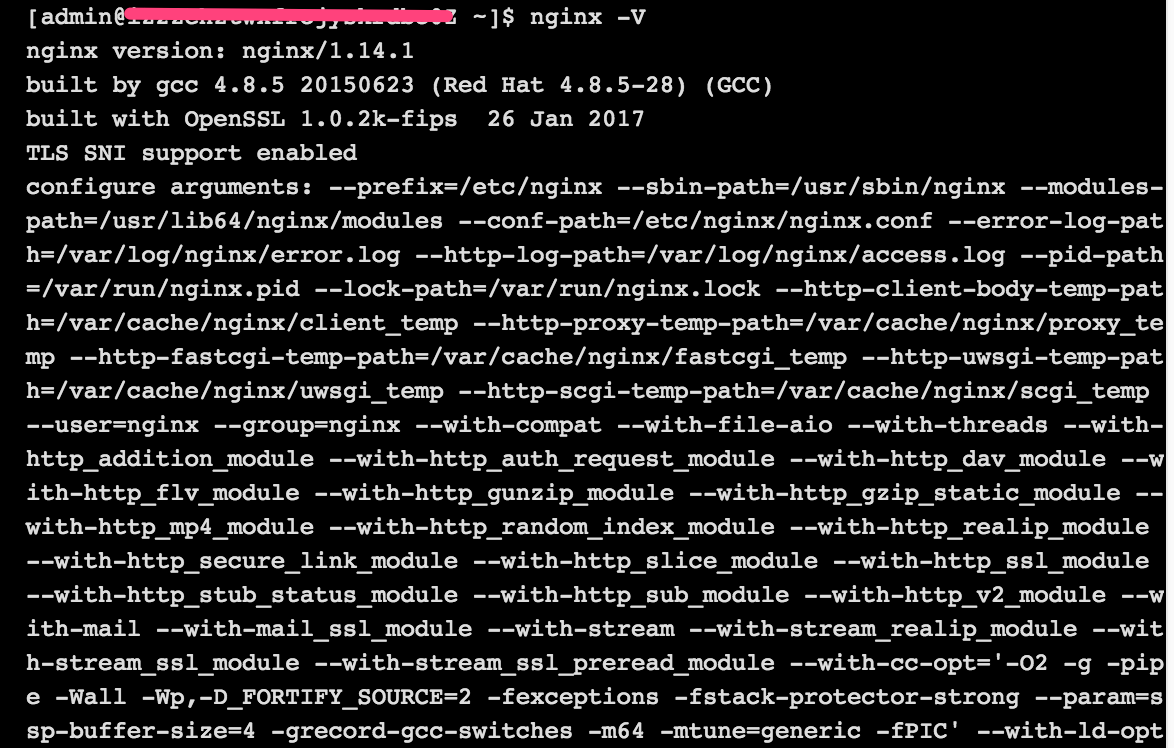
在nginx安装目录下,通过./configure --help,查看对应版本ngnix编译时支持的所有参数:
Nginx编译参数详细介绍:

--help 显示本提示信息

--prefix=PATH 设定安装目录

--sbin-path=PATH 设定程序文件目录

--conf-path=PATH 设定配置文件(nginx.conf)目录

--error-log-path=PATH 设定错误日志目录

--pid-path=PATH 设定pid文件(nginx.pid)目录

--lock-path=PATH 设定lock文件(nginx.lock)目录

--user=USER 设定程序运行的用户环境(www)

--group=GROUP 设定程序运行的组环境(www)

--build=NAME  设定程序编译名称

--builddir=DIR 设定程序编译目录

--with-rtsig_module 允许rtsig模块

--with-select_module 允许select模块(一种轮询模式,不推荐用在高载环境)

--without-select_module 不使用select模块

--with-poll_module 允许poll模块(一种轮询模式,不推荐用在高载环境)

--without-poll_module 不使用poll模块

--with-threads  允许支持的线程池线程数

--with-http_ssl_module 允许ngx_http_ssl_module模块(Apache对应:mod_ssl)

--with-http_realip_module 允许ngx_http_realip_module模块(mod_rpaf)

--with-http_addition_module 允许ngx_http_addition_module模块(mod_layout)

--with-http_xslt_module 允许ngx_http_xslt_module模块

--with-http_sub_module 允许ngx_http_sub_module模块

--with-http_dav_module 允许ngx_http_dav_module模块(mod_dav)

--with-http_flv_module 允许ngx_http_flv_module模块(mod_flvx)

--with-http_gzip_static_module 允许ngx_http_gzip_static_module模块(mod_dflate)

--with-http_random_index_module 允许ngx_http_random_index_module模块(mod_autoindex)

--with-http_stub_status_module 允许ngx_http_stub_status_module模块(mod_status)

--without-http_charset_module 不使用ngx_http_charset_module模块

--without-http_gzip_module 不使用ngx_http_gzip_module模块

--without-http_ssi_module 不使用ngx_http_ssi_module模块

--without-http_userid_module 不使用ngx_http_userid_module模块

--without-http_access_module 不使用ngx_http_access_module模块

--without-http_auth_basic_module 不使用ngx_http_auth_basic_module模块

--without-http_autoindex_module 不使用ngx_http_autoindex_module模块

--without-http_geo_module 不使用ngx_http_geo_module模块

--without-http_map_module 不使用ngx_http_map_module模块

--without-http_referer_module 不使用ngx_http_referer_module模块

--without-http_rewrite_module 不使用ngx_http_rewrite_module模块

--without-http_proxy_module 不使用ngx_http_proxy_module模块

--without-http_fastcgi_module 不使用ngx_http_fastcgi_module模块

--without-http_memcached_module 不使用ngx_http_memcached_module模块

--without-http_limit_zone_module 不使用ngx_http_limit_zone_module模块

--without-http_empty_gif_module 不使用ngx_http_empty_gif_module模块

--without-http_browser_module 不使用ngx_http_browser_module模块

--without-http_upstream_ip_hash_module 不使用ngx_http_upstream_ip_hash_module模块

--with-http_perl_module 允许ngx_http_perl_module模块

--with-perl_modules_path=PATH 设置perl模块路径

--with-perl=PATH 设置perl库文件路径

--http-log-path=PATH 设置access log文件路径

--http-client-body-temp-path=PATH 设置客户端请求临时文件路径

--http-proxy-temp-path=PATH 设置http proxy临时文件路径

--http-fastcgi-temp-path=PATH 设置http fastcgi临时文件路径

--without-http 不使用HTTP server功能

--with-mail 允许POP3/IMAP4/SMTP代理模块

--with-mail_ssl_module 允许ngx_mail_ssl_module模块

--without-mail_pop3_module 不允许ngx_mail_pop3_module模块

--without-mail_imap_module 不允许ngx_mail_imap_module模块

--without-mail_smtp_module 不允许ngx_mail_smtp_module模块

--with-google_perftools_module 允许ngx_google_perftools_module模块(调试用)

--with-cpp_test_module 允许ngx_cpp_test_module模块

--add-module=PATH 允许使用外部模块,以及路径

--with-cc=PATH 设置C编译器路径

--with-cpp=PATH 设置C预处理路径

--with-cc-opt=OPTIONS 设置C编译器参数

--with-ld-opt=OPTIONS 设置连接文件参数

--with-cpu-opt=CPU 为指定CPU优化,可选参数有:

          pentium, pentiumpro, pentium3, pentium4,

          athlon, opteron, sparc32, sparc64, ppc64

--without-pcre 不使用pcre库文件

--with-pcre=DIR 设定PCRE库路径

--with-pcre-opt=OPTIONS 设置PCRE运行参数

--with-md5=DIR 设定md5库文件路径

--with-md5-opt=OPTIONS 设置md5运行参数

--with-md5-asm 使用md5源文件编译

--with-sha1=DIR 设定sha1库文件路径

--with-sha1-opt=OPTIONS 设置sha1运行参数

--with-sha1-asm 使用sha1源文件编译

--with-zlib=DIR 设定zlib库文件路径

--with-zlib-opt=OPTIONS 设置zlib运行参数

--with-zlib-asm=CPU 使zlib对特定的CPU进行优化,可选参数:

          pentium, pentiumpro

--with-openssl=DIR 设定OpenSSL库文件路径

--with-openssl-opt=OPTIONS 设置OpenSSL运行参数

--with-debug 允许调试日志
补充:centos下如何查看yum安装的软件路径:
1、rpm -qa | grep 软件包名
2、rpm -ql 第一步的结果
例如:

《基于Nginx的中间件架构》学习笔记---4.nginx编译参数详细介绍的更多相关文章
- 基于Netty的RPC架构学习笔记(十二):借助spring实现业务分离、聊天室小项目、netty3和4、5的不同、业务线程池以及消息串行化
文章目录 借助spring实现业务分离(
- 基于Netty的RPC架构学习笔记(十一):粘包、分包分析,如何避免socket攻击
文章目录 问题 消息如何在管道中流转 源码解析 AbstractNioSelector.java AbstractNioWorker.java NioWorker.java DefaultChanne ...
- 基于Netty的RPC架构学习笔记(十):自定义数据包协议
文章目录 数据包简介 粘包.分包现象 数据包格式 举个
- 基于Netty的RPC架构学习笔记(九):自定义序列化协议
文章目录 为什么需要自定义序列化协议
- 基于Netty的RPC架构学习笔记(八):protocol buff学习使用
文章目录 简介 准备 protobuf配置文件 生成java代码 举个
- 基于Netty的RPC架构学习笔记(七):netty学习之心跳
文章目录 idleStateHandler netty3
- 基于Netty的RPC架构学习笔记(六):netty5案例学习
文章目录 netty5服务端入门案例 netty5客户端入门案例 单客户端多连接程序 知识普及 线程池原理图 对象池原理图 对象组原理图 结论 理论结合实际 开干开干 总结 netty5服务端入门案例 ...
- 基于Netty的RPC架构学习笔记(五):netty线程模型源码分析(二)
文章目录 小技巧(如何看开源框架的源码) 源码解析 阅读源码技巧 打印查看 通过打断点调试 查看调用栈 小技巧(如何看开源框架的源码) 一断点 二打印 三看调用栈 四搜索 源码解析 //设置nioso ...
- 基于Netty的RPC架构学习笔记(四):netty线程模型源码分析(一)
文章目录 如何提高NIO的工作效率 举个
- 基于Netty的RPC架构学习笔记(三):netty客户端
文章目录 举个
随机推荐
- The value for the useBean class attribute xxx is invalid
JSP页面报这个错可能的原因: 1:指定的 Bean 类没找到 2:该类不是 public 的,或者找到的 class 文件是 interface 或抽象类 3:Bean 类中没有 public 的无 ...
- cxgrid中回车键光标移到下列
OptionsBehavior.GoToNextCellOnEnter:=True; 更完善的回车 可以在焦点到了最后一列再回车时有下一行则移到下一行的第一列,没有下一行则新增记录并移到第一列 pro ...
- Linux:写一个简单的服务器
开始了新篇章:Linux网络编程. 基础知识: 套接字概念 Socket本身有"插座"的意思,在Linux环境下,用于表示进程间网络通信的特殊文件类型.本质为内核借助缓冲区形成的伪 ...
- upupw
https://sourceforge.net/projects/upupw/files/ANK/
- Oracle数据库中的数据出错的解决办法
http://www.jcwcn.com/article/database/oracle/ 今天上班犯了一个严重的错误:把我们系统所使用的Oracle数据库中的数据给改掉了!当发现自己改错时,顿时冒了 ...
- Structs复习 OGNL
Dominmodel只有传 User.age 类似的这种Structs才能帮创建对象 Dominmodel User里必须有空的构造方法 OGNL:OBJECT GRAPHIC NAVAGATION ...
- C# 获取汉字转拼音缩写-简写,不是全拼
///<summary> /// 汉字转拼音缩写 /// Code By ] -'\0')); if ( i <0xB0A1) return"*" ...
- FMS Dev Guide学习笔记(验证客户端)
一.开发交互式的媒体应用程序 1.使用客户端对象的属性 当一个客户端连接上服务器上的一个应用,服务端就会创建一个包含这个客户端信息的客户端对象并且将它传递给application.onConn ...
- EF 数据迁移
数据迁移: 在程序包管理器控制台,执行语句. 初始化: 1.Enable-Migrations -EnableAutomaticMigrations 2.Add-Migration InitialCr ...
- BOS物流项目第十一天
教学计划 1.在realm中进行授权 2.使用shiro的方法注解方式权限控制 a. 在spring文件中配置开启shiro注解支持 b. 在Action方法上使用注解 3.使用shiro的标签进 ...