
Atlassian JIRA Change IP
Oracle Linux 6.8
Atalssian JIRA 7
原来IP: 192.168.10.200
改新IP: 192.168.12.200
重新跑应用报错,如下所示:
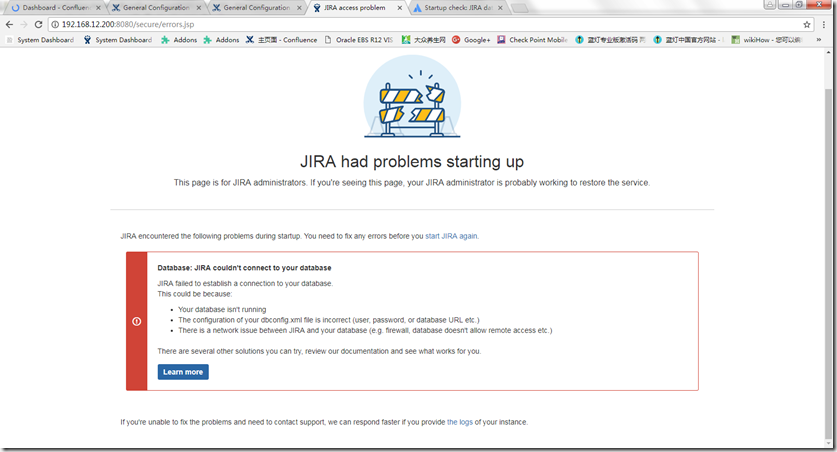
官方提示应用连接不上DB,是指当前安装应用系统时指定了固定DB的连接IP.
当时安装应用时有指定DB IP.
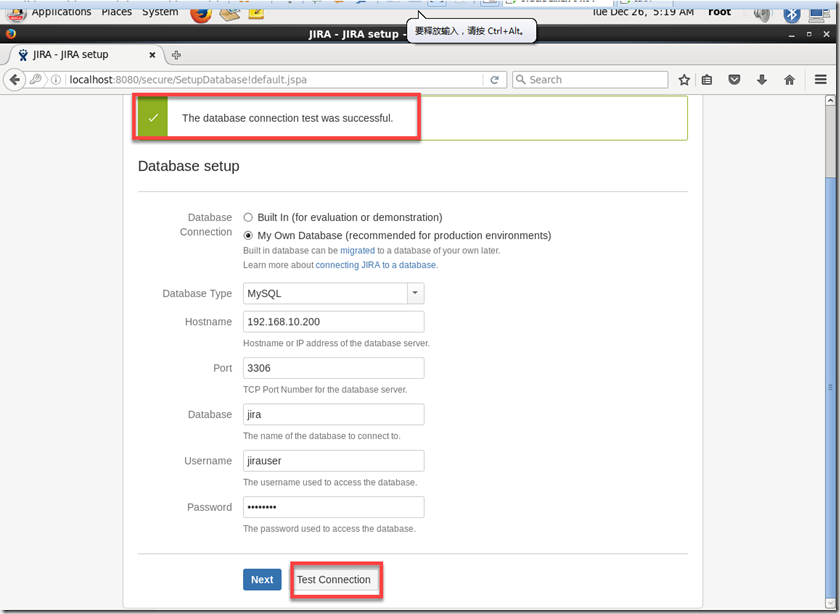
https://confluence.atlassian.com/jirakb/startup-check-jira-database-connections-872262124.html
Startup check: JIRA database connections
This Knowledge Base article was written specifically for the Atlassian Server platform. Due to the Restricted functions in Atlassian Cloud apps, the contents of this article cannot be applied to Atlassian Cloud applications.
During Installation, Upgrade or Startup, JIRA performs a number of checks. The Database Connection check verifies that JIRA can connect to a Database, as this is vital for JIRA to run.
Cause
The reasons for this check to fail are:
- You don't have a database running
- The configuration in your
dbconfig.xmlis incorrect - Username/Password for your database are incorrect
- Your database user doesn't have the correct permissions to connect to the database
- The database specified is not the JIRA database
- You're trying to use an incorrect port
- General network issues that prevent JIRA from connecting to your database include:
- Postgres/Mysql localhost errors
- Firewall errors
- Network connection not available/offline
Impact
The JIRA instance needs a database in order to run. Without a database it can't read any previously created Issues or store newly created issues.
Resolution
Given that there's a number of reasons this cold be happening, there's a few things you may need to check to resolve this.
Network issue
Lets see if your network is up. Lets check if your database is reachable for your JIRA instance.
Ping your database server
Can you ping your Database server? Take the URL for your database that's in your dbconfig.xml and ping your database
改正DB IP
[root@atlassian ~]# find / -name 'dbconfig.xml'
/var/atlassian/application-data/jira/dbconfig.xml
[root@atlassian ~]# vi /var/atlassian/application-data/jira/dbconfig.xml
<?xml version="1.0" encoding="UTF-8"?>
<jira-database-config>
<name>defaultDS</name>
<delegator-name>default</delegator-name>
<database-type>mysql</database-type>
<jdbc-datasource>
<url>jdbc:mysql://192.168.10.200:3306/jira?useUnicode=true&characterEncoding=UTF8&sessionVariables=default_storage_engine=InnoDB</url>
<url>jdbc:mysql://192.168.12.200:3306/jira?useUnicode=true&characterEncoding=UTF8&sessionVariables=default_storage_engine=InnoDB</url>
<driver-class>com.mysql.jdbc.Driver</driver-class>
<username>jirauser</username>
<password>jirauser</password>
<pool-min-size>20</pool-min-size>
<pool-max-size>20</pool-max-size>
<pool-max-wait>30000</pool-max-wait>
<validation-query>select 1</validation-query>
<min-evictable-idle-time-millis>60000</min-evictable-idle-time-millis>
<time-between-eviction-runs-millis>300000</time-between-eviction-runs-millis>
<pool-max-idle>20</pool-max-idle>
<pool-remove-abandoned>true</pool-remove-abandoned>
<pool-remove-abandoned-timeout>300</pool-remove-abandoned-timeout>
<pool-test-on-borrow>false</pool-test-on-borrow>
<pool-test-while-idle>true</pool-test-while-idle>
<validation-query-timeout>3</validation-query-timeout>
</jdbc-datasource>
</jira-database-config>
重启JIRA
[root@atlassian ~]# service jira stop
[root@atlassian ~]# service jira start
Atlassian JIRA Change IP的更多相关文章
- Atlassian JIRA服务器模板注入漏洞复现(CVE-2019-11581)
0x00 漏洞描述 Atlassian Jira是澳大利亚Atlassian公司的一套缺陷跟踪管理系统.该系统主要用于对工作中各类问题.缺陷进行跟踪管理. Atlassian Jira Server和 ...
- Atlassian JIRA 插件开发之二 安装和创建项目
安装参考 https://developer.atlassian.com/server/framework/atlassian-sdk/install-the-atlassian-sdk-on-a-w ...
- Atlassian JIRA 插件开发之一 环境搭建
参考 https://developer.atlassian.com/server/framework/atlassian-sdk/ download the SDK 说明 Download the ...
- CentOS Linux change IP Address
1.change network card configure edit: vi /etc/sysconfig/network-scripts/ifcfg-eth0 ps:notice HWADDR! ...
- Atlassian JIRA 插件开发之三 创建
之前的都是准备,真正的插件是从这里开始的 参考:https://developer.atlassian.com/server/framework/atlassian-sdk/modify-the-pl ...
- Atlassian 系列软件安装(Crowd+JIRA+Confluence+Bitbucket+Bamboo)
公司使用的软件开发和协作工具为 Atlassian 系列软件,近期需要从腾讯云迁移到阿里云环境,简单记录下安装和配置过程.(Atlassian 的文档非常详尽,过程中碰见的问题都可以找到解决办法.) ...
- 【转】使用JIRA搭建企业问题跟踪系统【个人推荐】
免责声明: 本文转自网络文章,转载此文章仅为个人收藏,分享知识,如有侵权,请联系博主进行删除. 原文作者:Judy Shen的专栏 原文地址:使用JIRA搭建企业问题跟踪系统 ...
- Setup JIRA Service Desk 3.9.2 on Oracle Linux 6.8
OS Oracle Linux 6.8 V138414-01.iso Database mysql5.6.30 MySQL-5.6.30-1.el6.x86_64.rpm-bundle.tar JIR ...
- Jira在linux上安装与部署
Where should JIRA 6.0.1 be installed? [/opt/atlassian/jira] /usr/local/jira Default location for JIR ...
随机推荐
- 002_CentOS-6.4-x86_64安装包的说明
http://mirrors.sohu.com/centos/6.6/isos/x86_64/?qq-pf-to=pcqq.group //souhu镜像下载地址 0_README.txt 25-Oc ...
- mysql 字符编码设置
安装mysql时如果字符编码为默认值latin1,则需要修改为utf8以便支持中文数据. 命令如下: 1.显示数据库字符集 mysql> show create database test;+- ...
- 通过 EXPLAIN 分析低效 SQL 的执行计划
每个列的简单解释如下: select_type:表示 SELECT 的类型,常见的取值有 SIMPLE(简单表,即不使用表连接 或者子查询).PRIMARY(主查询,即外层的查询).UNION(U ...
- ckeditor:新增时会得到上次编辑的内容
参考网址:http://blog.sina.com.cn/s/blog_6961ba9b0102wwye.html 第一次新增时没有问题,编辑器里面内容为空,编辑数据时,也是正常,但是第二次点击新增时 ...
- 《剑指offer》写一个函数,求两个整数之和,要求在函数体内不得使用+、-、*、/四则运算符号。
弱菜刷题还是刷中文题好了,没必要和英文过不去,现在的重点是基本代码能力的恢复. [题目] 剑指offer 写一个函数,求两个整数之和,要求在函数体内不得使用+.-.*./四则运算符号. [思路] 直觉 ...
- DSP 中关键字extern,cregister,Near ,Far,restrict,volatile
extern:extern可以置于变量或者函数前,以表示变量或者函数的定义在别的文件中,提示编译器遇到此变量和函数时在其他模块中寻找其定义.另外,extern也可用来进行链接指定. const: 可以 ...
- Android-Kotlin在Fragment获取View
Android-Kotlin在Fragment获取View Overview 在使用Fragment的时候,使用了ButterKnife 来获取View但是一直出错,后来就直接使用Kotlin的导入布 ...
- 8.4 正睿暑期集训营 Day1
目录 2018.8.4 正睿暑期集训营 Day1 A 数对子 B 逆序对 C 盖房子 考试代码 A B C 2018.8.4 正睿暑期集训营 Day1 时间:4.5h(实际) 期望得分:30+50+3 ...
- https建立通讯过程及运行机制 [转]
ssl与tls: SSL:(Secure Socket Layer,安全套接字层),为Netscape所研发,用以保障在Internet上数据传输之安全,利用数据加密(Encryption)技术,可确 ...
- 解决浏览器抛出乱码,(HTML、PHP等的乱码问题)
在Windows上编写html或php代码的时候,本地编辑器设置的文件编码格式是utf-8保存,但是浏览器打开页面的时候经常出现乱码,而且浏览器自动检测到的页面编码为GBK格式,这时候我就开始纳闷了? ...