
[WPF 基础知识系列] —— 绑定中的数据校验Vaildation
前言:
只要是有表单存在,那么就有可能有对数据的校验需求。如:判断是否为整数、判断电子邮件格式等等。
WPF采用一种全新的方式 - Binding,来实现前台显示与后台数据进行交互,当然数据校验方式也不一样了。
本专题全面介绍一下WPF中4种Validate方法,帮助你了解如何在WPF中对binding的数据进行校验,并处理错误显示。
一、简介
正常情况下,只要是绑定过程中出现异常或者在converter中出现异常,都会造成绑定失败。
但是WPF不会出现任何异常,只会显示一片空白(当然有些Converter中的异常会造成程序崩溃)。
这是因为默认情况下,Binding.ValidatesOnException为false,所以WPF忽视了这些绑定错误。
但是如果我们把Binding.ValidatesOnException为true,那么WPF会对错误做出以下反应:
- 设置绑定元素的附加属性 Validation.HasError为true(如TextBox,如果Text被绑定,并出现错误)。
- 创建一个包含错误详细信息(如抛出的Exception对象)的ValidationError对象。
- 将上面产生的对象添加到绑定对象的Validation.Errors附加属性当中。
- 如果Binding.NotifyOnValidationError是true,那么绑定元素的附加属性中的Validation.Error附加事件将被触发。(这是一个冒泡事件)
我们的Binding对象,维护着一个ValidationRule的集合,当设置ValidatesOnException为true时,
默认会添加一个ExceptionValidationRule到这个集合当中。
PS:对于绑定的校验只在Binding.Mode 为TwoWay和OneWayToSource才有效,
即当需要从target控件将值传到source属性时,很容易理解,当你的值不需要被别人使用时,就很可能校验也没必要。
二、四种实现方法
1、在Setter方法中进行判断
直接在Setter方法中,对value进行校验,如果不符合规则,那么就抛出异常。然后修改XAML不忽视异常。
public class PersonValidateInSetter : ObservableObject

    {

        private string name;

        private int age;

        public string Name

        {

            get   {  return this.name;   }

            set

            {

                if (string.IsNullOrWhiteSpace(value))

                {

                    throw new ArgumentException("Name cannot be empty!");

                }

                if (value.Length < )

                {

                  throw new ArgumentException("Name must have more than 4 char!");

                }

                this.name = value;

                this.OnPropertyChanged(() => this.Name);

            }

        }

        public int Age

        {

            get

            {    return this.age;  }

            set

            {

                if (value < )

                {

                    throw new ArgumentException("You must be an adult!");

                }

                this.age = value;

                this.OnPropertyChanged(() => this.Age);

            }

        }

    }
         <Grid DataContext="{Binding PersonValidateInSetter}">

                <Grid.RowDefinitions>

                    <RowDefinition />

                    <RowDefinition />

                </Grid.RowDefinitions>

                <Grid.ColumnDefinitions>

                    <ColumnDefinition Width="Auto" />

                    <ColumnDefinition />

                </Grid.ColumnDefinitions>

                <TextBlock Text="Name:" />

                <TextBox Grid.Column="1"

                         Margin="1"

                         Text="{Binding Name,

                                        ValidatesOnExceptions=True,

                                        UpdateSourceTrigger=PropertyChanged}" />

                <TextBlock Grid.Row="1" Text="Age:" />

                <TextBox Grid.Row="1"

                         Grid.Column="1"

                         Margin="1"

                         Text="{Binding Age,

                                        ValidatesOnExceptions=True,

                                        UpdateSourceTrigger=PropertyChanged}" />

            </Grid>
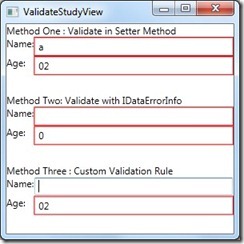
当输入的值,在setter方法中校验时出现错误,就会出现一个红色的错误框。
关键代码:ValidatesOnExceptions=True, UpdateSourceTrigger=PropertyChanged。
PS:这种方式有一个BUG,首次加载时不会对默认数据进行检验。
2、继承IDataErrorInfo接口
使Model对象继承IDataErrorInfo接口,并实现一个索引进行校验。如果索引返回空表示没有错误,如果返回不为空,
表示有错误。另外一个Erro属性,但是在WPF中没有被用到。
public class PersonDerivedFromIDataErrorInfo : ObservableObject, IDataErrorInfo

    {

        private string name;

        private int age;

        public string Name

        {

            get

            {

                return this.name;

            }

            set

            {

                this.name = value;

                this.OnPropertyChanged(() => this.Name);

            }

        }

        public int Age

        {

            get

            {

                return this.age;

            }

            set

            {

                this.age = value;

                this.OnPropertyChanged(() => this.Age);

            }

        }

        // never called by WPF

        public string Error

        {

            get

            {

                return null;

            }

        }

        public string this[string propertyName]

        {

            get

            {

                switch (propertyName)

                {

                    case "Name":

                        if (string.IsNullOrWhiteSpace(this.Name))

                        {

                            return "Name cannot be empty!";

                        }

                        if (this.Name.Length < )

                        {

                            return "Name must have more than 4 char!";

                        }

                        break;

                    case "Age":

                        if (this.Age < )

                        {

                            return "You must be an adult!";

                        }

                        break;

                }

                return null;

            }

        }

    }
<Grid  DataContext="{Binding PersonDerivedFromIDataErrorInfo}">

                <Grid.RowDefinitions>

                    <RowDefinition />

                    <RowDefinition />

                </Grid.RowDefinitions>

                <Grid.ColumnDefinitions>

                    <ColumnDefinition Width="Auto" />

                    <ColumnDefinition />

                </Grid.ColumnDefinitions>

                <TextBlock Text="Name:" />

                <TextBox Grid.Column="1"

                         Margin="1"

                         Text="{Binding Name,

                                        NotifyOnValidationError=True,

                                        ValidatesOnDataErrors=True,

                                        UpdateSourceTrigger=PropertyChanged}" />

                <TextBlock Grid.Row="1" Text="Age:" />

                <TextBox Grid.Row="1"

                         Grid.Column="1"

                         Margin="1"

                         Text="{Binding Age,

                                        NotifyOnValidationError=True,

                                        ValidatesOnDataErrors=True,

                                        UpdateSourceTrigger=PropertyChanged}" />
PS:这种方式,没有了第一种方法的BUG,但是相对很麻烦,既需要继承接口,又需要添加一个索引,如果遗留代码,那么这种方式就不太好。
3、自定义校验规则
一个数据对象或许不能包含一个应用要求的所有不同验证规则,但是通过自定义验证规则就可以解决这个问题。
在需要的地方,添加我们创建的规则,并进行检测。
通过继承ValidationRule抽象类,并实现Validate方法,并添加到绑定元素的Binding.ValidationRules中。
public class MinAgeValidation : ValidationRule

    {

        public int MinAge { get; set; }

        public override ValidationResult Validate(object value, CultureInfo cultureInfo)

        {

            ValidationResult result = null;

            if (value != null)

            {

                int age;

                if (int.TryParse(value.ToString(), out age))

                {

                    if (age < this.MinAge)

                    {

                        result = new ValidationResult(false, "Age must large than " + this.MinAge.ToString(CultureInfo.InvariantCulture));

                    }

                }

                else

                {

                    result = new ValidationResult(false, "Age must be a number!");

                }

            }

            else

            {

                result = new ValidationResult(false, "Age must not be null!");

            }

            return new ValidationResult(true, null);

        }

    }
<Grid>

                <Grid.RowDefinitions>

                    <RowDefinition />

                    <RowDefinition />

                </Grid.RowDefinitions>

                <Grid.ColumnDefinitions>

                    <ColumnDefinition Width="Auto" />

                    <ColumnDefinition />

                </Grid.ColumnDefinitions>

                <TextBlock Text="Name:" />

                <TextBox Grid.Column="1" Margin="1" Text="{Binding Name}">

                </TextBox>

                <TextBlock Grid.Row="1" Text="Age:" />

                <TextBox Grid.Row="1"

                         Grid.Column="1"

                         Margin="1">

                    <TextBox.Text>

                        <Binding Path="Age"

                                 UpdateSourceTrigger="PropertyChanged"

                                 ValidatesOnDataErrors="True">

                            <Binding.ValidationRules>

                                <validations:MinAgeValidation MinAge="18" />

                            </Binding.ValidationRules>

                        </Binding>

                    </TextBox.Text>

                </TextBox>

            </Grid>
这种方式,也会有第一种方法的BUG,暂时还不知道如何解决,但是这个能够灵活的实现校验,并且能传参数。
效果图:
4、使用数据注解(特性方式)
在System.ComponentModel.DataAnnotaions命名空间中定义了很多特性,
它们可以被放置在属性前面,显示验证的具体需要。放置了这些特性之后,
属性中的Setter方法就可以使用Validator静态类了,来用于验证数据。
public class PersonUseDataAnnotation : ObservableObject

    {

        private int age;

        private string name;

        [Range(, , ErrorMessage = "Age must be a positive integer")]

        public int Age

        {

            get

            {

                return this.age;

            }

            set

            {

                this.ValidateProperty(value, "Age");

                this.SetProperty(ref this.age, value, () => this.Age);

            }

        }

        [Required(ErrorMessage = "A name is required")]

        [StringLength(, MinimumLength = , ErrorMessage = "Name must have at least 3 characters")]

        public string Name

        {

            get

            {

                return this.name;

            }

            set

            {

                this.ValidateProperty(value, "Name");

                this.SetProperty(ref this.name, value, () => this.Name);

            }

        }

        protected void ValidateProperty<T>(T value, string propertyName)

        {

            Validator.ValidateProperty(value,
                new ValidationContext(this, null, null) { MemberName = propertyName });
        }
    }
<Grid>

                <Grid.RowDefinitions>

                    <RowDefinition />

                    <RowDefinition />

                </Grid.RowDefinitions>

                <Grid.ColumnDefinitions>

                    <ColumnDefinition Width="Auto" />

                    <ColumnDefinition />

                </Grid.ColumnDefinitions>

                <TextBlock Text="Name:" />

                <TextBox Grid.Column="1"

                         Margin="1"

                         Text="{Binding Name,

                                        ValidatesOnExceptions=True,

                                        UpdateSourceTrigger=PropertyChanged}" />

                <TextBlock Grid.Row="1" Text="Age:" />

                <TextBox Grid.Row="1"

                         Grid.Column="1"

                         Margin="1"

                         Text="{Binding Age,

                                        ValidatesOnExceptions=True,

                                        UpdateSourceTrigger=PropertyChanged}" />

            </Grid>
使用特性的方式,能够很自由的使用自定义的规则,而且在.Net4.5中新增了很多特性,可以很方便的对数据进行校验。
例如:EmailAddress, Phone, and Url等。
三、自定义错误显示模板
在上面的例子中,我们可以看到当出现验证不正确时,绑定控件会被一圈红色错误线包裹住。
这种方式一般不能够正确的展示出,错误的原因等信息,所以有可能需要自己的错误显示方式。
前面,我们已经讲过了。当在检测过程中,出现错误时,WPF会把错误信息封装为一个ValidationError对象,
并添加到Validation.Errors中,所以我们可以取出错误详细信息,并显示出来。
1、为控件创建ErrorTemplate
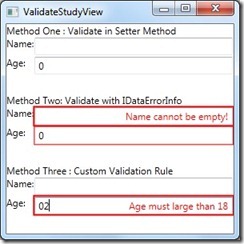
下面就是一个简单的例子,每次都把错误信息以红色展示在空间上面。这里的AdornedElementPlaceholder相当于
控件的占位符,表示控件的真实位置。这个例子是在书上直接拿过来的,只能做基本展示用。
<ControlTemplate x:Key="ErrorTemplate">

            <Border BorderBrush="Red" BorderThickness="2">

                <Grid>

                    <AdornedElementPlaceholder x:Name="_el" />

                    <TextBlock Margin="0,0,6,0"

                               HorizontalAlignment="Right"

                               VerticalAlignment="Center"

                               Foreground="Red"

                               Text="{Binding [0].ErrorContent}" />

                </Grid>

            </Border>

        </ControlTemplate>
<TextBox x:Name="AgeTextBox"

                         Grid.Row="1"

                         Grid.Column="1"

                         Margin="1" Validation.ErrorTemplate="{StaticResource ErrorTemplate}" >
使用方式非常简单,将上面的模板作为逻辑资源加入项目中,然后像上面一样引用即可。
效果图:
对知识梳理总结,希望对大家有帮助!
[WPF 基础知识系列] —— 绑定中的数据校验Vaildation的更多相关文章
- 基础知识系列☞C#中→属性和字段的区别
"好吧...准备写个'基础知识系列',算是记录下吧,时时看看,更加加深记忆···" 其实本来准备叫"面试系列"... 字段.属性.你先知道的哪个概念? ***我 ...
- 基础知识系列☞C#中数组Array、ArrayList和List三者的区别
数组() #region 数组 //初始化方式_0:先声明再赋值 ]; weekDays_0[] = "Sun"; weekDays_0[] = "Mon"; ...
- [C# 基础知识系列]C#中易混淆的知识点
一.引言 今天在论坛中看到一位朋友提出这样的一个问题,问题大致(问题的链接为:http://social.msdn.microsoft.com/Forums/zh-CN/52e6c11f-ad28-4 ...
- 基础知识系列☞C#中→委托
有些.NET中的高级特性,比如:委托! 有一种怎么也搞不懂的赶脚... 博客读了好几篇,代码也动手写了,书中的一些介绍也看了, 各种搜索关于委托的,至今还处于"会用"的阶段. 该怎 ...
- C# 基础知识系列- 3 集合数组
简单的介绍一下集合,通俗来讲就是用来保管多个数据的方案.比如说我们是一个公司的仓库管理,公司有一堆货物需要管理,有同类的,有不同类的,总而言之就是很多.很乱.我们对照集合的概念对仓库进行管理的话,那么 ...
- C# 基础知识系列- 9 字符串的更多用法(一)
0. 前言 在前面的文章里简单介绍了一下字符串的相关内容,并没有涉及到更多的相关内容,这一篇将尝试讲解一下在实际开发工作中会遇到的字符串的很多操作. 1. 创建一个字符串 这部分介绍一下如何创建一个字 ...
- C# 基础知识系列-13 常见类库(三)
0. 前言 在<C# 基础知识系列- 13 常见类库(二)>中,我们介绍了一下DateTime和TimeSpan这两个结构体的内容,也就是C#中日期时间的简单操作.本篇将介绍Guid和Nu ...
- C# 基础知识系列- 14 IO篇 文件的操作 (3)
本篇继续前两篇内容,跟大家介绍一下Path类以及FileSystemInfo这个类的主要方法和属性. 上文提到,在<C# 基础知识系列-IO篇>之文件相关的内容完结之后,会带领大家开发一个 ...
- C# 基础知识系列- 14 IO篇 流的使用
0. 前言 继续之前的C# IO流,在前几篇小短片中我们大概看了下C# 的基础IO也对文件.目录和路径的操作有了一定的了解.这一篇开始,给大家演示一下流的各种操作.以文件流为例,一起来看看如何操作吧. ...
随机推荐
- linux使用find和crontab命令定期清理过期文件
crontab 命令 crontab 命令是 Linux 中用来设定重复执行命令或脚本的工具.它能够在指定的时间段内,按照需求以某一时间间隔执行命令或脚本. crontab 的基本用法 crontab ...
- 【原创】Jquery初体验二
快速导航 一.传统方式生成Table 二.使用jquery.tmpl插件快速生成Table 三.Jquery中的操作class的几个方法 四:jq里面的克隆 五:属性过滤器 六:表单元素过滤器 一.传 ...
- jquery获得下拉框值的代码
jquery获得下拉框值的代码 获取Select : 获取select 选中的 text : $("#ddlRegType").find("option:sele ...
- Redis开发与运维
常用命令 redis-server启动redis redis-server /opt/redis/redis.conf 配置启动 redis-server --port 6379 --dir / ...
- mac 安装 python mysqlclient 遇到的问题及解决方法
在 mac 上安装 mysqlclient 遇到了一些问题,查找资料很多人都遇到了同样的问题.通过资料和试验,成功了.这里记录一下,希望帮到遇到同样问题的人. 本人使用python3, 安装步骤如下: ...
- KMP字符串匹配算法理解(转)
一.引言 主串(被扫描的串):S='s0s1...sn-1',i 为主串下标指针,指示每回合匹配过程中主串的当前被比较字符: 模式串(需要在主串中寻找的串):P='p0p1...pm-1',j 为模式 ...
- eclipse下查看java源码设置
myway: 1.选择一函数,按住ctrl,显示open declaration(或按F3); 2.点进去: 如果未配置,点 source attachment configuration -- ex ...
- Spark2.1.0——深入理解事件总线
Spark2.1.0——深入理解事件总线 概览 Spark程序在运行的过程中,Driver端的很多功能都依赖于事件的传递和处理,而事件总线在这中间发挥着至关重要的纽带作用.事件总线通过异步线程,提高了 ...
- Spark2.1.0模型设计与基本架构(下)
阅读提示:读者如果对Spark的背景知识不是很了解的话,建议首先阅读<SPARK2.1.0模型设计与基本架构(上)>一文. Spark模型设计 1. Spark编程模型 正如Hadoop在 ...
- ASP.NET MVC5+EF6+LayUI实战教程,通用后台管理系统框架(5)- 创建项目结构
前言 关于理论知识,我的表达能力有限,知识水平有限,就不过多的讲解编程工作中的专用术语了,大家写的代码多了,自然就懂了 前几节课,我们看到了后台的主页面,以及一个自认为比较漂亮的登录界面,算是编程套路 ...