
lightgbm的sklearn接口和原生接口参数详细说明及调参指点
class lightgbm.LGBMClassifier(boosting_type='gbdt', num_leaves=31, max_depth=-1, learning_rate=0.1, n_estimators=10, max_bin=255, subsample_for_bin=200000, objective=None, min_split_gain=0.0, min_child_weight=0.001, min_child_samples=20, subsample=1.0, subsample_freq=1, colsample_bytree=1.0, reg_alpha=0.0, reg_lambda=0.0, random_state=None, n_jobs=-1, silent=True, **kwargs)
boosting_type |
default="gbdt" |
"gbdt":Gradient Boosting Decision Tree "dart":Dropouts meet Multiple Additive Regression Trees "goss":Gradient-based One-Side Sampling "rf": Random Forest |
|
| num_leaves | (int, optional (default=31)) | 每个基学习器的最大叶子节点 | <=2^max_depth |
| max_depth | (int, optional (default=-1)) | 每个基学习器的最大深度, -1 means no limit | 当模型过拟合,首先降低max_depth |
| learning_rate | (float, optional (default=0.1)) | Boosting learning rate | |
| n_estimators | (int, optional (default=10)) | 基学习器的数量 | |
| max_bin | (int, optional (default=255)) | feature将存入的bin的最大数量,应该是直方图的k值 | |
| subsample_for_bin | (int, optional (default=50000)) | Number of samples for constructing bins | |
| objective | (string, callable or None, optional (default=None)) |
default: ‘regression’ for LGBMRegressor, ‘binary’ or ‘multiclass’ for LGBMClassifier, ‘lambdarank’ for LGBMRanker. |
|
| min_split_gain | (float, optional (default=0.)) | 树的叶子节点上进行进一步划分所需的最小损失减少 | |
| min_child_weight | (float, optional (default=1e-3)) |
Minimum sum of instance weight(hessian) needed in a child(leaf) |
|
| min_child_samples |
(int, optional (default=20)) | 叶子节点具有的最小记录数 | |
| subsample |
(float, optional (default=1.)) | 训练时采样一定比例的数据 | |
| subsample_freq | (int, optional (default=1)) | Frequence of subsample, <=0 means no enable | |
| colsample_bytree |
(float, optional (default=1.)) | Subsample ratio of columns when constructing each tree | |
| reg_alpha |
(float, optional (default=0.)) | L1 regularization term on weights | |
|
reg_lambda |
(float, optional (default=0.)) | L2 regularization term on weights | |
|
random_state |
(int or None, optional (default=None)) | ||
| silent | (bool, optional (default=True)) | ||
| n_jobs | (int, optional (default=-1)) |
######################################################################################################
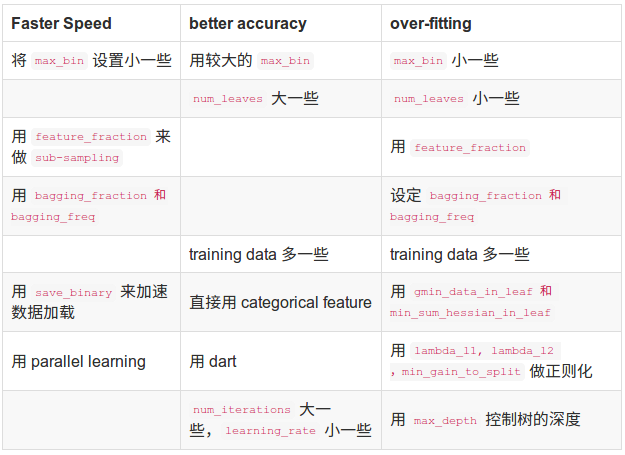
下表对应了Faster Spread,better accuracy,over-fitting三种目的时,可以调整的参数:
###########################################################################################
类的属性:
| n_features_ | int | 特征的数量 |
| classes_ | rray of shape = [n_classes] | 类标签数组(只针对分类问题) |
| n_classes_ | int | 类别数量 (只针对分类问题) |
| best_score_ | dict or None | 最佳拟合模型得分 |
| best_iteration_ | int or None | 如果已经指定了early_stopping_rounds,则拟合模型的最佳迭代次数 |
| objective_ | string or callable | 拟合模型时的具体目标 |
| booster_ | Booster | 这个模型的Booster |
| evals_result_ | dict or None | 如果已经指定了early_stopping_rounds,则评估结果 |
| feature_importances_ | array of shape = [n_features] | 特征的重要性 |
###########################################################################################
类的方法:
fit(X, y, sample_weight=None, init_score=None, eval_set=None, eval_names=None, eval_sample_weight=None, eval_init_score=None, eval_metric='logloss', early_stopping_rounds=None, verbose=True, feature_name='auto', categorical_feature='auto', callbacks=None)
| X | array-like or sparse matrix of shape = [n_samples, n_features] | 特征矩阵 |
| y | array-like of shape = [n_samples] | The target values (class labels in classification, real numbers in regression) |
| sample_weight | array-like of shape = [n_samples] or None, optional (default=None)) | 样本权重,可以采用np.where设置 |
| init_score | array-like of shape = [n_samples] or None, optional (default=None)) | Init score of training data |
| group | array-like of shape = [n_samples] or None, optional (default=None) | Group data of training data. |
| eval_set | list or None, optional (default=None) | A list of (X, y) tuple pairs to use as a validation sets for early-stopping |
| eval_names | list of strings or None, optional (default=None) | Names of eval_set |
| eval_sample_weight | list of arrays or None, optional (default=None) | Weights of eval data |
| eval_init_score | list of arrays or None, optional (default=None) | Init score of eval data |
| eval_group | list of arrays or None, optional (default=None) | Group data of eval data |
| eval_metric | string, list of strings, callable or None, optional (default="logloss") | "mae","mse",... |
| early_stopping_rounds | int or None, optional (default=None) | 一定rounds,即停止迭代 |
| verbose | bool, optional (default=True) | |
| feature_name | list of strings or 'auto', optional (default="auto") | If ‘auto’ and data is pandas DataFrame, data columns names are used |
| categorical_feature | list of strings or int, or 'auto', optional (default="auto") | If ‘auto’ and data is pandas DataFrame, pandas categorical columns are used |
| callbacks | list of callback functions or None, optional (default=None) |
###############################################################################################
| X | array-like or sparse matrix of shape = [n_samples, n_features] | Input features matrix |
| raw_score | bool, optional (default=False) | Whether to predict raw scores |
| num_iteration | int, optional (default=0) | Limit number of iterations in the prediction; defaults to 0 (use all trees). |
| Returns | predicted_probability | The predicted probability for each class for each sample. |
| Return type | array-like of shape = [n_samples, n_classes] |
不平衡处理的参数:
1.一个简单的方法是设置is_unbalance参数为True或者设置scale_pos_weight,二者只能选一个。 设置is_unbalance参数为True时会把负样本的权重设为:正样本数/负样本数。这个参数只能用于二分类。
2.自定义评价函数:
https://cloud.tencent.com/developer/article/1357671
lightGBM的原理总结:
http://www.cnblogs.com/gczr/p/9024730.html
论文翻译:https://blog.csdn.net/u010242233/article/details/79769950,https://zhuanlan.zhihu.com/p/42939089
处理分类变量的原理:https://blog.csdn.net/anshuai_aw1/article/details/83275299
CatBoost、LightGBM、XGBoost的对比
https://blog.csdn.net/LrS62520kV/article/details/79620615
lightgbm的sklearn接口和原生接口参数详细说明及调参指点的更多相关文章
- xgboost的sklearn接口和原生接口参数详细说明及调参指点
from xgboost import XGBClassifier XGBClassifier(max_depth=3,learning_rate=0.1,n_estimators=100,silen ...
- word2vec参数调整 及lda调参
一.word2vec调参 ./word2vec -train resultbig.txt -output vectors.bin -cbow 0 -size 200 -window 5 -neg ...
- DeepMind提出新型超参数最优化方法:性能超越手动调参和贝叶斯优化
DeepMind提出新型超参数最优化方法:性能超越手动调参和贝叶斯优化 2017年11月29日 06:40:37 机器之心V 阅读数 2183 版权声明:本文为博主原创文章,遵循CC 4.0 BY ...
- python+pytest接口自动化(6)-请求参数格式的确定
我们在做接口测试之前,先需要根据接口文档或抓包接口数据,搞清楚被测接口的详细内容,其中就包含请求参数的编码格式,从而使用对应的参数格式发送请求.例如某个接口规定的请求主体的编码方式为 applicat ...
- android 学习随笔二十七(JNI:Java Native Interface,JAVA原生接口 )
JNI(Java Native Interface,JAVA原生接口) 使用JNI可以使Java代码和其他语言写的代码(如C/C++代码)进行交互. 问:为什么要进行交互? 首先,Java语言提供的类 ...
- 接口作为方法的参数或返回值——List接口
接口作为方法的参数或返回值,源码可知,List为一个接口,ArraryList是的它的实现类: 其中,addNames方法中,入参和返回值都List接口,入参是多态的,编译看左,运行看右(访问成员方法 ...
- 编写高质量代码改善C#程序的157个建议——建议43:让接口中的泛型参数支持协变
建议43:让接口中的泛型参数支持协变 除了上一建议中提到的使用泛型参数兼容接口不可变性外,还有一种办法是为接口中的泛型声明加上out关键字来支持协变,如下所示: interface ISalary&l ...
- Python+request 分模块存放接口,多接口共用参数URL、headers的抽离,添加日志打印等《三》
主要介绍内容如下: 1.分模块存放接口 2.多接口共用参数URL.headers的抽离为配置文件 3.添加日志打印 4.一个py文件运行所有所测的接口 如上介绍内容的作用: 1.分模块存放接口:方便多 ...
- 对接接口时,组织参数json出现的问题
在进行对接第三方接口时,进行参数组装成json的过程中出现参数传递格式错误以及json格式化错误. 在拼接json时,如果json中有对象,则以map的方式组装好所有参数.最后map转成json,不然 ...
随机推荐
- oracle-db安装
在LINUX平台上手动创建多个实例(oracle11g) http://blog.csdn.net/sunchenglu7/article/details/39676659 安装完桌面与数据库软件后, ...
- mysql查看某库表大小
查询所有数据库占用磁盘空间大小的SQL语句: 语句如下 select TABLE_SCHEMA, concat(truncate(sum(data_length)/1024/1024,2),' MB' ...
- mysql之 openark-kit online ddl
MySQL工具集openark-kit (官方网站 http://code.openark.org/forge/openark-kit),内部包含很多小工具,在5.6之前用于实现online ddl操 ...
- requestAnimationFrame 知识点
与setTimeout相比,requestAnimationFrame最大的优势是由系统来决定回调函数的执行时机.具体一点讲,如果屏幕刷新率是60Hz,那么回调函数就每16.7ms被执行一次,如果刷新 ...
- mysql查询相关问题
前言 本文实现的这个需求其实十分普遍,举例来说,我们存在一个用户来源表,用来标记用户从哪个渠道注册进来.表结构如下所示… 其中 origin 是用户来源,其中的值有 iPhone .Android . ...
- href="javacript:;" href="javacript:void(0);" href="#"区别。。。
一.href="javacript:;" 这种用法不正确,这么用的话会出现浏览器访问“javascript:;”这个地址的现象: 二.href="javacript:v ...
- 第一个appium的Demo
原文来自:一颗糖果 http://www.cnblogs.com/linglingyuese/articles/8418311.html 一.环境搭建 略(后期补) 二.创建一个测试apk包的项目 ...
- hanlp源码解析之中文分词算法详解
词图 词图指的是句子中所有词可能构成的图.如果一个词A的下一个词可能是B的话,那么A和B之间具有一条路径E(A,B).一个词可能有多个后续,同时也可能有多个前驱,它们构成的图我称作词图. 需要稀疏2维 ...
- app崩溃后自动重启
android 引用:http://blog.csdn.net/caiwenfeng_for_23/article/details/41184353 package com.tan.abnormalr ...
- ubuntu16 配置git
github上的开源项目,在ubuntu系统中无法进行clone,通过在网站上注册账户,用命令生成ssh 公钥和私钥,把公钥添加到网站账户中可解决这个问题 1.产生ssh key ssh-keygen ...