
iOS-实现验证码倒计时功能(1)
验证码倒计时按钮的应用是非常普遍的,该Blog就和你一起来写一个IDCountDownButton来实现验证码倒计时的效果。你可以想使用普通的UIButton类型按钮一样,只需要设置其倒计时时长(若未设置,默认为60秒),就可以轻松的实现点击countDownButton开始倒计时,倒计时结束方可重新点击。
一、实现效果
如图

二、实现思路
1、自定义一个IDCountDownButton,重写 beginTrackingWithTouch:withEvent: 拦截button的点击事件,根据是否正在倒计时决定是否响应并传递button的点击事件(若倒计时正在进行中,再次点击不会重新开始倒计时)
2、是用NSTimer定时器,定时改变IDCountDownButton的title
3、若倒计时结束,取消定时器并回复倒计时时长(使IDCountDownButton具备再次开始倒计时的能力)
4、在IDCountDownButton销毁时,同样取消定时器
三、实现步骤
1、添加相关的属性
公有属性(public)
|
1
2
3
4
|
@interface IDCountDownButton : UIButton/** 验证码倒计时的时长 */@property (nonatomic, assign) NSInteger durationOfCountDown;@end |
私有属性
|
1
2
3
4
5
6
7
8
|
@interface IDCountDownButton ()/** 保存倒计时按钮的非倒计时状态的title */@property (nonatomic, copy) NSString *originalTitle;/** 保存倒计时的时长 */@property (nonatomic, assign) NSInteger tempDurationOfCountDown;/** 定时器对象 */@property (nonatomic, strong) NSTimer *countDownTimer;@end |
2、重写setter
title属性的setter
1)、私有属性originalTitle用来暂存开始计时前button的标题,即用户设置的button的标题,通常是“获取验证码”
2)、需要屏蔽计时过程中,title更新时改变originalTitle的值
|
1
2
3
4
5
6
7
|
- (void)setTitle:(NSString *)title forState:(UIControlState)state { [super setTitle:title forState:state]; // 倒计时过程中title的改变不更新originalTitle if (self.tempDurationOfCountDown == self.durationOfCountDown) { self.originalTitle = title; }} |
durationOfCountDown属性的setter
1)、设置tempDurationOfCountDown的值
2)、tempDurationOfCountDown的作用:倒计时;与durationOfCountDown配合判断当前IDCountDownButton是否具备重新开始倒计时的能力
|
1
2
3
4
|
- (void)setDurationOfCountDown:(NSInteger)durationOfCountDown { _durationOfCountDown = durationOfCountDown; self.tempDurationOfCountDown = _durationOfCountDown;} |
初始化
1)、设置倒计时的默认时长为60妙
2)、设置IDCountDownButton默认的title为“获取验证码”
|
1
2
3
4
5
6
7
8
9
10
11
12
13
14
15
16
17
18
|
- (instancetype)initWithFrame:(CGRect)frame { if (self = [super initWithFrame:frame]) { // 设置默认的倒计时时长为60秒 self.durationOfCountDown = 60; // 设置button的默认标题为“获取验证码” [self setTitle:@"获取验证码" forState:UIControlStateNormal]; } return self;}- (instancetype)initWithCoder:(NSCoder *)aDecoder { if (self = [super initWithCoder:aDecoder]) { // 设置默认的倒计时时长为60秒 self.durationOfCountDown = 60; // 设置button的默认标题为“获取验证码” [self setTitle:@"获取验证码" forState:UIControlStateNormal]; } return self;} |
拦截IDCountDownButton的点击事件,判断是否开始倒计时
1)、若tempDurationOfCountDown等于durationOfCountDown,说明未开始倒计时,响应并传递IDCountDownButton的点击事件;否则,不响应且不传递。
|
1
2
3
4
5
6
7
8
9
|
- (BOOL)beginTrackingWithTouch:(UITouch *)touch withEvent:(UIEvent *)event { // 若正在倒计时,不响应点击事件 if (self.tempDurationOfCountDown != self.durationOfCountDown) { return NO; } // 若未开始倒计时,响应并传递点击事件,开始倒计时 [self startCountDown]; return [super beginTrackingWithTouch:touch withEvent:event];} |
倒计时
1)、创建定时器,开始倒计时
|
1
2
3
4
5
6
|
- (void)startCountDown { // 创建定时器 self.countDownTimer = [NSTimer timerWithTimeInterval:1 target:self selector:@selector(updateIDCountDownButtonTitle) userInfo:nil repeats:YES]; // 将定时器添加到当前的RunLoop中(自动开启定时器) [[NSRunLoop currentRunLoop] addTimer:self.countDownTimer forMode:NSRunLoopCommonModes];} |
2)、更新IDCountDownButton的title为倒计时剩余的时间
|
1
2
3
4
5
6
7
8
9
10
11
12
|
- (void)updateIDCountDownButtonTitle { if (self.tempDurationOfCountDown == 0) { // 设置IDCountDownButton的title为开始倒计时前的title [self setTitle:self.originalTitle forState:UIControlStateNormal]; // 恢复IDCountDownButton开始倒计时的能力 self.tempDurationOfCountDown = self.durationOfCountDown; [self.countDownTimer invalidate]; } else { // 设置IDCountDownButton的title为当前倒计时剩余的时间 [self setTitle:[NSString stringWithFormat:@"%zd秒", self.tempDurationOfCountDown--] forState:UIControlStateNormal]; }} |
3)、移除定时器
|
1
2
3
|
- (void)dealloc { [self.countDownTimer invalidate];} |
使用示例
1)、添加vertificationCodeIDCountDownButton属性
|
1
2
3
4
|
@interface ViewController ()/** 验证码倒计时的button */@property (nonatomic, strong) IDCountDownButton *vertificationCodeIDCountDownButton;@end |
2)、创建vertificationCodeIDCountDownButton并进行相关设置
|
1
2
3
4
5
6
7
8
9
10
11
12
13
14
15
16
|
- (void)viewDidLoad { [super viewDidLoad]; // 创建vertificationCodeIDCountDownButton self.vertificationCodeIDCountDownButton = [[IDCountDownButton alloc] initWithFrame:CGRectMake(160, 204, 120, 44)]; // 添加点击事件 [self.vertificationCodeIDCountDownButton addTarget:self action:@selector(vertificationCodeIDCountDownButtonClick:) forControlEvents:UIControlEventTouchUpInside]; // 设置标题相关属性 [self.vertificationCodeIDCountDownButton setTitleColor:[UIColor whiteColor] forState:UIControlStateNormal]; [self.vertificationCodeIDCountDownButton setTitle:@"获取验证码" forState:UIControlStateNormal]; // 设置背景图片 [self.vertificationCodeIDCountDownButton setBackgroundImage:[UIImage imageNamed:@"redButton"] forState:UIControlStateNormal]; // 设置倒计时时长 self.vertificationCodeIDCountDownButton.durationOfCountDown = 10; // 将vertificationCodeIDCountDownButton添加的控制器的view中 [self.view addSubview:self.vertificationCodeIDCountDownButton];} |
3)、实现点击事件触发的操作
|
1
2
3
|
- (void)vertificationCodeIDCountDownButtonClick:(UIButton *)button { // TODO:调用服务器接口,获取验证码} |
四、关于AppIcon
添加AppIcon时需要遵循以下规则
1)、命名,以Icon开头(首字母大写),跟上@2x/@3x,如图:

2)、尺寸,必须按要求设置尺寸,如图
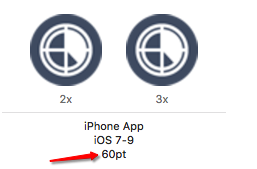
3)、图中所示的60pt对应的图片尺寸是
2x:120px X 120px
3x:180px X 180px
以上就是本文的全部内容,希望对大家的学习有所帮助。
iOS-实现验证码倒计时功能(1)的更多相关文章
- js之验证码倒计时功能
<!DOCTYPE html> <html > <head> <meta http-equiv="Content-Type" conten ...
- jq 实现发送验证码倒计时功能
var util = { wait:60, hsTime: function (that) { _this = this; if (_this.wait == 0) { $('#hsbtn').rem ...
- 34 Flutter仿京东商城项目 用户注册 注册流程 POST发送验证码 倒计时功能 验证验证码
加群452892873 下载对应34课文件,运行方法,建好项目,直接替换lib目录 以下列出的是本课涉及的文件. RegisterFirst.dart import 'package:flutter/ ...
- iOS 短信验证码倒计时按钮的实现
验证码倒计时按钮的应用是非常普遍的,本文介绍了IOS实现验证码倒计时功能,点击获取验证码,进入时间倒计时,感兴趣的小伙伴们可以参考一下: 实现思路: 创建按钮,添加点击方法: 用NSTimer定时器, ...
- Flutter 实际开发常用工具类(全局提示,请求封装,token缓存,验证码倒计时、常用窗帘动画及布局)
介绍: 一星期从入门到实际开发经验分享及总结 代码传送门github Flutter是谷歌的移动UI框架,可以快速在iOS和Android上构建高质量的原生用户界面.未来App开发 ...
- iOS “获取验证码”按钮的倒计时功能
iOS 的倒计时有多种实现细节,Cocoa Touch 为我们提供了 NSTimer 类和 GCD 的dispatch_source_set_timer方法去更加方便的使用计时器.我们也可以很容易的的 ...
- iOS 按钮倒计时功能
iOS 按钮倒计时功能, 建议把按钮换成label,这样会避免读秒时闪烁 __block ; __block UIButton *verifybutton = _GetverificationBtn; ...
- javascript的倒计时功能中newData().getTime()在iOS下会报错问题解决
javascript的倒计时功能中newData().getTime()在iOS下会报错问题解决 在做移动端时间转化为时间戳时,遇到了一个问题,安卓手机上访问时,能拿到时间戳,从而正确转换时间,而在i ...
- 微信小程序发送验证码功能,验证码倒计时
data{ timer:'', countDownNum:'发送验证码', } // 点击验证码倒计时获取验证码 Gain:function(e){ let that = this let count ...
随机推荐
- SQL入门
# SQL入门 数据库表 一个数据库(database)通常包含一个或多个表(table). 每一个表都有一个名字标识. 表单包含数据的记录(行). 一些重要的SQL命令(常用的吧) 命令 说明 ...
- 安卓app开发方式之webApp
1.phonegap: 专注于webapp调用native的功能.2.ionic: 专注于webapp的前端ui技术,需要与phonegap(准确的说是和Cordova配合使用).ionic是一个专注 ...
- 自动化运维工具ansible-如何设置客户端多python版本问题
问题:在使用ansible进行管理客户主机时,发现客户主机安装了多个版本的python,并且默认版本为3.0 shell>>cat list 192.168.2.9 shell>&g ...
- Apache Spark GraphX
GraphX基于BSP模型,在Spark之上封装类似Pregel的接口,进行大规模同步全局的图计算,尤其是当用户进行多轮迭代时,基于Spark内存计算的优势尤为明显.
- Struts2零碎点整理
1. 关于 Struts2 请求的扩展名问题 1). org.apache.struts2 包下的 default.properties 中配置了 Struts2 应用的一些常量 2). struts ...
- Java设计模式---工厂方法模式(Factory-Method)
一.普通工厂模式 建立一个工厂类,对实现了同一接口的一些类进行实例的创建 实例代码: 发送短信和邮件的例子,首先创建接口: public interface Sender { public void ...
- uniPanel特效
function beforeInit(sender){ sender.layout='accordion'; Ext.apply (sender, {title:'供应链',style:'text- ...
- 利用hashtable和time函数加速Lisp程序
程序功能是从一个英文文本中得到单词表,再得到押韵词表.即输出可能这样开始: a ameoeba alba samba marimba... 这样结束: ...megahertz gigahertz j ...
- dll开发中遇到的问题
刚碰到个问题,我的一个项目中引用了一个dll,这个dll又引用了另一个dll,我把这俩个都放在bin文件夹下,但是会报错,说第二个dll找不到.把它放到系统文件夹system32下就没事了. 但是遇到 ...
- MsSQL的游标的综合运用
USE [ChiefWMS]GO/****** Object: StoredProcedure [dbo].[WMS_Check] Script Date: 04/05/2016 09:51:13 * ...