
(一)问候Spring4
第一节:Spring 简介
Spring 作者:Rod Johnson;
官方网站:http://spring.io/
最新开发包及文档下载地址:http://repo.springsource.org/libs-release-local/org/springframework/spring/
核心思想:IOC 控制反转;AOP 面向切面;(这是学习spring的两个重点中的重点)
介绍:百度百科;
第二节:Spring4 版Hello World 实现
核心jar包:
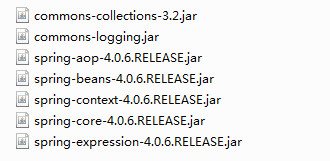
百度云下载:http://pan.baidu.com/s/1jIEphqQ
密码:3xb3
beans.xml
<?xml version="1.0" encoding="UTF-8"?>

<beans xmlns="http://www.springframework.org/schema/beans"

    xmlns:xsi="http://www.w3.org/2001/XMLSchema-instance"

    xsi:schemaLocation="http://www.springframework.org/schema/beans

        http://www.springframework.org/schema/beans/spring-beans.xsd">

</beans>
例子:
首先我们必须先导入相对应spring的jar包
beans.xml
<?xml version="1.0" encoding="UTF-8"?>

<beans xmlns="http://www.springframework.org/schema/beans"

    xmlns:xsi="http://www.w3.org/2001/XMLSchema-instance"

    xsi:schemaLocation="http://www.springframework.org/schema/beans

        http://www.springframework.org/schema/beans/spring-beans.xsd">

    <bean id="helloWorld" class="com.wishwzp.test.HelloWorld"></bean>

</beans>
HelloWorld.java
package com.wishwzp.test;

public class HelloWorld {

    public void say(){

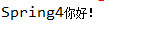
        System.out.println("Spring4你好!");

    }

}
Test.java
package com.wishwzp.service;

import org.springframework.context.ApplicationContext;

import org.springframework.context.support.ClassPathXmlApplicationContext;

import com.wishwzp.test.HelloWorld;

public class Test {

    public static void main(String[] args) {

        ApplicationContext ac=new ClassPathXmlApplicationContext("beans.xml");

        HelloWorld helloWorld=(HelloWorld)ac.getBean("helloWorld");

        helloWorld.say();

    }

}
说明:beans.xml文件在src目录下面,以为使用的是ClassPathXmlApplicationContext,会根据classpath加载。
还有一种是FileSystemXmlApplicationContext,根据文件绝对路径去查找
运行结果显示:
(一)问候Spring4的更多相关文章
- SSM整合(三):Spring4与Mybatis3与SpringMVC整合
源码下载 SSMDemo 上一节整合了Mybatis3与Spring4,接下来整合SpringMVC! 说明:整合SpringMVC必须是在web项目中,所以前期,新建的就是web项目! 本节全部采用 ...
- SSM整合(二):Spring4与Mybatis3整合
上一节测试好了Mybatis3,接下来整合Spring4! 一.添加spring上下文配置 在src/main/resources/目录下的spring新建spring上下文配置文件applicati ...
- dubbo升级spring4与cxf
阿里的dubbo项目是基于spring2.x的.但之后停止更新了.当当网有根据dubbo扩展成dubbox,基于spring3.x,但我的项目中用的是spring4.x,于是fork了dubbox,自 ...
- jsonp使用,spring4.x对jsonp的支持
1.Java中接口 @RequestMapping("/token/{token}") @ResponseBody public Object getUserByToken(@Pa ...
- (Spring4 json入门)Spring4+SpringMVC+页面数据发送与接收(json格式)
jar包(Maven仓库): Spring4 jar包(Maven仓库): 在测试过程中我查看了网上的一些教程,但是那些教程都是在Spring3环境下的,Spring3和Spring4解析json需要 ...
- [转]Struts2.3.16.1+Hibernate4.3.4+Spring4.0.2 框架整合
原文地址:http://blog.csdn.net/ycb1689/article/details/22928519 最新版Struts2+Hibernate+Spring整合 目前为止三大框架最新版 ...
- Spring4.0编程式定时任务配置
看过很多定时调度的配置,大多使用XML配置,觉得比较麻烦,也比较老套.这里介绍一种基于spring4.0注解编程式配置定时任务,简单清晰,使用方便.. 至于引入spring相关jar这里不多说,直接切 ...
- 基于Spring4+SpringMVC4+Mybatis3+Hibernate4+Junit4框架构建高性能企业级的部标GPS监控平台
开发企业级的部标GPS监控平台,投入的开发力量很大,开发周期也很长,选择主流的开发语言以及成熟的开源技术框架来构建基础平台,是最恰当不过的事情,在设计之初就避免掉了技术选型的风险,避免以后在开发过程中 ...
- spring4+websocket+nginx详细配置
实现的版本jdk1.7.0_25, tomcat7.0.47.0, Tengine/2.1.1 (nginx/1.6.2), servlet3.0, spring4.2.2 使用maven导入版本3. ...
随机推荐
- 《数据通信与网络》笔记--QoS
QoS(Quality of Service)服务质量,是网络的一种安全机制, 是用来解决网络延迟和阻塞等问题的一种技术. 1.QoS参数 衡量服务质量QoS的参数主要包括: 端到端延迟(Delay) ...
- Android Design 与 Holo Theme
转载:http://www.geekpark.net/topics/179488 [核心提示] 提到 Android Design,很多人会做出”啊,知道,就是黑色的背景和灰蓝色的平的按钮嘛”,那么到 ...
- 虚方法(virtual)和抽象方法(abstract)的区别
注:本文转载自 http://www.cnblogs.com/michaelxu/archive/2008/04/01/1132633.html 虚方法和抽象方法都可以供派生类重写,它们之间有什么区别 ...
- 【32】确定你的public继承塑模出Is-A关系
1.public继承表示Is-A关系,也就是满足里氏代换.与之相对应的,private继承表示根据某物实现出,不满足里氏代换.子类对象初始化父类引用,编译通不过. 2.考虑下面的需求,企鹅继承鸟,Bi ...
- Java连接MYSQL【转载】
这篇文章主要以MySQL为例讲下Java如何连接到数据库的. 当然,首先要安装有JDK(一般是JDK1.5.X).然后安装MySQL,这些都比较简单,具体过程就不说了.配置好这两个环境后,下载JDBC ...
- HDU 5475 An easy problem 线段树
An easy problem Time Limit: 1 Sec Memory Limit: 256 MB 题目连接 http://acm.hdu.edu.cn/showproblem.php?pi ...
- 基于注解的Spring MVC整合Hibernate(所需jar包,spring和Hibernate整合配置,springMVC配置,重定向,批量删除)
1.导入jar watermark/2/text/aHR0cDovL2Jsb2cuY3Nkbi5uZXQvdG90b3R1enVvcXVhbg==/font/5a6L5L2T/fontsize/400 ...
- Eclipse 开发WEB项目所遇问题 WebContent WebRoot
原文:http://blog.sina.com.cn/s/blog_525960510100jo0j.html 最近在做Web 项目时,新建了一个WEB 项目,如webdemo,eclipse默认的b ...
- Yum本地Rpm库设置
http://blog.csdn.net/dc_726/article/details/8497188 1 Yum对光盘的支持 查看/etc/yum.repos.d/CentOS-Media.re ...
- keyStore vs trustStore--转载
原文:http://lukejin.iteye.com/blog/605634 今天有同事向我问起这两个概念,所以我就记录下.首先我们得澄清一些概念.一个web应用如果需要提供以https的方式访问的 ...