
udev example -- detect usb and write test file
之前学习了下Udev,就随便做了个测试小程序.....设计什么的也没考虑,就实现了一个基本功能,插入U盘,识别,循环检测到有特定文件后,就然后往U盘里面写数据,插拔多次,都能正常工作。
里面的warning和不规范的写法请自己修改。
#include <unistd.h>

#include <stdio.h>

#include <stdlib.h>

#include <stddef.h>

#include <string.h>

#include <errno.h>

#include <getopt.h>

#include <fcntl.h>

#include <errno.h>

#include <signal.h>

#include <getopt.h>

#include <sys/time.h>

#include <sys/socket.h>

#include <sys/un.h>

#include <sys/select.h>

#include <linux/types.h>

#include <linux/netlink.h>

#include <sys/types.h>

#include <libudev.h>

#include <iostream>

#include <pthread.h>

#include <sys/mount.h>

#include <sys/stat.h>

#include <dirent.h>

#include <time.h>

using namespace std;

static std::string record_path="";

static bool FindRecord=false;

void File_Opreation();

void GetUsbFolderLocation(char *basePath);

void MountTheSystem(char *basePath);

static bool NeedToCheck=false;

int ListDevice()

{

    udev *udev;

    struct udev_enumerate *enumerate;

    struct udev_list_entry *devices, *dev_list_entry;

    struct udev_device *dev;

    /* Create the udev object */

    udev = udev_new();

    if (!udev)

    {

        printf("Can't create udev\n");

        exit();

    }

    /* Create a list of the devices in the 'hidraw' subsystem. */

    enumerate = udev_enumerate_new(udev);

    udev_enumerate_add_match_subsystem(enumerate, "block");

    udev_enumerate_scan_devices(enumerate);

    devices = udev_enumerate_get_list_entry(enumerate);

    /* For each item enumerated, print out its information.

       udev_list_entry_foreach is a macro which expands to

       a loop. The loop will be executed for each member in

       devices, setting dev_list_entry to a list entry

       which contains the device's path in /sys. */

    udev_list_entry_foreach(dev_list_entry, devices)

    {

        const char *path;

        /* Get the filename of the /sys entry for the device

           and create a udev_device object (dev) representing it */

        path = udev_list_entry_get_name(dev_list_entry);

        dev = udev_device_new_from_syspath(udev, path);

        /* usb_device_get_devnode() returns the path to the device node

           itself in /dev. */

        printf("Device Node Path: %s\n", udev_device_get_devnode(dev));

        /* The device pointed to by dev contains information about

           the hidraw device. In order to get information about the

           USB device, get the parent device with the

           subsystem/devtype pair of "usb"/"usb_device". This will

           be several levels up the tree, but the function will find

           it.*/

        dev = udev_device_get_parent_with_subsystem_devtype(

               dev,

               "usb",

               "usb_device");

        if (!dev)

        {

            cout<<"Unable to find parent usb device"<<endl;

            exit();

        }

        /* From here, we can call get_sysattr_value() for each file

           in the device's /sys entry. The strings passed into these

           functions (idProduct, idVendor, serial, etc.) correspond

           directly to the files in the directory which represents

           the USB device. Note that USB strings are Unicode, UCS2

           encoded, but the strings returned from

           udev_device_get_sysattr_value() are UTF-8 encoded. */

        printf("  VID/PID: %s %s\n",

                udev_device_get_sysattr_value(dev,"idVendor"),

                udev_device_get_sysattr_value(dev, "idProduct"));

        printf("  %s\n  %s\n",

                udev_device_get_sysattr_value(dev,"manufacturer"),

                udev_device_get_sysattr_value(dev,"product"));

        printf("  serial: %s\n",

                 udev_device_get_sysattr_value(dev, "serial"));

        udev_device_unref(dev);

    }

    /* Free the enumerator object */

    udev_enumerate_unref(enumerate);

    udev_unref(udev);

    return ;

}

void Udev_Enumrate()

{

    struct udev* udev_ancestor=NULL;

    struct udev_enumerate* udev_enum=NULL;

    struct udev_list_entry* device_fistentry=NULL;

    struct udev_list_entry *dev_list_entry=NULL; //entry to store the current position

    struct udev_device *dev=NULL;

    udev_ancestor=udev_new();

    udev_enum=udev_enumerate_new(udev_ancestor);

    if(udev_enumerate_add_match_subsystem (udev_enum, "block")==)

    {

        cout<<"add block device to match subsystem successful"<<endl;

    }

    if(udev_enumerate_add_match_subsystem (udev_enum, "usb")==)

    {

        cout<<"add usb device to match subsystem successful"<<endl;

    }

    if(udev_enumerate_add_match_subsystem (udev_enum, "scsi")==)

    {

        cout<<"add scsi device to match subsystem successful"<<endl;

    }

    //Scan the system under /sys/

    udev_enumerate_scan_devices(udev_enum);

    //get the first entry of the device list

    device_fistentry=udev_enumerate_get_list_entry(udev_enum);

    /* For each item enumerated, print out its information.

       udev_list_entry_foreach is a macro which expands to

       a loop. The loop will be executed for each member in

       devices, setting dev_list_entry to a list entry

       which contains the device's path in /sys. */

    udev_list_entry_foreach(dev_list_entry, device_fistentry)

    {

        const char *path;

        /* Get the filename of the /sys entry for the device

           and create a udev_device object (dev) representing it */

        path = udev_list_entry_get_name(dev_list_entry);

        dev = udev_device_new_from_syspath(udev_ancestor, path);

        /* usb_device_get_devnode() returns the path to the device node

           itself in /dev. */

        printf("Test Device Node Path: %s\n", udev_device_get_devnode(dev));

        /* The device pointed to by dev contains information about

        the hidraw device. In order to get information about the

        USB device, get the parent device with the

        subsystem/devtype pair of "usb"/"usb_device". This will

        be several levels up the tree, but the function will find

        it.*/

        dev = udev_device_get_parent_with_subsystem_devtype(

                                dev,

                                "usb",

                                "usb_device");

        if (!dev)

        {

            cout<<"Test Unable to find parent usb device"<<endl;

            //exit(1);

        }

        else

        {

            printf("  VID/PID: %s %s\n",udev_device_get_sysattr_value(dev,"idVendor"), udev_device_get_sysattr_value(dev, "idProduct"));

            printf("  %s\n  %s\n",udev_device_get_sysattr_value(dev,"manufacturer"), udev_device_get_sysattr_value(dev,"product"));

            printf("  serial: %s\n",udev_device_get_sysattr_value(dev, "serial"));

        }

        udev_device_unref(dev);

    }

    udev_enumerate_unref(udev_enum);

    udev_unref(udev_ancestor);

}

void* udev_Monitor(void*)

{

    struct udev* udev=NULL;

    struct udev_monitor * mon=NULL;

    struct udev_device *dev;

    int fd;

    fd_set fds;

    struct timeval tv;

    static int flag=;

    udev=udev_new();

    mon=udev_monitor_new_from_netlink(udev,"udev");

    udev_monitor_filter_add_match_subsystem_devtype(mon, "sound", "usb_device");

    udev_monitor_filter_add_match_subsystem_devtype(mon, "usb", "usb_device");

    udev_monitor_filter_add_match_subsystem_devtype(mon, "block", "disk");

    udev_monitor_filter_add_match_subsystem_devtype(mon, "block", "partition");

    udev_monitor_filter_add_match_subsystem_devtype(mon, "usb", "usb_interface");

    udev_monitor_enable_receiving(mon);

    fd = udev_monitor_get_fd(mon);

    while()

    {

        fd_set fds;

        struct timeval tv;

        int ret;

        FD_ZERO(&fds);

        FD_SET(fd, &fds);

        tv.tv_sec = ;

        tv.tv_usec = ;

        ret = select(fd+, &fds, NULL, NULL, &tv);

        //ret means there's an event fd_isset means fd is readable

        if(ret> & FD_ISSET(fd,&fds))

        {

            //cout<<"There's a change with Num="<<flag<<endl;

            //flag++;

            /* Make the call to receive the device.

               select() ensured that this will not block. */

            dev = udev_monitor_receive_device(mon);

            if (dev)

            {

                const char* sysPath        = udev_device_get_syspath(dev);

                const char* action        = udev_device_get_action(dev);

                const char* subsystem        = udev_device_get_subsystem(dev);

                const char* devType        = udev_device_get_devtype(dev);

                if ( == strncmp(action, "add", strlen("add")))

                {

                    const char* devClass         = udev_device_get_sysattr_value(dev, "bDeviceClass");

                    const char* devInterfaceClass     = udev_device_get_sysattr_value(dev, "bInterfaceClass");

                    cout<<"The  devClass: "<<devClass<<endl;

                    cout<<"The   devInterfaceClass:"<<devInterfaceClass<<endl;

                    NeedToCheck=true;

                }

                printf("Got Device\n");

                printf("   Node: %s\n", udev_device_get_devnode(dev));

                printf("   Subsystem: %s\n", udev_device_get_subsystem(dev));

                printf("   Devtype: %s\n", udev_device_get_devtype(dev));

                printf("   Action: %s\n",udev_device_get_action(dev));

                printf("   Path: %s\n",udev_device_get_syspath(dev));

                udev_device_unref(dev);

            }

            else

            {

                printf("No Device from receive_device(). An error occured.\n");

            }

        }

    }

}

int LoopileList(char *basePath)

{

    DIR *dir;

    struct dirent *ptr;

    char base[];

    if ((dir=opendir(basePath)) == NULL)

    {

        perror("Open dir error...");

        exit();

    }

    while ((ptr=readdir(dir)) != NULL)

    {

        if(strcmp(ptr->d_name,".")== || strcmp(ptr->d_name,"..")==)    ///current dir OR parrent dir

        {

            continue;

        }

        else if(ptr->d_type == )    ///file

        {

            printf("d_name:%s/%s\n",basePath,ptr->d_name);

        }

        else if(ptr->d_type == )    ///link file

        {

            printf("d_name:%s/%s\n",basePath,ptr->d_name);

    }

        else if(ptr->d_type == )    ///dir

        {

            memset(base,'\0',sizeof(base));

            strcpy(base,basePath);

            strcat(base,"/");

            strcat(base,ptr->d_name);

            LoopileList(base);

        }

    }

    closedir(dir);

    return ;

}

static bool stopLoopflag=false;

void GetUsbFolderLocation(char *basePath)

{

    bool ret=false;

    DIR *dir;

    struct dirent *ptr;

    char base[];

    MountTheSystem(basePath);

    //cout<<"Loop check  file "<<basePath<<endl;

    if ((dir=opendir(basePath)) == NULL)

    {

        //perror("Open dir error...");

        //exit(1);

    }

    else

    {

        while ((ptr=readdir(dir)) != NULL && !stopLoopflag)

            {

            if(strcmp(ptr->d_name,".")== || strcmp(ptr->d_name,"..")==)    ///current dir OR parrent dir

            {

                continue;

            }

            else if(ptr->d_type == )    ///file

            {

                if(strcmp(ptr->d_name,"Record_HFC")==)

                {

                    record_path=basePath;

                    printf("File :%s/%s\n",basePath,ptr->d_name);

                    strcat(basePath,"/");

                    record_path=basePath;

                    cout<<"Record Path is="<<record_path<<endl;

                    FindRecord=true;

                    stopLoopflag=true;

                    break;

                }

            }

            else if(ptr->d_type == )    ///link file

            {

                printf("Link:%s/%s\n",basePath,ptr->d_name);

            }

            else if(ptr->d_type == )    ///dir

            {

                memset(base,'\0',sizeof(base));

                strcpy(base,basePath);

                strcat(base,"/");

                strcat(base,ptr->d_name);

                GetUsbFolderLocation(base);

            }

            }

           if(dir!=NULL)

           {

               closedir(dir);

           }

    }

}

string GetLocalTime()

{

    //string str="/usr/bin/sgm/Conn/tmp/out_";

    string str="";

    time_t rawtime;

    struct tm* timeinfo;

    char timE[];

    time(&rawtime);

    timeinfo=localtime(&rawtime);

    strftime(timE,sizeof(timE),"%Y_%m_%d_%I_%M_%S",timeinfo);

    printf("%s",timE);

    str=str+timE;

    return str;

}

void MountTheSystem(char *basePath)

{

    //cout<<"mount"<<record_path<<endl;

    //mount(NULL, record_path.c_str(), NULL, MS_REMOUNT, "-o, rw");

    //cout<<"mount"<<record_path<<endl;

    mount(NULL, basePath, NULL, MS_REMOUNT, "-o, rw");

}

void WriteFileToUSB()

{

    record_path=record_path+"test.txt";

    FILE* fusb_Ubuntu=NULL;

    fusb_Ubuntu=fopen(record_path.c_str(),"w+");

    cout<<"path is="<<record_path<<endl;

    if(fusb_Ubuntu==NULL)

    {

        cout<<"cant't write"<<endl;

    }

    else

    {

        cout<<"start write"<<endl;

        std::string str_Ubuntu="This is test";

        str_Ubuntu=str_Ubuntu+GetLocalTime();

        char* arr_Ubuntu=new char[str_Ubuntu.length()+];

        for(int i=;i<str_Ubuntu.length();i++)

        {

            arr_Ubuntu[i]=str_Ubuntu[i];

        }

        cout<<str_Ubuntu<<endl;

        fwrite(arr_Ubuntu,str_Ubuntu.length(),sizeof(char),fusb_Ubuntu);

        fclose(fusb_Ubuntu);

        record_path="";

        NeedToCheck=false;

        stopLoopflag=false;

        delete []arr_Ubuntu;

        arr_Ubuntu=NULL;

    }

}

void File_Opreation()

{

    cout<<"start to do file operation"<<endl;

}

void* writeFile(void*)

{

    while()

    {

        if(NeedToCheck)

        {

            char* path="/media";

            GetUsbFolderLocation(path);

            if(FindRecord)

            {

                WriteFileToUSB();

            }

        }

        else

        {

            cout<<"sleep for 5s"<<endl;

            usleep(*);

        }

    }

}

//int main(int argc, char *argv[])

int main()

{

    #if 0

    char* path="/media";

    GetUsbFolderLocation(path);

    if(FindRecord)

    {

        File_Opreation();

    }

    #endif

    pthread_t monitor_thread=;

    pthread_t write_thread=;

    int err=;

    err=pthread_create(&monitor_thread, NULL,udev_Monitor, NULL);

    if(err!=)

    {

        cout<<"create thread error"<<endl;

    }

    else

    {

        cout<<"create thread monitor success "<<endl;

    }

    err=pthread_create(&write_thread, NULL,writeFile, NULL);

    if(err!=)

    {

        cout<<"create thread error"<<endl;

    }

    else

    {

        cout<<"create thread writeFile success "<<endl;

    }

    if(monitor_thread!=)

    {

        pthread_join(monitor_thread,NULL);

    }

    if(write_thread!=)

    {

        pthread_join(write_thread,NULL);

    }

    return ;

}
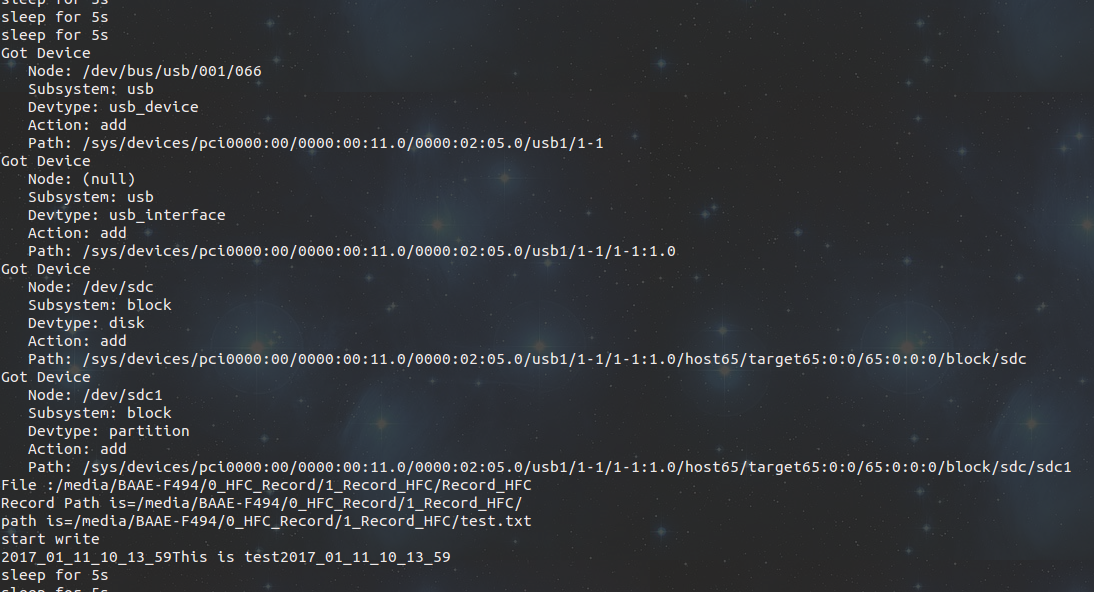
Linux 下运行,如果要在ARM下运行就编一个arm版本的。
Makefile
# specify the compiler

CC=/usr/bin/g++

# specify library

INCFLAGS=-I ./

# specify library

LIBFLAGS=-l pthread -l udev

# specify additional compile flags

FLAGS= -lm -g -Wall -Wextra

# List of files specific

SRC:= Udev_Monitor.cpp

testapp:

    ${CC} -o Udev_Monitor ${SRC} ${LIBFLAGS} ${INCFLAGS}  ${FLAGS}

clean:

    rm -f Udev_Monitor
只是基本的识别插拔U盘,检测特定的文件,检测到后往U盘里面写数据,可以用来帮助cp或者记录log文件。
虽然我的blog也没人会看,但是还是希望能帮到和我一样的菜鸟。
udev example -- detect usb and write test file的更多相关文章
- cannot open /proc/bus/usb/devices, No such file or directory
由于kernel config中没有打开对应的配置. make menuconfig 选择: Device Drivers ---> [*] USB support ---> [*] US ...
- Linux自动共享USB设备:udev+Samba
一.概述 公司最近要我实现USB设备插入Ubuntu后,自动共享到网络上,能像Windows共享一样(如\\192.168.1.10)访问里面的内容,不需要写入权限.当时听完这需求,我这新人表示惊呆了 ...
- 转://UDEV简介及配置过程
在Linux环境下安装Oracle11g RAC时,OS层面配置好多路径软件后(multipath),下一步就需要配置udev或asmlib来处理共享分区(Lun),以便Orace ASM能够看到这些 ...
- udev规则以及编写
主要内容: udev简介 如何配置和使用udev 如何编写udev规则 字符串替换和匹配 udev主要作用 编写udev规则实例 难点解析 1. udev简介 1.1 什么是udev? udev是Li ...
- Security arrangements for extended USB protocol stack of a USB host system
Security arrangements for a universal serial bus (USB) protocol stack of a USB host system are provi ...
- 嵌入式Linux驱动学习之路(二十)USB设备驱动
USB在接入系统的时候,以0的设备ID和主机通信,然后由主机为其分配新的ID. 在主机端,D+和D-都是下拉接地的.而设备端的D-接上拉时,表明此设备为高速设备:12M/s. D+接上拉时则是全速设备 ...
- [OrangePi] Booting from USB drive
You can also boot from USB drive partition. The file named cmdline.txt must exist on BOOT (fat) part ...
- Qt 获取usb设备信息 hacking
/************************************************************************** * Qt 获取usb设备信息 hacking * ...
- 如何忽略usb host 模式设备连接确认对话框
<li class="alt"><span><span>package android.hardware.usb; </span> ...
随机推荐
- CF 3-6 2级组 D题 STRESSFUL TRAINING 紧张的比赛
题目大概是这样的: 给出一个数列a[n] ,对于每一个数 a [i] 来说 都会在 T - - 时 -= b[i] 每个数都在任何时刻不能小于0 你可以在每次T - - 之前时给 一 个 a[i] + ...
- jQuery抽奖插件 jQueryRotate
实现代码 网页中引用 <script type="text/javascript" src="js/jquery.min.js"></scri ...
- 配置Beyond Compare作为比较和合并工具
配置方法 建议配置在~/.gitconfig中. Linux下 [diff] tool = bc3[difftool] prompt = false[merge] tool = bc ...
- Java 1.7 NQuery
package org.rx.common; import java.lang.reflect.Array; import java.util.*; /** * Created by wangxiao ...
- postman操作练习用例
1.注册用户:http://api.nnzhp.cn/api/user/user_reg 2.登录用户:http://api.nnzhp.cn/api/user/login 3.添加学生:http:/ ...
- 第二章:深入分析java I/O的工作机制
.2.1 java的I/O类库的基本架构 I/O的机器获取和交换信息的主要渠道,在当今数据大爆炸时代,I/O问题尤其突出,很容易成为一个性能瓶颈,Java在I/O上也一直做持续的优化,现在也引入了NI ...
- 2/17 笔记 n:字符串索引、切片、数据转换笔记
切片:顾头不顾尾 s[首:尾:步长] 代码是从上到下依次判断,只要满足一个,就不会再往下走! continue和break有点类似,区别在于continue只是终止本次循环,接着还执行后面的循环,br ...
- ip本地查询
下载地址:http://www.cz88.net/ http://www.crsky.com/soft/2611.html QQWry.dat文件在结构上分为3块:文件头,记录区,索引区. 一般我们要 ...
- ASP.NET中出现内存溢出错误System.OutOfMemoryException
原因1:数据库服务器性能问题导致内存不够用,从而引起内存溢出 原因2:在IIS的应用程序池中进行配置,引起IIS服务器的内存分配问题,从而引起内存溢出 分析: 32位操作系统的寻址空间是 ...
- Linux 查看端口被什么程序占用
lsof -i:8899 输出: COMMAND PID USER FD TYPE DEVICE SIZE/OFF NODE NAMEjava 38889 root 329u IPv6 5883661 ...