
MVC四大筛选器—ActionFilter&ResultedFilter
AuthorizeFilter筛选器
在Action的执行中包括两个重要的部分,一个是Action方法本身逻辑代码的执行,第二个就是Action方法的筛选器的执行。
MVC4中筛选器都是以AOP(面向方面编程)的方式来设计的,通过对Action方法上标注相应的Attribute标签来实现。MVC4提供了四种筛选器,分别为:AuthorizationFilter、ActionFilter、ExceptionFilter和ResultFilter,他们分别对应了四个筛选器接口IAuthorizationFilter、IActionFilter、IExceptionFilter和IResultFilter。
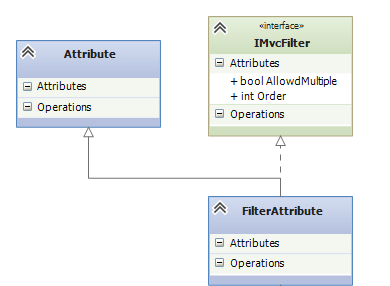
这四种筛选器都有派生于一个公共的类FilterAttribute,该类指定了筛选器的执行顺序Order和是否允许多个应用AllowedMultiple。这四种筛选器默认的执行顺序为最先进行授权筛选,最后进行异常处理,中间则是ActionFilter和ResultedFilter。
下面是抽象类FilterAttribute的类图
下面我们来具体列举一下各个筛选器的作用和实现
从字面上我们就能看出这是对Controller或Action方法授权的筛选器,即在Controller或Action方法执行前,首先会先执行该筛选器,若通过,才会继续执行。下面是此筛选器的简单类图
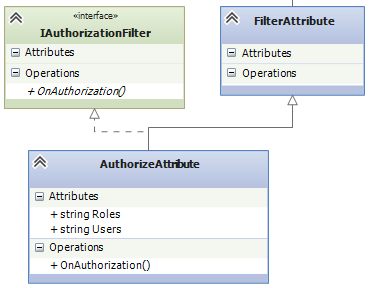
AuthorizeAttribute为最终授权筛选器的实现者,它实现了IAuthorizationFilter接口和FilterAttribute抽象类,接口中的OnAuthorization(AuthorizationContext filterContext)方法是最终验证授权的逻辑(其中AuthorizationContext是继承了ControllerContext类)
- protected virtual bool AuthorizeCore(HttpContextBase httpContext)
- {
- if (httpContext == null)
- {
- throw new ArgumentNullException("httpContext");
- }
- IPrincipal user = httpContext.User;
- if (!user.Identity.IsAuthenticated)
- {
- return false;
- }
- if (_usersSplit.Length > 0 && !_usersSplit.Contains(user.Identity.Name, StringComparer.OrdinalIgnoreCase))
- {
- return false;
- }
- if (_rolesSplit.Length > 0 && !_rolesSplit.Any(user.IsInRole))
- {
- return false;
- }
- return true;
- }
AuthorizeCore方法是最终OnAuthorization()方法调用的最终逻辑,从代码可以看出,当同时指定了users和roles时,两者只有同时满足条件时才可以验证授权通过。如
- [Authorize(Users="zhangsan", Roles="Admin")]
- public ActionResult ActionMethod()
- {
- }
则只有用户zhangsan,且用户属于Admin角色时才能验证授权通过。
若验证不通过时,OnAuthorization方法内部会调用HandleUnauthorizedRequest
虚方法进行处理,代码如下:
- protected virtual void HandleUnauthorizedRequest(AuthorizationContext filterContext)
- {
- // Returns HTTP 401 - see comment in HttpUnauthorizedResult.cs.
- filterContext.Result = new HttpUnauthorizedResult();
- }
该方法设置了参数上下文中ActionResult的值,用于供View展示。
我们可以自定义Authorize筛选器,由于OnAthurization()、AuthorizeCore()和HandleUnauthorizedRequest()方法都是虚方法,我们自定义的Authorize筛选器只需要继承AuthorizeAttribute类,重写以上三种方法,这样就可以自定义自己的验证规则和验证失败时的处理逻辑了。
IAuthorizationFilter还有其他类型的实现类,如RequireHttpsAttribute、ValidateInputAttribute都是实现了OnAuthorization()方法,来完成各自筛选器处理的。
ExceptionFilter过滤器
该筛选器是在系统出现异常时触发,可以对抛出的异常进行处理。所有的ExceptionFilter筛选器都是实现自IExceptionFilter接口
- public interface IExceptionFilter
- {
- void OnException(ExceptionContext filterContext);
- }
实现OnException方法来实现对异常的自定义处理
MVC4中实现了默认的异常处理机制,源码如下
- public virtual void OnException(ExceptionContext filterContext)
- {
- if (filterContext == null)
- {
- throw new ArgumentNullException("filterContext");
- }
- if (filterContext.IsChildAction)
- {
- return;
- }
- // If custom errors are disabled, we need to let the normal ASP.NET exception handler
- // execute so that the user can see useful debugging information.
- if (filterContext.ExceptionHandled || !filterContext.HttpContext.IsCustomErrorEnabled)
- {
- return;
- }
- Exception exception = filterContext.Exception;
- // If this is not an HTTP 500 (for example, if somebody throws an HTTP 404 from an action method),
- // ignore it.
- if (new HttpException(null, exception).GetHttpCode() != 500)
- {
- return;
- }
- if (!ExceptionType.IsInstanceOfType(exception))
- {
- return;
- }
- string controllerName = (string)filterContext.RouteData.Values["controller"];
- string actionName = (string)filterContext.RouteData.Values["action"];
- HandleErrorInfo model = new HandleErrorInfo(filterContext.Exception, controllerName, actionName);
- filterContext.Result = new ViewResult
- {
- ViewName = View,
- MasterName = Master,
- ViewData = new ViewDataDictionary<HandleErrorInfo>(model),
- TempData = filterContext.Controller.TempData
- };
- filterContext.ExceptionHandled = true;
- filterContext.HttpContext.Response.Clear();
- filterContext.HttpContext.Response.StatusCode = 500;
- // Certain versions of IIS will sometimes use their own error page when
- // they detect a server error. Setting this property indicates that we
- // want it to try to render ASP.NET MVC's error page instead.
- filterContext.HttpContext.Response.TrySkipIisCustomErrors = true;
- }
Application_Start中将HandleErrorAttribute添加到全局筛选器GlobalFilterCollection中,系统即会对异常进行对应的处理。
我们现在实现一个自定义的异常处理筛选器,在处理完后记录异常信息至日志文件中
- public class MyExceptionHandleAttribute : HandleErrorAttribute
- {
- public MyExceptionHandleAttribute()
- : base()
- {
- }
- public void OnException(ExceptionContext filterContext)
- {
- base.OnException(filterContext);
- //记录日志
- log.Info(filterContext.Exception);
- }
- }
在GlobalFilterCollection添加MyExceptionHandleAttribute 即可使用自定义的异常筛选器来处理
ActionFilter筛选器
ActionFilter筛选器是在Action方法执行前后会触发,主要用于在Action执行前后处理一些相应的逻辑。ActionFilter的筛选器都继承于ActionFilterAttribute抽象类,而它实现了IActionFilter、IResultFilter和FilterAttribute类,结构如下

因此自定义ActionFilter筛选器只要继承ActionFilterAttribute,实现其中的方法即可。
我们来举一个简单的例子,获取Action方法的执行时长,代码如下
- public class DefaultController : Controller
- {
- [ActionExecTimeSpan]
- public ActionResult DoWork()
- {
- return View();
- }
- }
- public class ActionExecTimeSpanAttribute : ActionFilterAttribute
- {
- private const string executeActionTimeKey = "ActionExecBegin";
- public override void OnActionExecuting(ActionExecutingContext filterContext)
- {
- base.OnActionExecuting(filterContext);
- //记录开始执行时间
- filterContext.HttpContext.Items[executeActionTimeKey] = DateTime.Now;
- }
- public override void OnActionExecuted(ActionExecutedContext filterContext)
- {
- //计算执行时间,并记录日志
- if (filterContext.HttpContext.Items.Contains(executeActionTimeKey))
- {
- DateTime endTime = DateTime.Now;
- DateTime beginTime = Convert.ToDateTime(filterContext.HttpContext.Items[executeActionTimeKey]);
- TimeSpan span = endTime - beginTime;
- double execTimeSpan = span.TotalMilliseconds;
- log.Info(execTimeSpan + "毫秒");
- }
- //
- base.OnActionExecuted(filterContext);
- }
- }
ResultFilter筛选器
ResultFilter筛选器是对Action方法返回的Result结果进行执行时触发的。它也分执行前和执行后两个段执行
所有的ResultFilter都实现了IResultFilter接口和FilterAttribute类,看一下接口定义
- public interface IResultFilter
- {
- void OnResultExecuting(ResultExecutingContext filterContext);
- void OnResultExecuted(ResultExecutedContext filterContext);
- }
其中OnResultExecuting和OnResultExecuted方法分别是在Result执行前、后(页面展示内容生成前、后)触发。

使用ResultFilter筛选器最典型的应用就是页面静态化,我们以后在其他文章中在对此进行详细讲解
MVC四大筛选器—ActionFilter&ResultedFilter的更多相关文章
- MVC四大筛选器—AuthorizeFilter
在Action的执行中包括两个重要的部分,一个是Action方法本身逻辑代码的执行,第二个就是Action方法的筛选器的执行. MVC4中筛选器都是以AOP(面向方面编程)的方式来设计的,通过对Act ...
- MVC四大筛选器—ExceptionFilter
该筛选器是在系统出现异常时触发,可以对抛出的异常进行处理.所有的ExceptionFilter筛选器都是实现自IExceptionFilter接口 public interface IExceptio ...
- 在ASP.NET MVC中的四大筛选器(Filter)及验证实现
http://www.cnblogs.com/artech/archive/2012/08/06/action-filter.html http://www.cnblogs.com/ghhlyy/ar ...
- MVC常用筛选器Filter
1.ActionFilterAttribute using System; using System.Collections.Generic; using System.Diagnostics; us ...
- mvc 筛选器
之前公司中,运用ActionFilterAttribute特性实现用户登录信息的验证,没事看了看,留下点东西备忘. 好的,瞅这玩意一眼就大概能猜到这货是干嘛的了吧,没错,action过滤器.其实就是A ...
- Asp.Net mvc筛选器中返回信息中断操作
在mvc中,使用response.end()或Response.Redirect("url"); 是无法阻止请求继续往下执行的.如果在action中,可以我们可以使用return ...
- Asp.Net MVC 页面代码压缩筛选器-自定义删除无效内容
Asp.Net MVC 页面代码压缩筛选器 首先定义以下筛选器,用于代码压缩. /*页面压缩 筛选器*/ public class WhiteSpaceFilter : Stream { privat ...
- 基础教程:ASP.NET Core 2.0 MVC筛选器
问题 如何在ASP.NET Core的MVC请求管道之前和之后运行代码. 解 在一个空的项目中,更新 Startup 类以添加MVC的服务和中间件. publicvoid ConfigureServi ...
- 如何在ASP.NET MVC为Action定义筛选器
在ASP.NET MVC中,经常会用到[Required]等特性,在MVC中,同样可以为Action自定义筛选器,来描述控制器所遵守的规则. 首先,我们在ASP.NET MVC项目中定义一个TestC ...
随机推荐
- ubuntu无法打开software-center
ubuntu无法打开software-center BUG: 在ubuntu14.04LTS版本下,点击软件中心图标,过了一会软件未能启动,没有动静.用命令行启动报如下错误: perrin@Littl ...
- python模块:random
"""Random variable generators. integers -------- uniform within range sequences ----- ...
- 如何通过Git GUI将自己本地的项目上传至Github(转)
githud是一个程序员以后成长都会使用到的,先不说很多优秀的开源框架都在这上面发布,光是用来管理自己的demo都已经让人感到很方便,用得也很顺畅.而真正让我下定决心使用github的原因是因为两次误 ...
- JDK、JRE、JVM之间的关系
JDK.JRE.JVM之间的关系 1.JDK下载地址 http://www.oracle.com/technetwork/java/javase/downloads/jdk8-downloads ...
- iOS逆向之Reveal
Reveal是一个强大的UI分析工具,使用它可以查看各个界面的视图层级,在解决界面显示问题时非常有用.它最大的特点就是非常直观,查看UI布局的时候非常方便. 我们知道,Reveal官网提供的方法只能监 ...
- 背水一战 Windows 10 (65) - 控件(WebView): 对 WebView 中的内容截图, 通过 Share Contract 分享 WebView 中的被选中的内容
[源码下载] 背水一战 Windows 10 (65) - 控件(WebView): 对 WebView 中的内容截图, 通过 Share Contract 分享 WebView 中的被选中的内容 作 ...
- 使用PostgreSQL进行中文全文检索
code[class*="language-"], pre[class*="language-"] { background-color: #fdfdfd; - ...
- while循环 格式化输出 密码本 编码的初识
第二天课程整理 while 循环 why : while ' 循环' 的意思 what : while 无限循环 how : 1.基本结构 while + 条件 循环的代码 初识循环 while tr ...
- InnoDB体系架构(四)Master Thread工作方式
Master Thread工作方式 在前面的文章:InnoDB体系架构——后台线程 说到:InnoDB存储引擎的主要工作都是在一个单独的后台线程Master Thread中完成.这篇具体介绍该线程的具 ...
- 16.IO之其他流
第一 打印流 一.概述: 该流提供了打印方法,可以将各种数据类型的数据都原样打印 原理; x<=3; x++){ al.add(new FileInputStream(x+".txt ...