
CentOS配置VSFTP服务
1.安装vsftpd
a、查看是否安装vsftp
[root@wsyjlly ~]# rpm -q vsftpd
package vsftpd is not installed
b、如果没有则安装vsftpd
[root@wsyjlly ~]# yum install -y vsftpd
Installed:
vsftpd.x86_64 0:3.0.2-22.el7
Complete!
c、检查安装
[root@wsyjlly ~]# whereis vsftpd
vsftpd: /usr/sbin/vsftpd /etc/vsftpd /usr/share/man/man8/vsftpd.8.gz
2.启动服务
[root@wsyjlly ~]# systemctl start vsftpd
3.查看服务状态
[root@wsyjlly ~]# systemctl status vsftpd
● vsftpd.service - Vsftpd ftp daemon
Loaded: loaded (/usr/lib/systemd/system/vsftpd.service; disabled; vendor preset: disabled)
Active: active (running) since Sun 2018-09-02 13:21:19 CST; 3s ago
Process: 1847 ExecStart=/usr/sbin/vsftpd /etc/vsftpd/vsftpd.conf (code=exited, status=0/SUCCESS)
Main PID: 1848 (vsftpd)
CGroup: /system.slice/vsftpd.service
└─1848 /usr/sbin/vsftpd /etc/vsftpd/vsftpd.conf
4.设置vsftpd开机自启
[root@wsyjlly ~]# systemctl enable vsftpd
Created symlink from /etc/systemd/system/multi-user.target.wants/vsftpd.service to /usr/lib/systemd/system/vsftpd.service.
5.查看看机启动服务中是否存在vsftpd服务
[root@wsyjlly ~]# systemctl list-unit-files | grep vsftpd
vsftpd.service enabled
vsftpd@.service disabled
vsftpd.target disabled
6.关闭匿名登录,设置root用户登录
- 修改 vsftpd.conf文件
[root@wsyjlly ~]# vi /etc/vsftpd/vsftpd.conf
设置anonymous_enable=NO
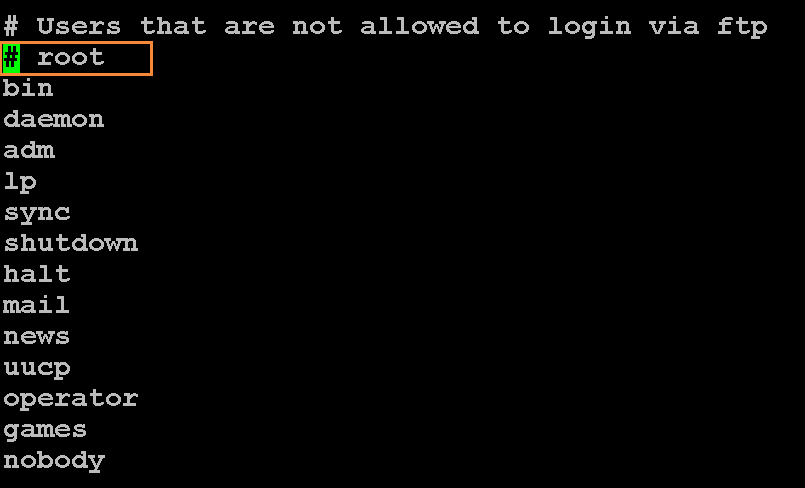
- 修改ftpusers文件
[root@wsyjlly ~]# vi /etc/vsftpd/ftpusers
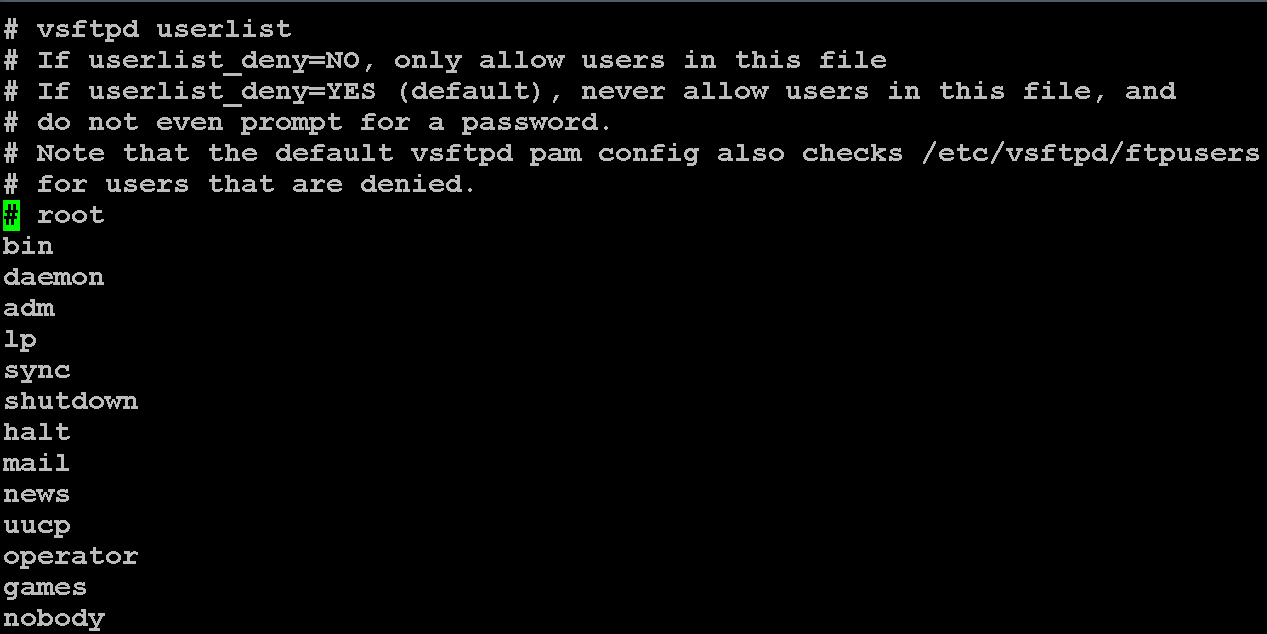
- 修改user_list文件
[root@wsyjlly ~]# vi /etc/vsftpd/user_list
7.设置防火墙
- 查看防火墙状态
[root@wsyjlly ~]# systemctl status firewalld
● firewalld.service - firewalld - dynamic firewall daemon
Loaded: loaded (/usr/lib/systemd/system/firewalld.service; disabled; vendor preset: enabled)
Active: inactive (dead)
Docs: man:firewalld(1)
[root@wsyjlly ~]#
- 开启防护墙
[root@wsyjlly ~]# systemctl start firewalld
- 防火墙开启vsftpd服务
[root@wsyjlly ~]# firewall-cmd --permanent --zone=public --add-service=ftp
success
[root@wsyjlly ~]# firewall-cmd --reload
success
8.设置SELinux
- 查看SELinux状态
[root@wsyjlly ~]# sestatus SELinux status:
SELinux status: enable 此时可掠过该步骤- [root@wsyjlly ~]# sestatus SELinux status:
SELinux status: disabled 此时需开启SELinux
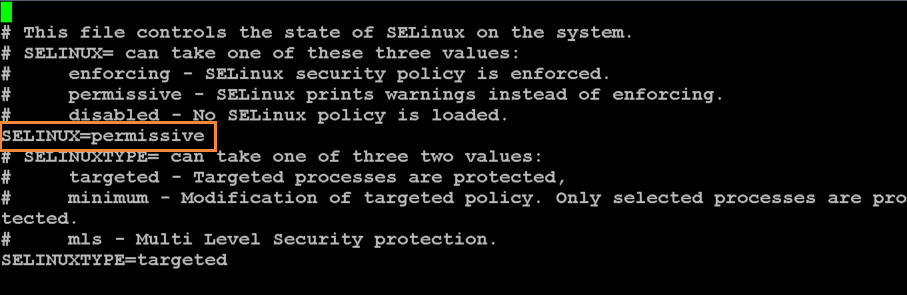
- 编辑/etc/selinux/config文件,将SELinux的值设置为permissive后reboot
[root@wsyjlly ~]# vi /etc/selinux/config
- 执行下列命令:genhomedircontouch /.autorelabel后reboot
[root@wsyjlly ~]# touch /.autorelabel
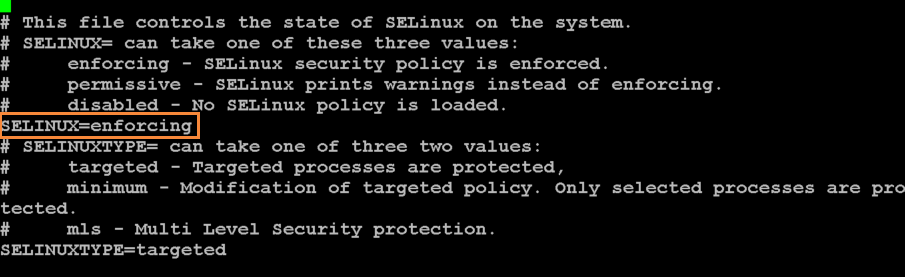
- 标记完成后再将SELinux的值设置为enforcing后reboot
[root@wsyjlly ~]# vi /etc/selinux/config
- SELinux查看ftp状态
[root@wsyjlly ~]# getsebool -a | grep ftp
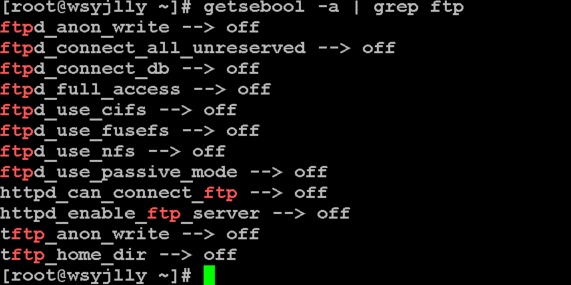
- 设置ftpd_full_access为on
[root@wsyjlly ~]# setsebool -P ftpd_full_access on
9. 重启vsftpd服务器
[root@wsyjlly ~]# systemctl restart vsftpd
[root@wsyjlly ~]# systemctl status vsftpd
T
CentOS配置VSFTP服务的更多相关文章
- Fedora 14配置vsftp服务步骤
Fedora 14配置vsftp服务步骤:1:检查Fedora14是否安装了vsftp服务 用rpm -qa|grep vsftp命令检查是否安装了vsftp服务,如果安装了,会显示安装好的版本 ...
- Centos安装vsftp服务
1.安装vsftp yum install vsftpd 2.开启vsftp服务,设置开机自启 service vsftpd restart chkconfig vsftpd on 停止vsftpd: ...
- CentOS配置VSFTP服务器
[1] 安装VSFTP [root@localhost ~]# yum -y install vsftpd [2] 配置vsftpd.conf文件 [root@localhost ~]# vi /et ...
- Centos配置tomcat服务并且开机自启动
把要配置成服务的tomcat文件夹中的catalina.sh脚本文件拷一份到/etc/init.d目录,并且改文件名称为tomcat6 cp /usr/web/tomcat/tomcat-/bin/c ...
- centos配置vsftp,ftp服务
1.安装vsftp 1.1.安装vsftp,测试安装的vsftpd的版本是:vsftpd.x86_64 0:3.0.2-11.el7_2 yum -y install vsftpd 1.2.修改配置文 ...
- centos配置nfs服务详细步骤(centos开启nfs服务)
一.NFS服务简介 NFS 是Network File System的缩写,即网络文件系统.一种使用于分散式文件系统的协定,由Sun公司开发,于1984年向外公布.功能是通过网络让不同的机器.不同的操 ...
- Linux(Centos)配置vsftp使用账号密码(虚拟用户)登录ftp进行文件上传和修改
安装vsftp yum install vsftpd -y 安装完成之后进入vsftp的配置文件夹 cd /etc/vsftpd/ 文件夹内容如下 [root@VM-0-12-centos vsftp ...
- centos配置ssh服务并简单测试
最近在做计算机集群方面的东西,简单弄了一下ssh服务. 首先把前提情况介绍一下: 1.我是用的虚拟机先模拟的,也不是没有真机,就是跑来跑去麻烦. 2.装了三个相同配置的centos虚拟机,详细参数就不 ...
- centos配置vsftpd服务2
ftp搭建 一.搭建前提a.ssh服务已经开启,b.防火墙关闭,c.连网1.查看ssh和防火墙的状态 service sshd status service iptables status 2.开启s ...
随机推荐
- fortran77读写文本文档
PROGRAM WRITETEXT IMPLICIT NONE INTEGER,PARAMETER :: NE=!fortran90 语法定义变量 DOUBLE PRECISION A(,),B(,) ...
- C++顺序容器之deque初探
C++顺序容器之deque初探 deque是双端队列,与vector非常相似,是顺序容器,不同的是,deque可以在数组开头和末尾插入和删除数据.支持快速随机访问. #include<iostr ...
- webapi 自定义缓存实现
定义一个Filter public class MyOutputCacheAttribute : ActionFilterAttribute { MemoryCacheDefault _cache = ...
- 使用ILMerge 打包C# 绿色免安装版程序
使用ILMerge工具,将C#项目debug目录下的exe及其依赖的dll文件打包成一个exe文件,直接双击就可运行. 使用工具: ILMerge :http://www.microsoft.com/ ...
- MySql数据保障
1, 安装文档 配置文件,目录,参数,用户,权限,程序,安装方式 2, 数据备份 强大的备份策略,
- Typescript 学习笔记四:回忆ES5 中的类
中文网:https://www.tslang.cn/ 官网:http://www.typescriptlang.org/ 目录: Typescript 学习笔记一:介绍.安装.编译 Typescrip ...
- redis pipeline 独占链接
pipeline期间将“独占”链接,此期间将不能进行非“管道”类型的其他操作,直到pipeline关闭:如果你的pipeline的指令集很庞大,为了不干扰链接中的其他操作,你可以为pipeline操作 ...
- 解决Eclipse中DDMS一直打印输出Connection attempts的问题
Eclipse/MyEclipse出现以下错误的解决方案: [2015-01-25 16:10:29 - DeviceMonitor] Adb connection Error:远程主机强迫关闭了一个 ...
- 和我一起打造个简单搜索之Logstash实时同步建立索引
用过 Solr 的朋友都知道,Solr 可以直接在配置文件中配置数据库连接从而完成索引的同步创建,但是 ElasticSearch 本身并不具备这样的功能,那如何建立索引呢?方法其实很多,可以使用 J ...
- 【PyTorch深度学习60分钟快速入门 】Part3:神经网络
神经网络可以通过使用torch.nn包来构建. 既然你已经了解了autograd,而nn依赖于autograd来定义模型并对其求微分.一个nn.Module包含多个网络层,以及一个返回输出的方法f ...