
vue引入bootstrap——webpack
var webpack = require('webpack')
和
// 增加一个plugins

plugins: [

  new webpack.ProvidePlugin({

    $: "jquery",

    jQuery: "jquery"

  })

],
添加完成后,文件内容如下
var path = require('path')

var fs = require('fs')

var utils = require('./utils')

var config = require('../config')

var vueLoaderConfig = require('./vue-loader.conf')

function resolve(dir) {

  return fs.realpathSync(__dirname + '/' + path.join('..', dir))

}

module.exports = {

  entry: {

    app: './src/main.js'

  },

  output: {

    path: config.build.assetsRoot,

    filename: '[name].js',

    publicPath: process.env.NODE_ENV === 'production'

      ? config.build.assetsPublicPath

      : config.dev.assetsPublicPath

  },

  resolve: {

    extensions: ['.js', '.vue', '.json'],

    alias: {

      'vue$': 'vue/dist/vue.esm.js',

      '@': resolve('src'),

    },

    symlinks: false

  },

  module: {

    rules: [

      {

        test: /\.vue$/,

        loader: 'vue-loader',

        options: vueLoaderConfig

      },

      {

        test: /\.js$/,

        loader: 'babel-loader',

        include: [resolve('src'), resolve('test')]

      },

      {

        test: /\.(png|jpe?g|gif|svg)(\?.*)?$/,

        loader: 'url-loader',

        options: {

          limit: 10000,

          name: utils.assetsPath('img/[name].[hash:7].[ext]')

        }

      },

      {

        test: /\.(mp4|webm|ogg|mp3|wav|flac|aac)(\?.*)?$/,

        loader: 'url-loader',

        options: {

          limit: 10000,

          name: utils.assetsPath('media/[name].[hash:7].[ext]')

        }

      },

      {

        test: /\.(woff2?|eot|ttf|otf)(\?.*)?$/,

        loader: 'url-loader',

        options: {

          limit: 10000,

          name: utils.assetsPath('fonts/[name].[hash:7].[ext]')

        }

      }

    ]

  },

  // 增加一个plugins

  plugins: [

    new webpack.ProvidePlugin({

      $: "jquery",

      jQuery: "jquery"

    })

  ],

}
import $ from 'jquery'
添加完成后,可以在home.vue中尝试jquery是否好用。
<template>

  <div class="hello">

    <h1>{{ msg }}</h1>

    <h2>Essential Links</h2>

    <ul>

      <li><a href="https://vuejs.org" target="_blank">Core Docs</a></li>

      <li><a href="https://forum.vuejs.org" target="_blank">Forum</a></li>

      <li><a href="https://chat.vuejs.org" target="_blank">Community Chat</a></li>

      <li><a href="https://twitter.com/vuejs" target="_blank">Twitter</a></li>

      <br>

      <li><a href="http://vuejs-templates.github.io/webpack/" target="_blank">Docs for This Template</a></li>

    </ul>

    <h2>Ecosystem</h2>

    <ul>

      <li><a href="http://router.vuejs.org/" target="_blank">vue-router</a></li>

      <li><a href="http://vuex.vuejs.org/" target="_blank">vuex</a></li>

      <li><a href="http://vue-loader.vuejs.org/" target="_blank">vue-loader</a></li>

      <li><a href="https://github.com/vuejs/awesome-vue" target="_blank">awesome-vue</a></li>

    </ul>

    <div class="btn-group" role="group" aria-label="...">

      <button type="button" class="btn btn-default">Left</button>

      <button type="button" class="btn btn-default">Middle</button>

      <button type="button" class="btn btn-default">Right</button>

    </div>

    <div id="cc">cc</div>

  </div>

</template>

<script>

  $(function () {

    alert(123);

  });

  export default {

    name: 'hello',

    data () {

      return {

        msg: 'Welcome to Your Vue.js App'

      }

    }

  }

</script>

<!-- Add "scoped" attribute to limit CSS to this component only -->

<style scoped>

  h1, h2 {

    font-weight: normal;

  }

  ul {

    list-style-type: none;

    padding: 0;

  }

  li {

    display: inline-block;

    margin: 0 10px;

  }

  a {

    color: #42b983;

  }

</style>
这样,使用npm run dev后,能够在界面上看到,弹出alert,就证明jquery引入成功了。
import 'bootstrap/dist/css/bootstrap.min.css'

import 'bootstrap/dist/js/bootstrap.min'
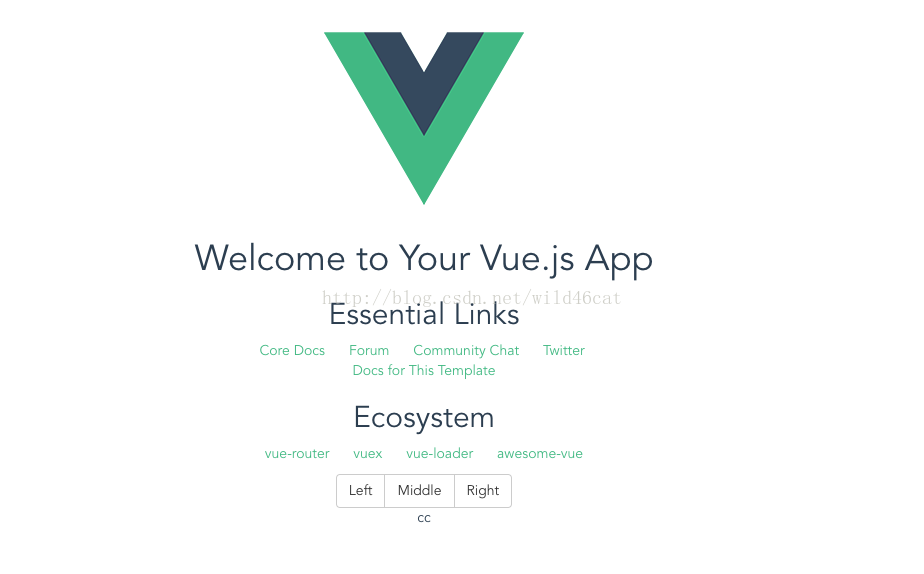
添加完成后,重新启动程序,npm run dev。就能看到界面中的按钮已经是bootstrap的按钮组了。
// The Vue build version to load with the `import` command

// (runtime-only or standalone) has been set in webpack.base.conf with an alias.

import Vue from 'vue'

import App from './App'

import router from './router'

import $ from 'jquery'

import 'bootstrap/dist/css/bootstrap.min.css'

import 'bootstrap/dist/js/bootstrap.min'

Vue.config.productionTip = false

/* eslint-disable no-new */

new Vue({

  el: '#app',

  router,

  template: '<App/>',

  components: {App}

})
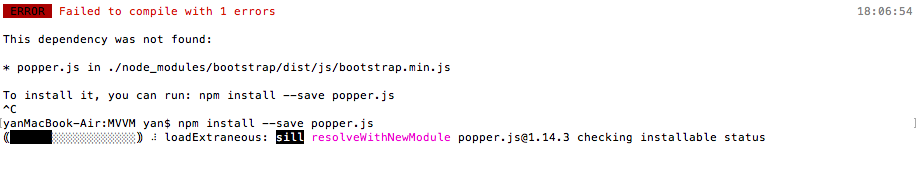
遇到的问题:
来自:https://blog.csdn.net/wild46cat/article/details/77662555
vue引入bootstrap——webpack的更多相关文章
- vue引入bootstrap、jquery
在进行vue的学习,项目中需要引入bootstrap.jquery的步骤. 一.引入jQuery 在当前项目的目录下(就是package.json),运行命令 cnpm install jquery ...
- vue 引入bootstarp --webpack
注意对应好版本 - 稳定版本 :"bootstrap": "^3.0.0" 否则样式异常, 1.npm install jquery --save-dev 引 ...
- vue引入bootstrap和fontawesome
npm install jquery npm install bootstrap npm install popper.js. import $ from 'jquery' import 'boots ...
- vue引入bootstrap.min.css报错:Cannot find module "./assets/css/bootstrap.min.css"
问题如下图: 明明文件就在那里,就是报错说找不到模板,然后我就用了网上的方法,重新建立了一个项目,请参考如下: http://blog.csdn.net/ansu2009/article/detail ...
- vue项目引入bootstrap、jquery
在进行vue的学习,项目中需要引入bootstrap.jquery的步骤. 一.引入jQuery 在当前项目的目录下(就是package.json),运行命令 cnpm install jquery ...
- Vue中引入bootstrap导致的CSS问题
最近在进行vue.js+webpack进行模块化开发的时候,遇到一个奇怪的问题. 问题是这样的: 1. 在main.js文件中引入bootstrap的js和css. 2. 自己写了一个Header.v ...
- 在进行vue的学习,项目中需要引入bootstrap、jquery的步骤。
在进行vue的学习,项目中需要引入bootstrap.jquery的步骤. 一.引入jQuery 在当前项目的目录下(就是package.json),运行命令 cnpm install jquery ...
- vue引入jQuery、bootstrap
vue引入jQuery.bootstrap 1.使用vue-cli构建的vue项目 2.npm安装jquery.bootstrap npm install jquery 3.修改build/webpa ...
- VUE引入jq bootstrap 之终极解决方案(测试)
初入VUE遇见的一些问题,在网上找了些方法,再根据自己的实际项目解决的问题写得此文,,希望对你有所帮助. vue-cli快速构建项目以及引入boostrap.jq各种插件配置 vue-cli脚手架工具 ...
随机推荐
- 纯css进度条效果
<!--html代码--> <!DOCTYPE html> <html lang="zh"> <head> <meta cha ...
- this练习题
1 function fn2(){ console.log(this.n) var n='n' this.n=10 console.log(n) } var obj={fn2:fn2, n:1} fn ...
- HTML5之FileReader文件读取接口
FileReader用来把文件读入内存,并且读取文件中的数据.FileReader接口提供了一个异步API,使用该API可以在浏览器主线程中异步访问文件系统,读取文件中的数据. 1.FileReade ...
- 常用的评价指标:accuracy、precision、recall、F1-score、ROC-AUC、PR-AUC
- Liferay7 BPM门户开发之25: Liferay7应用程序配置(APPLICATION CONFIGURATION)
首先有几个概念需要明确.1.第一个概念是这里的应用程序配置不是写XML之类的配置文件,是类似字典的类型化配置这意味着应用程序配置不只是一个字符串键值对的列表.值还可以有类型,如整数列表,字符串列表,一 ...
- iOS-UIImage图片绘制颜色
- (UIImage *)dtk_setImageColor:(UIColor *)imageColor{ //获取画布 UIGraphicsBeginImageContextWithOptions( ...
- IDEA里五种目录类型简介(Mark Directory as)
通过File -> Settings-project Structure-Modules 或者右键Mark Directory as可以找到这五种类型. Sources 一般用于标注类似 sr ...
- 【Redis面试题】Redis的字符串是怎么实现的?
年前本人在找工作面试时在Redis相关问题上可栽了跟头.在面试前按常规套路准备了一下,比如 Redis 的常用5种数据结构,Redis持久化策略,Redis实现分布式锁,简单发布订阅等等都准备了,当时 ...
- fidder显示 请求响应时间
在顶部的工具栏找到 Rules->CustomRules,第一次打开会弹出提示要安装Fiddler Script 工具,选择 [否], 就会打开 CustomRules.js 文件. 在 cla ...
- url参数+,&,=,/等转义编码
url出现了有+,空格,/,?,%,#,&,= 等特殊符号的时候,可能在服务器端无法获得正确的参数值. 案例: <img src="BarCode39.aspx?barcode ...