
安卓开发_浅谈Notification(通知栏)
Notification通知栏
是显示在手机状态的消息,代表一种全局效果的通知
快速创建一个Notification的步骤简单可以分为以下四步:
第一步:通过getSystemService()方法得到NotificationManager对象;
第二步:对Notification的一些属性进行设置比如:内容,图标,标题,相应notification的动作进行处理等等;
第三步:通过NotificationManager对象的notify()方法来执行一个notification的快讯;
第四步:通过NotificationManager对象的cancel()方法来取消一个notificatioin的快讯;
示例:
布局:
 <?xml version="1.0" encoding="utf-8"?>

 <LinearLayout xmlns:android="http://schemas.android.com/apk/res/android"

     android:layout_width="match_parent"

     android:layout_height="match_parent"

     android:orientation="vertical" >

     <Button

         android:id="@+id/notification_open"

         android:layout_width="fill_parent"

         android:layout_height="wrap_content"

         android:text="打开通知栏" />

     <Button

         android:id="@+id/notification_close"

         android:layout_width="fill_parent"

         android:layout_height="wrap_content"

         android:text="取消通知栏" />

 </LinearLayout>
布局
JAVA文件:
 package information;

 import android.annotation.SuppressLint;

 import android.app.Activity;

 import android.app.Notification;

 import android.app.Notification.Builder;

 import android.app.NotificationManager;

 import android.app.PendingIntent;

 import android.content.Context;

 import android.content.Intent;

 import android.os.Bundle;

 import android.view.View;

 import android.view.View.OnClickListener;

 import android.widget.Button;

 import com.example.allcode.R;

 public class Notification_text_one extends Activity implements OnClickListener{

     NotificationManager manger; //通知控制类

     int notification_id;

     private Button open;

     private Button close;

     @Override

     protected void onCreate(Bundle savedInstanceState) {

         // TODO Auto-generated method stub

         super.onCreate(savedInstanceState);

         setContentView(R.layout.notification);

         open = (Button) findViewById(R.id.notification_open);

         close = (Button) findViewById(R.id.notification_close);

         //系统服务

         manger = (NotificationManager) getSystemService(Context.NOTIFICATION_SERVICE);

         open.setOnClickListener(this);

         close.setOnClickListener(this);

     }

     @Override

     public void onClick(View v) {

         // TODO Auto-generated method stub

         switch (v.getId()) {

         case R.id.notification_open:  //打开通知栏

             sendNotification();

             break;

         case R.id.notification_close:

             manger.cancel(notification_id);  //取消通知栏

             break;

         default:

             break;

         }

     }

     private void sendNotification(){

         Intent intent = new Intent(this,AlertDialog_text.class);

         PendingIntent pi = PendingIntent.getActivity(this, , intent, );

         Builder builder = new Notification.Builder(this);

         builder.setSmallIcon(R.drawable.icon_72);  //设置通知栏图标

         builder.setTicker("Hello");  //设置通知栏提示

         builder.setWhen(System.currentTimeMillis());//设置时间

         builder.setContentTitle("这是通知栏标题");//通知栏标题

         builder.setContentText("这里是通知栏内容");//通知栏内容

         builder.setContentIntent(pi);//设置点击后的意图

         //效果,需要添加相应的权限

         builder.setDefaults(Notification.DEFAULT_SOUND);//设置提示声音

         builder.setDefaults(Notification.DEFAULT_LIGHTS);//设置指示灯

         builder.setDefaults(Notification.DEFAULT_VIBRATE);//设置震动

         //builder.setDefaults(Notification.DEFAULT_ALL);//设置全部效果
      //权限 <uses-permission android:name="android.permission.VIBRATE" />

         //Notification notification = builder.build();//安卓版本4.1及以上

         Notification notification = builder.getNotification();//安卓版本4.1以下

         manger.notify(notification_id,notification);

     }

 }
PendingIntent.getActivity(this, 0, intent, 0);
参数:
第二个:
    id
第四个:
设置flag位
FLAG_AUTO_CANCEL 该通知能被状态栏的清除按钮给清除掉
FLAG_NO_CLEAR 该通知能被状态栏的清除按钮给清除掉
FLAG_ONGOING_EVENT 通知放置在正在运行
FLAG_INSISTENT 是否一直进行,比如音乐一直播放,知道用户响应
1         notification.flags = Notification.FLAG_NO_CLEAR; // 点击清除按钮时就会清除消息通知,但是点击通知栏的通知时不会消失

         notification.flags = Notification.FLAG_ONGOING_EVENT; // 点击清除按钮不会清除消息通知,可以用来表示在正在运行

         notification.flags |= Notification.FLAG_AUTO_CANCEL; // 点击清除按钮或点击通知后会自动消失

         notification.flags |= Notification.FLAG_INSISTENT; // 一直进行,比如音乐一直播放,知道用户响应
效果图:

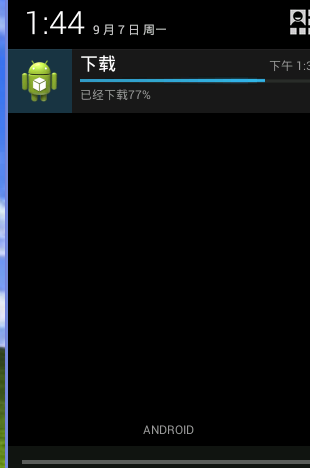
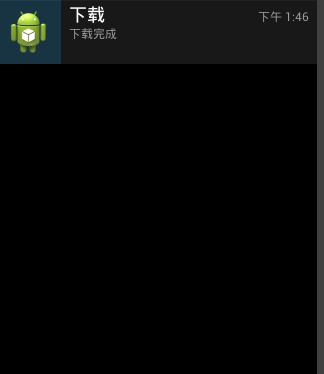
下面看一个具体应用,异步任务下载网络上的一个图片,将下载进度放到通知栏里,要求下载时,通知栏不能被删除,下载完成时,通知栏可以被删除
 package com.example.work;

 import java.io.ByteArrayOutputStream;

 import java.io.IOException;

 import java.io.InputStream;

 import java.net.HttpURLConnection;

 import java.net.MalformedURLException;

 import java.net.ProtocolException;

 import java.net.URL;

 import android.app.Activity;

 import android.app.ProgressDialog;

 import android.graphics.Bitmap;

 import android.graphics.BitmapFactory;

 import android.os.AsyncTask;

 import android.os.Bundle;

 import android.util.Log;

 import android.view.View;

 import android.view.View.OnClickListener;

 import android.widget.Button;

 import android.widget.ImageView;

 public class MainActivity extends Activity {

     private Button btn_load;

     private ImageView image_load;

     private ProgressDialog dialog;

     @Override

     protected void onCreate(Bundle savedInstanceState) {

         super.onCreate(savedInstanceState);

         setContentView(R.layout.activity_main);

         btn_load = (Button) findViewById(R.id.btn_submit);

         image_load = (ImageView) findViewById(R.id.image);

         btn_load.setOnClickListener(new OnClickListener() {

             @Override

             public void onClick(View v) {

                 // TODO Auto-generated method stub

                 new DownImageAsyncTask(MainActivity.this,image_load).execute("http://images2015.cnblogs.com/blog/493196/201509/493196-20150901203057606-579869820.jpg");

             }

         });

     }

 }
MainActivity.class
异步任务类:
 package com.example.work;

 import java.io.ByteArrayOutputStream;

 import java.io.IOException;

 import java.io.InputStream;

 import java.net.HttpURLConnection;

 import java.net.MalformedURLException;

 import java.net.ProtocolException;

 import java.net.URL;

 import android.app.Notification;

 import android.app.NotificationManager;

 import android.content.Context;

 import android.graphics.Bitmap;

 import android.graphics.BitmapFactory;

 import android.os.AsyncTask;

 import android.support.v4.app.NotificationCompat;

 import android.util.Log;

 import android.widget.ImageView;

 class DownImageAsyncTask extends AsyncTask<String, Integer, byte[]>

 {

     private Context context;

     private ImageView image;

     public DownImageAsyncTask(Context context ,ImageView image)

     {

         this.context = context;

         this.image = image;

     }

     @Override

     protected byte[] doInBackground(String... params) {

         // TODO Auto-generated method stub

         byte b[] = new byte[*];

         if(params[]!=null)

         {

             URL url;

             try {

                 url = new URL(params[]);

                 HttpURLConnection conn = (HttpURLConnection) url.openConnection();

                 conn.setRequestMethod("GET");

                 conn.setConnectTimeout();

                 conn.setDoInput(true);

                 //记录当前下载量

                 int current_len = ;

                 if(conn.getResponseCode()==)

                 {

                     //获取下载文件的总大小

                     InputStream in = conn.getInputStream();

                     int len=;

                     //获取总长度

                     long total = conn.getContentLength();

                     ByteArrayOutputStream out = new ByteArrayOutputStream();

                     while((len = in.read(b))!=-)

                     {

                         out.write(b,,len);

                         current_len+=len;

                         int progress = (int)(current_len/(float)total*);

                         //发布进度

                         publishProgress(progress);

                         Log.i("-------------------", progress+"");

                     }

                     b = out.toByteArray();

                 }

             } catch (MalformedURLException e) {

                 // TODO Auto-generated catch block

                 e.printStackTrace();

             } catch (ProtocolException e) {

                 // TODO Auto-generated catch block

                 e.printStackTrace();

             } catch (IOException e) {

                 // TODO Auto-generated catch block

                 e.printStackTrace();

             }

         }

         return b;

     }

     @Override

     protected void onPostExecute(byte[] result) {

         // TODO Auto-generated method stub

         super.onPostExecute(result);

         //将网络解析数据转换成bitmap图片格式

         Bitmap bitmap = BitmapFactory.decodeByteArray(result, , result.length);

         //下载完成后 关闭对话框

         image.setImageBitmap(bitmap);

         NotificationCompat.Builder builder = new NotificationCompat.Builder(context);

         builder.setContentTitle("下载");

         builder.setContentText("下载完成");

         builder.setSmallIcon(R.drawable.ic_launcher);

 //        builder.setOngoing(true);//设置不可以被删除

         Notification n = builder.build();

         NotificationManager manager = (NotificationManager) context.getSystemService(Context.NOTIFICATION_SERVICE);

         manager.notify(, n);

     }

     //在执行doInputBackground方法前主线程自动执行

     @Override

     protected void onPreExecute() {

         // TODO Auto-generated method stub

         super.onPreExecute();

     }

     //当使用publishProgress()方法时 自动调用此方法来更新进度

     @Override

     protected void onProgressUpdate(Integer... values) {

         // TODO Auto-generated method stub

 NotificationCompat.Builder builder = new NotificationCompat.Builder(context);

         builder.setContentTitle("下载");

         builder.setContentText("已经下载"+values[]+"%");

         builder.setSmallIcon(R.drawable.ic_launcher);

         builder.setOngoing(true);//设置不可以被删除

         //设置通知栏进度条,第一个参数为最大进度,第二个参数为进度,第三个参数为显示进度,为true时不显示进度条填充效果,

         builder.setProgress(, values[], false);

         Notification n = builder.build();

         NotificationManager manager = (NotificationManager) context.getSystemService(Context.NOTIFICATION_SERVICE);

         manager.notify(, n);

         super.onProgressUpdate(values);

     }

 }
布局文件
 <LinearLayout xmlns:android="http://schemas.android.com/apk/res/android"

     xmlns:tools="http://schemas.android.com/tools"

     android:layout_width="match_parent"

     android:layout_height="match_parent"

        android:orientation="vertical"

        android:gravity="center_horizontal"

     >

     <ImageView

         android:layout_width="wrap_content"

         android:layout_height="wrap_content"

         android:id="@+id/image"

         android:src="@drawable/ic_launcher"

         />

     <Button

         android:layout_width="wrap_content"

         android:layout_height="wrap_content"

         android:id="@+id/btn_submit"

         android:text="下载"

         />

 </LinearLayout>
效果图:
安卓开发_浅谈Notification(通知栏)的更多相关文章
- 安卓开发_浅谈ListView(SimpleAdapter数组适配器)
安卓开发_浅谈ListView(ArrayAdapter数组适配器) 学习使用ListView组件和SimapleAdapter适配器实现一个带图标的ListView列表 总共3部分 一.MainAc ...
- 安卓开发_浅谈Android动画(四)
Property动画 概念:属性动画,即通过改变对象属性的动画. 特点:属性动画真正改变了一个UI控件,包括其事件触发焦点的位置 一.重要的动画类及属性值: 1. ValueAnimator 基本属 ...
- 安卓开发_浅谈ListView(自定义适配器)
ListView作为一个实际开发中使用率非常高的视图,一般的系统自带的适配器都无法满足开发中的需求,这时候就需要开发人员来自定义适配器使得ListView能够有一个不错的显示效果 有这样一个Demo ...
- 安卓开发_浅谈Fragment之ListFragment
ListFragment,即Fragment的一个子类,当我们用的一个Fragment只需要一个listview视图的时候使用 该类有几个特点: 1.ListFragment 本身具只有一个ListV ...
- 安卓开发_浅谈OptionsMenus(选项菜单)
Android平台下所提供的菜单大体上可分为三类:选项菜单.上下文菜单和子菜单. 当Activity在前台运行时,如果用户按下手机上的Menu键,此时就会在屏幕低端弹出相应的选项菜单.但这个功能需要开 ...
- 安卓开发_浅谈ListView之分页列表
前言: 在开发的过程中,有时候我们需要从网络解析一些数据,比如最近的一些新闻,我们需要把这些数据用ListView显示出来. 因为是解析一个网络数据源,这样将会一下子将所有的数据解析出来,当数据源数据 ...
- 安卓开发_浅谈AsyncTask
现在就来学习一下AsyncTask. 一.先介绍一下AsyncTask: 在开发Android移动客户端的时候往往要使用多线程来进行操作,我们通常会将耗时的操作放在单独的线程执行,避免其占用主线程而给 ...
- 安卓开发_浅谈ListView(ArrayAdapter数组适配器)
列表视图(ListView)以垂直的形式列出需要显示的列表项. 实现过程:新建适配器->添加数据源到适配器->视图加载适配器 在安卓中,有两种方法可以在屏幕中添加列表视图 1.直接用Lis ...
- 安卓开发_浅谈SubMenu(子菜单)
子菜单,即点击菜单后出现一个菜单栏供选择 创建子菜单的步骤: (1) 覆盖Activity的onCreateOptionsMenu()方法,调用Menu的addSubMenu()方法来添加子菜单 (2 ...
随机推荐
- Apache重写规则
1..htaccess文件使用前提 .htaccess的主要作用就是实现url改写,也就是当浏览器通过url访问到服务器某个文件夹时,作为主人,我们可以来接待这个url,具体 地怎样接待它,就是此文件 ...
- Git本地上传到服务器
Git本地上传到服务器 2018年05月17日 10:45:02 VV-King 阅读数:643 标签: git 1.本机window系统的话先下载msysgit 下载后在开始菜单里面找到 &q ...
- Flask源码复习之路由
构建路由规则 一个 web 应用不同的路径会有不同的处理函数,路由就是根据请求的 URL 找到对应处理函数的过程. 在执行查找之前,需要有一个规则列表,它存储了 url 和处理函数的对应关系.最容易想 ...
- “大话架构”阿里架构师分享Java程序员需要突破的技术要点
一.源码分析 源码分析是一种临界知识,掌握了这种临界知识,能不变应万变,源码分析对于很多人来说很枯燥,生涩难懂. 源码阅读,我觉得最核心有三点:技术基础+强烈的求知欲+耐心. 我认为是阅读源码的最核心 ...
- 来了!阿里开源分布式事务解决方案 Fescar
摘要: 阿里妹导读:广为人知的阿里分布式事务解决方案:GTS(Global Transaction Service),已正式推出开源版本,取名为“Fescar”,希望帮助业界解决微服务架构下的分布式事 ...
- 可以用软连接的方式解决linux内存空间不足的问题
突然提示说/var空间满了,然后接着系统卡死,最后彻底没辙,重启试试,没想到提示什么系统错误,请联系管理员之类的提示语,也进不去登陆界面啥了.之后用其他电脑连接SSH用root账号访问. # cd / ...
- .Net RPC框架Thrift的用法
关于Thrift 下面是来自百度百科关于Thrift的介绍: thrift是一个软件框架,用来进行可扩展且跨语言的服务的开发.它结合了功能强大的软件堆栈和引擎,以构建在 C++, Java, Go ...
- Ajax之跨域访问与JSONP
前言 同源策略的限制,使得ajax无法发出跨域请求.在许多情况下,我们需要让ajax支持跨域.以下是其中一种解决方案(JSONP).JSONP解决了跨域数据访问的问题. 在html中,具有src属性的 ...
- 【PyTorch深度学习60分钟快速入门 】Part5:数据并行化
在本节中,我们将学习如何利用DataParallel使用多个GPU. 在PyTorch中使用多个GPU非常容易,你可以使用下面代码将模型放在GPU上: model.gpu() 然后,你可以将所有张 ...
- 第一个Quartz程序 (二)
1 我们使用maven项目 2 创建一个job类,在execute()方法里写上业务逻辑代码. 3 在另外一个类中创建触发器,调度器,并且绑定job. 首先在项目的pom.xml引入需要的jar包. ...