
线程封装组件(BackgroundWorker)和线程(Thread)
BackgroundWorker是微软的在.net Framwork中添加的一个组件,主要对线程的访问提供了一种安全的方式。简单的说就是对Thread的一次封装。
BackgroundWorker位于System.ComponentModel下,是一个继承了Component的组件,微软官方的解释为:Executes an operation on a separate thread.就是说,开始一个新的线程执行操作。
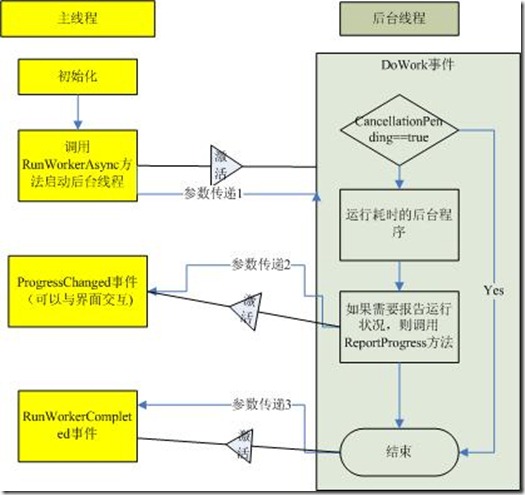
首先介绍一下BackgroundWorker的相关属性和方法:
属性:
WorkerReportsProgress:是否可以报告进度。
WorkerSupportsCancellation:是否允许异步中止。
IsBusy:是否在运行。
CancellationPending:判断BackgroundWorker是否已经异步取消。
方法:
RunWorkerAsync:开始执行任务。触发DoWork事件
ReportProgress:异步提醒,触发ProgressChanged事件,但是这个如果可以使用,必须设置WorkerReportsProgress为True
CancelAsync:取消BackgroundWorker操作。
事件:
DoWork:执行RunWorkerAsync后触发,异步执行的认为。
ProgressChanged:执行ReportProgress时触发,异步获得进度。
RunWorkerCompleted:线程结束时触发,主要有成功结束,发生异常或者取消时发生。
Thread相对来说就简单了,但是使用起来就比较麻烦了。Thread位于System.Threading的名空间下,是一个可以独立创建和操作一个线程,并且对线程进行设置优先级和获得状态的一个不可继承的类。
下面是我做的一个例子,来比较他们两个的使用。
建立一个窗体,放置了两个TextBox,分别为设置开始和结束的Progree的值,放置两个ProgressBar,分别设置为线程的Progressbar和BackGroundWorker的ProgressBar。另外放置按钮为StartBackGroundWorker,StartThread,CancelBackGroundWorker,CancelThread和PauseThread。
BackGroundWorker的使用就非常简单:
/// <summary>

        /// Handles the Click event of the btnBackGroundWorker control.

        /// </summary>

        /// <param name="sender">The source of the event.</param>

        /// <param name="e">The <see cref="System.EventArgs"/> instance containing the event data.</param>

        private void btnBackGroundWorker_Click(object sender, EventArgs e)

        {

            StartFrom = Convert.ToInt32(txtStart.Text);

            EndTo = Convert.ToInt32(txtEnd.Text);

            progressBarThread.Minimum = StartFrom;

            progressBarThread.Maximum = EndTo;

            this.btnBackGroundWorker.Enabled = false;

            this.backgroundWorker.RunWorkerAsync();

        }

        /// <summary>

        /// Handles the DoWork event of the backgroundWorker control.

        /// </summary>

        /// <param name="sender">The source of the event.</param>

        /// <param name="e">The <see cref="System.ComponentModel.DoWorkEventArgs"/> instance containing the event data.</param>

        private void backgroundWorker_DoWork(object sender, DoWorkEventArgs e)

        {

            for (int nValue = StartFrom; nValue <= EndTo; nValue++)

            {

                if (this.backgroundWorker.CancellationPending)

                {

                    e.Cancel = true;

                    return;

                }

                this.backgroundWorker.ReportProgress(nValue);

                Thread.Sleep();

            }

        }

        /// <summary>

        /// Handles the ProgressChanged event of the backgroundWorker control.

        /// </summary>

        /// <param name="sender">The source of the event.</param>

        /// <param name="e">The <see cref="System.ComponentModel.ProgressChangedEventArgs"/> instance containing the event data.</param>

        private void backgroundWorker_ProgressChanged(object sender, ProgressChangedEventArgs e)

        {

            this.prgProcessBackGroundWorker.Value = e.ProgressPercentage;

        }

        /// <summary>

        /// Handles the RunWorkerCompleted event of the backgroundWorker control.

        /// </summary>

        /// <param name="sender">The source of the event.</param>

        /// <param name="e">The <see cref="System.ComponentModel.RunWorkerCompletedEventArgs"/> instance containing the event data.</param>

        private void backgroundWorker_RunWorkerCompleted(object sender, RunWorkerCompletedEventArgs e)

        {

            // 取消

            if (e.Cancelled)

            {

                MessageBox.Show("Cancelled");

            }

            // 出现错误

            else if (e.Error != null)

            {

                MessageBox.Show(e.Error.Message + Environment.NewLine + e.Error.StackTrace);

            }

            // 完成

            else

            {

                MessageBox.Show("Completed");

                this.btnBackGroundWorker.Enabled = true;

            }

        }

        /// <summary>

        /// Handles the Click event of the btnCancelBackgroundWoker control.

        /// </summary>

        /// <param name="sender">The source of the event.</param>

        /// <param name="e">The <see cref="System.EventArgs"/> instance containing the event data.</param>

        private void btnCancelBackgroundWoker_Click(object sender, EventArgs e)

        {

            this.backgroundWorker.CancelAsync();

        }
Thread的使用就比较麻烦了,对于尤其是对异步提醒来说,需要写委托,代码量是很多,但是对于BackgroundWorker来说,却没有线程暂停和继续的方法。但是对于一般的来说,这些功能也是不用的,而且在微软的文档中还提到了,Thread的Resume和Suspend已经不推荐使用。
// 声明委托

        delegate void DelegateType(int x);

       DelegateType TheDelegate;

        // ProgressBar的开始和结束值

        int StartFrom, EndTo;

        // 是否线程暂停

        bool IsThreadPaused;

        ManualResetEvent CancelEvent = new ManualResetEvent(false);

        Thread MyThread;

        /// <summary>

        /// 委托的消息事件

        /// </summary>

        /// <param name="nProgress">进度值</param>

        private void MessageHandler(int nProgress)

        {

            lblThreadStatus.Text = "处理: " + Convert.ToString(nProgress);

            progressBarThread.Value = nProgress;

            if (nProgress == progressBarThread.Maximum)

            {

                MessageBox.Show("Completed");

                this.btnTread.Enabled = true;

            }

        }

        /// <summary>

        /// Handles the Click event of the btnTread control.

        /// </summary>

        /// <param name="sender">The source of the event.</param>

        /// <param name="e">The <see cref="System.EventArgs"/> instance containing the event data.</param>

        private void btnTread_Click(object sender, EventArgs e)

        {

            TheDelegate = MessageHandler;

            StartFrom = Convert.ToInt32(txtStart.Text);

            EndTo = Convert.ToInt32(txtEnd.Text);

            progressBarThread.Minimum = StartFrom;

            progressBarThread.Maximum = EndTo;

            btnTread.Enabled = false;

            IsThreadPaused = false;

            MyThread = new Thread(ProcessRoutine);

            MyThread.Start();

        }

        /// <summary>

        /// Processes the routine.

        /// </summary>

        private void ProcessRoutine()

        {

            for (int nValue = StartFrom; nValue <= EndTo; nValue++)

            {

                // 判断是否取消

                if (CancelEvent.WaitOne(, false) == true)

                {

                    return;

                }

                this.BeginInvoke(this.TheDelegate, nValue);

                Thread.Sleep();

            }

        }

        /// <summary>

        /// Handles the Click event of the btnCancelThread control.

        /// </summary>

        /// <param name="sender">The source of the event.</param>

        /// <param name="e">The <see cref="System.EventArgs"/> instance containing the event data.</param>

        private void btnCancelThread_Click(object sender, EventArgs e)

        {

            btnCancelThread.Enabled = false;

            btnPauseThread.Enabled = false;

            CancelEvent.Set();

            MyThread.Join();

        }

        /// <summary>

        /// Handles the Click event of the btnPauseThread control.

        /// </summary>

        /// <param name="sender">The source of the event.</param>

        /// <param name="e">The <see cref="System.EventArgs"/> instance containing the event data.</param>

        private void btnPauseThread_Click(object sender, EventArgs e)

        {

            // Bad approach!

            if (!IsThreadPaused)

            {

                IsThreadPaused = true;

                MyThread.Suspend();

                btnPauseThread.Text = "Resume Thread";

                // Disallow Cancel

                btnCancelThread.Enabled = false;

            }

            else

            {

                IsThreadPaused = false;

                MyThread.Resume();

                btnPauseThread.Text = "Pause Thread";

                btnCancelThread.Enabled = true;

            }

        }
比较起来,两个是完全相同的,对于Thread来说,灵活性就比较好了,BackgroundWorker的使用就相对来说简单了。
线程封装组件(BackgroundWorker)和线程(Thread)的更多相关文章
- Java 线程同步组件 CountDownLatch 与 CyclicBarrier 原理分析
1.简介 在分析完AbstractQueuedSynchronizer(以下简称 AQS)和ReentrantLock的原理后,本文将分析 java.util.concurrent 包下的两个线程同步 ...
- .NET组件程序设计之线程、并发管理(二)
.Net组件程序设计之线程.并发管理(二) 2.同步线程 手动同步 监视器 互斥 可等待事件 同步线程 所有的.NET组件都支持在多线程的环境中运行,可以被多个线程并发访问,如果没有线程同步,这样的后 ...
- .Net组件程序设计之线程、并发管理(一)
.Net组件程序设计之线程.并发管理(一) 1.线程 线程 线程的创建 线程的阻塞 线程挂起 线程睡眠 加入线程 线程中止 现在几乎所有的应用程序都是多线程的,给用户看来就是一个应用程序界面(应用程序 ...
- ThreadExecutorPool 线程池组件
ThreadExecutorPool是使用最多的线程池组件: Executor是用来执行提交的Runnable任务的对象,并以接口的形式定义,提供一种提交任务(submission task)与执行任 ...
- Java带参数的线程类ParameterizedThread——即如何给Thread传递参数
在Java中似乎没有提供带运行参数的线程实现类,在第三方类库中也没有找到.网上有大量的文章在讨论这个问题,但都没有提供很好的代码封装解决方案,这令我很吃惊.如果读者知道有官方或者第三方的实现方式,欢迎 ...
- 创建线程的三种方式(Thread、Runnable、Callable)
方式一:继承Thread类实现多线程: 1. 在Java中负责实现线程功能的类是java.lang.Thread 类. 2. 可以通过创建 Thread的实例来创建新的线程. 3. 每个线程都是通过某 ...
- 创建线程的两种方式比较Thread VS Runnable
1.首先来说说创建线程的两种方式 一种方式是继承Thread类,并重写run()方法 public class MyThread extends Thread{ @Override public vo ...
- Java 线程第三版 第一章Thread导论、 第二章Thread的创建与管理读书笔记
第一章 Thread导论 为何要用Thread ? 非堵塞I/O I/O多路技术 轮询(polling) 信号 警告(Alarm)和定时器(Timer) 独立的任务(Ta ...
- java中的线程问题(三)——继承Thread VS 实现Runnable的区别
从java的设计来看,通过继承Thread或者实现Runnable接口来创建线程本质上没有区别,从jdk帮助文档我们可以看到Thread类本身就实现了Runnable接口,如果一定要说它们有什么区别, ...
随机推荐
- java菜鸟之微信分享
前言:我终于理解了什么叫做教科书:教科书就是把一些简单容易的知识写成一堆谁都看不懂的书,这,就简称“教科书” 这些天接触到微信分享以及回调的问题,因为之前没接触过,所以这次做这个分享,碰了一点点壁,特 ...
- [python]UnicodeEncodeError: 'gbk' codec can't encode character '\ufffd'
有关编码问题,一直以来都是十分头疼的问题.代码中的字符编码其实还好,但是由于使用的window系统,会用Window的默认编码去解析文本. 今天用脚本在写文件的时候,就总是弹出UnicodeEncod ...
- Good Bye 2018 (A~F, H)
目录 Codeforces 1091 A.New Year and the Christmas Ornament B.New Year and the Treasure Geolocation C.N ...
- Android 屏幕适配问题分析
一.屏幕分辨率.大小及相关单位介绍 Android categorizes device screens using two general properties: size and density. ...
- 转 U-BOOT之stage1
前言 本文主要是基于大家比较熟悉的 s3c2410 ,对移植 u-boot 时 stage1 过程进行一个分析,网上关于之方面的资料很多,但是几乎都只是对代码作注解,容易让人产生知其一不知其二的感觉, ...
- ajax 浏览网页等待页面
- C++程序设计方法3:数组下标运算符重载
数组下标运算符重载 函数声明形式 返回类型operator[](参数): 如果返回类型是引用,则数组运算符调用可以出现在等式的左边,接受赋值,即: Obj[index] = value; 如果返回类型 ...
- Java 动态代理 Demo
相比于静态代理,动态代理避免了开发者编写各个繁锁的静态代理类,只需指定一组接口及目标类对象就能动态地获取代理对象. 使用动态代理的六大步骤: 1 通过实现InvocationHandler接口来自定义 ...
- angular.copy()
<!DOCTYPE html> <html> <head> <meta charset="UTF-8"> <title> ...
- oracle显示一个月的所有天数
效率高: ) s_date from dual connect 效率低: select to_date() s_date from all_tables where rownum <= ( fr ...