
211. Orchard学习 二 2、ManualResetEvent 与 AutoResetEvent
一、Orchard里异步请求处理线程队列的控制
Orchard的Orchard.WarmupStarter模块,为HttpApplication.BeginRequest时间附加了一个异步处理事件:BeginBeginRequest。
1: /// <summary>
2: /// 启动 System.Web.HttpApplication.BeginRequest 的异步处理的 System.Web.BeginEventHandler
3: /// System.Web.HttpApplication.BeginRequest 在 ASP.NET 响应请求时作为 HTTP 执行管线链中的第一个事件发生。
4: /// </summary>
5: private IAsyncResult BeginBeginRequest(object sender, EventArgs e, AsyncCallback cb, object extradata)
6: {
7: // host is available, process every requests, or file is processed
8: if (!InWarmup() || WarmupUtility.DoBeginRequest(_context))
9: {
10: /***
11: * !InWarmup() 不在预热中
12: * WarmupUtility.DoBeginRequest(_context) 找到了与请求URL匹配的静态文件资源
13: */
14: var asyncResult = new DoneAsyncResult(extradata);
15: cb(asyncResult);
16: return asyncResult;
17: }
18: else
19: {
20: // this is the "on hold" execution path
21: var asyncResult = new WarmupAsyncResult(cb, extradata);
22: Await(asyncResult.Completed);
23: return asyncResult;
24: }
25: }
在请求开始时,检查系统状态,“不在预热中”或者找到了与请求的URL匹配的静态文件资源,则构造一个 DoneAsncResult类型实例,执行并返回结果状态。如果正在预热,或没有匹配的静态文件资源,将请求加入一个待执行队列,直到预热完成发出信号后再执行(这个见Orchard.WarmupStarter.Starter.LaunchStartupThread())。
我们再来看 DoneAsyncResult和WarmupAsyncResult
1: /// <summary>
2: /// AsyncResult for "on hold" request (resumes when "Completed()" is called)
3: /// </summary>
4: private class WarmupAsyncResult : IAsyncResult
5: {
6: /****************
7: // 通知一个或多个正在等待的线程已发生事件,处理器类型。 “等待线程 事件通知 处理器”.
8: // AutoResetEvent 继承自 ,EventWaitHandle:WaitHandle , 表示一个线程同步事件。
9: // EventWaitHandle 主要操作方法: Set() , Reset()。
10: // WaitHandle 封装等待对共享资源的独占访问的操作系统特定的对象
11:
12: // 初始化一个 “等待线程 事件通知 处理器” 。
13: // 参数 initialState ,初始状态是否为 终止:
14: // true 终止 ,即目前已无事件发生,无需等待,线程继续运行
15: // false 非终止,即目前有事件发生,需等待,线程暂停运行
16: ****************/
17: private readonly EventWaitHandle _eventWaitHandle = new AutoResetEvent(false/*initialState*/);
18:
19: //...省略若干代码
20: }
21:
22: /// <summary>
23: /// 已 “执行完成 or 正在处理” 的异步操作状态
24: /// Async result for "ok to process now" requests
25: /// </summary>
26: private class DoneAsyncResult : IAsyncResult
27: {
28: /****************
29: // 通知一个或多个正在等待的线程已发生事件,处理器类型。 “等待线程 事件通知 处理器”.
30: // ManualResetEvent 继承自 ,EventWaitHandle:WaitHandle , 表示一个线程同步事件。
31: // EventWaitHandle 主要操作方法: Set() , Reset()。
32: // WaitHandle 封装等待对共享资源的独占访问的操作系统特定的对象
33:
34: // 初始化一个 “等待线程 事件通知 处理器” 。
35: // 参数 initialState ,初始状态是否为 终止:
36: // true 终止 ,即目前已无事件发生,无需等待,线程继续运行
37: // false 非终止,即目前有事件发生,需等待,线程暂停运行
38: ****************/
39: private static readonly WaitHandle _waitHandle = new ManualResetEvent(true/*initialState*/);
40:
41: //...省略若干代码
42: }
他们分别实例化了AutoResetEvent 和 ManualResetEvent事件通知处理器。AutoResetEvent 和 ManualResetEvent 都继承自 EventWaitHandle,WaitHandle ,表示一个线程同步事件通知器。 通俗的讲,就是程序中需要跨多个线程处理协调事件时,一个用来通知协调事件处理状态的处理器。
EventWaitHandle 主要操作方法:
- Set() :将事件状态设置为终止状态,即目前已无事件发生,无需等待,其他等待中的线程继续运行;
- Reset() :将事件状态设置为非终止状态,即目前有事件发生,需等待,其他线程暂停运行;
- WaitOne():阻塞当前线程 ,直到 _resetEventHandler 收到新的事件信号(即 set or reset);
AutoResetEvent 和 ManualResetEvent初始化时,参数 initialState ,初始状态是否为 终止。其表意如下:
- true 终止 ,即目前已无事件发生,无需等待,线程继续运行,
- false 非终止,即目前有事件发生,需等待,线程暂停运行
二、AutoResetEvent 与 ManualResetEvent
看起来 AutoResetEvent 和 ManualResetEvent 很像,我们通过一个demo来看看他们的区别
Class Program 与 CLaunchStartupThread
1: class Program
2: {
3: static void Main(string[] args)
4: {
5: Common.ConsoleWriteLine("----------------------", false);
6: Common.ConsoleWriteLine(" S 暂停 R 继续 ", false);
7:
8: var resetEventHandler = new ResetEventHandle<ManualResetEvent>(new ManualResetEvent(true));
9: //var resetEventHandler = new ResetEventHandle<AutoResetEvent>(new AutoResetEvent(true));
10: Common.ConsoleWriteLine(" Type: " + resetEventHandler.CurTypeName, false);
11: Common.ConsoleWriteLine(" MainThread: ");
12: Common.ConsoleWriteLine("\r\n", false);
13: //创建线程
14: Common.CreateThreads(resetEventHandler.Run, 3);
15:
16: while (true)
17: {
18: string input = Console.ReadLine();
19: if (input.Trim().ToLower() == "s")
20: {
21: Common.ConsoleWriteLine("线程 暂停 运行.");
22: resetEventHandler.Reset();
23: }
24: else if (input.Trim().ToLower() == "r")
25: {
26: Common.ConsoleWriteLine("线程 继续 运行.");
27: resetEventHandler.Set();
28: }
29: }
30:
31: }
32: }
33: class Common
34: {
35: public static void CreateThreads(Action runFunc, int tCount = 2)
36: {
37: var i = 0;
38: while (i < tCount)
39: {
40: var t = new Thread(new ThreadStart(runFunc));
41: t.Start();
42: i++;
43: }
44: }
45: public static void ConsoleWriteLine(string msg, bool withThreadSign = true, bool withDateTimeSign = false)
46: {
47: Console.WriteLine(
48: msg +
49: (withThreadSign ? (" [ThreadId: " + Thread.CurrentThread.ManagedThreadId.ToString() + " ]") : "") +
50: (withDateTimeSign ? ("[" + System.DateTime.Now.ToString("yyyy-MM-dd HH:mm:ss fff") + "]") : "")
51: );
52: }
53: }ResetEventHandle.cs1: class ResetEventHandle<T> where T : EventWaitHandle
2: {
3: /// <summary>test
4: /// 通知一个或多个正在等待的线程已发生事件,处理器类型。 “等待线程 事件通知 处理器”.
5: /// ManualResetEvent 继承自 ,EventWaitHandle:WaitHandle , 表示一个线程同步事件。
6: /// EventWaitHandle 主要操作方法: Set() , Reset()。
7: /// WaitHandle 封装等待对共享资源的独占访问的操作系统特定的对象
8: /// </summary>
9: private T _resetEventHandler;
10:
11: public ResetEventHandle(T resetEventHandler)
12: {
13: // 初始化一个 “等待线程 事件通知 处理器” 。
14: // 参数 initialState ,初始状态是否为 终止:
15: // true 终止 ,即目前已无事件发生,无需等待程暂,线程继续运行
16: // false 非终止,即目前有事件发生,需等待,线停运行
17: // this._mre = new ManualResetEvent(true);
18: this._resetEventHandler = resetEventHandler;
19: }
20:
21: public string CurTypeName { get { return _resetEventHandler.GetType().Name; } }
22: /// <summary>
23: /// 将事件状态设置为终止状态, 即目前已无事件发生,无需等待,其他等待中的线程继续运行
24: /// </summary>
25: public void Set() { this._resetEventHandler.Set(); }
26:
27: /// <summary>
28: /// 将事件状态设置为非终止状态,即目前有事件发生,需等待,其他线程暂停运行
29: /// </summary>
30: public void Reset() { this._resetEventHandler.Reset(); }
31:
32: public void Run()
33: {
34: string strThreadID = string.Empty;
35: try
36: {
37: while (true)
38: {
39: // 阻塞当前线程 ,直到 _resetEventHandler 收到新的事件信号(即 set or reset)
40: this._resetEventHandler.WaitOne();
41:
42: strThreadID = Thread.CurrentThread.ManagedThreadId.ToString();
43: Common.ConsoleWriteLine("线程 (" + strThreadID + ") 正在运行.");
44:
45: Thread.Sleep(5000);
46: }
47: }
48: catch (Exception ex)
49: {
50: Common.ConsoleWriteLine("线程 (" + strThreadID + ") 异常!错误:" + ex.Message.ToString());
51: }
52: }
53: }
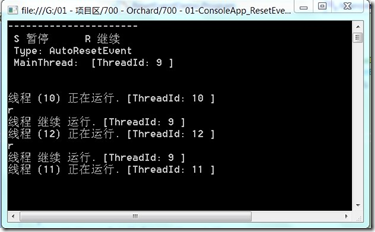
在Program.Main()中,如果调用AutoResetEvent类型,我们每次输入r,创建的三个线程继续运行,但一次只运行一个线程,其他被阻塞的线程则继续等待通知信号:
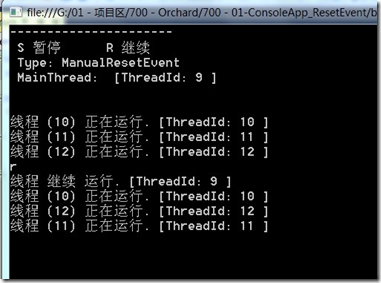
如果调用ManualResetEvent类型,我们每次输入r,创建的三个线程继续运行,每次所有创建后被阻塞的线程都会运行起来:
三、生活中的例子:
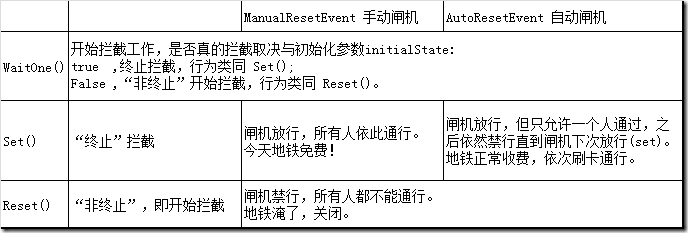
参考文档中,所列公路收费站的例子并不恰当。我们参考一下地铁闸机:
四、一点总结:
- ManualResetEvent 和 AutoResetEvent都可以继续运行或阻塞线程,并且都是一次性阻塞所有影响到的线程;
- ManualResetEvent 是一次继续运行一批线程;
- AutoResetEvent 是一次继续运行一个线程,其他影响到的线程继续等待新的事件通知信号;
- AutoResetEvent.Set() = ManualResetEvent.Set() + ManualResetEvent.Reset();
- 如果共享资源仅允许单线程使用的情况下,应选择AutoResetEvent;如果共享资源允许多个线程同时使用,则可以选择ManualResetEvent;
- 言外之意,只有一个待处理线程时,ManualResetEvent 和 AutoResetEvent效果是一致的。
DEMO代码
https://bitbucket.org/wsliujun/700-01-consoleapp_resetevent/
相关参考
http://www.cnblogs.com/tianzhiliang/archive/2011/03/04/1970726.html
http://www.cnblogs.com/qingyun163/archive/2013/01/05/2846633.html
http://msdn.microsoft.com/zh-cn/library/system.threading.manualresetevent.aspx
http://msdn.microsoft.com/zh-cn/library/system.threading.autoresetevent.aspx
211. Orchard学习 二 2、ManualResetEvent 与 AutoResetEvent的更多相关文章
- C#多线程之二:ManualResetEvent和AutoResetEvent
初次体验 ManualResetEvent和AutoResetEvent主要负责多线程编程中的线程同步:以下一段是引述网上和MSDN的解析: 在.Net多线程编程中,AutoResetEvent和Ma ...
- 213. Orchard学习 二 3、001.IOrchardHost 与Autofac
继前篇,在Orchard Application_Start() -> HostInitialization() 里,调用 OrchardStarter.CreateHost创建IOrchard ...
- 200. Orchard学习 目录
201. Orchard学习 一.基础 210. Orchard学习 二.启动 211. Orchard学习 二 1.Application_Start 212. Orchard学习 二 2.Manu ...
- C# 多线程学习系列四之ThreadPool取消、超时子线程操作以及ManualResetEvent和AutoResetEvent信号量的使用
1.简介 虽然ThreadPool.Thread能开启子线程将一些任务交给子线程去承担,但是很多时候,因为某种原因,比如子线程发生异常.或者子线程的业务逻辑不符合我们的预期,那么这个时候我们必须关闭它 ...
- emberjs学习二(ember-data和localstorage_adapter)
emberjs学习二(ember-data和localstorage_adapter) 准备工作 首先我们加入ember-data和ember-localstorage-adapter两个依赖项,使用 ...
- 【C#】【Thread】ManualResetEvent和AutoResetEvent区别
ManualResetEvent和AutoResetEvent主要用于线程之间同步问题. 主要使用方法有Set();Reset();WaitOne(); Set():将事件状态设置为终止状态,允许一个 ...
- ReactJS入门学习二
ReactJS入门学习二 阅读目录 React的背景和基本原理 理解React.render() 什么是JSX? 为什么要使用JSX? JSX的语法 如何在JSX中如何使用事件 如何在JSX中如何使用 ...
- ManualResetEvent和AutoResetEvent的区别实例
ManualResetEvent和AutoResetEvent的作用可以理解为在线程执行中插入停顿点flag终止程序运行,然后通过设置flag的状态来使得程序继续运行. 两者的区别是:ManualRe ...
- TweenMax动画库学习(二)
目录 TweenMax动画库学习(一) TweenMax动画库学习(二) TweenMax动画库学习(三) Tw ...
随机推荐
- Eclipse Android 模拟器启动过慢
打开AVD Manager窗口,在模拟器配置页面,选择Intel Atom (x86)选项.笔记本的CPU处理器是Intel 酷睿. 可以发现模拟器的启动速度明显变快.
- E. Segment Sum(数位dp)
题意:求一个区间内满足所有数位不同数字个数小于K的数字总和.比如:k=2 1,2,3所有数位的不同数字的个数为1满足,但是123数位上有三个不同的数字,即123不满足. 我们可以使用一个二进制的数 ...
- MAC shell ps 命令详解(转)
ps命令为我们提供了一次性的查看进程结果,它所提供的查看结果不是动态连续的:如果想对进程时间监控,应该用top工具 Linux中的ps命令是Process Status的缩写.ps命令用来列出系统中当 ...
- [leetcode]75. Sort Colors三色排序
Given an array with n objects colored red, white or blue, sort them in-place so that objects of the ...
- day0-功能自动化的前提
自动化不是万能的,不是什么产品都适合自动化测试,那些产品适合自动化测试? 只要满足下面三个条件就可以进行自动化测试 一:软件需求变动不频繁 二:项目周期较长 自动化测试框架的设计.脚本的开发与调试需要 ...
- playframework 一步一步来 之 日志(一)
日志模块是一个系统中必不可少的一部分,它可以帮助我们写程序的时候查看错误信息,利于调试和维护,在业务面,它也可以记录系统的一些关键性的操作,便于系统信息的监控和追踪. play的日志是基于logbac ...
- TensorFlow数据读取
TensorFlow高效读取数据的方法 TF Boys (TensorFlow Boys ) 养成记(二): TensorFlow 数据读取 Tensorflow从文件读取数据 极客学院-数据读取 十 ...
- JNI 记
Java Native Interface(JNI)从零开始详细教程 ================================================================ ...
- JavaScript日历(es5版本)
近期在知乎上看到这么一个帖子,题主说自己JavaScript都学完了,结果老师留的作业还是不会写,就是写一个日历的插件,结果楼下一堆大牛出现了,百度的阿里的纷纷站出来发表自己的看法,有人认为简单,有人 ...
- ActiveMQ_4SpringBoot整合
SpringBoot实现 引入jar包 <dependency> <groupId>org.springframework.boot</groupId> ...