
kindeditor富文本编辑器初步使用教程
下载kindeditor
可以选择去官网下载(http://kindeditor.net/down.php),不过要翻墙;或者直接CSDNhttp://download.csdn.net/download/dknightl/9813052下载解压完放入自己的项目中
在解压完后可以删除不需要的文件夹,我是删除了asp、asp.net、jsp、php,examples可以放到其他地方,用作代码参考。
初始化kindeditor富文本编辑器
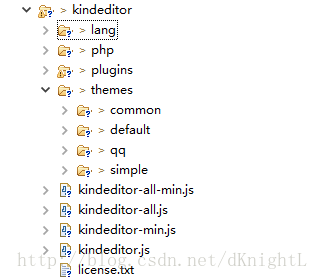
- 首先先导入下面css和js文件
        <link rel="stylesheet" href="../themes/default/default.css" />

        <script charset="utf-8" src="../kindeditor-min.js"></script>

<script charset="utf-8" src="../lang/zh_CN.js"></script>- 然后初始化(textarea 为富文本编辑器主题,script代码初始化)
    <textarea id="mul_input" name="content" style="width:700px;height:200px;visibility:hidden;display: block;">KindEditor</textarea>

    <script>

        //简单模式初始化

        var editor;

        KindEditor.ready(function(K) {

            editor = K.create('textarea[name="content"]', {

                resizeType : 1,

                allowPreviewEmoticons : false,

                allowImageUpload : false,

                items : [

                    'fontname', 'fontsize', '|', 'forecolor', 'hilitecolor', 'bold', 'italic', 'underline',

                    'removeformat', '|', 'justifyleft', 'justifycenter', 'justifyright', 'insertorderedlist',

                    'insertunorderedlist', '|', 'emoticons', 'image', 'link']

            });

        });

    </script>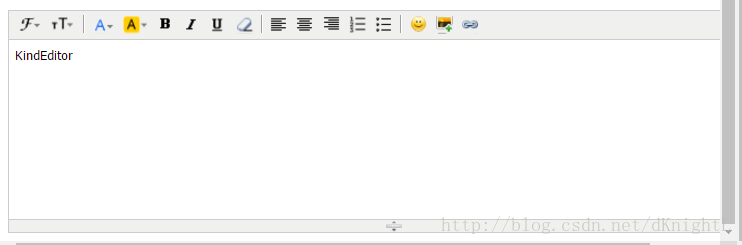
        //默认模式

        <script>

            var editor;

            KindEditor.ready(function(K) {

                editor = K.create('textarea[name="content"]', {

                    allowFileManager : true

                });

                K('input[name=getHtml]').click(function(e) {

                    alert(editor.html());

                });

                K('input[name=isEmpty]').click(function(e) {

                    alert(editor.isEmpty());

                });

                K('input[name=getText]').click(function(e) {

                    alert(editor.text());

                });

                K('input[name=selectedHtml]').click(function(e) {

                    alert(editor.selectedHtml());

                });

                K('input[name=setHtml]').click(function(e) {

                    editor.html('<h3>Hello KindEditor</h3>');

                });

                K('input[name=setText]').click(function(e) {

                    editor.text('<h3>Hello KindEditor</h3>');

                });

                K('input[name=insertHtml]').click(function(e) {

                    editor.insertHtml('<strong>插入HTML</strong>');

                });

                K('input[name=appendHtml]').click(function(e) {

                    editor.appendHtml('<strong>添加HTML</strong>');

                });

                K('input[name=clear]').click(function(e) {

                    editor.html('');

                });

            });

        </script>

    </head>

    <body>

        <h3>默认模式</h3>

        <form style="margin: 0;">

            <textarea name="content" style="width:800px;height:400px;visibility:hidden;display: block;">KindEditor</textarea>

            <p>

                <input type="button" name="getHtml" value="取得HTML" />

                <input type="button" name="isEmpty" value="判断是否为空" />

                <input type="button" name="getText" value="取得文本(包含img,embed)" />

                <input type="button" name="selectedHtml" value="取得选中HTML" />

                <br />

                <br />

                <input type="button" name="setHtml" value="设置HTML" />

                <input type="button" name="setText" value="设置文本" />

                <input type="button" name="insertHtml" value="插入HTML" />

                <input type="button" name="appendHtml" value="添加HTML" />

                <input type="button" name="clear" value="清空内容" />

                <input type="reset" name="reset" value="Reset" />

            </p>

        </form>

    </body>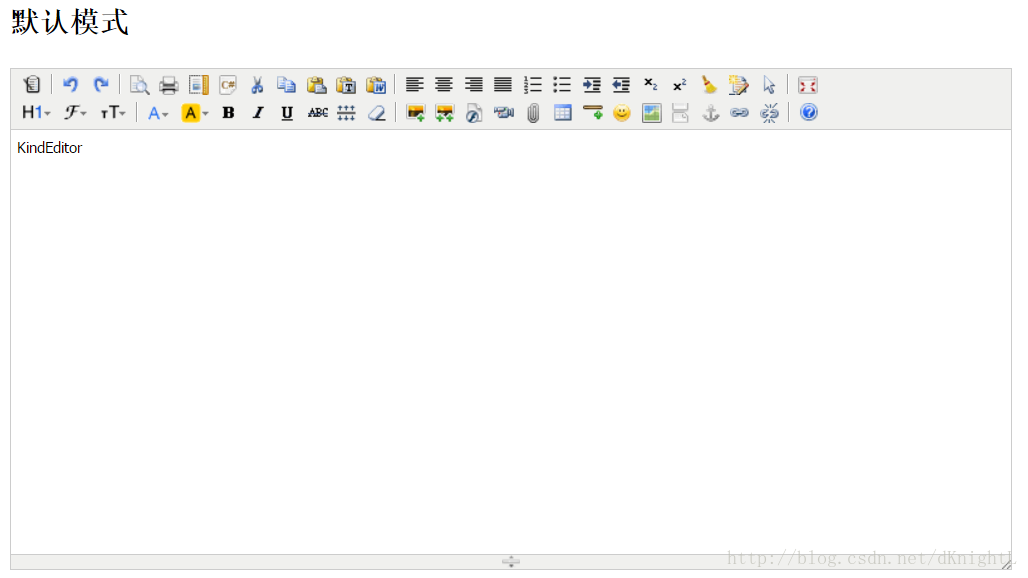
kindeditor富文本编辑器初步使用教程的更多相关文章
- django的admin或者应用中使用KindEditor富文本编辑器
由于django后台管理没有富文本编辑器,看着好丑,展示出来的页面不美观,无法做到所见即所得的编辑方式,所以我们需要引入第三方富文本编辑器. 之前找了好多文档已经博客才把这个功能做出来,有些博客虽然写 ...
- KindEditor富文本编辑器使用
我的博客本来打算使用layui的富文本编辑器,但是出了一个问题,无法获取编辑器内容,我参考官方文档,获取内容也就那几个方法而已,但是引入进去后始终获取的值为空,百度和bing都试过了,但是始终还是获取 ...
- (转)淘淘商城系列——KindEditor富文本编辑器的使用
http://blog.csdn.net/yerenyuan_pku/article/details/72809794 通过上文的学习,我们知道了怎样解决KindEditor富文本编辑器上传图片时的浏 ...
- (转)学习淘淘商城第二十二课(KindEditor富文本编辑器的使用)
http://blog.csdn.net/u012453843/article/details/70184155 上节课我们一起学习了怎样解决KindEditor富文本编辑器上传图片的浏览器兼容性问题 ...
- coding++:快速构建 kindeditor 富文本编辑器(一)
此案例 demo 为 SpringBoot 开发 1.官网下载相关资源包:http://kindeditor.net/down.php 2.编写页面(引入相关JS) <!DOCTYPE html ...
- springboot中使用kindeditor富文本编辑器实现博客功能
kindeditor在之前已经用过,现在在springboot项目中使用.并且也在里面使用了图片上传以及回显等功能. 其实主要的功能是图片的处理:kindeditor对输入的内容会作为html标签处理 ...
- kindEditor 富文本编辑器 使用介绍
第一版:存放位置: ---->把该创建的文件包放到javaWeb 过程的 WEB_INF 下:如图所示. 第二步:< kindEditor 插件的引用> :JS引用 <scr ...
- 20180310 KindEditor 富文本编辑器
问题: 如何判断富文本编辑器文本内容非空 错误的办法,采用js 对控件本身的txt ID 号抓取获取值,由于加载富文本编辑器时,界面的ID 已经经过了修改或者可以用转换来说,所以抓取是无效果的. 需要 ...
- ASP.NET网站使用Kindeditor富文本编辑器配置步骤
1. 下载编辑器 下载 KindEditor 最新版本,下载页面: http://www.kindsoft.net/down.php 2. 部署编辑器 解压 kindeditor-x.x.x.zip ...
随机推荐
- echo的运行
例子:编译.链接examples中的echo. 编译: g++ -c -I ~/build/release-install-cpp11/include echo.cc -std=c++11 g++ - ...
- OpenGL的gl.h出现一堆错误,如重定义什么的
问题:生成时提示 gl.h中出现一堆错误,如 error C2144: 语法错误 : "void"的前面应有";" error C2182: "API ...
- CAS和ABA问题
一.引言 ...
- zabbix通过自动发现tomcat应用端口监控连接数
192.168.10.98上 netstat -anp | wc -l netstat -anp|grep 8094 | grep ESTABLISHED | wc -l netstat -anp|g ...
- NowCoder Wannafly 27E 黄魔法师 构造
原文链接https://www.cnblogs.com/zhouzhendong/p/NowCoder-Wannafly27E.html 题目传送门 - NowCoder Wannafly 27E 题 ...
- 063 SparkStream数据接收方式
1.两种方式 2.Basic Source 由StreamingContext可以提供的API 上面做的wordcount中的方式就算是第一种方式. 3.Advanced Source 使用数据接收器 ...
- Maya cmds filterExpand 列出 选择的 uvs vertices faces edges 等 component 类型
Maya cmds filterExpand 列出 选择的 uvs vertices faces edges 等 component 类型 cmds.ls() 的 flags 中没有指明 uvs 等这 ...
- 用sql的avg(score)求完平均值后,保存两位小数的方法(用于查询或视图)
查jx_score表的平均值,以哪次考试(testid)和科目分组(courseid) select testid, courseid, round(avg(`jx_score`.`score`),2 ...
- linux硬盘挂载-新硬盘挂载和扩容硬盘挂载
这里对当前我实际操作后的两种硬盘挂载进行整理: 第1种是直接添加一块新硬盘,然后进行挂载. 第2种是对硬盘进行扩容后,对扩容后的空间进行分区再进行挂载. [内容为参考网上资料,再加自已实际操作情况进行 ...
- Cinema CodeForces - 670C (离散+排序)
Moscow is hosting a major international conference, which is attended by n scientists from different ...