
python入门 -- 学习笔记1
学习资料:笨方法学Python
准备:
- 安装环境----请自行网络搜索(Windows安装很简单,和其他安装程序一样)
- 找一个自己习惯的编辑器(比如:sublime text 3)
- 创建一个专门的目录,按着资料把所有的代码敲一遍 -- 可了解下DOS基本命令
1、第一个程序
文件命名方式: 文件.py
执行方式:python 文件.py (在该文件路径下执行)
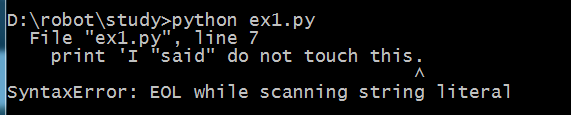
若执行错误,会有报错提示,看不懂可以从搜索引擎中查询
字符串的表示有几种方式,你注意到了吗~,还可以继续搜索是否有其他表示方式
正确代码及结果:

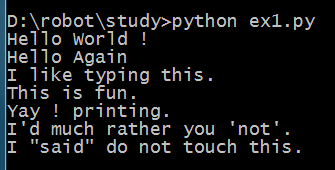
错误代码及结果:可以根据提示进行搜索错误原因,并可通过提示查找对应的错误代码行进行检查

习题2:注释与井号----程序里的注释是很重要的
代码:
# A comment,this is so you can read your program later.
# Anything after the # is ingnored by python.
print "I could have code like this." # and the comment after is ignored
# You can also use a comment to "disable" or comment out a piece of code:
# print "This won't run."
print "This will run"
运行:

习题3:数字和数学计算
• + plus 加法计算
• - minus 减法计算
• / slash 除法计算(保留商,舍弃余数)
• * asterisk 乘法计算
• % percent 模计算(取余数)
• < less-than 比较运算 小于号
• > greater-than 比较运算 大于号
• <= less-than-equal 比较运算 小于等于号
• >= greater-than-equal 比较运算 大于等于号
代码:建议养成良好的代码习惯,加空格
print "I will count my chickens:"
print "Hens", 25 + 30 / 6
print "Roosters", 100 - 25 * 3 % 4
print "Now I will count the eggs:"
print 3 + 2 + 1 - 5 + 4 % 2 - 1 /4 + 6
print "Is it true that 3 + 2 < 5 - 7?"
print 3 + 2 < 5 - 7
print "What is 3 + 2?", 3 + 2
print "What is 5 - 7?", 5 - 7
print "Oh, that's why it's False."
print "How about some more."
print "Is it greater?", 5 > -2
print "Is it greater or egual?", 5 >= -2
print "Is it less or egual?", 5 <= -2
结果:

习题4:变量和命名 -- 某东西的名字,在程序中建议以变量代表的真实含义用英语命名,亦可多个单词以“_”拼接
命名规范:适用字母、数字、下划线,数字不能开头
备注:字符串与变量的区别? 变量不用引号,直接调用变量名
代码:
cars = 100
space_in_a_car = 4.0
drivers = 30
passengers = 90
cars_not_driven = cars - drivers
cars_driven = drivers
carpool_capacity = cars_driven * space_in_a_car
average_passengers_per_car = passengers / cars_driven
print "There are", cars, "cars available."
print "There are only", drivers, "drivers available."
print "There will be", cars_not_driven, "empty cars today."
print "We van transport", carpool_capacity, "people today."
print "We have", passengers, "to carpool today."
print "We need to put about", average_passengers_per_car, "in each car."
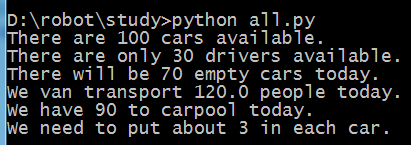
结果:
习题5:更多的变量及打印
字符串是程序将信息展示给人的方式。可以打印它们,可以将它们写入文件,还可以将它们发送给网站服务器,很多事情都是通过字符串交流实现。本习题引入格式化字符串。
常用:%s 字符串 ; %d 整数 ; %f 浮点数 ; %r 自然字符串 ,其余可搜索看看,另可查查%s和%r有什么不同~( 和 print "%r" % "\n")
格式:"%s" % 对应的变量(变量多个时,用圆括号括起来,与前面一一对应,中间用逗号隔开)
注意:大小写敏感,my_age和My_age代表不同的变量
如果使用了非ASCII字符碰到了编码错误,记得在最顶端加一行 # coding: utf-8
代码:
my_name = 'Zed A. Shaw'
my_age = 35
my_height = 74
my_weight = 180
my_eyes = 'Brown'
my_teeth = 'White'
my_hair = 'Black'
print "Let's talk about %s." % my_name
print "He's %d inches tail." % my_height
print "He's %d pounds heavy." % my_weight
print "Actually that's not too heavy."
print "He's got %s eyes and %s hair." % (my_eyes, my_hair)
print "His teeth are usually %s depending on the coffee." % my_teeth
# this line is trick, try to get it exactly right
print "If I add %d, %d, and %d I get %d." % (my_age, my_height, my_weight, my_age + my_height + my_weight)
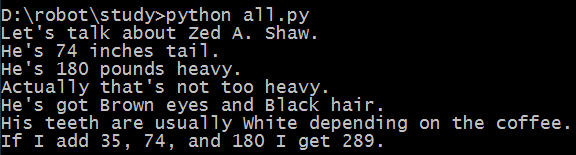
结果:
习题6:字符串和文本
备注:字符串拼接可以使用“+”
-- “+” 表示拼接 “,”主要是分割参数的一种方式
代码:
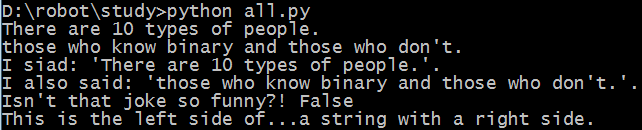
X = "There are %d types of people." % 10
binary = "binary"
do_not = "don't"
Y = "those who know %s and those who %s." % (binary, do_not)
print X
print Y
print "I siad: %r." % X
print "I also said: '%s'." % Y
hilarious = False
joke_evaluation = "Isn't that joke so funny?! %r"
print joke_evaluation % hilarious
w = "This is the left side of..."
e = "a string with a right side."
print w + e
结果:
习题7:更多打印
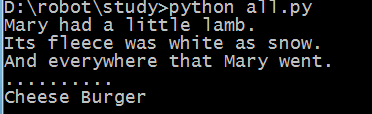
备注:代码倒数第二行的打印,最后的逗号注意到了吗?不加的话会有怎样的效果呢?
代码:
print "Mary had a little lamb."
print "Its fleece was white as %s." % 'snow'
print "And everywhere that Mary went."
print "." * 10 # what'd that do?
end1 = "C"
end2 = "h"
end3 = "e"
end4 = "e"
end5 = "s"
end6 = "e"
end7 = "B"
end8 = "u"
end9 = "r"
end10 = "g"
end11 = "e"
end12 = "r"
# watch that comma at the end. try removing it to see what happens
print end1 + end2 + end3 + end4 + end5 +end6,
print end7 + end8 + end9 + end10 + end11 + end12
结果:
习题8:打印,打印
代码:
formmatter = "%r %r %r %r"
print formmatter % (1, 2, 3, 4)
print formmatter % ("one", "two", "three", "four")
print formmatter % (True, False, False, True)
print formmatter % (formmatter, formmatter, formmatter, formmatter)
print formmatter % (
"I had this thind.",
"That you could type up right.",
"But it didn't sing.",
"So I said goodnight."
)
结果:

习题9:打印,打印,打印
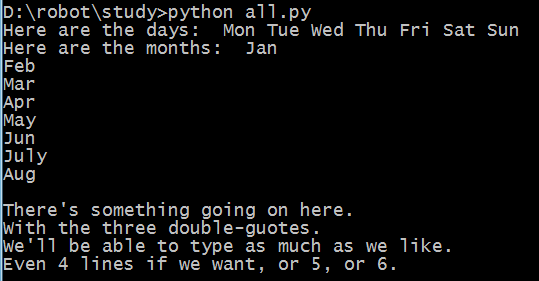
备注:代码中三个连着的双引号有什么作用?使用三个连着的单引号可以吗?\n 的作用?
-- """ 多行
文本
"""
-- \n 转义字符,表示新起一行 是否还有其他类似的转义字符?
代码:
# Here's some new strange stuff, remember type it exactly.
days = "Mon Tue Wed Thu Fri Sat Sun"
months = "Jan\nFeb\nMar\nApr\nMay\nJun\nJuly\nAug"
print "Here are the days: ", days
print "Here are the months: ", months
print """
There's something going on here.
With the three double-guotes.
We'll be able to type as much as we like.
Even 4 lines if we want, or 5, or 6.
"""
结果:
习题10:那是什么?
备注:更多的转义字符 -- \t \\ \' \" \r ...
"I "understand" joe." -- 这样表达会有什么问题?怎样解决呢?
-- 会认为understand左侧的引号为结束引号,将报错,可通过转义字符解决 "I \"understand\" joe."
代码:
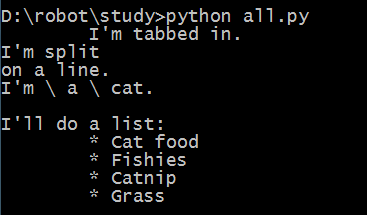
tabby_cat = "\tI'm tabbed in."
persian_cat = "I'm split\non a line."
backslash_cat = "I'm \\ a \\ cat."
fat_cat = """
I'll do a list:
\t* Cat food
\t* Fishies
\t* Catnip\n\t* Grass
"""
print tabby_cat
print persian_cat
print backslash_cat
print fat_cat
结果:
python入门 -- 学习笔记1的更多相关文章
- Python入门学习笔记4:他人的博客及他人的学习思路
看其他人的学习笔记,可以保证自己不走弯路.并且一举两得,即学知识又学方法! 廖雪峰:https://www.liaoxuefeng.com/wiki/0014316089557264a6b348958 ...
- Python入门学习笔记
了解 一下Python中的基本语法,发现挺不适应的,例如变量经常想去指定类型或者if加个括号之类的.这是在MOOC中学习到的知识中一点简单的笔记. Python的变量和数据类型: 1.Python这种 ...
- python入门学习笔记(三)
10.函数 求绝对值的函数 abs(x) 也可以在交互式命令行通过 help(abs) 查看abs函数的帮助信息.调用 abs 函数:>>> abs(100)100>>& ...
- Python入门 学习笔记 (二)
今天学习了一些简单的语法规则,话不多说,开始了: 二.数据类型 常用数据类型中的整形和浮点型就不多说了. 1.字符串 ...
- Python入门 学习笔记 (一)
原文地址:http://www.cnblogs.com/lujianwenance/p/5939786.html 说到学习一门语言第一步就是先选定使用的工具(环境).因为本人是个小白,所以征求了一下同 ...
- python入门学习笔记(二)
6.6替换元素 7.tuple类型 7.1创建tuple 7.2创建单元素tuple 7.3"可变"的tuple 8.条件判断和循环 8.1,if语句 8.2,if... ...
- python入门学习笔记(一)
写在开头: A:python的交互式环境 ...
- python入门 -- 学习笔记4
习题38:列表的操作 当你看到像 mystuff.append('hello') 这样的代码时,你事实上已经在 Python 内部激发了一个连锁反应.以下是它的工作原理: 1. Python 看到你用 ...
- python入门 -- 学习笔记3
习题21:函数可以返回东西 过程解析: 1.定义函数:如def add(形参)函数 2.调用函数: add(实参) 别忘记加() 3.在函数调用的时候将实参的值传给形参,代入到函数中进行计算,r ...
随机推荐
- jQuery-2.DOM---节点插入
DOM内部插入append()与appendTo() 动态创建的元素是不够的,它只是临时存放在内存中,最终我们需要放到页面文档并呈现出来.那么问题来了,怎么放到文档上? 这里就涉及到一个位置关系,常见 ...
- node.js 调用第三方服务
node作为客户端调用第三方服务 nodejs.cn/api 1. let http = require('http'); let util = require("util") ...
- python中datetime常用方法
# 可运算的时间方法包 >>> import datetime >>> import time >>> res = datetime.dateti ...
- 自定义textview
#import <UIKit/UIKit.h> @class FSTextView; typedef void(^FSTextViewHandler)(FSTextView *textVi ...
- Leetcode : eImplement strStr
Leetcode : eImplement strStr 描述 对于一个给定的 source 字符串和一个 target 字符串,你应该在 source 字符串中找出 target 字符串出现的第一个 ...
- select添加option
本文介绍select添加option的两种方法 1.使用selectObject.add(option,before)方法,其中 option为要添加选项元素.必需是 option 或 optgrou ...
- 洛谷P1605:迷宫(DFS)
题目背景 迷宫 [问题描述] 给定一个N*M方格的迷宫,迷宫里有T处障碍,障碍处不可通过.给定起点坐标和终点坐标,问: 每个方格最多经过1次,有多少种从起点坐标到终点坐标的方案.在迷宫中移动有上下左右 ...
- 一款我常用到的手机app
我从初中开始接触电子书,后来渐渐养成了看电子书的习惯.在阅读电子书的过程中自然要接触到各种各样的阅读类的手机app,比如书旗.qq阅读.百度阅读器等等.个人感觉掌阅使用起来好一些. 首先,它的界面很简 ...
- centos安装jdk步骤
1.官网或wget下载 jdk-8u172-linux-x64.tar.gz,解压到/usr/local/java目录: cd /home/tar wget xxxxxxx cp /home/tar/ ...
- form表单以及内嵌框架标签
今关于今天所学习的东西又复杂又简单,上午学习了form表单,也是挺简单的:搭配table表格使用也是非常熟练. 下午讲了讲给网页内嵌框架标签以及在内嵌框架标签中添加其他的网页:还有在内嵌框架标签中添加 ...