
【node.js】GET/POST请求、Web 模块
获取GET请求内容
node.js 中 url 模块中的 parse 函数提供了这个功能。
var http = require('http');

var url = require('url');

var util = require('util');

http.createServer(function(req, res){

    res.writeHead(200, {'Content-Type': 'text/plain; charset=utf-8'});

    res.end(util.inspect(url.parse(req.url, true)));

}).listen(3000);
获取 URL 的参数
var http = require('http');

var url = require('url');

var util = require('util');

http.createServer(function(req, res){

    res.writeHead(200, {'Content-Type': 'text/plain'});

    // 解析 url 参数

    var params = url.parse(req.url, true).query;

    res.write("网站名:" + params.name);

    res.write("\n");

    res.write("网站 URL:" + params.url);

    res.end();

}).listen(3000);
获取 POST 请求内容
var http = require('http');

var querystring = require('querystring');

var postHTML =

  '<html><head><meta charset="utf-8"><title>菜鸟教程 Node.js 实例</title></head>' +

  '<body>' +

  '<form method="post">' +

  '网站名: <input name="name"><br>' +

  '网站 URL: <input name="url"><br>' +

  '<input type="submit">' +

  '</form>' +

  '</body></html>';

http.createServer(function (req, res) {

  var body = "";

  req.on('data', function (chunk) {

    body += chunk;

  });

  req.on('end', function () {

    // 解析参数

    body = querystring.parse(body);

    // 设置响应头部信息及编码

    res.writeHead(200, {'Content-Type': 'text/html; charset=utf8'});

    if(body.name && body.url) { // 输出提交的数据

        res.write("网站名:" + body.name);

        res.write("<br>");

        res.write("网站 URL:" + body.url);

    } else {  // 输出表单

        res.write(postHTML);

    }

    res.end();

  });

}).listen(3000);
使用 Node 创建 Web 服务器(服务端创建服务器,解析请求,读取文件内容,发送响应数据(响应头部、响应内容))
创建server.js
var http = require('http');

var fs = require('fs');

var url = require('url');

// 创建服务器

http.createServer( function (request, response) {

   // 解析请求,包括文件名

   var pathname = url.parse(request.url).pathname;

   // 输出请求的文件名

   console.log("Request for " + pathname + " received.");

   // 从文件系统中读取请求的文件内容

   fs.readFile(pathname.substr(1), function (err, data) {

      if (err) {

         console.log(err);

         // HTTP 状态码: 404 : NOT FOUND

         // Content Type: text/plain

         response.writeHead(404, {'Content-Type': 'text/html'});

      }else{

         // HTTP 状态码: 200 : OK

         // Content Type: text/plain

         response.writeHead(200, {'Content-Type': 'text/html'});

         // 响应文件内容

         response.write(data.toString());

      }

      //  发送响应数据

      response.end();

   });

}).listen(8081);

// 控制台会输出以下信息

console.log('Server running at http://127.0.0.1:8081/');
创建一个 index.html
<html>

<head>

<title>Sample Page</title>

</head>

<body>

Hello World!

</body>

</html>
进入http://127.0.0.1:8081/index.html后

使用 Node 创建 Web 客户端(向服务端请求,请求的选项,不断更新数据,数据接收完成)
var http = require('http');

// 用于请求的选项

var options = {

   host: 'localhost',

   port: '8081',

   path: '/index.htm'

};

// 处理响应的回调函数

var callback = function(response){

   // 不断更新数据

   var body = '';

   response.on('data', function(data) {

      body += data;

   });

   response.on('end', function() {

      // 数据接收完成

      console.log(body);

   });

}

// 向服务端发送请求

var req = http.request(options, callback);

req.end();
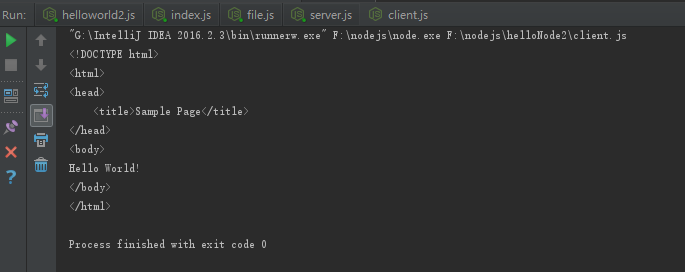
运行后得到结果
【node.js】GET/POST请求、Web 模块的更多相关文章
- node.js(二)各种模块
我们知道Node.js适合于IO密集型应用,不适合于CPU密集型应用. JS和Node.js区别: JS运行于客户端浏览器中,存在兼容性问题:数据类型:值类型+引用类型(ES+D ...
- Node.js GET/POST请求
在很多场景中,我们的服务器都需要跟用户的浏览器打交道,如表单提交. 表单提交到服务器一般都使用GET/POST请求. 我将为大家介绍 Node.js GET/POST请求. 获取GET请求内容 由于G ...
- node.js 发送http 请求
自己研究了一下 node.js 的 http模块 下面为想服务器发送请求的代码 ,通过学习了解http 请求的过程 ,node.js 对http请求的原始封装比较低,以前php 可以用$_GET , ...
- [Node.js与数据库]node-mysql 模块介绍
[Node.js与数据库]node-mysql 模块介绍 转载至:https://itbilu.com/nodejs/npm/NyPG8LhlW.html#multiple-statement-q ...
- body-parser Node.js(Express) HTTP请求体解析中间件
body-parser Node.js(Express) HTTP请求体解析中间件 2016年06月08日 781 声明 在HTTP请求中,POST.PUT和PATCH三种请求方法中包 ...
- Node.js进程管理之Process模块
在前面Node.js事件运行机制也有提到,Node.js应用在单个线程运行,但是现在大部分服务器都是多处理器,为了方便使用多个进程,Node.js提供了3个模块.Process模块提供了访问正在运行的 ...
- Node.js 从零开发 web server博客项目[express重构博客项目]
web server博客项目 Node.js 从零开发 web server博客项目[项目介绍] Node.js 从零开发 web server博客项目[接口] Node.js 从零开发 web se ...
- Node.js 从零开发 web server博客项目[登录]
web server博客项目 Node.js 从零开发 web server博客项目[项目介绍] Node.js 从零开发 web server博客项目[接口] Node.js 从零开发 web se ...
- Node.js 从零开发 web server博客项目[项目介绍]
web server博客项目 Node.js 从零开发 web server博客项目[项目介绍] Node.js 从零开发 web server博客项目[接口] Node.js 从零开发 web se ...
- Fenix – 基于 Node.js 的桌面静态 Web 服务器
Fenix 是一个提供给开发人员使用的简单的桌面静态 Web 服务器,基于 Node.js 开发.您可以同时在上面运行任意数量的项目,特别适合前端开发人员使用. 您可以通过免费的 Node.js 控制 ...
随机推荐
- 湘潭校赛 Bob's Problem
Bob's Problem Accepted : 18 Submit : 115 Time Limit : 1000 MS Memory Limit : 65536 KB 题目描述 Bob今 ...
- JAVA成员方法的调用分析
如下面例子: public class A { int x=10; public int getx() {return x;} } public class B extends A { int x=2 ...
- 备忘:CSS术语词汇表——张鑫旭
一.叨点什么 写文章的时候经常用到一些CSS方面的专业词汇.但是毕竟芳华年少不在,脑袋有点秀逗了,很多名词都记不住,这种感觉比厕所便秘还难受.比如今天居然记不起来公司公认脸蛋最pp的同事的名字,没想到 ...
- ionic开发中遇到的问题
开发调试过程中,会遇到这样的问题:同源策略请求url禁止请求. 一 网上搜的结果基本是2类: 1. 同源策略请求被阻止, 跨域问题,大家建议添加Access-Control-Allow-Origi ...
- Spring Boot—20Zookeeper
https://docs.spring.io/spring-boot/docs/2.0.1.RELEASE/reference/htmlsingle/ pom.xml <dependency&g ...
- Android 时间轴的实现
时间轴 时间轴,顾名思义就是将发生的事件按照时间顺序罗列起来,给用户带来一种更加直观的体验.京东和淘宝的物流顺序就是一个时间轴(如图),想必大家都不陌生. 时间轴的初探 初次见到这种UI,感觉整个布局 ...
- JSON学习笔记-2
JSON的语法 1.JSON 数据的书写格式是:名称/值对. "name" : "我是一个菜鸟" 等价于这条 JavaScript 语句: name = &qu ...
- reentrantlock用于替代synchronized
1.①使用reentrantlock可以完成同样的功能 ②需要注意的是,必须要必须要必须要手动释放锁(重要的事情说三遍) ③使用syn锁定的话如果遇到异常,jvm会自动释放锁,但是lock必须 ...
- Mouse For Winpad
Mouse For Winpad 用WIN10的平板模式玩游戏总会到一些兼容性问题,之前在推Re:LieF的时候就遇到了触屏不能像鼠标指针一样进行游戏,于是猜想一定是程序没进行标准化MFC的编程.于是 ...
- python 事务
事务命令 事务指逻辑上的一组操作,组成这组操作的各个单元,要不全部成功,要不全部不成功. 数据库开启事务命令 -- start transaction 开启事务 -- Rollback 回滚事务,即撤 ...