
设计带有placeHolder的TextView
设计带有placeHolder的TextView
效果:
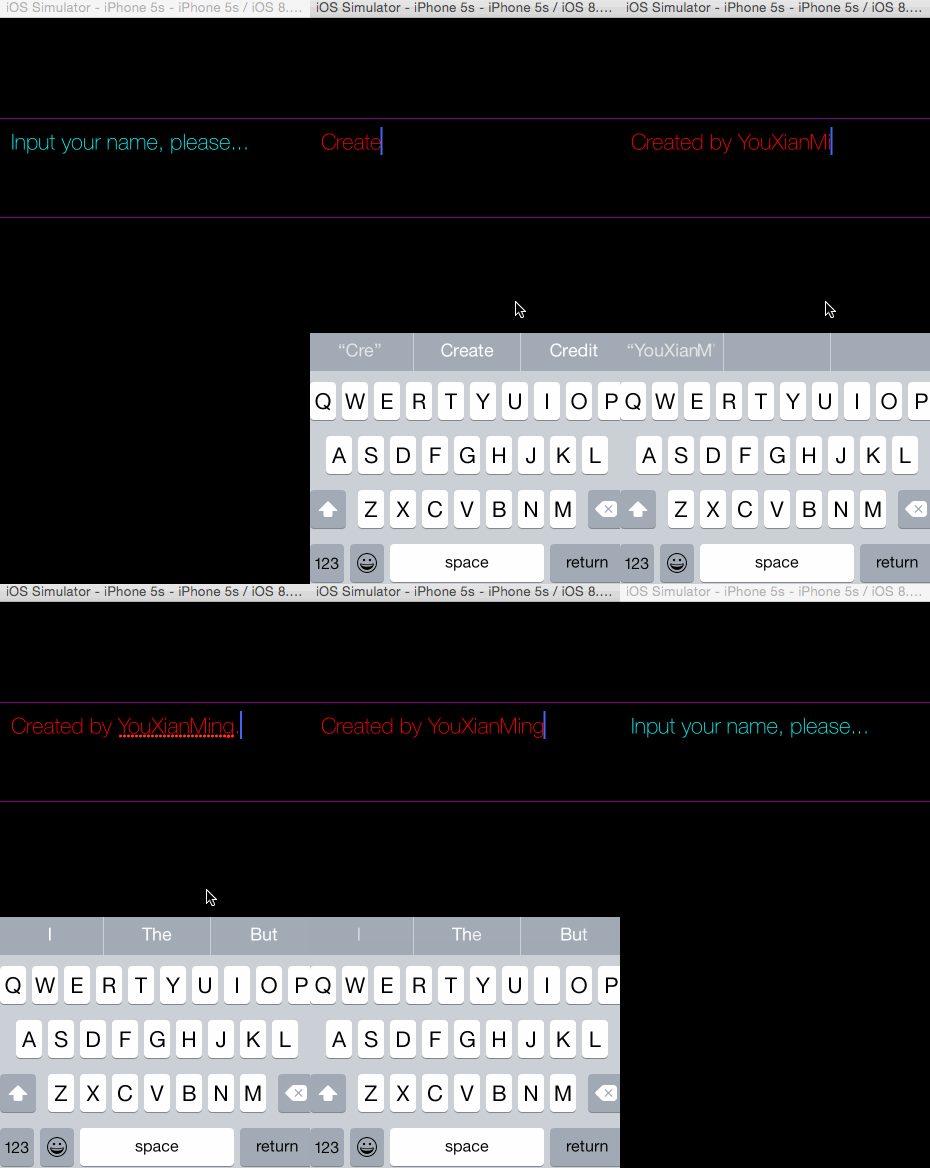
源码:
PlaceholderTextView.h 与 PlaceholderTextView.m
//

//  PlaceholderTextView.h

//  YXTextView

//

//  Created by YouXianMing on 14/12/23.

//  Copyright (c) 2014年 YouXianMing. All rights reserved.

//

#import <UIKit/UIKit.h>

@interface PlaceholderTextView : UIView

// 获取的字符串

@property (nonatomic, strong, readonly) NSString *string;

// textView

@property (nonatomic, strong) UITextView  *textView;

// 占位字符

@property (nonatomic, strong) NSString    *placeHolderString;

// 文本边缘留白

@property(nonatomic, assign) UIEdgeInsets  textContainerInset;

// 颜色设置

@property (nonatomic, strong) UIColor     *editTextColor;

@property (nonatomic, strong) UIColor     *placeHolderColor;

// 返回键是否用来做取消第一响应者

@property (nonatomic, assign) BOOL         returnButtonToResignFirstResponder;

// 取消第一响应者

- (void)resignTextViewFirstResponder;

@end
//

//  PlaceholderTextView.m

//  YXTextView

//

//  Created by YouXianMing on 14/12/23.

//  Copyright (c) 2014年 YouXianMing. All rights reserved.

//

#import "PlaceholderTextView.h"

@interface PlaceholderTextView ()<UITextViewDelegate>

@property (nonatomic, strong) NSString *string;

@end

@implementation PlaceholderTextView

- (instancetype)initWithFrame:(CGRect)frame

{

    self = [super initWithFrame:frame];

    if (self) {

        [self createTextView];

    }

    return self;

}

- (void)createTextView {

    self.textView                 = [[UITextView alloc] initWithFrame:self.bounds];

    self.textView.delegate        = self;

    self.textView.backgroundColor = [UIColor clearColor];

    self.textView.textColor       = [UIColor grayColor];

    [self addSubview:self.textView];

}

#pragma mark - 代理方法

- (BOOL)textViewShouldBeginEditing:(UITextView *)textView {

    // 设置编辑状态文字颜色

    textView.textColor = (self.editTextColor == nil ? [UIColor blackColor] : self.editTextColor);

    // 如果文字为placeHolder文字

    if ([textView.text isEqualToString:self.placeHolderString]) {

        textView.text = @"";

    }

    return YES;

}

- (BOOL)textViewShouldEndEditing:(UITextView *)textView {

    // 如果长度为0,则显示placeHolder文字

    if (textView.text.length == ) {

        textView.text      = self.placeHolderString;

        textView.textColor = (self.placeHolderColor == nil ? [UIColor grayColor] : self.placeHolderColor);

    }

    return YES;

}

- (BOOL)textView:(UITextView *)textView shouldChangeTextInRange:(NSRange)range replacementText:(NSString *)text {

    if (_returnButtonToResignFirstResponder == YES) {

        if ([text isEqualToString:@"\n"]) {

            [textView resignFirstResponder];

            return NO;

        }

    }

    return YES;

}

- (void)resignTextViewFirstResponder {

    [self.textView resignFirstResponder];

}

#pragma mark - 重写setter,getter方法

@synthesize string = _string;

- (NSString *)string {

    if ([self.textView.text isEqualToString:self.placeHolderString]) {

        return @"";

    } else {

        return self.textView.text;

    }

}

@synthesize placeHolderColor = _placeHolderColor;

- (void)setPlaceHolderColor:(UIColor *)placeHolderColor {

    _placeHolderColor       = placeHolderColor;

    self.textView.textColor = _placeHolderColor;

}

- (UIColor *)placeHolderColor {

    return _placeHolderColor;

}

@synthesize placeHolderString = _placeHolderString;

- (void)setPlaceHolderString:(NSString *)placeHolderString {

    _placeHolderString = placeHolderString;

    _textView.text     = placeHolderString;

}

- (NSString *)placeHolderString {

    return _placeHolderString;

}

@synthesize textContainerInset = _textContainerInset;

- (void)setTextContainerInset:(UIEdgeInsets)textContainerInset {

    _textContainerInset          = textContainerInset;

    _textView.textContainerInset = textContainerInset;

}

- (UIEdgeInsets)textContainerInset {

    return _textContainerInset;

}

@end
控制器源码:
//

//  ViewController.m

//  YXTextView

//

//  Created by YouXianMing on 14/12/23.

//  Copyright (c) 2014年 YouXianMing. All rights reserved.

//

#import "ViewController.h"

#import "PlaceholderTextView.h"

@interface ViewController ()

@end

@implementation ViewController

- (void)viewDidLoad {

    [super viewDidLoad];

    self.view.backgroundColor = [UIColor blackColor];

    PlaceholderTextView *textView = [[PlaceholderTextView alloc] initWithFrame:CGRectMake(-, , , )];

    [self.view addSubview:textView];

    textView.layer.borderWidth  = .f;

    textView.layer.borderColor  = [UIColor purpleColor].CGColor;

    textView.returnButtonToResignFirstResponder = YES;

    textView.textView.font      = [UIFont fontWithName:@"HelveticaNeue-Thin" size:.f];

    textView.placeHolderColor   = [UIColor cyanColor];

    textView.editTextColor      = [UIColor redColor];

    textView.textContainerInset = UIEdgeInsetsMake(, , , );

    textView.placeHolderString  = @"Input your name, please...";

}

@end
需要注意的一些细节:

设计带有placeHolder的TextView的更多相关文章
- 李洪强iOS开发之带placeHolder的Textview
李洪强iOS开发之带placeHolder的Textview 01 - 创建工过程,定义全局属性,遵守textview的代理协议 02 - 添加一个textview和一个label 03 - 实现 ...
- 新浪微博客户端(36)-自定义带placeholder的TextView
iOS 上自带的UITextView竟然不能设置placeholder,但是UITextView却可以,我也真是醉了.没办法了,自己写一个 DJTextView.h #import <UIKit ...
- [web设计]带有方向感应的hover effect
See the Pen bdxLQa by jeremylee (@lijie33402) on CodePen. codepen不知道怎么嵌入到cnblogs..待编辑 参考资料 参考博客
- iOS 第三方库、插件、知名博客总结
iOS 第三方库.插件.知名博客总结 用到的组件 1.通过CocoaPods安装 项目名称 项目信息 AFNetworking 网络请求组件 FMDB 本地数据库组件 SDWebImage 多个缩略图 ...
- iOS -- 开源项目和库
TimLiu-iOS 目录 UI 下拉刷新 模糊效果 AutoLayout 富文本 图表 表相关与Tabbar 隐藏与显示 HUD与Toast 对话框 其他UI 动画 侧滑与右滑返回手势 gif动画 ...
- ios很好的开源库
Tim9Liu9/TimLiu-iOS 自己总结的iOS.mac开源项目及库,持续更新.. 目录 UI 下拉刷新 模糊效果 AutoLayout 富文本 图表 表相关与Tabbar 隐藏与显示 HUD ...
- [iOS UI进阶 - 1] 自定义控件
A.关于Quiartz2D的一些细节 1.UIKit的工具已经封装了上下文引用,所以不用手动获取和渲染 - (void)drawRect:(CGRect)rect { [[UIColor redCol ...
- iOS TextView输入长度限制 设置placeholder
textView在使用中通常会有2个功能是最常用的 设置placeholder 限制输入长度 TYLimitedTextView刚好是为了解决这个2个问题而诞生的,下面讲解TYLimitedTextV ...
- iOS开发-带Placeholder的UITextView实现
iOS中UITextField带有PlaceHolder属性,可以方便用于提示输入.但是同样可以进行文本输入的UITextView控件则没有PlaceHolder属性,还是有些不方便的,尤其是对于略带 ...
随机推荐
- mysql创建用户,并指定用户的权限(grant命令)
参考链接http://blog.csdn.net/leili0806/article/details/8573636,谢谢这位仁兄 1.创建新用户的SQL语句: CREATE USER 'pig'@' ...
- 面试题27:单链表向右旋转k个节点
Given a list, rotate the list to the right by kplaces, where k is non-negative. For example:Given1-& ...
- Linux 命令 "cp" 代码实现简介
本blog主要是模仿Linux的cp命令的功能,未实现参数,只是基础功能部分. 本文的主要目的在于练习 文件流 和 目录流 中的函数的使用. 主要功能包括两种: 源文件属性为文件,拷贝到其它文件(内容 ...
- 马尔科夫随机场(Markov Random Field)
马尔可夫随机场(Markov Random Field),它包含两层意思:一是什么是马尔可夫,二是什么是随机场. 马尔可夫过程可以理解为其当前的状态只与上一刻有关而与以前的是没有关系的.X(t+1)= ...
- [转]SQL Server中用While循环替代游标(Cursor)的解决方案
本文转自:https://www.cnblogs.com/SunnyZhu/p/5719184.html By行处理数据,推荐2种方式: 1.游标 2.While循环 我们来了解下这两种方案处理1w行 ...
- PHP 集成开发环境比较
专注了这么些年技术,没有养成记录和积累的习惯.如今乐于开源和分享经验,却停笔踌躇,不知该从何处说起.开通博客也有一段时间了,也没能写出一篇像样的文章,其实这篇文章也是被我拉壮丁似的用来练手的.思前想后 ...
- 小白学习之Code First(二)
Code First约定: 注:EDMX模板 (SSDL:存储模型=>数据库表 ,CSDL:概念模型=>实体,C-S模型=>存储和概念模型之间的映射关系) System.Data.E ...
- jstack,jmap,jstat分别的意义
1.Jstack 1.1 jstack能得到运行java程序的java stack和native stack的信息.可以轻松得知当前线程的运行情况.如下图所示 注:这个和thread dump是同 ...
- 山东第四届省赛: Boring Counting 线段树
http://acm.sdibt.edu.cn/JudgeOnline/problem.php?id=3237 Problem H:Boring Counting Time Limit: 3 Sec ...
- WCF使用net.tcp传输文件
摘要:今天看了一些官方的资料和配置,简单写了一个WCF服务来传递一个文件,借此看看WCF传输大文件的能力,这里采用的是NetTcp绑定,之所以没有采用 basicHttpBinding是因为考虑这种方 ...