
Visualizing LSTM Layer with t-sne in Neural Networks
LSTM 可视化
Visualizing Layer Representations in Neural Networks
Visualizing and interpreting representations learned by machine learning / deep learning algorithms is pretty interesting! As the saying goes — “A picture is worth a thousand words”, the same holds true with visualizations. A lot can be interpreted using the correct tools for visualization. In this post, I will cover some details on visualizing intermediate (hidden) layer features using dimension reduction techniques.
We will work with the IMDB sentiment classification task (25000 training and 25000 test examples). The script to create a simple Bidirectional LSTM model using a dropout and predicting the sentiment (1 for positive and 0 for negative) using sigmoid activation is already provided in the Keras examples here.
Note: If you have doubts on LSTM, please read this excellent blog by Colah.
OK, let’s get started!!
The first step is to build the model and train it. We will use the example code as-is with a minor modification. We will keep the test data aside and use 20% of the training data itself as the validation set. The following part of the code will retrieve the IMDB dataset (from keras.datasets), create the LSTM model and train the model with the training data.
'''

This code snippet is copied from https://github.com/fchollet/keras/blob/master/examples/imdb_bidirectional_lstm.py.

A minor modification done to change the validation data.

'''

from __future__ import print_function

import numpy as np

from keras.preprocessing import sequence

from keras.models import Sequential

from keras.layers import Dense, Dropout, Embedding, LSTM, Bidirectional

from keras.datasets import imdb

max_features = 20000

# cut texts after this number of words

# (among top max_features most common words)

maxlen = 100

batch_size = 32

print('Loading data...')

(x_train, y_train), (x_test, y_test) = imdb.load_data(num_words=max_features)

print(len(x_train), 'train sequences')

print(len(x_test), 'test sequences')

print('Pad sequences (samples x time)')

x_train = sequence.pad_sequences(x_train, maxlen=maxlen)

x_test = sequence.pad_sequences(x_test, maxlen=maxlen)

print('x_train shape:', x_train.shape)

print('x_test shape:', x_test.shape)

y_train = np.array(y_train)

y_test = np.array(y_test)

model = Sequential()

model.add(Embedding(max_features, 128, input_length=maxlen))

model.add(Bidirectional(LSTM(64)))

model.add(Dropout(0.5))

model.add(Dense(1, activation='sigmoid'))

# try using different optimizers and different optimizer configs

model.compile('adam', 'binary_crossentropy', metrics=['accuracy'])

print('Train...')

model.fit(x_train, y_train,

          batch_size=batch_size,

          epochs=4,

          validation_split=0.2)
Now, comes the interesting part! We want to see how has the LSTM been able to learn the representations so as to differentiate between positive IMDB reviews from the negative ones. Obviously, we can get an idea from Precision, Recall and F1-score measures. However, being able to visually see the differences in a low-dimensional space would be much more fun!
In order to obtain the hidden-layer representation, we will first truncate the model at the LSTM layer. Thereafter, we will load the model with the weights that the model has learnt. A better way to do this is create a new model with the same steps (until the layer you want) and load the weights from the model. Layers in Keras models are iterable. The code below shows how you can iterate through the model layers and see the configuration.
for layer in model.layers:

    print(layer.name, layer.trainable)

    print('Layer Configuration:')

    print(layer.get_config(), end='\n{}\n'.format('----'*10))
For example, the bidirectional LSTM layer configuration is the following:
bidirectional_2 True

Layer Configuration:

{'name': 'bidirectional_2', 'trainable': True, 'layer': {'class_name': 'LSTM', 'config': {'name': 'lstm_2', 'trainable': True, 'return_sequences': False, 'go_backwards': False, 'stateful': False, 'unroll': False, 'implementation': 0, 'units': 64, 'activation': 'tanh', 'recurrent_activation': 'hard_sigmoid', 'use_bias': True, 'kernel_initializer': {'class_name': 'VarianceScaling', 'config': {'scale': 1.0, 'mode': 'fan_avg', 'distribution': 'uniform', 'seed': None}}, 'recurrent_initializer': {'class_name': 'Orthogonal', 'config': {'gain': 1.0, 'seed': None}}, 'bias_initializer': {'class_name': 'Zeros', 'config': {}}, 'unit_forget_bias': True, 'kernel_regularizer': None, 'recurrent_regularizer': None, 'bias_regularizer': None, 'activity_regularizer': None, 'kernel_constraint': None, 'recurrent_constraint': None, 'bias_constraint': None, 'dropout': 0.0, 'recurrent_dropout': 0.0}}, 'merge_mode': 'concat'}
The weights of each layer can be obtained using:
trained_model.layers[i].get_weights()
The code to create the truncated model is given below. First, we create a truncated model. Note that we do model.add(..) only until the Bidirectional LSTM layer. Then we set the weights from the trained model (model). Then, we predict the features for the test instances (x_test).
def create_truncated_model(trained_model):

    model = Sequential()

    model.add(Embedding(max_features, 128, input_length=maxlen))

    model.add(Bidirectional(LSTM(64)))

    for i, layer in enumerate(model.layers):

        layer.set_weights(trained_model.layers[i].get_weights())

    model.compile(optimizer='adam',

              loss='categorical_crossentropy',

              metrics=['accuracy'])

    return model

truncated_model = create_truncated_model(model)

hidden_features = truncated_model.predict(x_test)
The hidden_features has a shape of (25000, 128) for 25000 instances with 128 dimensions. We get 128 as the dimensionality of LSTM is 64 and there are 2 classes. Hence, 64 X 2 = 128.
Next, we will apply dimensionality reduction to reduce the 128 features to a lower dimension. For visualization, T-SNE (Maaten and Hinton, 2008) has become really popular. However, as per my experience, T-SNE does not scale very well with several features and more than a few thousand instances. Therefore, I decided to first reduce dimensions using Principal Component Analysis (PCA) following by T-SNE to 2d-space.
If you are interested on details about T-SNE, please read this amazing blog.
Combining PCA (from 128 to 20) and T-SNE (from 20 to 2) for dimensionality reduction, here is the code. In this code, we used the PCA results for the first 5000 test instances. You can increase it.
Our PCA variance is ~0.99, which implies that the reduced dimensions do represent the hidden features well (scale is 0 to 1). Please note that running T-SNE will take some time. (So may be you can go grab a cup of coffee.)
I am not aware of faster T-SNE implementations than the one that ships with Scikit-learn package. If you are, please let me know by commenting below.
from sklearn.decomposition import PCA

from sklearn.manifold import TSNE

pca = PCA(n_components=20)

pca_result = pca.fit_transform(hidden_features)

print('Variance PCA: {}'.format(np.sum(pca.explained_variance_ratio_)))

##Variance PCA: 0.993621154832802

#Run T-SNE on the PCA features.

tsne = TSNE(n_components=2, verbose = 1)

tsne_results = tsne.fit_transform(pca_result[:5000]
Now that we have the dimensionality reduced features, we will plot. We will label them with their actual classes (0 and 1). Here is the code for visualization.
from keras.utils import np_utils

import matplotlib.pyplot as plt

%matplotlib inline

y_test_cat = np_utils.to_categorical(y_test[:5000], num_classes = 2)

color_map = np.argmax(y_test_cat, axis=1)

plt.figure(figsize=(10,10))

for cl in range(2):

    indices = np.where(color_map==cl)

    indices = indices[0]

    plt.scatter(tsne_results[indices,0], tsne_results[indices, 1], label=cl)

plt.legend()

plt.show()

'''

from sklearn.metrics import classification_report

print(classification_report(y_test, y_preds))

             precision    recall  f1-score   support

          0       0.83      0.85      0.84     12500

          1       0.84      0.83      0.84     12500

avg / total       0.84      0.84      0.84     25000

'''
We convert the test class array (y_test) to make it one-hot using the to_categorical function. Then, we create a color map and based on the values of y, plot the reduced dimensions (tsne_results) on the scatter plot.
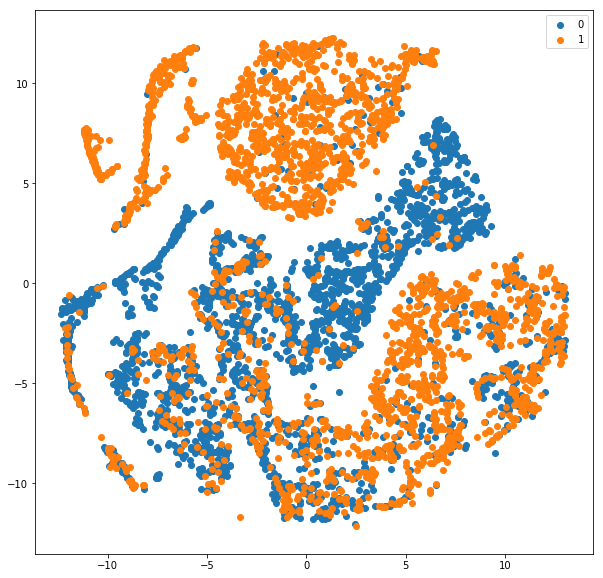
T-SNE visualization of hidden features for LSTM model trained on IMDB sentiment classification dataset
Please note that we reduced y_test_cat to 5000 instances too just like the tsne_results. You can change it and allow it to run longer.
Also, the classification report is shown for all the 25000 test instances. About 84% F1-score with a model trained for just 4 epochs. Cool! Here is the scatter plot we obtained.
As can be seen from the plot, the blue (0 — negative class) is fairly separable from the orange (1-positive class). Obviously, there are certain overlaps and the reason why our F-score is around 84 and not closer to 100 :). Understanding and visualizing the outputs at different layers can help understand which layer is causing major errors in learning representations.
I hope you find this article useful. I would love to hear your comments and thoughts. Also, do share your experiences with visualization.
Also, feel free to get in touch with me via LinkedIn.
来源: https://becominghuman.ai/visualizing-representations-bd9b62447e38
Visualizing LSTM Layer with t-sne in Neural Networks的更多相关文章
- 卷积神经网络用于视觉识别Convolutional Neural Networks for Visual Recognition
Table of Contents: Architecture Overview ConvNet Layers Convolutional Layer Pooling Layer Normalizat ...
- Training (deep) Neural Networks Part: 1
Training (deep) Neural Networks Part: 1 Nowadays training deep learning models have become extremely ...
- Convolutional Neural Networks for Visual Recognition
http://cs231n.github.io/ 里面有很多相当好的文章 http://cs231n.github.io/convolutional-networks/ Table of Cont ...
- Visualizing CNN Layer in Keras
CNN 权重可视化 How convolutional neural networks see the world An exploration of convnet filters with Ker ...
- 通过Visualizing Representations来理解Deep Learning、Neural network、以及输入样本自身的高维空间结构
catalogue . 引言 . Neural Networks Transform Space - 神经网络内部的空间结构 . Understand the data itself by visua ...
- 课程五(Sequence Models),第一 周(Recurrent Neural Networks) —— 3.Programming assignments:Jazz improvisation with LSTM
Improvise a Jazz Solo with an LSTM Network Welcome to your final programming assignment of this week ...
- 课程一(Neural Networks and Deep Learning),第三周(Shallow neural networks)—— 3.Programming Assignment : Planar data classification with a hidden layer
Planar data classification with a hidden layer Welcome to the second programming exercise of the dee ...
- Hacker's guide to Neural Networks
Hacker's guide to Neural Networks Hi there, I'm a CS PhD student at Stanford. I've worked on Deep Le ...
- (zhuan) Attention in Long Short-Term Memory Recurrent Neural Networks
Attention in Long Short-Term Memory Recurrent Neural Networks by Jason Brownlee on June 30, 2017 in ...
随机推荐
- C#4.0使用dynamic 动态添加属性
最近做一个项目,用wpf mvvm实现,而前台表格需要根据数据库某表的设置不同生成不同的列名.过去用winform和Ado.net实现这种功能的时候就只需要拼装DataTable,拼成最后需要的表格, ...
- phpqrcode 分别生成普通、带logo、带背景带logo二维码
前提:下载好 phpqrcode 类库 1.生成普通二维码 //引入类库 include('phpqrcode/phpqrcode.php'); //二维码里面的链接地址 $url="htt ...
- P1484 种树
P1484 种树 题意: 在n个数中选出至多k个数,且两两不相邻,并使所选数的和最大. n<=500000 思路 先建一个堆,把所有点扔进去,当取出队首元素时累加到答案时,把它和它左右两个点一 ...
- Mac 10.12连接iSCSI硬盘软件iSCSI Initiator X
Mac下的iSCSI协议苹果一直以来没有集成,而网络上流传的最好用支持iSCSI硬盘的软件是globalSAN,但是这个软件是收费的,当然有破解版,只不多不太好找,因为现在用iSCSI的用户已经很少了 ...
- 用asp.net core 2.0 + EFCore.Sqlite做个小网站
许久没用C#写程序.听说进来发生大事,.NetCore2.0发布了,于是便学习了下,本站也应运而生. 大多数的地方按照官方的文档起步走就可以了,这里谈谈遇到的几个坑. 首先,本站是基于ASP.NetC ...
- 细说Activity与Task(任务栈)
Task概要: task是一个具有栈结构的容器,可以放置多个Activity实例.启动一个应用,系统就会为之创建一个task,来放置根Activity:默认情况下, 一个Activity启动另一个Ac ...
- Android硬件抽象层(HAL)深入剖析(三)【转】
前面分析了android HAL层是如何搜索硬件模块的动态共享库的,其实就是在"system/lib/hw/"或者"/vendor/lib/hw/"这两个路径下 ...
- hibernate原生sql封装,报错信息:could not find setter for rownum_
今天用hibernate的时候,用了一个原生态sql做了一个分页查询,结果就报错了... 找到解决方法了:http://shmily2038.iteye.com/blog/1704963
- 将已有Git库代码推送到新建库中
cd /path/to/your/git/repo/ git remote -v git remote rm origin git remote add origin ssh://abc@gmail. ...
- Java 国际化
国际化英文单词为:Internationalization,又称I18N,I为因为单词的第一个字母,18为这个单词的长度,而N代表这个单词的最后一个字母.国际化又称本地化(Localization,L ...