
ceilometer 源码分析(polling)(O版)
一、简单介绍ceilometer
这里长话短说, ceilometer是用来采集openstack下面各种资源的在某一时刻的资源值,比如云硬盘的大小等。下面是官网现在的架构图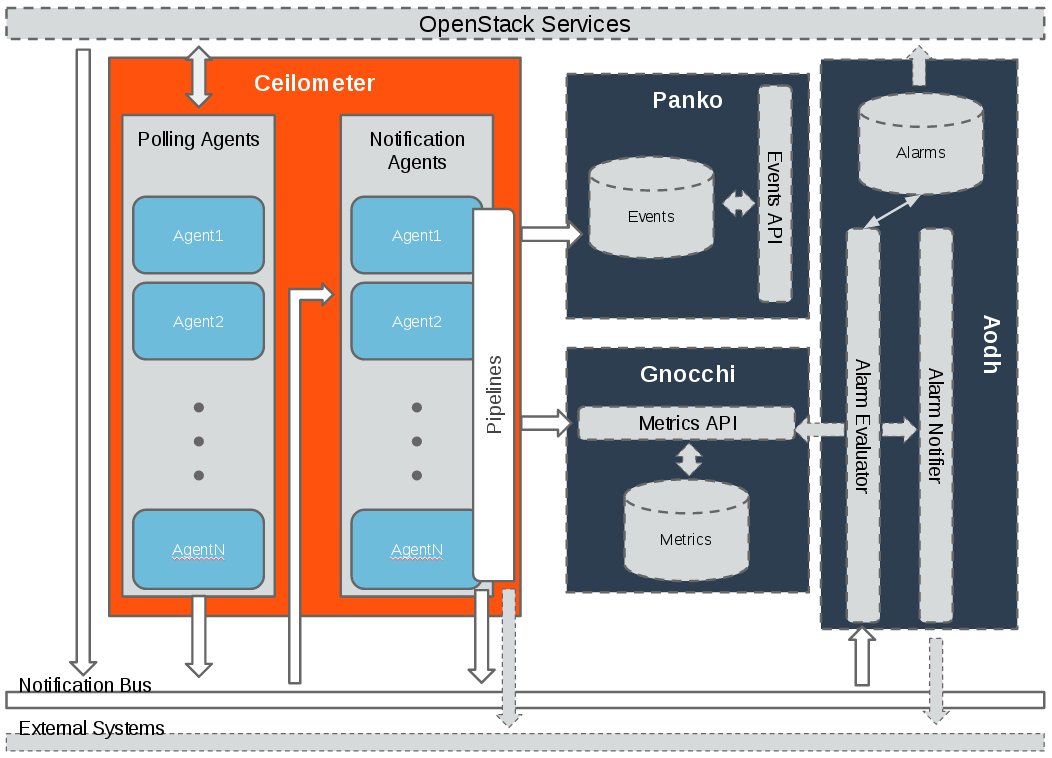
这里除了ceilometer的架构图,还有另外三个组件:
- Panko 用来存储事件的, 后面用来实现cloudkitty事件秒级计费也是我的工作之一,目前实现来一部分,有时间单独在写一篇博文。
- gnocchi是用来存储ceilometer的计量数据,之前的版本是存在mongo中, 不过随着计量数据的不断累计, 查询性能变得极低, 因此openstack后面推出来gnocchi项目,gnocchi的存储后端支持redis,file,ceph等等。这一块也是我负责,目前已经实现了, 有时间也可以写一篇文章。
- Aodh 是用来告警的。
这里需要注意ceilometer 主要有两个agent:
- 一个是polling 主要是定时调用相应的openstack接口来获取计量数据,
- 一个是notification 主要是用来监听openstack的事件消息,然后转换成相应的计量数据,
两者的计量数据, 最后通过定义的pipeline,传递给gnocchi暴露出来的rest API ,后面由gnocchi来做聚合处理以及存储
下面来看一下,具体的官网的数据采集和处理转发的架构图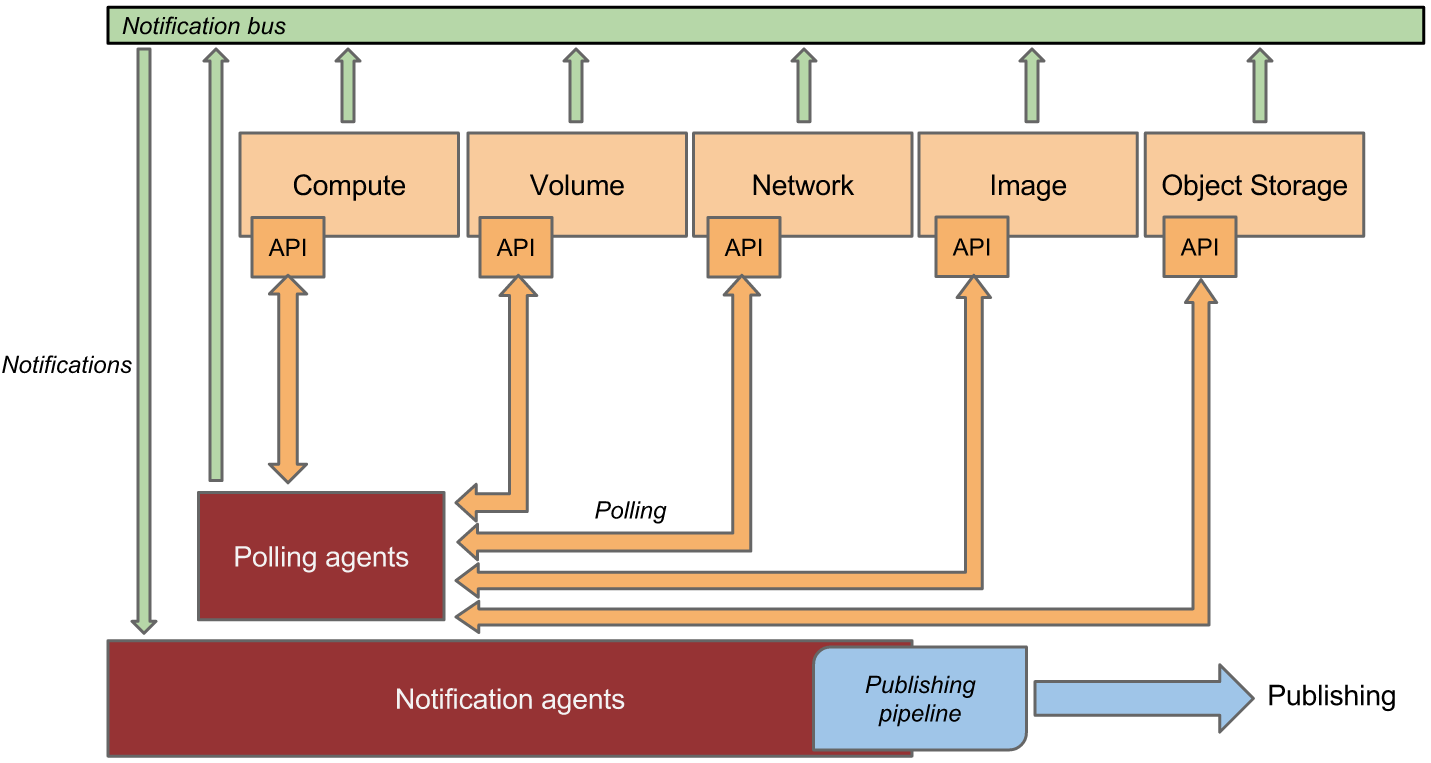
再来看一下数据的处理过程
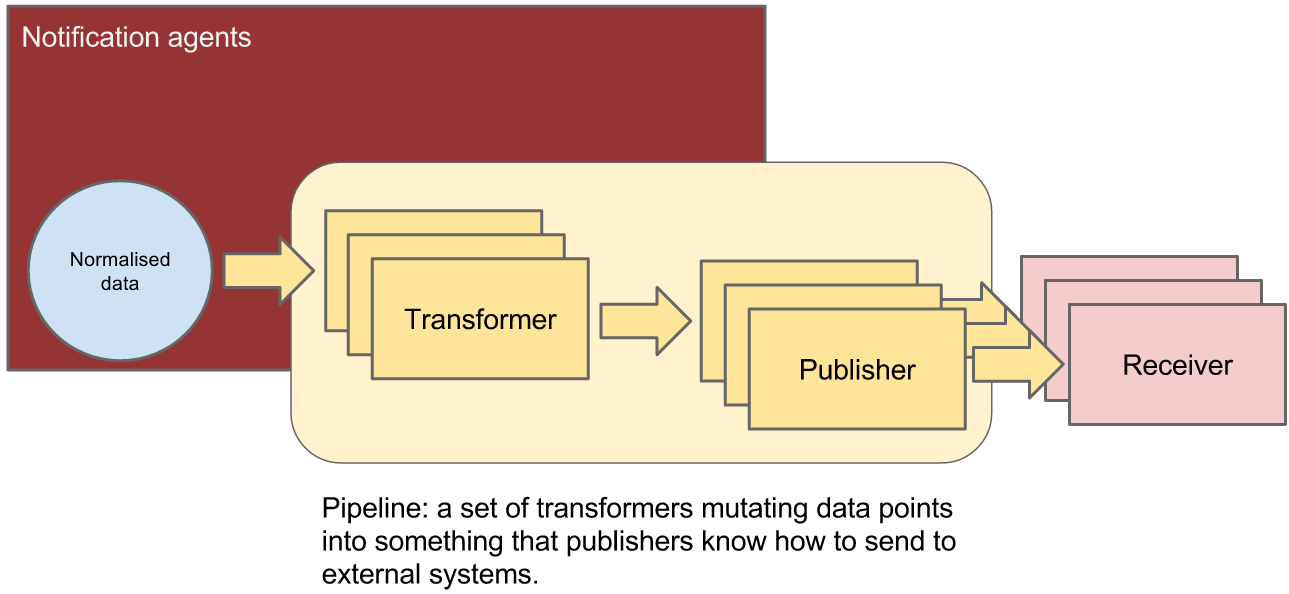
这里,我觉得官方文档的架构图描述得非常好, 我就不在多说来。
二、源码分析
说实话, 目测openstack估计是最大的python项目了,真的是一个庞然大物。第一次接触的时候,完全不知所措。不过看看就强一点了, 虽然有很多地方还是懵逼。看openstack下面的项目的话,其实有些文件很重要比如setup.py, 里面配置了项目的入口点。这篇文章,我主要分析polling这一块是如何实现的, 其他的地方类似。
- ceilometer polling-agent启动的地方
# ceilometer/cmd/polling.py
1 def main():

     conf = cfg.ConfigOpts()

     conf.register_cli_opts(CLI_OPTS)

     service.prepare_service(conf=conf)

     sm = cotyledon.ServiceManager()

     sm.add(create_polling_service, args=(conf,))

     oslo_config_glue.setup(sm, conf)

     sm.run()

# 前面几行是读取配置文件, 然后通过cotyledon这个库add一个polling的service,最后run 起来。 cotyledon这个库简单看了一下,可以用来启动进程任务
def create_polling_service(worker_id, conf):
return manager.AgentManager(worker_id,
conf,
conf.polling_namespaces,
conf.pollster_list)
# create_polling_service 返回了一个polling agent polling-namespaces的默认值为choices=['compute', 'central', 'ipmi'], polling AgentManager # ceilometer/agent/manager.py
 class AgentManager(service_base.PipelineBasedService):

     def __init__(self, worker_id, conf, namespaces=None, pollster_list=None, ):

         namespaces = namespaces or ['compute', 'central']

         pollster_list = pollster_list or []

         group_prefix = conf.polling.partitioning_group_prefix

         # features of using coordination and pollster-list are exclusive, and

         # cannot be used at one moment to avoid both samples duplication and

         # samples being lost

         if pollster_list and conf.coordination.backend_url:

             raise PollsterListForbidden()

         super(AgentManager, self).__init__(worker_id, conf)

         def _match(pollster):

             """Find out if pollster name matches to one of the list."""

             return any(fnmatch.fnmatch(pollster.name, pattern) for

                        pattern in pollster_list)

         if type(namespaces) is not list:

             namespaces = [namespaces]

         # we'll have default ['compute', 'central'] here if no namespaces will

         # be passed

         extensions = (self._extensions('poll', namespace, self.conf).extensions

                       for namespace in namespaces)

         # get the extensions from pollster builder

         extensions_fb = (self._extensions_from_builder('poll', namespace)

                          for namespace in namespaces)

         if pollster_list:

             extensions = (moves.filter(_match, exts)

                           for exts in extensions)

             extensions_fb = (moves.filter(_match, exts)

                              for exts in extensions_fb)

         self.extensions = list(itertools.chain(*list(extensions))) + list(

             itertools.chain(*list(extensions_fb)))

         if self.extensions == []:

             raise EmptyPollstersList()

         discoveries = (self._extensions('discover', namespace,

                                         self.conf).extensions

                        for namespace in namespaces)

         self.discoveries = list(itertools.chain(*list(discoveries)))

         self.polling_periodics = None

         self.partition_coordinator = coordination.PartitionCoordinator(

             self.conf)

         self.heartbeat_timer = utils.create_periodic(

             target=self.partition_coordinator.heartbeat,

             spacing=self.conf.coordination.heartbeat,

             run_immediately=True)

         # Compose coordination group prefix.

         # We'll use namespaces as the basement for this partitioning.

         namespace_prefix = '-'.join(sorted(namespaces))

         self.group_prefix = ('%s-%s' % (namespace_prefix, group_prefix)

                              if group_prefix else namespace_prefix)

         self.notifier = oslo_messaging.Notifier(

             messaging.get_transport(self.conf),

             driver=self.conf.publisher_notifier.telemetry_driver,

             publisher_id="ceilometer.polling")

         self._keystone = None

         self._keystone_last_exception = None

     def run(self):

         super(AgentManager, self).run()

         self.polling_manager = pipeline.setup_polling(self.conf)

         self.join_partitioning_groups()

         self.start_polling_tasks()

         self.init_pipeline_refresh()

1 初始化函数里面通过 ExtensionManager加载setup里面定义的各个指标的entry point 包括discover和poll,
  discover就是调用openstack的api来get 资源,
  poll 就是将discover获取到资源转换成相应的sample(某一时刻的指标值)
2 如果有多个agent 还会创建一个定时器来做心跳检测

3 定义收集到的数据通过消息队列转发送到哪里去 (oslo_messaging.Notifier)

4 之后通过run方法启动polling agent
# setup.py
ceilometer.discover.compute =
    local_instances = ceilometer.compute.discovery:InstanceDiscovery
ceilometer.poll.compute =
    disk.read.requests = ceilometer.compute.pollsters.disk:ReadRequestsPollster
    disk.write.requests = ceilometer.compute.pollsters.disk:WriteRequestsPollster
    disk.read.bytes = ceilometer.compute.pollsters.disk:ReadBytesPollster
    disk.write.bytes = ceilometer.compute.pollsters.disk:WriteBytesPollster
    disk.read.requests.rate = ceilometer.compute.pollsters.disk:ReadRequestsRatePollster
  ......
- 设置 polling 比如多长的时间间隔去获取资源的指标
 def setup_polling(conf):

     """Setup polling manager according to yaml config file."""

     cfg_file = conf.polling.cfg_file

     return PollingManager(conf, cfg_file)
class PollingManager(ConfigManagerBase):
"""Polling Manager Polling manager sets up polling according to config file.
""" def __init__(self, conf, cfg_file):
"""Setup the polling according to config. The configuration is supported as follows: {"sources": [{"name": source_1,
"interval": interval_time,
"meters" : ["meter_1", "meter_2"],
"resources": ["resource_uri1", "resource_uri2"],
},
{"name": source_2,
"interval": interval_time,
"meters" : ["meter_3"],
},
]}
} The interval determines the cadence of sample polling Valid meter format is '*', '!meter_name', or 'meter_name'.
'*' is wildcard symbol means any meters; '!meter_name' means
"meter_name" will be excluded; 'meter_name' means 'meter_name'
will be included. Valid meters definition is all "included meter names", all
"excluded meter names", wildcard and "excluded meter names", or
only wildcard. The resources is list of URI indicating the resources from where
the meters should be polled. It's optional and it's up to the
specific pollster to decide how to use it. """
super(PollingManager, self).__init__(conf)
try:
cfg = self.load_config(cfg_file)
except (TypeError, IOError):
LOG.warning(_LW('Unable to locate polling configuration, falling '
'back to pipeline configuration.'))
cfg = self.load_config(conf.pipeline_cfg_file)
self.sources = []
if 'sources' not in cfg:
raise PollingException("sources required", cfg)
for s in cfg.get('sources'):
self.sources.append(PollingSource(s)) # 根据下面的配置文件 etc/ceilometer/polling.yaml 初始化配置---
sources:
- name: all_pollsters
interval: 600
meters:
- "*" - 将每个discovery根据相应的group id 加入到同一个组里面去
     def join_partitioning_groups(self):

         self.groups = set([self.construct_group_id(d.obj.group_id)

                           for d in self.discoveries])

         # let each set of statically-defined resources have its own group

         static_resource_groups = set([

             self.construct_group_id(utils.hash_of_set(p.resources))

             for p in self.polling_manager.sources

             if p.resources

         ])

         self.groups.update(static_resource_groups)

         if not self.groups and self.partition_coordinator.is_active():

             self.partition_coordinator.stop()

             self.heartbeat_timer.stop()

         if self.groups and not self.partition_coordinator.is_active():

             self.partition_coordinator.start()

             utils.spawn_thread(self.heartbeat_timer.start)

         for group in self.groups:

self.partition_coordinator.join_group(group) - 开启polling task
     def start_polling_tasks(self):

         # allow time for coordination if necessary

         delay_start = self.partition_coordinator.is_active()

         # set shuffle time before polling task if necessary

         delay_polling_time = random.randint(

             0, self.conf.shuffle_time_before_polling_task)

         data = self.setup_polling_tasks()

         # Don't start useless threads if no task will run

         if not data:

             return

         # One thread per polling tasks is enough

         self.polling_periodics = periodics.PeriodicWorker.create(

             [], executor_factory=lambda:

             futures.ThreadPoolExecutor(max_workers=len(data)))

         for interval, polling_task in data.items():

             delay_time = (interval + delay_polling_time if delay_start

                           else delay_polling_time)

             @periodics.periodic(spacing=interval, run_immediately=False)

             def task(running_task):

                 self.interval_task(running_task)

             utils.spawn_thread(utils.delayed, delay_time,

                                self.polling_periodics.add, task, polling_task)

         utils.spawn_thread(self.polling_periodics.start, allow_empty=True)
# 根据之前的polling.yaml和从setup文件动态加载的extensions生成一个个task
def setup_polling_tasks(self):
polling_tasks = {}
for source in self.polling_manager.sources:
polling_task = None
for pollster in self.extensions:
if source.support_meter(pollster.name):
polling_task = polling_tasks.get(source.get_interval())
if not polling_task:
polling_task = self.create_polling_task()
polling_tasks[source.get_interval()] = polling_task
polling_task.add(pollster, source)
return polling_tasks 之后通过periodics 和polling.yaml定义的间隔周期性的执行任务def interval_task(self, task):
# NOTE(sileht): remove the previous keystone client
# and exception to get a new one in this polling cycle.
self._keystone = None
self._keystone_last_exception = None task.poll_and_notify()def poll_and_notify(self):
"""Polling sample and notify."""
cache = {}
discovery_cache = {}
poll_history = {}
for source_name in self.pollster_matches:
for pollster in self.pollster_matches[source_name]:
key = Resources.key(source_name, pollster)
candidate_res = list(
self.resources[key].get(discovery_cache))
if not candidate_res and pollster.obj.default_discovery:
candidate_res = self.manager.discover(
[pollster.obj.default_discovery], discovery_cache) # Remove duplicated resources and black resources. Using
# set() requires well defined __hash__ for each resource.
# Since __eq__ is defined, 'not in' is safe here.
polling_resources = []
black_res = self.resources[key].blacklist
history = poll_history.get(pollster.name, [])
for x in candidate_res:
if x not in history:
history.append(x)
if x not in black_res:
polling_resources.append(x)
poll_history[pollster.name] = history # If no resources, skip for this pollster
if not polling_resources:
p_context = 'new ' if history else ''
LOG.info(_LI("Skip pollster %(name)s, no %(p_context)s"
"resources found this cycle"),
{'name': pollster.name, 'p_context': p_context})
continue LOG.info(_LI("Polling pollster %(poll)s in the context of "
"%(src)s"),
dict(poll=pollster.name, src=source_name))
try:
polling_timestamp = timeutils.utcnow().isoformat()
samples = pollster.obj.get_samples(
manager=self.manager,
cache=cache,
resources=polling_resources
)
sample_batch = [] for sample in samples:
# Note(yuywz): Unify the timestamp of polled samples
sample.set_timestamp(polling_timestamp)
sample_dict = (
publisher_utils.meter_message_from_counter(
sample, self._telemetry_secret
))
if self._batch:
sample_batch.append(sample_dict)
else:
self._send_notification([sample_dict]) if sample_batch:
self._send_notification(sample_batch) except plugin_base.PollsterPermanentError as err:
LOG.error(_LE(
'Prevent pollster %(name)s from '
'polling %(res_list)s on source %(source)s anymore!')
% ({'name': pollster.name, 'source': source_name,
'res_list': err.fail_res_list}))
self.resources[key].blacklist.extend(err.fail_res_list)
except Exception as err:
LOG.error(_LE(
'Continue after error from %(name)s: %(error)s')
% ({'name': pollster.name, 'error': err}),
exc_info=True)# 循环调用discovery的extensions的 discover方法,获取资源, 之后调用polling的extensions的get_samples方法将资源转换成相应的指标对象sample
之后将消息发送到消息队列里面去。然后由ceilometer的notification agnet 获取,之后在做进一步的转换发送给gnocchi
polling agent 的基本过程就是这样的,后面就是notification agent 的处理
ceilometer 源码分析(polling)(O版)的更多相关文章
- 一步步实现windows版ijkplayer系列文章之六——SDL2源码分析之OpenGL ES在windows上的渲染过程
一步步实现windows版ijkplayer系列文章之一--Windows10平台编译ffmpeg 4.0.2,生成ffplay 一步步实现windows版ijkplayer系列文章之二--Ijkpl ...
- 一步步实现windows版ijkplayer系列文章之三——Ijkplayer播放器源码分析之音视频输出——音频篇
一步步实现windows版ijkplayer系列文章之一--Windows10平台编译ffmpeg 4.0.2,生成ffplay 一步步实现windows版ijkplayer系列文章之二--Ijkpl ...
- 一步步实现windows版ijkplayer系列文章之二——Ijkplayer播放器源码分析之音视频输出——视频篇
一步步实现windows版ijkplayer系列文章之一--Windows10平台编译ffmpeg 4.0.2,生成ffplay 一步步实现windows版ijkplayer系列文章之二--Ijkpl ...
- JVM源码分析之警惕存在内存泄漏风险的FinalReference(增强版)
概述 JAVA对象引用体系除了强引用之外,出于对性能.可扩展性等方面考虑还特地实现了四种其他引用:SoftReference.WeakReference.PhantomReference.FinalR ...
- 一个由正则表达式引发的血案 vs2017使用rdlc实现批量打印 vs2017使用rdlc [asp.net core 源码分析] 01 - Session SignalR sql for xml path用法 MemCahe C# 操作Excel图形——绘制、读取、隐藏、删除图形 IOC,DIP,DI,IoC容器
1. 血案由来 近期我在为Lazada卖家中心做一个自助注册的项目,其中的shop name校验规则较为复杂,要求:1. 英文字母大小写2. 数字3. 越南文4. 一些特殊字符,如“&”,“- ...
- Duilib源码分析(三)XML解析器—CMarkup
上一节介绍了控件构造器CDialogBuilder,接下来将分析其XML解析器CMarkup: CMarkup:xml解析器,目前内置支持三种编码格式:UTF8.UNICODE.ASNI,默认为UTF ...
- YARN DistributedShell源码分析与修改
YARN DistributedShell源码分析与修改 YARN版本:2.6.0 转载请注明出处:http://www.cnblogs.com/BYRans/ 1 概述 2 YARN Distrib ...
- jquery2源码分析系列
学习jquery的源码对于提高前端的能力很有帮助,下面的系列是我在网上看到的对jquery2的源码的分析.等有时间了好好研究下.我们知道jquery2开始就不支持IE6-8了,从jquery2的源码中 ...
- [源码]String StringBuffer StringBudlider(2)StringBuffer StringBuilder源码分析
纵骑横飞 章仕烜 昨天比较忙 今天把StringBuffer StringBulider的源码分析 献上 在讲 StringBuffer StringBuilder 之前 ,我们先看一下 ...
随机推荐
- Linux - 搭建FastDFS分布式文件系统
1. FastDFS简介 说明:FastDFS简介部分的理论知识全部来自于博主bojiangzhou的 <用FastDFS一步步搭建文件管理系统>,在此感谢博主的无私分享.当然最最要感谢的 ...
- Python - 格式化字符串的用法
0. 摘要 Python支持多种格式化字符串的方法,包括%-fromatting.str.format().f-strings三种,f-strings是Python3.6以后出现的一种新方法,相比其他 ...
- Hive学习之路 (十四)Hive分析窗口函数(二) NTILE,ROW_NUMBER,RANK,DENSE_RANK
概述 本文中介绍前几个序列函数,NTILE,ROW_NUMBER,RANK,DENSE_RANK,下面会一一解释各自的用途. 注意: 序列函数不支持WINDOW子句.(ROWS BETWEEN) 数据 ...
- 第三部分 OpenStack镜像管理
一.简介 很多源都有为OpenStack已经编译好的各种镜像了,您可以直接下载并通过使用这些镜像来熟悉OpenStack. 不过如果是为生产环境进行部署的话,您一定需要构建含有定制软件或配置的镜像文件 ...
- 404 Note Found 队- BETA 版冲刺前准备
目录 过去存在的问题 任务分工 规范 后端总结 卉卉 家灿 前端总结 绪佩 青元 恺琳 宇恒 丹丹 算法&API接口 家伟 鸿杰 一好 文档&博客撰写 政演 产品功能 我们已经坐了哪些 ...
- expect 分发ssh key脚本
#!/usr/bin/expect } { send_user "USAGE:expect_sshkey.exp host" exit } #define var set host ...
- rtthread移植到jz2440之BootLoader
从2016年第一次接触rtthread,感觉很容易上手,记得一个项目是小飞行器上的IPC,趁着空闲,手里有一块jz2440的板子,准备在这块板子上跑起来rtthread,查了很多资料,最后决定自己写一 ...
- webBrowser.Document.Cookie取不到HttpOnly的Cookie,取Cookie不完整
在做数据采集时,有些网站需要输入验证码,但各网站验证码都不同,不可能有完美的识别验证码的代码,所以我也没去研究,我所采取的方案是:在winform里通过WebBrowser调用网页先手动登录系统,然后 ...
- 补交20145226蓝墨云班课 -- Arrays和String单元测试
蓝墨云班课 -- Arrays和String单元测试 具体描述: 在IDEA中以TDD的方式对String类和Arrays类进行学习 测试相关方法的正常,错误和边界情况 String类 charAt ...
- 北京Uber优步司机奖励政策(4月22日)
滴快车单单2.5倍,注册地址:http://www.udache.com/ 如何注册Uber司机(全国版最新最详细注册流程)/月入2万/不用抢单:http://www.cnblogs.com/mfry ...