
Android -- 图片异步上传到PHP服务器
背景
网上很多上传到java服务器上的,找了好久,找到了上传到php的了,思路跟我当初想的差不多,就是POST过去。废话不多说,直接上图看代码。
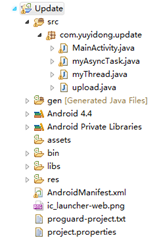
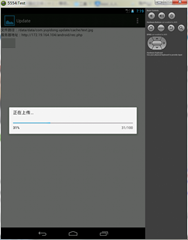

php代码
<?php

$target_path  = "./upload/";//接收文件目录

$target_path = $target_path . basename( $_FILES['uploadedfile']['name']);

if(move_uploaded_file($_FILES['uploadedfile']['tmp_name'], $target_path)) {

   echo "The file ".  basename( $_FILES['uploadedfile']['name']). " has been uploaded";

}  else{

   echo "There was an error uploading the file, please try again!" . $_FILES['uploadedfile']['error'];

}

?>
Android代码
上传的主要代码:
private void uploadFile(String uploadUrl)

  {

    String end = "\r\n";

    String twoHyphens = "--";

    String boundary = "******";

    try

    {

      URL url = new URL(uploadUrl);

      HttpURLConnection httpURLConnection = (HttpURLConnection) url

          .openConnection();//http连接

      // 设置每次传输的流大小,可以有效防止手机因为内存不足崩溃

      // 此方法用于在预先不知道内容长度时启用没有进行内部缓冲的 HTTP 请求正文的流。

      httpURLConnection.setChunkedStreamingMode(128 * 1024);// 128K

      // 允许输入输出流

      httpURLConnection.setDoInput(true);

      httpURLConnection.setDoOutput(true);

      httpURLConnection.setUseCaches(false);

      // 使用POST方法

      httpURLConnection.setRequestMethod("POST");

      httpURLConnection.setRequestProperty("Connection", "Keep-Alive");//保持一直连接

      httpURLConnection.setRequestProperty("Charset", "UTF-8");//编码

      httpURLConnection.setRequestProperty("Content-Type",

          "multipart/form-data;boundary=" + boundary);//POST传递过去的编码

      DataOutputStream dos = new DataOutputStream(

          httpURLConnection.getOutputStream());//输出流

      dos.writeBytes(twoHyphens + boundary + end);

      dos.writeBytes("Content-Disposition: form-data; name=\"uploadedfile\"; filename=\""

          + srcPath.substring(srcPath.lastIndexOf("/") + 1)

          + "\""

          + end);

      dos.writeBytes(end);

      FileInputStream fis = new FileInputStream(srcPath);//文件输入流,写入到内存中

      byte[] buffer = new byte[8192]; // 8k

      int count = 0;

      // 读取文件

      while ((count = fis.read(buffer)) != -1)

      {

        dos.write(buffer, 0, count);

      }

      fis.close();

      dos.writeBytes(end);

      dos.writeBytes(twoHyphens + boundary + twoHyphens + end);

      dos.flush();

      InputStream is = httpURLConnection.getInputStream();//http输入,即得到返回的结果

      InputStreamReader isr = new InputStreamReader(is, "utf-8");

      BufferedReader br = new BufferedReader(isr);

      String result = br.readLine();

      Toast.makeText(this, result, Toast.LENGTH_LONG).show();//将结果输出

      dos.close();

      is.close();

    } catch (Exception e)

    {

      e.printStackTrace();

      setTitle(e.getMessage());

    }

  }
因为安卓4.0之后耗时间的操作要求都在非UI线程中操作,即将前面的AsyncTask拿来用了吧~
AsyncTask传送门:http://www.cnblogs.com/yydcdut/p/3707960.html
在这个类中,将上传的操作放在doInBackground当中,可以有ProgressDialog显示上传了多少:
// Read file

            bytesRead = fileInputStream.read(buffer, 0, bufferSize);

            while (bytesRead > 0) {

                outputStream.write(buffer, 0, bufferSize);

                length += bufferSize;

                progress = (int) ((length * 100) / totalSize);

                publishProgress(progress);

                bytesAvailable = fileInputStream.available();

                bufferSize = Math.min(bytesAvailable, maxBufferSize);

                bytesRead = fileInputStream.read(buffer, 0, bufferSize);

            }

            outputStream.writeBytes(lineEnd);

            outputStream.writeBytes(twoHyphens + boundary + twoHyphens

                    + lineEnd);

            publishProgress(100);
还有就是,注意权限哟:
<uses-permission android:name="android.permission.INTERNET" />
我是天王盖地虎的分割线
源代码:http://pan.baidu.com/s/1dD1Qx01
Update.zip
参考:http://blog.csdn.net/sxwyf248/article/details/7012496
转载请注明出处:http://www.cnblogs.com/yydcdut/p/3720635.html
Android -- 图片异步上传到PHP服务器的更多相关文章
- html5图片异步上传/ 表单提交相关
1 form 表单 get/post提交时候. action地址(或者啥ajax的url地址) 会涉及到跨域问题 常见跨域问题http://www.cnblogs.com/rainman/archiv ...
- AsyncTask异步上传文本到服务器
服务器代码:用于接收客户端信息 package ches; import java.io.IOException; import java.io.PrintWriter; import javax.s ...
- Ajax图片异步上传并回显
1.jsp页面 <td width="20%" class="pn-flabel pn-flabel-h"></td> <td w ...
- 一个完整的springmvc + ajaxfileupload实现图片异步上传的案例
一,原理 详细原理请看这篇文章 springmvc + ajaxfileupload解决ajax不能异步上传图片的问题.java.lang.ClassCastException: org.apache ...
- Android 通过httppost上传文本文件到服务器。
/** * 往服务器上上传文本 比如log日志 * @param urlstr 请求的url * @param uploadFile log日志的路径 * /mnt/shell/emulated/0/ ...
- ajax+XMLHttpRequest里的FormData实现图片异步上传
发这篇博客的时候我是自己在研究这个XMLHttpRequest请求,在别人的博客上面知道XMLHttpRequest新加了一个FormData的东西,好像现在APP请求后台也有用这种方式的吧. 别的不 ...
- base64字符串转文件,以及ngImgCrop裁剪图片并上传保存到服务器示例
base64字符串是包含文件格式的文件字符串,例如:data:image/png;base64,iVBORw0KGgoAAAANSUhEUgAAAMgAAADICAYAAACtWK6eAAAgAElE ...
- asp.net使用jquery.form实现图片异步上传
首先我们需要做准备工作: jquery下载:http://files.cnblogs.com/tianguook/jquery1.8.rar jquery.form.js下载:http://files ...
- Android图片压缩上传(二)
之前有用到libjpeg,还是有一定的局限性,最近用了一个新的方式,效果还是挺不错,随着作者的版本更新,Bug也随之变少,目前项目中运用已上线. 1.之前的方式Android图片压缩,不失真,上线项目 ...
随机推荐
- 选择 React Native 的理由
转载:选择 React Native 的理由 从开始知道 React Native 到现在已经过了5个月,真实的试用也经历了三个月的时间.阅读文档开始,了解是什么,到简单的理解为什么,都是在聆听不同的 ...
- C# 简单读写ini文件帮助类 INIHelp
软件里需要读取一些初始化信息, 决定用ini来做,简单方便. 于是查了一写代码,自己写了一个帮助类. INI文件格式是某些平台或软件上的配置文件的非正式标准, 以节(section)和键(key)构成 ...
- BZOJ 3130: [Sdoi2013]费用流 网络流 二分 最大流
https://www.lydsy.com/JudgeOnline/problem.php?id=3130 本来找费用流的题,权当复习一下网络流好了. 有点麻烦的是double,干脆判断大小或者二分增 ...
- 【8.14校内测试】【DP专题】
nlogn做法,dp[i]表示当前长度为i的最长上升子序列末尾元素的值. 不会写lower_bound(qwq,贴一个以前的好看点的代码 #include<iostream>//使用low ...
- linux下使用cronjob定时执行php脚本
在linux中输入命令 crontab -e 然后使用vim的命令编辑打开的文件,输入 * * * * /usr/bin/php -f /home/userxxx/update.php 保存,退出,好 ...
- [Visual Studio] 安装清单
VS安装位置要求路径必须是英文,且位于Program Files (x86)文件夹下. 下载工具vs_Professional.exe:https://pan.baidu.com/s/1jHRjiia ...
- SQLiteSpy - A fast and compact GUI database manager for SQLite
http://www.yunqa.de/delphi/doku.php/products/sqlitespy/index SQLiteSpy is a fast and compact GUI dat ...
- JTAG/SPI/ISP/ICSP 接口电路
- Nginx HTTP负载均衡/反向代理的相关参数测试
原文地址:http://www.cnblogs.com/xiaochaohuashengmi/archive/2011/03/15/1984976.html 测试目的 (1)弄清楚HTTP Upstr ...
- [Erlang 0004] Centos 源代码编译 安装 Erlang
原文地址: http://www.cnblogs.com/me-sa/archive/2011/07/09/erlang0004.html 由于最终部署的生产环境是Centos,所以我需要在Cento ...