
windows 10 部署flask web
起因
本来想这用django 写一个web 应用程序,便于管理mongodb的数据。结果django 不直接支持mongodb……又没时间研究NoSQL。于是想着随便整个api吧……
于是先用flask 做个简单的demo 部署到本地试试水
简单的demo
from flask import Flask, jsonify

app = Flask(__name__)

tasks = [

    {

        'id': 1,

        'title': u'Buy groceries',

        'description': u'Milk, Cheese, Pizza, Fruit, Tylenol',

        'done': False

    },

    {

        'id': 2,

        'title': u'Learn Python',

        'description': u'Need to find a good Python tutorial on the web',

        'done': False

    }

]

@app.route('/')

def hello_world():

    return jsonify({'task':tasks})

if __name__ == '__main__':

    app.run()
走进部署之坑
网上五花八门的部署blog……各种转载…… http://python.jobbole.com/87655/ 借鉴一下吧
- 安装IIS
- 启用CGI
- 安装Microsoft Web Platform Installer
- 添加 url 重写(URL Rewrite)和IIS(CGI)
- 安装 wfastcgi (pip install wfastcgi)
- 启用 wfastcgi

- 创建web.config
<?xml version="1.0" encoding="utf-8"?> <configuration> <system.webServer> <handlers>
<!-- name 和 path 都是项目名 ;scriptProcessor 就是上面启动wfastcgi 的返回信息(如上图,画线部分)-->
<add name="DMApi" path="DMApi" verb="*" modules="FastCgiModule" scriptProcessor="e:\demo\flask\dmapi\venv\scripts\python36.exe|e:\demo\flask\dmapi\venv\lib\site-packages\wfastcgi.py" resourceType="File" /> <!-- scriptProcessor 的值来自命令行工具 wfastcgi-enable --> <add name="FlaskFastCGI" path="*" verb="*" modules="FastCgiModule" scriptProcessor="e:\demo\flask\dmapi\venv\scripts\python36.exe|e:\demo\flask\dmapi\venv\lib\site-packages\wfastcgi.py" resourceType="Unspecified" requireAccess="Script" /> </handlers> <security> <!-- URL 重写中的特殊字符,比如加号+等等 --> <requestFiltering allowDoubleEscaping="true"></requestFiltering> </security> </system.webServer> <appSettings> <!-- Required settings --> <!-- 在这里指定Falsk app在模块中的具体位置 --> <add key="WSGI_HANDLER" value="DMApi.app" /> <add key="PYTHONPATH" value="~/" /> <!-- Optional settings --> <!-- 需要先创建日志目录,否则报错 --> <add key="WSGI_LOG" value="F:\\Demo\\flask\\DMApi\\logs\\web.log" /> <add key="WSGI_RESTART_FILE_REGEX" value="" /> </appSettings> </configuration> - 配置IIS 目录及权限
- 创建网站
访问掉坑
人家教程里写的好好的 “hello ……”
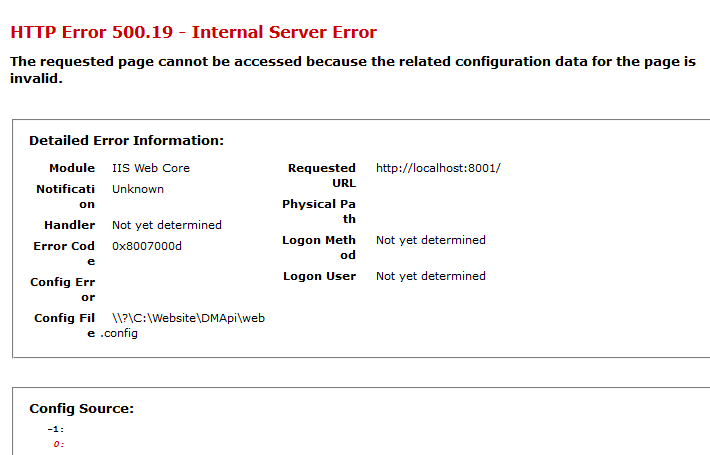
而我却是这样的
Config Error This configuration section cannot be used at this path. This happens when the section is locked at a parent level. Locking is either by default (overrideModeDefault="Deny"), or set explicitly by a location tag with overrideMode="Deny" or the legacy allowOverride="false".
是这样的……
结果
This error occurs when there is a problem reading the configuration file for the Web server or Web application. In some cases, the event logs may contain more information about what caused this error.
Add Application Development from the Features! Remember to add the 4.5 stuff if you need it
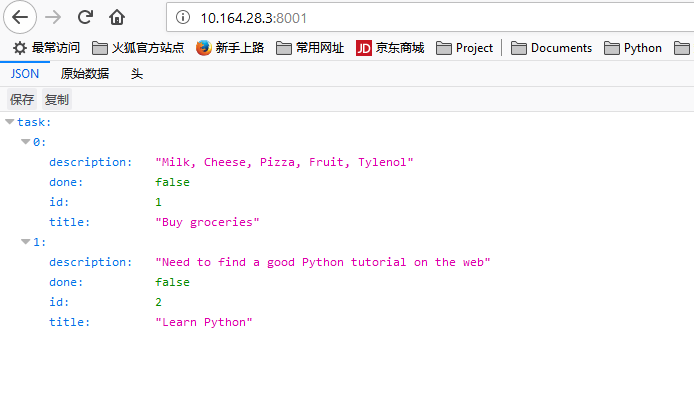
终于看到了结果……
windows 10 部署flask web的更多相关文章
- Ubuntu16.04采用FastCGI方式部署Flask web框架
1 部署nginx 1.1 安装nginx服务 root@desktop:~# apt-get install nginx -y 1.2 验证nginx服务是否启动 root@des ...
- 如何使用Nginx和uWSGI或Gunicorn在Ubuntu上部署Flask Web应用
你好!欢迎阅读我的博文,你可以跳转到我的个人博客网站,会有更好的排版效果和功能. 此外,本篇博文为本人Pushy原创,如需转载请注明出处:https://pushy.site/posts/151981 ...
- Windows 10 部署Enterprise Solution 5.5
Windows 10正式版发布以后,新操作系统带来了许多的变化.现在新购买的电脑安装的系统应该是Windows 10.与当初用户不习惯Windows 7,购买新电脑后第一个想做的事情就是重装成XP,估 ...
- Windows 10部署教程
1. 获取主板密钥 在powershell中执行: (Get-WmiObject -query 'select * from softwareLicensingService').OA3xOrigin ...
- 腾讯云Unubtu 16.04 (gunicorn+supervisor+ngnix+mongodb)部署Flask应用
1.申请腾讯云服务 我申请了免费使用的云服务器 ,选择安装的Linux版本是ubuntu16.04.1 LTSx86_64.我个人PC安装使用的也是这个版本,比较熟悉些. 详细参考帮助文档. 2.登录 ...
- [IOT] - Raspberry Pi 3B + Windows 10 IOT Core + .Net Core Web 部署
硬件:Raspberry Pi 3B 系统:Windows 10 IOT Core 应用:.Net Core Web 部署流程 1. 系统安装 1.1 下载并安装 Windows 10 IoT Cor ...
- 张高兴的 Windows 10 IoT 开发笔记:部署 ASP.NET Core 2 应用
今天是大年初二,都去走亲戚了吧,享受一下这难得的能和亲友相聚的时光.而我就不一样了,今天一回到家就又开始瞎折腾了,哈哈哈. 问题背景 最近花了点时间用 ASP.NET Core 2 写了个个人博客,中 ...
- 阿里云服务器Windows Server 2008/2012部署Office Web Server 2013
以前成功将Office Web Server 2013部署在了本地服务器上,此次是将Office Web Server 2013部署在阿里云服务器Windows Server 2008和2012上,中 ...
- windows 10开启bash on windows,配置sshd,部署hadoop
1.安装Bash on Windows 这个参考官网步骤,很容易安装,https://msdn.microsoft.com/en-us/commandline/wsl/install_guide 安装 ...
随机推荐
- 使用 MQTTnet 快速实现 MQTT 通信
1 什么是 MQTT ? MQTT(Message Queuing Telemetry Transport,消息队列遥测传输)是 IBM 开发的一个即时通讯协议,有可能成为物联网的重要组成部分.MQT ...
- JS选取DOM元素的方法
摘自JavaScript权威指南(jQuery根据样式选择器查找元素的终极方式是 先用getElementsByTagName(*)获取所有DOM元素,然后根据样式选择器对所有DOM元素进行筛选) 今 ...
- python print输出到文件
要将程序的输出送到一个文件中,需要在 print 语句后面使用 >> 指定一个文件,如下所示: principal = # 初始金额 rate = 0.05 # 利率 numyears = ...
- java与C++相比增加和缺少的特性--持续更新
缺少的特性 java值类型中没有无符号数 java没有运算符重载语法 java中没有struct和union等用户自定义值类型 java中没有虚函数的概念,所有函数默认具有虚函数的特性 java采用单 ...
- iOS 一些常见问题
1.屏幕横屏时 xib上拖拉的控件不会跟着横过来: 是因为在主文件面里的 main interface 方框里的main 没有删除: 2.运行出现你没有权限 : 清理一下: 3.将对象转成字符串: / ...
- BZOJ5212 ZJOI2018历史(LCT)
首先相当于最大化access的轻重边交换次数. 考虑每个点作为战场(而不是每个点所代表的国家与其他国家交战)对答案的贡献,显然每次产生贡献都是该点的子树内(包括自身)此次access的点与上次acce ...
- Idea的Maven使用
使用SSM(Spring,SpringMVC和Mybatis) 1.1.Spring Spring是一个开源框架,Spring是于2003 年兴起的一个轻量级的Java 开发框架,由Rod Johns ...
- Android Progurad 代码混淆
ref: ProGuard基础语法和打包配置.mdhttps://github.com/D-clock/Doc/blob/master/Android/Gradle/3_ProGuard%E5%9F% ...
- 【纪中集训2019.3.12】Mas的仙人掌
题意: 给出一棵\(n\)个点的树,需要加\(m\)条边,每条边脱落的概率为\(p_{i}\) ,求加入的边在最后形成图中仅在一个简单环上的边数的期望: \(1 \le n \ , m \le 1 ...
- Levenshtein Distance莱文斯坦距离算法来计算字符串的相似度
Levenshtein Distance莱文斯坦距离定义: 数学上,两个字符串a.b之间的莱文斯坦距离表示为levab(|a|, |b|). levab(i, j) = max(i, j) 如果mi ...