
Spyder code editor里的小秘密: 右侧高亮提示
Spyder code editor里的小秘密: 右侧高亮提示
在spyder环境里, 混了那么长时间了. 可是对其代码编辑器右侧紧贴滚动条的高亮指示区, 还没有弄明白.
今天仔细研究和观察了一下, 终于搞明白其用意了.
用途
- 提示光标所在位置的变量的多少和位置
- 分为灰色和黄色高亮提示, 分别表示:
灰色: 正常的位置提示: 表示该变量在这里出现(包括注释行)
黄色: 警告, 有语法错误的地方 将光标移到非变量处, 比如关键字或者运算符处, 如果脚本没有语法错误的话, 就应该没有灰色提示了.
贴个图展示一下上述所述的各种状况:
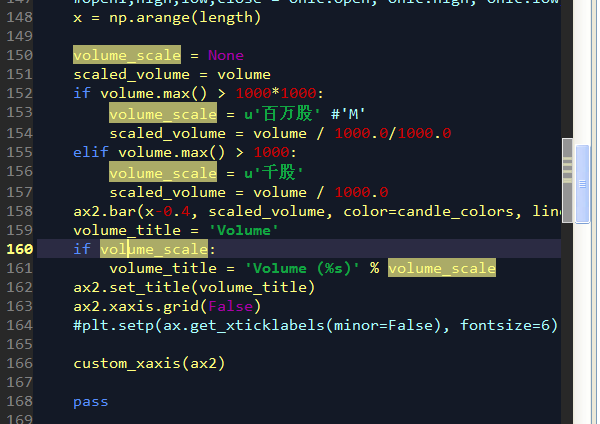
当光标停留在volume_scale变量上时, 灰色标记: 提示变量 volume_scale在代码里的位置
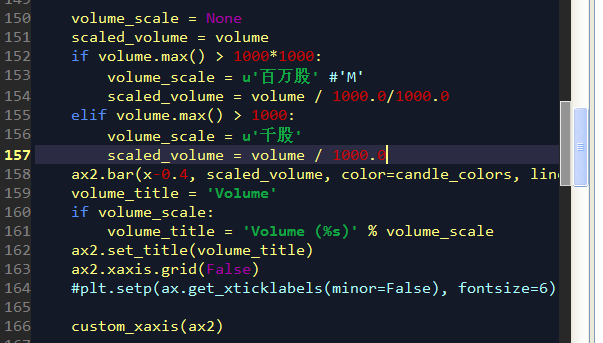
当光标停留在一个常量上的时候, 没有任何灰色提示了. 表名脚本在语法上没有错误了.
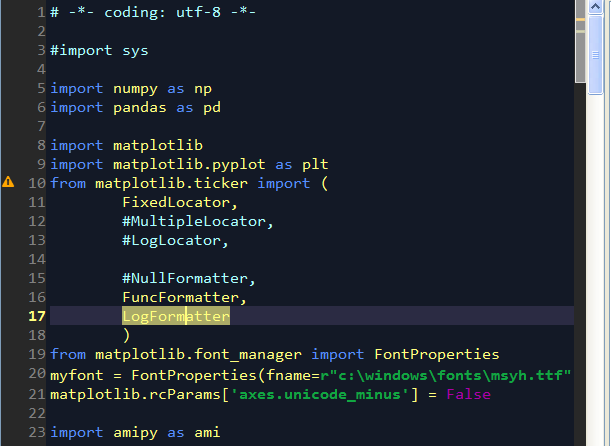
右侧的黄色提示: 警告这里有问题, 黄色条状警告
左侧的黄色提示: 警告这里有问题, 黄色三角叹号警告
Spyder code editor里的小秘密: 右侧高亮提示的更多相关文章
- 关于python命令在editor里编写与在interpreter里的编写的不同之处
关于python命令在editor里编写与在interpreter里的编写的不同之处 其实用这个标题,我心里还是有点胆怯的.作为一个python入门的小白,不,编程入门的小白,我还不太确定我对edit ...
- Delphi Code Editor 之 几个特性
Delphi Code Editor有几个特性在编写大规模代码时非常有用.下面分别进行介绍: 1.Code Templates(代码模板) 使用代码模板可把任意预定义代码(或正文)插入到单元文件中.当 ...
- Delphi Code Editor 之 几个特性(转)
Delphi Code Editor有几个特性在编写大规模代码时非常有用.下面分别进行介绍: 原地址:http://www.cnblogs.com/pchmonster/category/343330 ...
- Delphi Code Editor 之 编辑器选项
Delphi Code Editor 之 编辑器选项 可从Code Editor的右键菜单中选择“Properties”菜单项来查看编辑器选项.也可以从主菜单[Tools | Editor Optio ...
- Delphi Code Editor 之 基本操作
Delphi Code Editor 之 基本操作 毫无疑问,Delphi是高度可视化的.这是使用Delphi进行编程的最大好处之一.当然,任何一个有用的程序中都有大量手工编写的代码.当读者开始编写应 ...
- Delphi Code Editor 之 快捷菜单
Code Editor的快捷菜单分为两个部分:编辑器菜单项和调试器菜单项. 调试器菜单项留作以后讲解调试应用程序时再讲,这里只讲讲Code Editor的编辑器快捷菜单项. 下面列出了全部菜单项及描述 ...
- ace & web ide & web code editor
ace & web ide & web code editor web ide https://ace.c9.io/ https://github.com/ajaxorg/ace ht ...
- web online code editor All In One
web online code editor All In One 在线代码编辑器 Monaco Editor 摩纳哥编辑器 ️ 22.1k The Monaco Editor is the code ...
- auto embedded component in an online code editor
auto embedded component in an online code editor how to auto open a component in the third parts onl ...
随机推荐
- lintcode-513-完美平方
513-完美平方 给一个正整数 n, 找到若干个完全平方数(比如1, 4, 9, ... )使得他们的和等于 n.你需要让平方数的个数最少. 样例 给出 n = 12, 返回 3 因为 12 = 4 ...
- [BUAA_SE_2017]提问回顾
提问回顾 学期初疑问回答 学期初疑问博客 教材中说,PM在衡量需求时需要方方面面的能力与研究.可是,当下许多互联网IT公司只承担外包业务,即客户给什么需求就实现什么需求,甚至可能不要求其它先进的功能. ...
- Python入门:参数传递方式
这是关于Python的第5篇文章,主要介绍下参数传递方式和如何设计自己的函数. (一) 本篇主要介绍2种参数传递方式. 位置参数 调用函数时,根据函数定义的参数位置来传递参数. def right_t ...
- [转]让opencv输出人脸检测的得分(置信率)
转自:http://www.cnblogs.com/sciencefans/ 作者:sciencefans 最近项目略多,其中一个需要找出一些和脸比较像但是不是脸的负样本,想用opencv的人脸检测器 ...
- 程序集里包含多个版本dll引用 ,强制低版本到制定版本dll引用
在 config 的 <configuration> 节点内加入以下 类似信息 以下是以Newtonsoft.Json 为例子 <runtime> <assemblyBi ...
- ACdream原创群赛__15
这场感觉题目确实还算可以,不过,说好的每题10s效果上却不理想.这个时限还算比较紧.因为时间不是按绝对的多出几秒来计算,而是几倍来计算的. 比赛做的不好,后面又去做了一下. A:典型的数位DP,一直坑 ...
- Qt中 QString 转 char*
Qt下面,字符串都用QString,确实给开发者提供了方便,想想VC里面定义的各种变量类型,而且函数参数类型五花八门,经常需要今年新那个类型转换 Qt再使用第三方开源库时,由于库的类型基本上都是标准的 ...
- 关于OpenGL游戏全屏模式的设置
使用DirectX的API的话可以给游戏窗口设置指定的显示器和全屏独占模式,但是如果使用OpenGL的API就比较遗憾不能直接设置. 以下内容基于Windows系统. 如果使用OpenGL渲染,第一步 ...
- SDNnet PX Programmming Language
写在前面 本篇是关于 SDNet PX Programming Language User Guide 其中「Introduction」 部分的一些翻译.理解以及我从其他方面看来的一些资料的整合.网上 ...
- webservice 菜鸟探索之旅
项目背景 接到的任务是通过调用其他平台厂商提供的webservice接口来获取他们的图片数据把图片下载下来录入我司平台.之前没有接触过webservice,所以开始了这次webservice的菜鸟之旅 ...