
Android:后台给button绑定onClick事件、当返回项目到手机页面时提示是否退出APP
上一篇文章我们学习了android通过findViewById的方式查找控件,本章将了解button控件,及btton如何绑定控件。
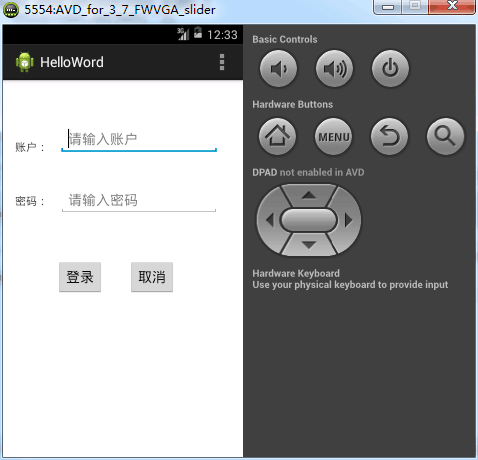
通过android的ui设计工具设计一个登录页面:
<RelativeLayout xmlns:android="http://schemas.android.com/apk/res/android"

    xmlns:tools="http://schemas.android.com/tools"

    android:layout_width="match_parent"

    android:layout_height="match_parent"

    android:paddingBottom="@dimen/activity_vertical_margin"

    android:paddingLeft="@dimen/activity_horizontal_margin"

    android:paddingRight="@dimen/activity_horizontal_margin"

    android:paddingTop="@dimen/activity_vertical_margin"

    tools:context=".MainActivity" >

    <TextView

        android:id="@+id/tvUsername"

        android:layout_width="wrap_content"

        android:layout_height="wrap_content"

        android:layout_above="@+id/etPassword"

        android:layout_alignParentLeft="true"

        android:text="@string/main_activity_username" />

    <TextView

        android:id="@+id/tvPassword"

        android:layout_width="wrap_content"

        android:layout_height="wrap_content"

        android:layout_alignBaseline="@+id/etPassword"

        android:layout_alignBottom="@+id/etPassword"

        android:layout_alignLeft="@+id/tvUsername"

        android:text="@string/main_activity_password" />

    <EditText

        android:id="@+id/etUsername"

        android:layout_width="wrap_content"

        android:layout_height="wrap_content"

        android:layout_alignParentTop="true"

        android:layout_marginLeft="15dp"

        android:layout_marginTop="42dp"

        android:layout_toRightOf="@+id/tvUsername"

        android:hint="@string/main_activity_username_hint"

        android:ems="10" />

    <EditText

        android:id="@+id/etPassword"

        android:layout_width="wrap_content"

        android:layout_height="wrap_content"

        android:layout_alignLeft="@+id/etUsername"

        android:layout_below="@+id/etUsername"

        android:layout_marginTop="41dp"

        android:hint="@string/main_activity_password_hint"

        android:ems="10"

        android:inputType="textPassword" >

        <requestFocus />

    </EditText>

    <Button

        android:id="@+id/btnCancel"

        android:layout_width="wrap_content"

        android:layout_height="wrap_content"

        android:layout_alignBottom="@+id/btnOk"

        android:layout_alignRight="@+id/etUsername"

        android:layout_marginRight="57dp"

        android:text="@string/main_activity_btnCancel" />

    <Button

        android:id="@+id/btnOk"

        android:layout_width="wrap_content"

        android:layout_height="wrap_content"

        android:layout_below="@+id/etPassword"

        android:layout_marginRight="32dp"

        android:layout_marginTop="59dp"

        android:layout_toLeftOf="@+id/btnCancel"

        android:text="@string/main_activity_btnOk" />

    <TextView

        android:id="@+id/tvShow"

        android:layout_width="wrap_content"

        android:layout_height="wrap_content"

        android:layout_alignLeft="@+id/tvPassword"

        android:layout_alignParentBottom="true"

        android:layout_alignRight="@+id/etUsername"

        android:layout_marginBottom="74dp"

        android:text="" />

</RelativeLayout>
1)文本框使用的EditText控件;
2)文本hint是输入提示;
3)inputType是文本内容的格式设定。
后台给button绑定onClick事件:
android后台绑定button的onClick的函数setOnClickListener函数:
package com.example.helloword;

import android.app.Activity;

import android.os.Bundle;

import android.view.Menu;

import android.view.View;

import android.widget.Button;

import android.widget.EditText;

import android.widget.TextView;

import android.widget.Toast;

public class MainActivity extends Activity {

    private EditText etUsername, etPassword;

    private TextView tvUsername, tvPassword, tvShow;

    private Button btnOk, btnCancel;

    @Override

    protected void onCreate(Bundle savedInstanceState) {

        super.onCreate(savedInstanceState);

        setContentView(R.layout.activity_main);

        etUsername = (EditText) this.findViewById(R.id.etUsername);

        etPassword = (EditText) this.findViewById(R.id.etPassword);

        tvUsername = (TextView) this.findViewById(R.id.tvUsername);

        tvPassword = (TextView) this.findViewById(R.id.tvPassword);

        tvShow = (TextView) this.findViewById(R.id.tvShow);

        btnOk = (Button) this.findViewById(R.id.btnOk);

        btnCancel = (Button) this.findViewById(R.id.btnCancel);

        btnOk.setOnClickListener(new View.OnClickListener() {

            @Override

            public void onClick(View arg0) {

                String username = etUsername.getText().toString();

                String password = etPassword.getText().toString();

                tvShow.setText(username + "," + password);

            }

        });

        btnCancel.setOnClickListener(new View.OnClickListener() {

            @Override

            public void onClick(View arg0) {

                etUsername.setText("");

                etPassword.setText("");

                tvShow.setText("");

            }

        });

    }

    @Override

    public boolean onCreateOptionsMenu(Menu menu) {

        // Inflate the menu; this adds items to the action bar if it is present.

        getMenuInflater().inflate(R.menu.main, menu);

        return true;

    }

}
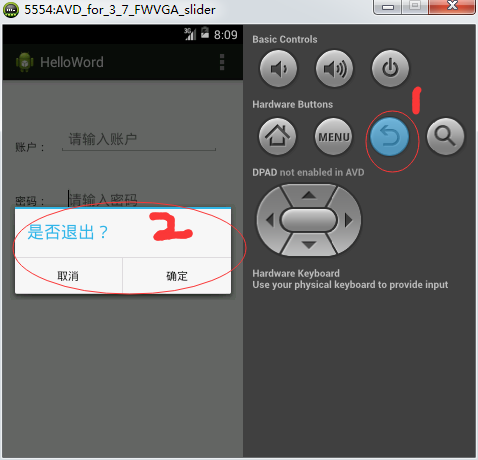
当返回项目到手机页面时提示是否退出APP
    @Override

    public boolean onKeyUp(int keyCode, KeyEvent event) {

        // 当点击回退时,弹出该窗口(也就相当于关闭操作)

        if (keyCode == KeyEvent.KEYCODE_BACK) {

            new AlertDialog.Builder(this).setTitle("是否退出?")

                    .setPositiveButton("确定", new OnClickListener() {

                        @Override

                        public void onClick(DialogInterface arg0, int arg1) {

                            finish();

                        }

                    }).setNegativeButton("取消", null).show();

            return true;

        }

        return super.onKeyUp(keyCode, event);

    }
使用android仿真机测试效果:
当点击返回到手机时:
Android:后台给button绑定onClick事件、当返回项目到手机页面时提示是否退出APP的更多相关文章
- ListView中的组件Button的OnClick事件触发时机
Android开发时,ListView中的组件Button的OnClick事件必须在ListView之外的组件事件触发后才能触发? 此处ListView无OnItemClick事件,而且ListVie ...
- input 的blur事件之后button的onclick事件不执行解决方案
最近发现网页程序中有个BUG,就是在input标签输入框中输入完数据后,直接点击“取消” 按钮的时候.出现网页崩死的情况: 经过小主酸菜我,各种方法的尝试后,找到一个初步可以解决的方案,在这里分享给大 ...
- Android开发入门——Button绑定监听事件三种方式
import android.app.Activity; import android.os.Bundle;import android.view.View;import android.widget ...
- Asp.Net回车键触发Button的OnClick事件解决方案
在aspx页面有textbox文本框,还有三个button按钮.启用textbox的TextChanged事件和button的click事件. 问题: 现在在textbox文本框输入完数据按“回车”后 ...
- 在js中绑定onclick事件为什么不加括号,在html代码中必须要加?
<!DOCTYPE html> <html lang="en"> <head> <meta charset="UTF-8&quo ...
- 问题解决:在js中绑定onclick事件为什么不加括号,在html代码中必须要加?(转载)
<!DOCTYPE html> <html lang="en"> <head> <meta charset="UTF-8&quo ...
- android ListView中button点击事件盖掉onItemClick解决办法
ListView 1.在android应用当中,很多时候都要用到listView,但如果ListView当中添加Button后,ListView 自己的 public void onItemClick ...
- button的onclick事件给函数传递参数
ul+='<button onclick="pay(\''+regiId+'\')" >按钮</button>' //此为原生JS页面拼接//此方式的关键就 ...
- 页面所有的button绑定同一个事件,点击不同的button赋值不同
<script type="text/javascript"> $(function(){ $("input[type='button']").cl ...
随机推荐
- 斗地主案例(利用集合/增强for等技术)
斗地主案例(利用集合/增强for等技术) package Task10; import java.util.ArrayList; import java.util.Collections; publi ...
- 【Flask】 使用Flask-Moment进行日期时间的管理
Flask-Moment Flask-Moment又是一个flask的扩展模块,用来处理时间日期等信息.用这个模块主要是考虑到两点,第一是为了让不同时区的用户看到的都是各自时区的实际时间,而不是服务器 ...
- java中的notify和notifyAll有什么区别?
先说两个概念:锁池和等待池 锁池:假设线程A已经拥有了某个对象(注意:不是类)的锁,而其它的线程想要调用这个对象的某个synchronized方法(或者synchronized块),由于这些线程在进入 ...
- Django学习(六)---博客文章页面的超链接设置
Django中的超链接 超链接的目标地址 href后面是目标地址 template中可以用 {% url 'app_name : url_name' param %} app_name:应用命名 ...
- 十分钟释疑Oracle中“小表超慢”之谜(SQL调优/SQL优化)
前几天,一个用户找到我,说查一个小表的时候非常慢,我问有多慢,他说最快也得半个小时才能出结果,有时干脆不出结果,我说小表多大,他说就几十兆,有点疑惑,让他帮忙获取了相关信息,一看就明白了,原来所谓的小 ...
- 从零部署Spring boot项目到云服务器(正式部署)
上一篇文章总结了在Linux云服务器上部署Spring Boot项目的准备过程,包括环境的安装配置,项目的打包上传等. 链接在这里:http://www.cnblogs.com/Lovebugs/p/ ...
- C语言第一周作业
题目一:7-3 温度转换 本题要求编写程序,计算华氏温度150°F对应的摄氏温度.计算公式:C=5×(F−32)/9,式中:C表示摄氏温度,F表示华氏温度,输出数据要求为整型. 1.实验代码 2.设计 ...
- CPP 栈 示例
#include<iostream> #include<stdlib.h> using namespace std; typedef struct node { int dat ...
- 【iOS】OC-Quartz2D简单使用
什么是Quartz2D Quartz 2D是一个二维绘图引擎,同时支持iOS和Mac系统 作用 ? 1 2 3 4 5 6 7 8 9 <code>Quartz 2D能完成的工作 绘制图形 ...
- JUnit单元测试遇到的问题及解决思路
JUnit是Java单元测试框架,我们在对开发的系统进行单元测试的时候,也遇到了如何测试多个测试用例的问题. 背景:我们的所有测试用例都保存在Excel文件中,该文件包含测试用例和预期输出.我们希望 ...