
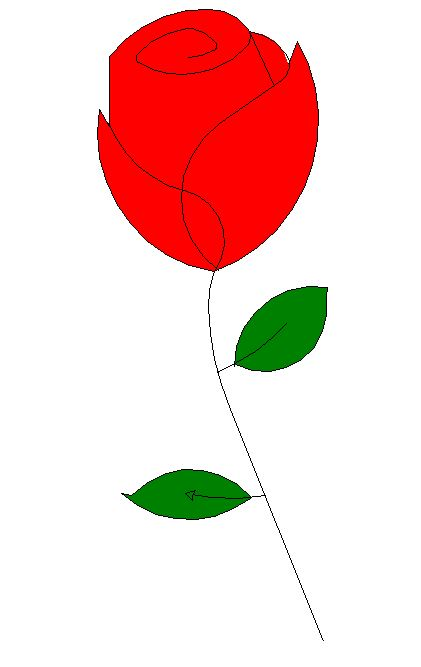
用python程序来画花
 from turtle import *

 import time

 setup(600,800,0,0)

 speed(0)

 penup()

 seth(90)

 fd(340)

 seth(0)

 pendown()

 speed(5)

 begin_fill()

 fillcolor('red')

 circle(50,30)

 for i in range(10):

     fd(1)

     left(10)

 circle(40,40)

 for i in range(6):

     fd(1)

     left(3)

 circle(80,40)

 for i in range(20):

     fd(0.5)

     left(5)

 circle(80,45)

 for i in range(10):

     fd(2)

     left(1)

 circle(80,25)

 for i in range(20):

     fd(1)

     left(4)

 circle(50,50)

 time.sleep(0.1)

 circle(120,55)

 speed(0)

 seth(-90)

 fd(70)

 right(150)

 fd(20)

 left(140)

 circle(140,90)

 left(30)

 circle(160,100)

 left(130)

 fd(25)

 penup()

 right(150)

 circle(40,80)

 pendown()

 left(115)

 fd(60)

 penup()

 left(180)

 fd(60)

 pendown()

 end_fill()

 right(120)

 circle(-50,50)

 circle(-20,90)

 speed(1)

 fd(75)

 speed(0)

 circle(90,110)

 penup()

 left(162)

 fd(185)

 left(170)

 pendown()

 circle(200,10)

 circle(100,40)

 circle(-52,115)

 left(20)

 circle(100,20)

 circle(300,20)

 speed(1)

 fd(250)

 penup()

 speed(0)

 left(180)

 fd(250)

 circle(-300,7)

 right(80)

 circle(200,5)

 pendown()

 left(60)

 begin_fill()

 fillcolor('green')

 circle(-80,100)

 right(90)

 fd(10)

 left(20)

 circle(-63,127)

 end_fill()

 penup()

 left(50)

 fd(20)

 left(180)

 pendown()

 circle(200,25)

 penup()

 right(150)

 fd(180)

 right(40)

 pendown()

 begin_fill()

 fillcolor('green')

 circle(-100,80)

 right(150)

 fd(10)

 left(60)

 circle(-80,98)

 end_fill()

 penup()

 left(60)

 fd(13)

 left(180)

 pendown()

 speed(1)

 circle(-200,23)

 exitonclick()
第二种
 import turtle

 import math

 def p_line(t, n, length, angle):

     """Draws n line segments."""

     for i in range(n):

         t.fd(length)

         t.lt(angle)

 def polygon(t, n, length):

     """Draws a polygon with n sides."""

     angle = 360 / n

     p_line(t, n, length, angle)

 def arc(t, r, angle):

     """Draws an arc with the given radius and angle."""

     arc_length = 2 * math.pi * r * abs(angle) / 360

     n = int(arc_length / 4) + 1

     step_length = arc_length / n

     step_angle = float(angle) / n

     # Before starting reduces, making a slight left turn.

     t.lt(step_angle / 2)

     p_line(t, n, step_length, step_angle)

     t.rt(step_angle / 2)

 def petal(t, r, angle):

     """Draws a 花瓣 using two arcs."""

     for i in range(2):

         arc(t, r, angle)

         t.lt(180 - angle)

 def flower(t, n, r, angle, p):

     """Draws a flower with n petals."""

     for i in range(n):

         petal(t, r, angle)

         t.lt(p / n)

 def leaf(t, r, angle, p):

     """Draws a 叶子 and fill it."""

     t.begin_fill()  # Begin the fill process.

     t.down()

     flower(t, 1, r, angle, p)

     t.end_fill()

 def main():

     window = turtle.Screen()  # creat a screen

     window.bgcolor("white")

     window.title("draw a flower")

     lucy = turtle.Turtle()

     lucy.shape("turtle")

     lucy.color("red")

     lucy.width(3)

     # lucy.speed(10)

     # Drawing flower

     flower(lucy, 7, 60, 100, 360)

     # Drawing pedicel

     lucy.color("brown")

     lucy.rt(90)

     lucy.fd(200)

     # Drawing leaf 1

     lucy.width(1)

     lucy.rt(270)

     lucy.color("green")

     leaf(lucy, 40, 80, 180)

     lucy.rt(140)

     lucy.color("black")

     lucy.fd(30)

     lucy.lt(180)

     lucy.fd(30)

     # Drawing leaf 2

     lucy.rt(120)

     lucy.color("green")

     leaf(lucy, 40, 80, 180)

     lucy.color("black")

     lucy.rt(140)

     lucy.fd(30)

     lucy.ht()  # hideturtle

     window.exitonclick()

 main()
效果图:

用python程序来画花的更多相关文章
- [daily][optimize] 一个小python程序的性能优化 (python类型转换函数引申的性能优化)
前天,20161012,到望京面试.第四个职位,终于进了二面.好么,结果人力安排完了面试时间竟然没有通知我,也没有收到短信邀请.如果没有短信邀请门口的保安大哥是不让我进去大厦的.然后,我在11号接到了 ...
- python运用turtle 画出汉诺塔搬运过程
python运用turtle 画出汉诺塔搬运过程 1.打开 IDLE 点击File-New File 新建立一个py文件 2.向py文件中输入如下代码 import turtle class Stac ...
- 3.第一个python程序
学习任何一门语言的第一步,首先要写个'hello world',这算是程序员的一个传统.但在写之前,还有注意几个问题. 首先,python是一门脚本语言,而脚本语言的特点就是:我们写的代码会先由解释器 ...
- 想拥有自己的Python程序包,你只需15步
来源商业新知网,原标题:15步,你就能拥有自己的Python程序包 全文共 3192 字,预计学习时长 6 分钟 每个软件开发员和数据科学家都难免要做程序包.本文推荐一篇 Python开源程序包的制作 ...
- 我的第一个Python程序,定义主函数,eval、format函数详解,
程序实例: #第一个py小程序 def main(): f = eval(input("输入一个数值:")) p=f*(5/9) print("现在的值为:{0:3.3f ...
- Python 开篇及第一个Python程序
本节内容 python 简单介绍 python 2.x 或者python 3.x python 安装 第一个python程序 一.python简单介绍 python的创始人为吉多.范罗苏姆(Guido ...
- Python程序调试工具Py-Spy
序言 如果你是从Java语言开发转Python开发,可能在庆幸自己的开发效率提高了很多,但是也有痛苦的时候,比如你会怀念jstack,jmap, 等各种工具在生产环境做perfomance tunin ...
- python应用(2):写个python程序给自己用
用python写一个程序,然后在命令行上执行,看不到界面(UI),这种程序很常见了,叫命令行程序.然而很多人,特别是不懂程序的人,更需要看到的是一个有界面的,能通过鼠标操作的程序,毕竟已经迈进&quo ...
- 运行python程序
1 在windows下运行python程序 1)从DOS命令行运行python脚本 用python解释器来执行python脚本,在windows下面python解释器是python.exe,我的pyt ...
随机推荐
- PL/SQL NOCOPY限制模式
NOCOPY模式用于限定OUT模式和IN OUT模式在调用时是不是以传引用的方式进行. 默认情况下,OUT模式和IN OUT模式的参数是以传值的方式进行调用的. IN模式总是以传引用的方式,如果用NO ...
- 利用PowerDesigner15在win7系统下对MySQL 进行反向工程(二)
利用PowerDesigner15在win7系统下对MySQL 进行反向工程 1.打开PowerDesigner,建立新模型,选择Physical Data Model中的Physical Da.. ...
- zTree实现获取当前选中的第一个节点在同级节点中的序号
zTree实现获取当前选中的第一个节点在同级节点中的序号 1.实现源码 <!DOCTYPE html> <html> <head> <title>zTr ...
- 7.C++类与封装的概念
类通常分为以下两部分 -类的内部具体实现 -类的外部使用方法 比如: 用户使用手机,只需要知道如何使用. 而手机开发者,则需要考虑手机内部的实现细节. 类的封装 并不是类的每个成员变量和成员函数都要对 ...
- python 实现多层目录文件查找
本文针对多层目录下文件的查找. 利用 os模块的基本操作,并利用递归的思想实现了目录多层查找. 代码如下: import os #dir_name: 处理文件的起始目录 def count_file( ...
- visual studio 2010 Error: IntelliSense: identifier "DWORD" is undefined
在自己工程里,添加别的工程文件时,出现改错误 解决方法 在文件前添加: using namespace std; 参考: http://www.programgo.com/article/502412 ...
- C#图解教程 第二十四章 反射和特性
反射和特性 元数据和反射Type 类获取Type对象什么是特性应用特性预定义的保留的特性 Obsolete(废弃)特性Conditional特性调用者信息特性DebuggerStepThrough 特 ...
- 描述Spring Web MVC的工作流程
Spring Web MVC的共工作流程如下: 1.浏览器发出Spring mvc请求,请求给前端控制器 DispatcherServlet处理. 2.控制器通过HandlerMapping维护的请求 ...
- [HNOI2013]切糕
题目描述 网址:https://daniu.luogu.org/problemnew/show/3227 大意: 平面上有一长方体,目标为将其切割为上下两半. 切割点为\((x,y,z)\)的点,每个 ...
- [BZOJ1212][HNOI2004]L语言
BZOJ Luogu sol 设\(f_i\)表示文章的前\(i\)个字符是否可以被理解.每次匹配要暴跳\(fail\)到根,转移就是\(f_i|=f_{i-len}\),其中\(len\)是某个可以 ...