
SpringBoot配置mybatis
一直都说SpringBoot是零配置,当然,真正实现零配置是不可能的,但是在配置mybatis这里真的是太简单了,哈哈,下面我们一起看一下。
1.先导入基于SpringBoot的mybatis依赖包
        <dependency>

            <groupId>org.mybatis.spring.boot</groupId>

            <artifactId>mybatis-spring-boot-starter</artifactId>
       <version>1.3.0</version>

        </dependency>
2.引入mybatis的基本配置文件mybatis.cfg.xml,这里就不过多做其他的配置了,一个最简单的配置文件如下
<!DOCTYPE configuration PUBLIC "-//mybatis.org//DTD Config 3.0//EN"

        "http://mybatis.org/dtd/mybatis-3-config.dtd">

<configuration>

    <!-- 进行Mybatis的相应的环境的属性定义 -->

    <settings>   <!-- 在本项目中开启二级缓存 -->

            <setting name="cacheEnabled" value="true"/>

    </settings>

</configuration>
3.在application.yml下配置mybatis相关。此配置主要是针对mybatis配置文件和mapper配置文件以及bean的路径。
mybatis:

  config-location: classpath:mybatis/mybatis.cfg.xml      #mybatis配置文件所在路径

  type-aliases-package: cn.mldn.microboot.vo              #定义所有操作类的别名所在包

  mapper-locations:                                       #所有的mapper映射文件

  - classpath:mybatis/mapper/**/*.xml
4.我们做一个Student对象的映射,实现基本的增删改查功能,Student表和bean已经提前建好。
<?xml version="1.0" encoding="UTF-8" ?>

<!DOCTYPE mapper PUBLIC "-//mybatis.org//DTD Mapper 3.0//EN"

        "http://mybatis.org/dtd/mybatis-3-mapper.dtd">

<mapper namespace="cn.mldn.microboot.dao.IStudentDAO">

    <select id="findAll" resultType="Student">

        SELECT * FROM student;

    </select>

    <insert id="doCreate" parameterType="Student">

        INSERT INTO    student(name,age,sex,birthday) VALUES(#{name},#{age},#{sex},#{birthday})

    </insert>

    <update id="doUpdate" parameterType="Student">

        UPDATE student set name = #{name} where id=#{id}

    </update>

    <delete id="doDelete" parameterType="int">

        Delete from student Where id=#{id}

    </delete>

</mapper>
这里的namespace属性值对应我们Dao层,id则为方法名。先看一下Dao层的代码。
import java.util.List;

import org.apache.ibatis.annotations.Mapper;

import cn.mldn.microboot.vo.Student;

@Mapper

public interface IStudentDAO {

        public List<Student> findAll();

        public boolean doCreate(Student vo);

        public boolean doUpdate(Student vo);

        public boolean doDelete(Integer id);

}
看到了,就是这么简单,一个Mapper注解,解决了所有问题。
5.接下来我们写一下Servic层和调用的测试类。
Service层接口定义如下:
import java.util.List;

import org.springframework.transaction.annotation.Propagation;

import org.springframework.transaction.annotation.Transactional;

import cn.mldn.microboot.vo.Student;

public interface IStudentService {

    @Transactional(readOnly = true)

    public List<Student> list();

    @Transactional(propagation=Propagation.REQUIRED)

    public boolean add(Student vo);

    @Transactional(propagation=Propagation.REQUIRED)

    public boolean update(Student vo);

    @Transactional(propagation=Propagation.REQUIRED)

    public boolean delete(Integer id);

}
Transactional注解是对事物的控制。
下面是Service的实现
import java.util.List;

import javax.annotation.Resource;

import org.springframework.stereotype.Service;

import cn.mldn.microboot.dao.IStudentDAO;

import cn.mldn.microboot.service.IStudentService;

import cn.mldn.microboot.vo.Student;

@Service

public class StudentServiceImpl implements IStudentService {

    @Resource

    private IStudentDAO studentDao;

    @Override

    public List<Student> list() {

        return this.studentDao.findAll();

    }

    @Override

    public boolean add(Student vo) {

        return this.studentDao.doCreate(vo);

    }

    @Override

    public boolean update(Student vo) {

        return this.studentDao.doUpdate(vo);

    }

    @Override

    public boolean delete(Integer id) {

        return this.studentDao.doDelete(id);

    }

}
最后我们写下测试类
import javax.annotation.Resource;

import org.junit.Test;

import org.junit.runner.RunWith;

import org.springframework.boot.test.context.SpringBootTest;

import org.springframework.test.context.junit4.SpringJUnit4ClassRunner;

import org.springframework.test.context.web.WebAppConfiguration;

import cn.mldn.microboot.StartSpringBootMain;

import cn.mldn.microboot.service.IStudentService;

import cn.mldn.microboot.vo.Student;

@SpringBootTest(classes = StartSpringBootMain.class)

@RunWith(SpringJUnit4ClassRunner.class)

@WebAppConfiguration

public class TestStudentService {

    @Resource

    private IStudentService studentService;

    @Test

    public void testList() throws Exception{

        System.out.println(this.studentService.list());

    }

    @Test

    public void testAdd() throws Exception{

        Student student = new Student();

        student.setAge(26);

        student.setName("来来来");

        student.setBirthday("2018/03/01");

        student.setSex(true);

        System.out.println(this.studentService.add(student));

    }

}
这里只写了查询和添加的测试类,测试
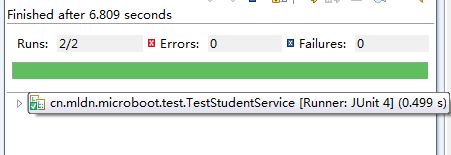
测试后,成功添加与查询。
SpringBoot配置mybatis的更多相关文章
- springboot 配置mybatis 配置mapper.xml
# 插件 进行配置 也可以用yml # 1. 配置 Tomcat 修改端口号 server.port=8848 server.context-path=/zxf #2.配置数据源 spring.dat ...
- 【记录】spring/springboot 配置mybatis打印sql
======================springboot mybatis 打印sql========================================== 方式 一: ##### ...
- springboot配置mybatis的mapper路径
1.在src/main/resources/目录下新建mybatis文件夹,将xxx.xml文件放入该文件夹内 2.在application.yml文件中配置: mybatis: configurat ...
- springboot 配置mybatis打印sql
方式 一: ###########################################################配置打印sql############################ ...
- springboot 配置mybatis
- IDEA springboot配置
基于springboot2.1.7 springboot项目创建 springboot热部署 springboot配置swagger2 springboot配置mybatis springboot配置 ...
- springboot添加多数据源连接池并配置Mybatis
springboot添加多数据源连接池并配置Mybatis 转载请注明出处:https://www.cnblogs.com/funnyzpc/p/9190226.html May 12, 2018 ...
- SpringBoot集成mybatis配置
一个有趣的现象:传统企业大都喜欢使用hibernate,互联网行业通常使用mybatis:之所以出现这个问题感觉与对应的业务有关,比方说,互联网的业务更加的复杂,更加需要进行灵活性的处理,所以myba ...
- SpringBoot系列七:SpringBoot 整合 MyBatis(配置 druid 数据源、配置 MyBatis、事务控制、druid 监控)
1.概念:SpringBoot 整合 MyBatis 2.背景 SpringBoot 得到最终效果是一个简化到极致的 WEB 开发,但是只要牵扯到 WEB 开发,就绝对不可能缺少数据层操作,所有的开发 ...
随机推荐
- SQL优化 MySQL版 - 单表优化及细节详讲
单表优化及细节详讲 作者 : Stanley 罗昊 [转载请注明出处和署名,谢谢!] 注:本文章需要MySQL数据库优化基础或观看前几篇文章,传送门: B树索引详讲(初识SQL优化,认识索引):htt ...
- java 并发多线程 锁的分类概念介绍 多线程下篇(二)
接下来对锁的概念再次进行深入的介绍 之前反复的提到锁,通常的理解就是,锁---互斥---同步---阻塞 其实这是常用的独占锁(排它锁)的概念,也是一种简单粗暴的解决方案 抗战电影中,经常出现为了阻止日 ...
- .Net Core 根据配置文件动态发布至服务器
前言 一个软件的开发周期需要经历开发.测试.上线三个基本的阶段,同理我们在开发过程中会需要经常切换不同的运行环境..NetCore可以通过配置文件以及写入系统环境变量来自动识别站点的运行环境,保证了数 ...
- 数据库艰难求生之路(基础:创建数据库表格)part1
创建表格 1.创建表格之identity create table TableName( id ,), col_1 ), col_2 ) ) 这是一个简单的表格创建,identity这个是指在创建表 ...
- Centos 7.6搭建Tomcat 环境,发布Java项目
安装 JDK Tomcat 的安装依赖 JDK,在安装 Tomcat 之前需要先安装 Java JDK.输入命令 java -version,如果显示 JDK 版本,证明已经安装了 JDK java ...
- 0422作业:基础(if,while)
""" 1.题目:企业发放的奖金根据利润提成.利润(I)低于或等于10万元时,奖金可提10%: 利润高于10万元,低于20万元时,低于10万元的部分按10%提成,高于10 ...
- Poj1543
Perfect Cubes Time Limit: 1000MS Memory Limit: 10000K Total Submissions: 16522 Accepted: 8444 De ...
- css3自适应布局单位vw,vh你知道多少?
视口单位(Viewport units) 什么是视口? 在桌面端,视口指的是在桌面端,指的是浏览器的可视区域:而在移动端,它涉及3个视口:Layout Viewport(布局视口),Visual Vi ...
- 【土旦】vue项目中 使用 pako.js 解密 gzip加密字符串
前言 今天跟后台对接一个接口,接受到一个加密的值,说是通过gzip加密过的,然后就蒙蔽了, 赶紧上百度找了一下资料,通过一篇文章(原文在底部)发现有个js库可以解密,就下载轻松解密了 实现代码 pok ...
- 覆盖ng-zorro样式(非style.scss)
之前发现在模板的样式表里写样式不起作用,然后想起vue里有个/deep/,angular会不会也有一个,果然,发现了一个::ng-deep可以在模板的样式表里覆盖ng-zorro的样式.记录一下(●' ...