
微信小程序 Request faild 请求后台失败
首先确认你的域名和ssl证书是否配置完成。
进行ssl证书验证
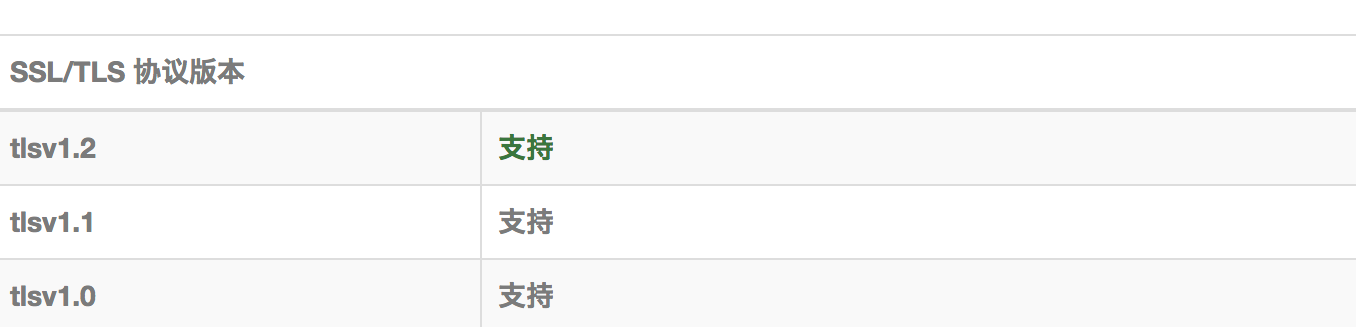
检测证书是否支持TSL1.2
Windows Registry Editor Version 5.00

[HKEY_LOCAL_MACHINE\SYSTEM\CurrentControlSet\Control\SecurityProviders\SCHANNEL\Protocols]

[HKEY_LOCAL_MACHINE\SYSTEM\CurrentControlSet\Control\SecurityProviders\SCHANNEL\Protocols\Multi-Protocol Unified Hello]

[HKEY_LOCAL_MACHINE\SYSTEM\CurrentControlSet\Control\SecurityProviders\SCHANNEL\Protocols\Multi-Protocol Unified Hello\Client]

"Enabled"=dword:00000000

"DisabledByDefault"=dword:00000001

[HKEY_LOCAL_MACHINE\SYSTEM\CurrentControlSet\Control\SecurityProviders\SCHANNEL\Protocols\Multi-Protocol Unified Hello\Server]

"Enabled"=dword:00000000

"DisabledByDefault"=dword:00000001

[HKEY_LOCAL_MACHINE\SYSTEM\CurrentControlSet\Control\SecurityProviders\SCHANNEL\Protocols\PCT 1.0]

[HKEY_LOCAL_MACHINE\SYSTEM\CurrentControlSet\Control\SecurityProviders\SCHANNEL\Protocols\PCT 1.0\Client]

"Enabled"=dword:00000000

"DisabledByDefault"=dword:00000001

[HKEY_LOCAL_MACHINE\SYSTEM\CurrentControlSet\Control\SecurityProviders\SCHANNEL\Protocols\PCT 1.0\Server]

"Enabled"=dword:00000000

"DisabledByDefault"=dword:00000001

[HKEY_LOCAL_MACHINE\SYSTEM\CurrentControlSet\Control\SecurityProviders\SCHANNEL\Protocols\SSL 2.0]

[HKEY_LOCAL_MACHINE\SYSTEM\CurrentControlSet\Control\SecurityProviders\SCHANNEL\Protocols\SSL 2.0\Client]

"DisabledByDefault"=dword:00000001

"Enabled"=dword:00000000

[HKEY_LOCAL_MACHINE\SYSTEM\CurrentControlSet\Control\SecurityProviders\SCHANNEL\Protocols\SSL 2.0\Server]

"Enabled"=dword:00000000

"DisabledByDefault"=dword:00000001

[HKEY_LOCAL_MACHINE\SYSTEM\CurrentControlSet\Control\SecurityProviders\SCHANNEL\Protocols\SSL 3.0]

[HKEY_LOCAL_MACHINE\SYSTEM\CurrentControlSet\Control\SecurityProviders\SCHANNEL\Protocols\SSL 3.0\Client]

"Enabled"=dword:00000000

"DisabledByDefault"=dword:00000001

[HKEY_LOCAL_MACHINE\SYSTEM\CurrentControlSet\Control\SecurityProviders\SCHANNEL\Protocols\SSL 3.0\Server]

"Enabled"=dword:00000000

"DisabledByDefault"=dword:00000001

[HKEY_LOCAL_MACHINE\SYSTEM\CurrentControlSet\Control\SecurityProviders\SCHANNEL\Protocols\TLS 1.0]

[HKEY_LOCAL_MACHINE\SYSTEM\CurrentControlSet\Control\SecurityProviders\SCHANNEL\Protocols\TLS 1.0\Client]

"Enabled"=dword:00000001

"DisabledByDefault"=dword:00000000

[HKEY_LOCAL_MACHINE\SYSTEM\CurrentControlSet\Control\SecurityProviders\SCHANNEL\Protocols\TLS 1.0\Server]

"Enabled"=dword:00000001

"DisabledByDefault"=dword:00000000

[HKEY_LOCAL_MACHINE\SYSTEM\CurrentControlSet\Control\SecurityProviders\SCHANNEL\Protocols\TLS 1.1]

[HKEY_LOCAL_MACHINE\SYSTEM\CurrentControlSet\Control\SecurityProviders\SCHANNEL\Protocols\TLS 1.1\Client]

"DisabledByDefault"=dword:00000000

"Enabled"=dword:00000001

[HKEY_LOCAL_MACHINE\SYSTEM\CurrentControlSet\Control\SecurityProviders\SCHANNEL\Protocols\TLS 1.1\Server]

"DisabledByDefault"=dword:00000000

"Enabled"=dword:00000001

[HKEY_LOCAL_MACHINE\SYSTEM\CurrentControlSet\Control\SecurityProviders\SCHANNEL\Protocols\TLS 1.2]

[HKEY_LOCAL_MACHINE\SYSTEM\CurrentControlSet\Control\SecurityProviders\SCHANNEL\Protocols\TLS 1.2\Client]

"DisabledByDefault"=dword:00000000

"Enabled"=dword:00000001

[HKEY_LOCAL_MACHINE\SYSTEM\CurrentControlSet\Control\SecurityProviders\SCHANNEL\Protocols\TLS 1.2\Server]

"Enabled"=dword:00000001

"DisabledByDefault"=dword:00000000
微信小程序 Request faild 请求后台失败的更多相关文章
- 微信小程序request同步请求
今天在搞微信小程序的时候顺手用了async,await死活不起作用,后来查了一下子,竟然不支持,那没办法就换了一种实现wx.request同步请求的方案 祭出promise来搞一搞,下面直接贴代码,简 ...
- 微信小程序request(ajax)接口请求封装
微信小程序request(ajax)接口请求封装 最近在进行小程序的编写,需要调用后端接口,经常要用到wx.request方法,所以就自己封装了一下,简化一下代码,如果能给大家提供帮助更好,在封装的时 ...
- 微信小程序request请求之GET跟POST的区别
1.GET 例子: wx.request({ url: 'test.php', //仅为示例,并非真实的接口地址 data: { x: '' , y: '' }, header: { 'content ...
- 微信小程序https发起请求失败的解决方法
https://blog.csdn.net/yuhui123999/article/details/60572888 https://blog.csdn.net/yuhui123999/article ...
- 微信小程序request请求动态获取数据
微信小程序开发文档链接 1 后台代码: clickButton:function(){ var that = this; wx.request({ url: 'http://localhost:909 ...
- 微信小程序request请求实例,网络请求。
最近微信小程序开始开放测试了,小程序提供了很多api,极大的方便了开发者,其中网络请求api是wx.request(object),这是小程序与开发者的服务器实现数据交互的一个很重要的api. 官方参 ...
- 微信小程序request请求的封装
目录 1,前言 2,实现思路 3,实现过程 3.1,request的封装 3.2,api的封装 4,实际使用 1,前言 在开发微信小程序的过程中,避免不了和服务端请求数据,微信小程序给我们提供了wx. ...
- 微信小程序开发:http请求
在微信小程序进行网络通信,只能和指定的域名进行通信,微信小程序包括四种类型的网络请求. 普通HTTPS请求(wx.request) 上传文件(wx.uploadFile) 下载文件(wx.downlo ...
- [转]微信小程序开发:http请求
本文转自:http://www.cnblogs.com/dragondean/p/5921079.html 在微信小程序进行网络通信,只能和指定的域名进行通信,微信小程序包括四种类型的网络请求. 普通 ...
随机推荐
- scoring_criteria.go
package types // 评分规则通用接口 type ScoringCriteria interface { // 给一个文档评分,文档排序时先用第一个分值比较,如果 // 分 ...
- Go的context的问题
Go的context的问题 2017-05-29 最近被由context引发的一个bug坑得不轻,所以反思一下Go的context的问题. context是隐式的约束,没有检测 如果我们写一个函数,比 ...
- cad二次开发--添加对象到模型空间中
通过实体名来将实体加入到模型空间 AcDbObjectId PostToModelSpace(AcDbEntity *pEnt){ //打开块表 AcDbBlockTable *pBlockTable ...
- 【源码分析】Canal之Binlog的寻找过程
binlog的寻找过程可能的场景如下: instance第一次启动 发生数据库主备切换 canal server HA情况下的切换 所以这个过程是能够保证binlog不丢失的关键点. 本文从源码的角度 ...
- BZOJ_1266_[AHOI2006]上学路线route_最小割
BZOJ_1266_[AHOI2006]上学路线route_最小割 Description 可可和卡卡家住合肥市的东郊,每天上学他们都要转车多次才能到达市区西端的学校.直到有一天他们两人参加了学校的信 ...
- 对图片进行索引,存入数据库sqlite3中,实现快速搜索打开
对图片进行索引,存入数据库中,实现快速搜索打开 这个任务分为两步: 第一步:建立索引 import os import shutil import sqlite3 # 扫描函数,需扫描路径目录处 ...
- 【填坑纪事】一次用System.nanoTime()填坑System.currentTimeMills()的实例记录
JDK提供了两个方法,System.currentTimeMillis()和System.nanoTime(),这两个方法都可以用来获取表征当前时间的数值.但是如果不仔细辨别这两个方法的差别和联系,在 ...
- 死磕 java集合之LinkedTransferQueue源码分析
问题 (1)LinkedTransferQueue是什么东东? (2)LinkedTransferQueue是怎么实现阻塞队列的? (3)LinkedTransferQueue是怎么控制并发安全的? ...
- 前端利用百度开发文档给的web服务接口实现对某个区域周边配套的检索
最近项目需要实现地图功能,以便于实现对房源周边配套设施的检索.内容如下 其实百度官方有对应的api,但是对于一个网站来说这样的样式难免有些难看 这样的结果显然不能满足当下的需求,所以我决定利用官方给的 ...
- C#调用Python脚本打印pdf文件
介绍:通过pdf地址先将文件下载到本地,然后调用打印机打印,最后将下载的文件删除. 环境:windows系统.(windows64位) windows系统中安装python3.6.2环境 资料: O ...