
微信小程序 Request faild 请求后台失败
首先确认你的域名和ssl证书是否配置完成。
进行ssl证书验证
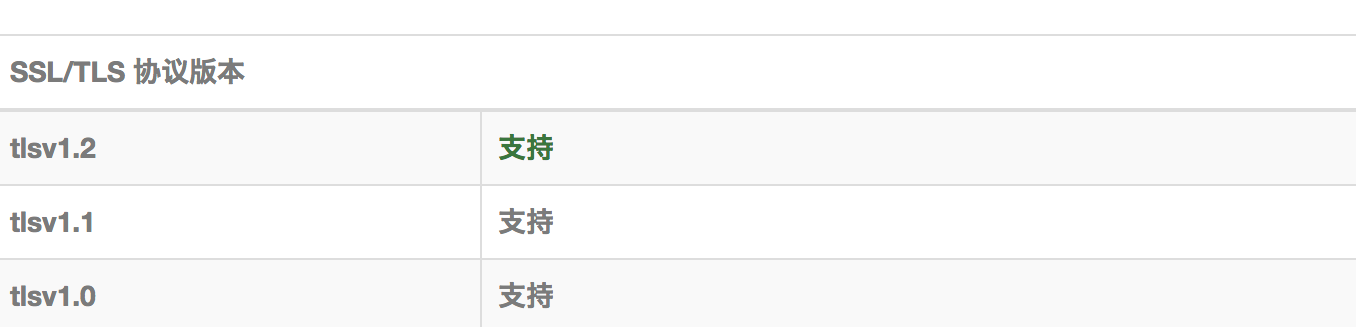
检测证书是否支持TSL1.2
Windows Registry Editor Version 5.00

[HKEY_LOCAL_MACHINE\SYSTEM\CurrentControlSet\Control\SecurityProviders\SCHANNEL\Protocols]

[HKEY_LOCAL_MACHINE\SYSTEM\CurrentControlSet\Control\SecurityProviders\SCHANNEL\Protocols\Multi-Protocol Unified Hello]

[HKEY_LOCAL_MACHINE\SYSTEM\CurrentControlSet\Control\SecurityProviders\SCHANNEL\Protocols\Multi-Protocol Unified Hello\Client]

"Enabled"=dword:00000000

"DisabledByDefault"=dword:00000001

[HKEY_LOCAL_MACHINE\SYSTEM\CurrentControlSet\Control\SecurityProviders\SCHANNEL\Protocols\Multi-Protocol Unified Hello\Server]

"Enabled"=dword:00000000

"DisabledByDefault"=dword:00000001

[HKEY_LOCAL_MACHINE\SYSTEM\CurrentControlSet\Control\SecurityProviders\SCHANNEL\Protocols\PCT 1.0]

[HKEY_LOCAL_MACHINE\SYSTEM\CurrentControlSet\Control\SecurityProviders\SCHANNEL\Protocols\PCT 1.0\Client]

"Enabled"=dword:00000000

"DisabledByDefault"=dword:00000001

[HKEY_LOCAL_MACHINE\SYSTEM\CurrentControlSet\Control\SecurityProviders\SCHANNEL\Protocols\PCT 1.0\Server]

"Enabled"=dword:00000000

"DisabledByDefault"=dword:00000001

[HKEY_LOCAL_MACHINE\SYSTEM\CurrentControlSet\Control\SecurityProviders\SCHANNEL\Protocols\SSL 2.0]

[HKEY_LOCAL_MACHINE\SYSTEM\CurrentControlSet\Control\SecurityProviders\SCHANNEL\Protocols\SSL 2.0\Client]

"DisabledByDefault"=dword:00000001

"Enabled"=dword:00000000

[HKEY_LOCAL_MACHINE\SYSTEM\CurrentControlSet\Control\SecurityProviders\SCHANNEL\Protocols\SSL 2.0\Server]

"Enabled"=dword:00000000

"DisabledByDefault"=dword:00000001

[HKEY_LOCAL_MACHINE\SYSTEM\CurrentControlSet\Control\SecurityProviders\SCHANNEL\Protocols\SSL 3.0]

[HKEY_LOCAL_MACHINE\SYSTEM\CurrentControlSet\Control\SecurityProviders\SCHANNEL\Protocols\SSL 3.0\Client]

"Enabled"=dword:00000000

"DisabledByDefault"=dword:00000001

[HKEY_LOCAL_MACHINE\SYSTEM\CurrentControlSet\Control\SecurityProviders\SCHANNEL\Protocols\SSL 3.0\Server]

"Enabled"=dword:00000000

"DisabledByDefault"=dword:00000001

[HKEY_LOCAL_MACHINE\SYSTEM\CurrentControlSet\Control\SecurityProviders\SCHANNEL\Protocols\TLS 1.0]

[HKEY_LOCAL_MACHINE\SYSTEM\CurrentControlSet\Control\SecurityProviders\SCHANNEL\Protocols\TLS 1.0\Client]

"Enabled"=dword:00000001

"DisabledByDefault"=dword:00000000

[HKEY_LOCAL_MACHINE\SYSTEM\CurrentControlSet\Control\SecurityProviders\SCHANNEL\Protocols\TLS 1.0\Server]

"Enabled"=dword:00000001

"DisabledByDefault"=dword:00000000

[HKEY_LOCAL_MACHINE\SYSTEM\CurrentControlSet\Control\SecurityProviders\SCHANNEL\Protocols\TLS 1.1]

[HKEY_LOCAL_MACHINE\SYSTEM\CurrentControlSet\Control\SecurityProviders\SCHANNEL\Protocols\TLS 1.1\Client]

"DisabledByDefault"=dword:00000000

"Enabled"=dword:00000001

[HKEY_LOCAL_MACHINE\SYSTEM\CurrentControlSet\Control\SecurityProviders\SCHANNEL\Protocols\TLS 1.1\Server]

"DisabledByDefault"=dword:00000000

"Enabled"=dword:00000001

[HKEY_LOCAL_MACHINE\SYSTEM\CurrentControlSet\Control\SecurityProviders\SCHANNEL\Protocols\TLS 1.2]

[HKEY_LOCAL_MACHINE\SYSTEM\CurrentControlSet\Control\SecurityProviders\SCHANNEL\Protocols\TLS 1.2\Client]

"DisabledByDefault"=dword:00000000

"Enabled"=dword:00000001

[HKEY_LOCAL_MACHINE\SYSTEM\CurrentControlSet\Control\SecurityProviders\SCHANNEL\Protocols\TLS 1.2\Server]

"Enabled"=dword:00000001

"DisabledByDefault"=dword:00000000
微信小程序 Request faild 请求后台失败的更多相关文章
- 微信小程序request同步请求
今天在搞微信小程序的时候顺手用了async,await死活不起作用,后来查了一下子,竟然不支持,那没办法就换了一种实现wx.request同步请求的方案 祭出promise来搞一搞,下面直接贴代码,简 ...
- 微信小程序request(ajax)接口请求封装
微信小程序request(ajax)接口请求封装 最近在进行小程序的编写,需要调用后端接口,经常要用到wx.request方法,所以就自己封装了一下,简化一下代码,如果能给大家提供帮助更好,在封装的时 ...
- 微信小程序request请求之GET跟POST的区别
1.GET 例子: wx.request({ url: 'test.php', //仅为示例,并非真实的接口地址 data: { x: '' , y: '' }, header: { 'content ...
- 微信小程序https发起请求失败的解决方法
https://blog.csdn.net/yuhui123999/article/details/60572888 https://blog.csdn.net/yuhui123999/article ...
- 微信小程序request请求动态获取数据
微信小程序开发文档链接 1 后台代码: clickButton:function(){ var that = this; wx.request({ url: 'http://localhost:909 ...
- 微信小程序request请求实例,网络请求。
最近微信小程序开始开放测试了,小程序提供了很多api,极大的方便了开发者,其中网络请求api是wx.request(object),这是小程序与开发者的服务器实现数据交互的一个很重要的api. 官方参 ...
- 微信小程序request请求的封装
目录 1,前言 2,实现思路 3,实现过程 3.1,request的封装 3.2,api的封装 4,实际使用 1,前言 在开发微信小程序的过程中,避免不了和服务端请求数据,微信小程序给我们提供了wx. ...
- 微信小程序开发:http请求
在微信小程序进行网络通信,只能和指定的域名进行通信,微信小程序包括四种类型的网络请求. 普通HTTPS请求(wx.request) 上传文件(wx.uploadFile) 下载文件(wx.downlo ...
- [转]微信小程序开发:http请求
本文转自:http://www.cnblogs.com/dragondean/p/5921079.html 在微信小程序进行网络通信,只能和指定的域名进行通信,微信小程序包括四种类型的网络请求. 普通 ...
随机推荐
- CFile类的open方法中的参数说明
CFile::Open是在MFC里面,打开一个文件的方法. Open函数的原型如下: virtual BOOL Open( LPCTSTR lpszFileName, UINT nOpenFlags, ...
- BZOJ_3589_动态树_容斥原理+树链剖分
BZOJ_3589_动态树_容斥原理+树链剖分 题意: 维护一棵树,支持1.子树内点权加上一个数 2.给出k条链,求路径上的点权和(重复的计算一次) (k<=5) 分析: 可以用树剖+线段树解 ...
- BZOJ_4818_[Sdoi2017]序列计数_矩阵乘法
BZOJ_4818_[Sdoi2017]序列计数_矩阵乘法 Description Alice想要得到一个长度为n的序列,序列中的数都是不超过m的正整数,而且这n个数的和是p的倍数.Alice还希望 ...
- 面试阿里前端P6血和泪换来的收获
我的一个朋友在前端耕耘一段时间,也在网上进行了高度培训学习,最近一段时间他打算跳槽去阿里面试前端P6开发岗位,结果被痛虐了一回,估计从此以后会给他留下不可磨灭的阴影啊 真是十年生死两茫茫,一鲁代码 ...
- 说说 input 输入框的事件
从input框获取焦点到,输入值,失去焦点这个过程所有事件,以及一些特点: 1.过程 onfocus -> 键盘输入 -> onkeydown -> onkeypress -> ...
- numpy C语言源代码调试(二)
前一篇已经介绍,可以使用gdb进行调试,但是本人不太习惯gdb的文本界面,所以希望找一个比较好用的gdb的前端gui调试器. 想到的第一个是一个非常老的调试工具,DDD. DDD - Data Dis ...
- #Java学习之路——基础阶段二(第九篇)
我的学习阶段是跟着CZBK黑马的双源课程,学习目标以及博客是为了审查自己的学习情况,毕竟看一遍,敲一遍,和自己归纳总结一遍有着很大的区别,在此期间我会参杂Java疯狂讲义(第四版)里面的内容. 前言: ...
- 金三银四,今年Python就业前,看看这篇文章找找感觉
Python就业行情和前景分析之一爬取数据 最近Python大热,就想要分析一下相关的市场需求,看一下Python到底集中在哪些城市,企业对Python工程师的一些需求到底是怎样的,基于此,爬取了国内 ...
- KnockoutJS-与服务端交互
几乎所有Web应用程序都要和服务器端交换数据,交换数据时最方便的就是使用JSON格式.Knockout可以实现很复杂的客户端交互,对于前后端交互使用的技术最为基本且常用的是Ajax,本次利用Ajax和 ...
- 前端笔记之NodeJS(一)初识NodeJS&内置模块&特点
一.NodeJS简介 NodeJS是开发服务器后台的东西,和PHP.JavaEE.python类似,和传统的浏览器的关注DOM的JS完全不同,将JavaScript触角伸到了服务器端.内核是Chrom ...