
分析dhcp.lease文件,统计DHCP服务器IP自动分配
#!/usr/bin/env python

# coding=utf-8

import string

import time,datetime

class TIMEFORMAT:

    def __init__(self, time_string="1970-1-1 00:00:00"):

        self.time_string = self._format_time_string(time_string)

    def _format_time_string(self, time_string):

        return time.strftime("%Y-%m-%d %H:%M:%S", self.get_struct(time_string))

    @property

    def time_struct(self):

        return self.get_struct(self.time_string)

    def get_struct(self, time_string):

        return time.localtime(self.get_seconds(time_string))

    @property

    def seconds(self):

        return self.get_seconds(self.time_string)

    def get_seconds(self, time_string):

        d = datetime.datetime.strptime(time_string, "%Y-%m-%d %H:%M:%S")

        return time.mktime(d.timetuple())

    def get_string(self, time_sec):

        return time.strftime("%Y-%m-%d %H:%M:%S", time.localtime(time_sec))

# 对于中国的时间,是1970-01-01 08:00:00

    def check_diff_time(self, t1, t2):

        sec1 = int(self.get_seconds(t1))

        sec2 = int(self.get_seconds(t2))

        if sec1 > sec2:

            secdiff = sec1 - sec2

        else:

            secdiff = sec2 - sec1

        d = self.get_struct(self.get_string(secdiff))

        day = d.tm_mday

        hour = d.tm_hour

        if d.tm_hour < 8:

            day -= 1

            hour = 24 + (d.tm_hour - 8)

        else:

            hour = d.tm_hour - 8

        return {

            "year"  :d.tm_year - 1970,

            "month" :d.tm_mon  - 1,

            "day"   : day - 1,

            "hour"  : hour,

            "min"   : d.tm_min,

            "sec"   : d.tm_sec,

        }

#######################################

alist=[]

lease_IP=' '

lease_start=' '

lease_end=' '

istatus=' '

MAC=' '

client_Hostname=' '

# 修改以下路径

f=open('/var/lib/dhcpd/dhcpd.leases')

lines = f.readlines()

f.close()

#########################################

for line in lines:

    if line.find('lease') <> -1:

        lease_IP = line.split('\n')[0].split(' ')[1]

    if line.find('starts') <> -1:

        lease_start = line.split('\n')[0].split(' ')[4:6]

    if line.find('ends') <> -1:

        lease_end = line.split('\n')[0].split(' ')[4:6]

    if line.find('binding state active') <> -1:

        istatus='active'

    if line.find('next binding state') <> -1:

        pass

    if line.find('hardware ethernet') <> -1:

        MAC=line.split('\n')[0].split(' ')[4].split(';')[0]

    if line.find('uid') <> -1:

        pass

    if line.find('client-hostname') <> -1:

        if istatus == 'active':

            client_Hostname= line.split('\n')[0].split(' ')[3].split('"')[1]

            start_time = str(lease_start[0]) +" " +  str(lease_start[1]).rstrip(';')

            end_time =  str(lease_end[0]) + " " +  str(lease_end[1]).rstrip(';')

            start_time_format = time.strftime("%Y-%m-%d %H:%M:%S",time.strptime(start_time,"%Y/%m/%d %H:%M:%S"))

            end_time_format = time.strftime("%Y-%m-%d %H:%M:%S",time.strptime(end_time,"%Y/%m/%d %H:%M:%S"))

            t1 = TIMEFORMAT("%s"%(start_time_format))

            t2 = TIMEFORMAT("%s"%(end_time_format))

            d = t1.check_diff_time(t1.time_string, t2.time_string)

            diff = str(d["year"]) + "年" + str(d["month"]) + "月" + str(d["day"]) + "天 " + str(d["hour"])+ "时" +  str(d["min"]) + "分" + str(d["sec"]) + "秒"

            record = str(lease_IP) +"\t" + start_time + "\t" + end_time + "\t" + diff + "\t" + str( MAC )+ "\t"  + str(istatus) + "\t" + str( client_Hostname )

            alist.append(record)

            lease_IP = ' '

            lease_start = ' '

            lease_end = ' '

            istatus = ' '

            MAC = ' '

            client_Hostname =' '

        else:

            pass

print  "IP 地址" + "\t\t\t"  + "获取时间" + "\t\t\t\t" + "释放时间" + "\t\t\t\t" + " 剩余时间" + "\t\t\t\t"  +"MAC地址" + "\t\t\t\t" +"是否激活" + "\t" + "主机名"

for ip in alist:

    print ip
执行:python print_ip.py
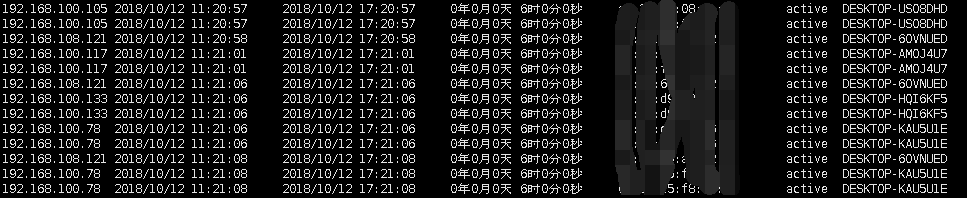
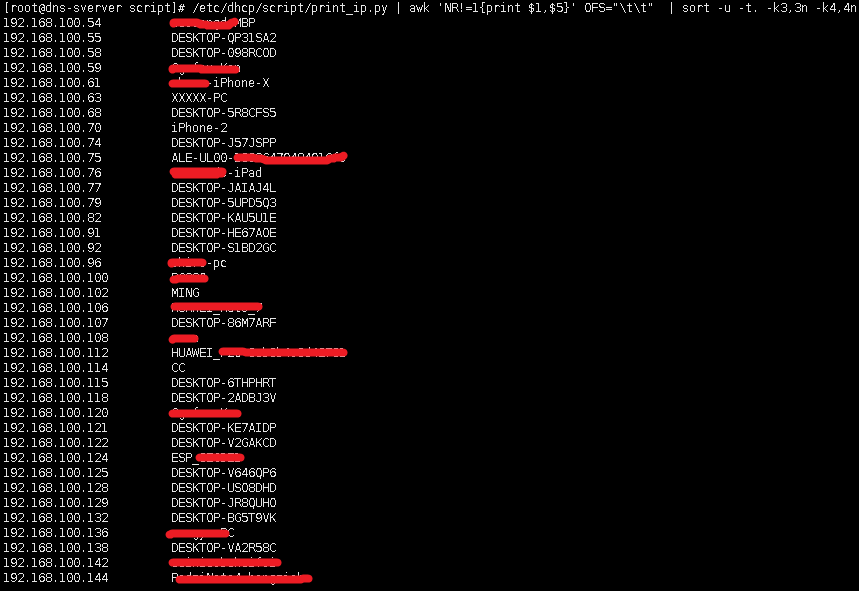
提取IP和主机名,并排序
./print_ip.py | awk 'NR!=1{print $1,$5}' OFS="\t\t" | sort -u -t. -k3,3n -k4,
分析dhcp.lease文件,统计DHCP服务器IP自动分配的更多相关文章
- 日志文件 统计 网站PV IP
1. 安装rrdtool yum install rrdtool 2. 创建 rrdtool 数据库 rrdtool create /opt/local/rrdtool/jicki.rrd -s 30 ...
- DHCP服务自动分配IP地址原理
转载自:http://blog.csdn.net/lycb_gz/article/details/8499559 DHCP在提供服务时,DHCP客户端是以UDP 68号端口进行数据传输的,而DHCP服 ...
- 阿里云 云解析使用方法/在阿里云ESC服务器解析域名并绑定服务器IP后上传文件通过域名访问步骤教程
第一步:登录阿里云官网,获取服务器ECS的指定公网IP地址. 1.输入阿里云官网账号进入首页,如下图: 2.点击进入"管理控制台",如下图: 3.点击"云服务器ECS&q ...
- DHCP协议格式、DHCP服务搭建、DHCP协商交互过程入门学习
相关学习资料 http://www.rfc-editor.org/rfc/rfc2131.txt http://baike.baidu.com/view/7992.htm?fromtitle=DHCP ...
- [DHCP服务]——一个验证DHCP原理实验(VMware)
大致实验拓扑图 DHCP Server端的配置 1. 安装DHCP # yum -y install dhcp 2. 拷贝配置文件 # /dhcpd.conf.sample /etc/dhcp/dhc ...
- 因客户机IP与服务器IP不在同一网段导致无盘客户机开机卡tftp,提示:PXE-E11: ARP timeout
61的地址需要在上面的地址范围段之内 问题现象] 无盘客户机启动获取DHCP后卡在tftp界面提示:PXE-E11: ARP timeout,如下图: [原因说明] 客户机的IP地址与服务器IP地址不 ...
- 服务器IP配置功能实现小结
1. 服务器网卡配置文件 /etc/sysconfig/network/ifcfg-***(eth0) linux-f1s9:/etc/sysconfig/network # cat ifcfg-et ...
- 如何修改因Informatica 8.6服务器IP而造资料库无法访问的问题
原因分析解决及如何避免(PowerCenter 8.6.1) 前几天同事安装了个PowerCenter8.6.1做测试,出去了几天回来后Administration Console无法登入了.同事用的 ...
- 如何变更站点 AD 域服务器IP地址
在 winserver 2012 单森林单域,多站点环境中,想把某一个站点AD 域服务器IP地址更改,要如何操作,才能保证客户端正常运行,不影响客户端的运行.有些朋友也经常提出类似问题. 想在不影响 ...
随机推荐
- Scrapy-redis<数据库篇>
scrapy-redis爬虫数据库连接部分——windows准备做salve,Linux准备做master开展工作 首先处理简单的windows熟悉的环境——安装Redis服务和Redis可视化~可视 ...
- 性能测试工具 wrk 使用教程
文章首发自个人微信公众号:小哈学Java 个人网站地址:https://www.exception.site/wrk 被面试官经常问到之前开发的系统接口 QPS 能达到多少,经常给不出一个数值,支支吾 ...
- 如何为ASP.NET Core设置客户端IP白名单验证
原文链接:Client IP safelist for ASP.NET Core 作者:Damien Bowden and Tom Dykstra 译者:Lamond Lu 本篇博文中展示了如何在AS ...
- RecyclerViewSelectableAdapterDemo【封装BaseSelectableAdapter用于多选、单选,以及切换选中状态等功能】
版权声明:本文为HaiyuKing原创文章,转载请注明出处! 前言 记录封装单选.多选.切换选中状态的BaseSelectableAdapter基类,配合Recyclerview使用. 注意:此Dem ...
- 学习笔记01(mybatis逆向工程)
今天来看看一个常用的小功能,就是mybatis的逆向工程.(数据库是mysql) 什么是逆向工程呢?看名字就知道反方向的一个什么工程! 其实啊,如果是平常我们自己学习实践一些小项目的时候,应该是先瞎写 ...
- Docker Swarm搭建多服务器下Docker集群
对于有多台服务器来讲,如果每一台都去手动操控,那将会是一件非常浪费时间的事情,毕竟时间这东西,于我们而言,十分宝贵,或许在开始搭建环境的时候耗费点时间,感觉是正常的,我也如此,花费大堆时间在采坑和填坑 ...
- springboot~Mongodb的集成与使用
说说springboot与大叔lind.ddd的渊源 Mongodb在Lind.DDD中被二次封装过(大叔的.net和.net core),将它当成是一种仓储来使用,对于开发人员来说只公开curd几个 ...
- 2.3Options建立配置和实体的映射「深入浅出ASP.NET Core系列」
希望给你3-5分钟的碎片化学习,可能是坐地铁.等公交,积少成多,水滴石穿,谢谢关注. Startup.cs中创建MVC中间件 关键代码:services.AddMvc();app.UseMvcWith ...
- 关于ApiCloud的Superwebview在androidstudio中集成微信支付模块,提示模块未绑定的问题
前两天ApiCloud项目集成了微信支付模块,android端今天也将ApiCloud官方的uzWxPay.jar集成了.在编译玩测试的时候提示wxPay模块为绑定!我的项目是使用ApiCloud推出 ...
- qutebrowser 只用键盘操作的浏览器
一个 Qt 库制作的最简化浏览器,内核是 Chromium.最大特点就是它自带命令行,可以完全用键盘操作. 下载地址: 链接:https://share.weiyun.com/5Y2Ajvn 密码:m ...