
DC/OS安装
dc/os: https://dcos.io/
- 安装文档-docker:https://docs.mesosphere.com/1.11/installing/oss/custom/system-requirements/install-docker-centos/
- 安装文档-命令行:https://docs.mesosphere.com/1.11/installing/oss/custom/cli/
坑:
- 网上介绍的GUI-web方式安装,在最新版里已经弃用了,也就是没有这个参数了。。。只能命令行来装
- 阿里云centos 7.2以上OS默认安装的docker不是xfs底层存储,需要单独处理(大坑)
其他都很顺利
先说下安装顺序,官网上写的不清楚(这里以阿里云上的ec节点为例):
- 确定bootstrap, master, agent这3个角色的机器分别是多少
- 去阿里云申请机器时,每个节点都多申请一个本地磁盘(后面要把这个本地磁盘挂载为xfs文件系统,并且让docker使用)
- 各个节点全部升级到最新的内核
- 格式化以及挂载本地磁盘到/storage下,并且建立软连接:/var/lib/docker,需要链接到/storage
- 按照dc/os安装文档中一步步安装
先确定bootstrap, master, agent分别多少节点数
- bootstrap就1个,不多不少,就1个
- master:至少1个
- agent:至少1个
我这阿里云的配置:
- bootstrap
- 172.31.91.117
- masters
- 172.31.91.125
- agents
- 172.31.91.124
- 172.31.91.123
各个节点全部升级到最新的内核:
按照这个文档照做,目前只做第一步到第七部,千万不要做第八步!
https://docs.mesosphere.com/1.11/installing/oss/custom/system-requirements/install-docker-centos/
格式化以及挂载本地磁盘到/storage下,并且建立软连接:/var/lib/docker,需要链接到/storage:
执行命令fdisk -l查看当前磁盘设备
Disk /dev/vda: 42.9 GB, 42949672960 bytes, 83886080 sectors

Units = sectors of 1 * 512 = 512 bytes

Sector size (logical/physical): 512 bytes / 512 bytes

I/O size (minimum/optimal): 512 bytes / 512 bytes

Disk label type: dos

Disk identifier: 0x0008d73a

   Device Boot      Start         End      Blocks   Id  System

/dev/vda1   *        2048    83884031    41940992   83  Linux

Disk /dev/vdb: 21.5 GB, 21474836480 bytes, 41943040 sectors
/dev/vda是系统盘,/dev/vdb 才是我们多申请的那个本地磁盘设备,现在要对它进行分区+xfs格式化
[root@izm5e7dqv477rmbrojabgrz ~]# fdisk /dev/vdb

Welcome to fdisk (util-linux 2.23.2).

Changes will remain in memory only, until you decide to write them.

Be careful before using the write command.

Command (m for help):
输入p:查看主分区列表,刚开始时应该是没有的
输入n:新增分区,都选默认值就好
完成后,输入w:写入磁盘(前面都是内存操作,不会实际影响,直到w为止)
[root@izm5e7dqv477rmbrojabgrz ~]# fdisk /dev/vdb

Welcome to fdisk (util-linux 2.23.2).

Changes will remain in memory only, until you decide to write them.

Be careful before using the write command.

Command (m for help): p

Disk /dev/vdb: 21.5 GB, 21474836480 bytes, 41943040 sectors

Units = sectors of 1 * 512 = 512 bytes

Sector size (logical/physical): 512 bytes / 512 bytes

I/O size (minimum/optimal): 512 bytes / 512 bytes

Disk label type: dos

Disk identifier: 0x90e789fd

   Device Boot      Start         End      Blocks   Id  System

/dev/vdb1            2048    41943039    20970496   83  Linux

Command (m for help): w

The partition table has been altered!

Calling ioctl() to re-read partition table.

WARNING: Re-reading the partition table failed with error 16: Device or resource busy.

The kernel still uses the old table. The new table will be used at

the next reboot or after you run partprobe(8) or kpartx(8)

Syncing disks.
然后就是用xfs格式化这个分区
mkfs -t xfs -n ftype=1 /dev/vdb1
然后就是伟大的那步了-挂载/dev/vdb1到/storage:
mkdir /storage

mount /dev/vdb1 /storage
然后,需要把docker的默认存储文件路径变成/storage,一种实现方式就是给/var/lib/docker建立软链接到/storage
ln -sv /storage/ /var/lib/docker
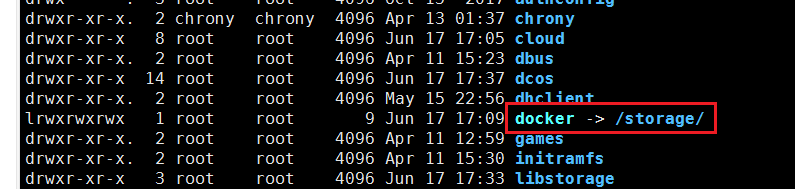
OK,关键一步完成了,剩下的就是回到官方安装教程,开始安装docker
https://docs.mesosphere.com/1.11/installing/oss/custom/system-requirements/install-docker-centos/
从第八步开始安装,安装完后验证方式:
[root@izm5e7dqv477rmbrojabgrz lib]# docker info

Containers: 20

 Running: 0

 Paused: 0

 Stopped: 20

Images: 2

Server Version: 1.13.1

Storage Driver: overlay

 Backing Filesystem: xfs

 Supports d_type: true

Logging Driver: json-file

Cgroup Driver: cgroupfs

Plugins:

 Volume: local

 Network: bridge host macvlan null overlay

Swarm: inactive

Runtimes: runc

Default Runtime: runc

Init Binary: docker-init

containerd version: aa8187dbd3b7ad67d8e5e3a15115d3eef43a7ed1

runc version: 9df8b306d01f59d3a8029be411de015b7304dd8f

init version: 949e6fa

Security Options:

 seccomp

  Profile: default

Kernel Version: 3.10.0-862.3.3.el7.x86_64

Operating System: CentOS Linux 7 (Core)

OSType: linux

Architecture: x86_64

CPUs: 2

Total Memory: 7.639 GiB

Name: izm5e7dqv477rmbrojabgrz

ID: LA6Q:RHIV:BZCN:4T5S:QXW7:3OWY:ITSQ:GJ23:UA6C:E6CN:X2J4:7X7Y

Docker Root Dir: /storage

Debug Mode (client): false

Debug Mode (server): false

Registry: https://index.docker.io/v1/

Experimental: false

Insecure Registries:

 127.0.0.0/8

Live Restore Enabled: false
出现这些字符就代表docker部分完成了,然后安装(都在bootstrap机器上执行)
https://docs.mesosphere.com/1.11/installing/oss/custom/cli/
我把我这的文件目录和内容贴出来:
[root@izm5e44dzsuwalzsalz2rkz ~]# tree genconf/

genconf/

├── config.yaml

├── ip-detect

├── ssh_key
[root@izm5e44dzsuwalzsalz2rkz genconf]# cat config.yaml

agent_list:

- 172.31.91.124

- 172.31.91.123

# Use this bootstrap_url value unless you have moved the DC/OS installer assets.

bootstrap_url: file:///opt/dcos_install_tmp

cluster_name: 'McKayDCOS'

exhibitor_storage_backend: static

master_discovery: static

ip_detect_filename: genconf/ip-detect

master_list:

- 172.31.91.125

resolvers:

- 8.8.4.4

- 8.8.8.8

ssh_port: 22

ssh_user: root
[root@izm5e44dzsuwalzsalz2rkz genconf]# cat ip-detect

#!/usr/bin/env bash

set -o nounset -o errexit

export PATH=/usr/sbin:/usr/bin:$PATH

echo $(ip addr show eth0 | grep -Eo '[0-9]{1,3}\.[0-9]{1,3}\.[0-9]{1,3}\.[0-9]{1,3}' | head -1)
这里还要配置下ssh免密登录(因为bootstrp节点安装的时候会ssh连接到master, agent节点)
ssh-keygen -t rsa 会出现让你输入密码,千万不能写密码,都为空
cp ~/.ssh/id_rsa genconf/ssh_key && chmod 0600 genconf/ssh_key 把ssh私钥key拷贝到安装目录下
ssh-copy-id -i 172.31.91.125    传播公钥到对方节点,期间会要求输入root密码

ssh-copy-id -i 172.31.91.124

ssh-copy-id -i 172.31.91.123
剩下根据安装文档进行安装:
https://docs.mesosphere.com/1.11/installing/oss/custom/cli/
装完后,有几个url:
http://47.104.244.204:8181/exhibitor/v1/ui/index.html zookeeper监控
http://47.104.244.204/#/dashboard?_k=37kze5 marathon界面
http://47.104.244.204/mesos/#/ mesos集群界面
DC/OS安装的更多相关文章
- DCOS实践分享(4):如何基于DC/OS整合SMACK(Spark, Mesos, Akka, Cassandra, Kafka)
这篇文章入选CSDN极客头条 http://geek.csdn.net/news/detail/71572 当前,要保证业务的市场竞争力,仅靠设计一个可用并且好看的产品,已经完全不能满足要求.全球消费 ...
- 深入解析DC/OS 1.8 – 高可靠的微服务及大数据管理平台
深入解析DC/OS 1.8 – 高可靠的微服务及大数据管理平台 大家好,欢迎大家参加这次DC/OS的技术分享. 先做个自我介绍,刘超,Linker Networks首席架构师,Open DC/OS社区 ...
- 容器平台选型的十大模式:Docker、DC/OS、K8S 谁与当先?
作者:刘超 来自:网易云 基础服务 无论是在社区,还是在同客户交流的过程中,总会被问到到底什么时候该用 Docker?什么时候用虚拟机?如果使用容器,应该使用哪个容器平台? 显而易见,我不会直接给 ...
- 容器平台选型的十大模式:Docker、DC/OS、K8S 谁与当先?【转】
网易企业服务2017-10-13 无论是在社区,还是在同客户交流的过程中,总会被问到到底什么时候该用 Docker?什么时候用虚拟机?如果使用容器,应该使用哪个容器平台? 显而易见,我不会直接给大家一 ...
- 容器平台选型的十大模式:Docker、DC/OS、K8S谁与当先?
首先我们来谈什么情况下应该使用Docker的问题 如图,左面是经常挂在嘴边的所谓容器的优势,但是虚拟机都能一一怼回去. 如果部署的是一个传统的应用,这个应用启动速度慢,进程数量少,基本不更新,那么 ...
- parrot os 安装后更改更新源
parrot os 安装后 parrot os 自带的更新源更新速度太慢(需要几个小时) 提供如下更新源 中国 USTC(中国科学技术大学和USTCLUG) - 合肥大学 CMCC 1 Gbps Ce ...
- Cent OS安装使用ffmpeg(完整版)
Cent OS安装使用ffmpeg centos作为主流后台linux 系统,ffmpeg作为视频流解析的主力,尤其是ffmpeg配合opencv使用,则是视觉操作的基础 版本: ffmpeg3.1 ...
- Mac os安装DVWA环境教程
Mac os安装DVWA环境教程 1.尽管Mac自带Apache和php 事实上Mac和WIN都用XAMPP一键化安装比较方便 2.解压DVWA-master 改名为dvwa移动到XAMPP的目录 3 ...
- mac OS 安装配置Nginx服务器
系统环境 安装工具 Homebrew软件包管理器 :<mac OS 安装 Homebrew软件包管理器>https://blog.csdn.net/weixin_41791279/arti ...
随机推荐
- DataIntegrityViolationException
今天出现了这个问题: org.springframework.dao.DataIntegrityViolationException: Could not execute JDBC batch upd ...
- Python基础(time模块,datetime模块)
#Author : Kelvin #Date : 2019/1/6 15:10 import time #获取此时的时间戳(从此刻到1970年一月一号零点的秒数) res1=time.time() p ...
- 使用chan的时候选择对象还是指针
使用chan的时候选择对象还是指针 今天在写代码的时候遇到一个问题,在创建一个通道的时候,不确定创建的通道是使用chan A还是chan *A. 思考了一下,觉得这个应该和函数一样是一个值传递还是参数 ...
- DotNetCore跨平台~认识环境和环境变量
回到目录 环境 环境,对于开发来说就是部署的一种场景,你可以是调试场景,测试场景,生产场景,当然还可以有很多其它的场景,只要你的项目需要就可以自定义,微软帮我们定义了三种标准的环境变量,下面来说一下. ...
- 泥瓦匠想做一个与众不同的技术"匠"
点击蓝字,关注泥瓦匠 本文阅读大约 3 分钟.感谢阅读 喝了最后一口百事可乐,想到它的 slogan:新一代的选择.新一代的选择,每个人选择不同,人生道路历程也不同.就像我刚毕业的时候,毕业选择不一样 ...
- HTTP Get与Post的本质区别
作者:Larry链接:https://zhuanlan.zhihu.com/p/22536382来源:知乎著作权归作者所有.商业转载请联系作者获得授权,非商业转载请注明出处. GET和POST是HTT ...
- 一次 C# 查詢數據庫 算法優化的案例
最近有次在修改某段程式時,發現一段程式算法看起來簡單. 但背後因為多次查詢數據庫,導致效能問題. 這段程式主要是利用 EPPLUS 讀取 Excel 資料,檢查資料是否已存在數據庫中,若有就將已存在的 ...
- vscode下面开发vue.js项目
vscode下面开发vue.js项目 https://blog.csdn.net/linzhiqiang0316/article/details/79176651 vscode下面开发vue.js ...
- 学了两天 react,乱讲一下学习思路,顺便弄了一个脚手架
之前一直用 vue 做一些小项目,最近接触了一个项目是用 react 做前端,虽然本身是做后端开发的,但是前端还是要了解一点的. 现在的项目基本上都是前后端分离的,后端就先不提了.前端的框架也是层出不 ...
- ___Html页面使用Ajax做数据显示
<!DOCTYPE html><html xmlns="http://www.w3.org/1999/xhtml"><head> <met ...