
Kafka Frequently Asked Questions
This is intended to be an easy to understand FAQ on the topic of Kafka. One part is for beginners, one for advanced users and use cases. We hope you find it fruitful. If you are missing a question, please send it to your favorite Cloudera representative and we’ll populate this FAQ over time.
Basics
What is Kafka?
Kafka is a streaming message platform. Breaking it down a bit further:
“Streaming”: Lots of messages (think tens or hundreds of thousands) being sent frequently by publishers ("producers"). Message polling occurring frequently by lots of subscribers ("consumers").
“Message”: From a technical standpoint, a key value pair. From a non-technical standpoint, a relatively small number of bytes (think hundreds to a few thousand bytes).
If this isn’t your planned use case, Kafka may not be the solution you are looking for. Contact your favorite Cloudera representative to discuss and find out. It is better to understand what you can and cannot do upfront than to go ahead based on some enthusiastic arbitrary vendor message with a solution that will not meet your expectations in the end.
What is Kafka designed for?
Kafka was designed at LinkedIn to be a horizontally scaling publish-subscribe system. It offers a great deal of configurability at the system- and message-level to achieve these performance goals. There are well documented cases (Uber and LinkedIn) that showcase how well Kafka can scale when everything is done right.
What is Kafka not well fitted for (or what are the tradeoffs)?
It’s very easy to get caught up in all the things that Kafka can be used for without considering the tradeoffs. Kafka configuration is also not automatic. You need to understand each of your use cases to determine which configuration properties can be used to tune (and retune!) Kafka for each use case.
Some more specific examples where you need to be deeply knowledgeable and careful when configuring are:
- Using Kafka as your microservices communication hub
Kafka can replace both the message queue and the services discovery part of your software infrastructure. However, this is generally at the cost of some added latency as well as the need to monitor a new complex system (i.e. your Kafka cluster).
- Using Kafka as long-term storage
While Kafka does have a way to configure message retention, it’s primarily designed for low latency message delivery. Kafka does not have any support for the features that are usually associated with filesystems (such as metadata or backups). As such, using some form of long-term ingestion, such as HDFS, is recommended instead.
- Using Kafka as an end-to-end solution
Kafka is only part of a solution. There are a lot of best practices to follow and support tools to build before you can get the most out of it (see this wise LinkedIn post).
- Deploying Kafka without the right support
Uber has given some numbers for their engineering organization. These numbers could help give you an idea what it takes to reach that kind of scale: 1300 microservers, 2000 engineers.
Where can I get a general Kafka overview?
The first four sections (Introduction, Setup, Clients, Brokers) of the CDH 6 Kafka Documentation cover the basics and design of Kafka. This should serve as a good starting point. If you have any remaining questions after reading that documentation, come to this FAQ or talk to your favorite Cloudera representative about training or a best practices deep dive.
Where does Kafka fit well into an Analytic DB solution?
ADB deployments benefit from Kafka by utilizing it for data ingest. Data can then populate tables for various analytics workloads. For ad hoc BI the real-time aspect is less critical, but the ability to utilize the same data used in real time applications, in BI and analytics as well, is a benefit that Cloudera’s platform provides, as you will have Kafka for both purposes, already integrated, secured, governed and centrally managed.
Where does Kafka fit well into an Operational DB solution?
Kafka is commonly used in the real-time, mission-critical world of Operational DB deployments. It is used to ingest data and allow immediate serving to other applications and services via Kudu or HBase. The benefit of utilizing Kafka in the Cloudera platform for ODB is the integration, security, governance and central management. You avoid the risks and costs of siloed architecture and “yet another solution” to support.
What is a Kafka consumer?
If Kafka is the system that stores messages, then a consumer is the part of your system that reads those messages from Kafka.
While Kafka does come with a command line tool that can act as a consumer, practically speaking, you will most likely write Java code using the KafkaConsumer API for your production system.
What is a Kafka producer?
While consumers read from a Kafka cluster, producers write to a Kafka cluster.
Similar to the consumer (see previous question), your producer is also custom Java code for your particular use case.
Your producer may need some tuning for write performance and SLA guarantees, but will generally be simpler (fewer error cases) to tune than your consumer.
What functionality can I call in my Kafka Java code?
The best way to get more information on what functionality you can call in your Kafka Java code is to look at the Java docs. And read very carefully!
What’s a good size of a Kafka record if I care about performance and stability?
There is an older blog post from 2014 from LinkedIn titled: Benchmarking Apache Kafka: 2 Million Writes Per Second (On Three Cheap Machines). In the “Effect of Message Size” section, you can see two charts which indicate that Kafka throughput starts being affected at a record size of 100 bytes through 1000 bytes and bottoming out around 10000 bytes. In general, keeping topics specific and keeping message sizes deliberately small helps you get the most out of Kafka.
Excerpting from Deploying Apache Kafka: A Practical FAQ:
|
How to send large messages or payloads through Kafka? Cloudera benchmarks indicate that Kafka reaches maximum throughput with message sizes of around 10 KB. Larger messages show decreased throughput. However, in certain cases, users need to send messages much larger than 10 KB. If the message payload sizes are in the order of 100s of MB, consider exploring the following alternatives:
|
Where can I get Kafka training?
You have many options. Cloudera provides training as listed in the next two questions. You can also ask your Resident Solution Architect to do a deep dive on Kafka architecture and best practices. And you could always engage in the community to get insight and expertise on specific topics.
Where can I get basic Kafka training?
Cloudera training offers a basic on-demand training for Kafka1.
This covers basics of Kafka architecture, messages, ordering, and a few slides (code examples) of (to my knowledge) an older version of the Java API. It also covers using Flume + Kafka.
Where can I get Kafka developer training?
Kafka developer training is included in Cloudera’s Developer Training for Apache Spark and Hadoop2.
Use Cases
Like most Open Source projects, Kafka provides a lot of configuration options to maximize performance. In some cases, it is not obvious how best to map your specific use case to those configuration options. We attempt to address some of those situations below.
What can I do to ensure that I never lose a Kafka event?
This is a simple question which has lots of far-reaching implications for your entire Kafka setup. A complete answer includes the next few related FAQs and their answers.
What is the recommended node hardware for best reliability?
Operationally, you need to make sure your Kafka cluster meets the following hardware setup:
- Have a 3 or 5 node cluster only running Zookeeper (higher only necessary at largest scales).
- Have at least a 3 node cluster only running Kafka.
- Have the disks on the Kafka cluster running in RAID 10. (Required for resiliency against disk failure.)
- Have sufficient memory for both the Kafka and Zookeeper roles in the cluster. (Recommended: 4GB for the broker, the rest of memory automatically used by the kernel as file cache.)
- Have sufficient disk space on the Kafka cluster.
- Have a sufficient number of disks to handle the bandwidth requirements for Kafka and Zookeeper.
- You need a number of nodes greater than or equal to the highest replication factor you expect to use.
What are the network requirements for best reliability?
Kafka expects a reliable, low-latency connection between the brokers and the Zookeeper nodes.
- The number of network hops between the Kafka cluster and the Zookeeper cluster is relatively low.
- Have highly reliable network services (such as DNS).
What are the system software requirements for best reliability?
Assuming you’re following the recommendations of the previous two questions, the actual system outside of Kafka must be configured properly.
- The kernel must be configured for maximum I/O usage that Kafka requires.
- Large page cache
- Maximum file descriptions
- Maximum file memory map limits
- Kafka JVM configuration settings:
- Brokers generally don’t need more than 4GB-8GB of heap space.
- Run with the +G1GC garbage collection using Java 8 or later.
How can I configure Kafka to ensure that events are stored reliably?
The following recommendations for Kafka configuration settings make it extremely difficult for data loss to occur.
- Producer
- block.on.buffer.full=true
- retries=Long.MAX_VALUE
- acks=all
- max.in.flight.requests.per.connections=1
- Remember to close the producer when it is finished or when there is a long pause.
- Broker
- Topic replication.factor >= 3
- Min.insync.replicas = 2
- Disable unclean leader election
- Consumer
- Disable enable.auto.commit
- Commit offsets after messages are processed by your consumer client(s).
If you have more than 3 hosts, you can increase the broker settings appropriately on topics that need more protection against data loss.
Once I’ve followed all the previous recommendations, my cluster should never lose data, right?
Kafka does not ensure that data loss never occurs. There are the following tradeoffs:
- Throughput vs. reliability. For example, the higher the replication factor, the more resilient your setup will be against data loss. However, to make those extra copies takes time and can affect throughput.
- Reliability vs. free disk space. Extra copies due to replication use up disk space that would otherwise be used for storing events.
Beyond the above design tradeoffs, there are also the following issues:
- To ensure events are consumed you need to monitor your Kafka brokers and topics to verify sufficient consumption rates are sustained to meet your ingestion requirements.
- Ensure that replication is enabled on any topic that requires consumption guarantees. This protects against Kafka broker failure and host failure.
- Kafka is designed to store events for a defined duration after which the events are deleted. You can increase the duration that events are retained up to the amount of supporting storage space.
- You will always run out of disk space unless you add more nodes to the cluster.
My Kafka events must be processed in order. How can I accomplish this?
After your topic is configured with partitions, Kafka sends each record (based on key/value pair) to a particular partition based on key. So, any given key, the corresponding records are “in order” within a partition.
For global ordering, you have two options:
- Your topic must consist of one partition (but a higher replication factor could be useful for redundancy and failover). However, this will result in very limited message throughput.
- You configure your topic with a small number of partitions and perform the ordering after the consumer has pulled data. This does not result in guaranteed ordering, but, given a large enough time window, will likely be equivalent.
Conversely, it is best to take Kafka’s partitioning design into consideration when designing your Kafka setup rather than rely on global ordering of events.
How do I size my topic? Alternatively: What is the “right” number of partitions for a topic?
Choosing the proper number of partitions for a topic is the key to achieving a high degree of parallelism with respect to writes to and reads and to distribute load. Evenly distributed load over partitions is a key factor to have good throughput (avoid hot spots). Making a good decision requires estimation based on the desired throughput of producers and consumers per partition.
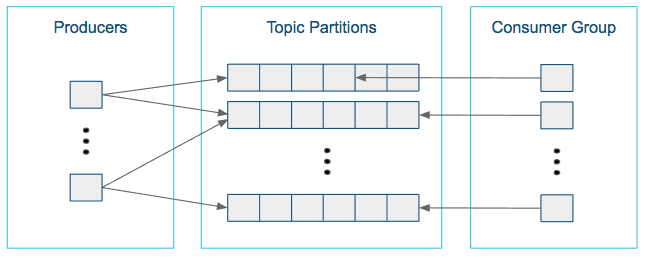
For example, if you want to be able to read 1 GB/sec, but your consumer is only able process 50 MB/sec, then you need at least 20 partitions and 20 consumers in the consumer group. Similarly, if you want to achieve the same for producers, and 1 producer can only write at 100 MB/sec, you need 10 partitions. In this case, if you have 20 partitions, you can maintain 1 GB/sec for producing and consuming messages. You should adjust the exact number of partitions to number of consumers or producers, so that each consumer and producer achieve their target throughput.
So a simple formula could be:
#Partitions = max(NP, NC)
where:
- NP is the number of required producers determined by calculating: TT/TP
- NC is the number of required consumers determined by calculating: TT/TC
- TT is the total expected throughput for our system
- TP is the max throughput of a single producer to a single partition
- TC is the max throughput of a single consumer from a single partition
This calculation gives you a rough indication of the number of partitions. It's a good place to start. Keep in mind the following considerations for improving the number of partitions after you have your system in place:
- The number of partitions can be specified at topic creation time or later.
- Increasing the number of partitions also affects the number of open file descriptors. So make sure you set file descriptor limit properly.
- Reassigning partitions can be very expensive, and therefore it's better to over- than under-provision.
- Changing the number of partitions that are based on keys is challenging and involves manual copying (see Kafka Administration).
- Reducing the number of partitions is not currently supported. Instead, create a new a topic with a lower number of partitions and copy over existing data.
- Metadata about partitions are stored in ZooKeeper in the form of znodes. Having a large number of partitions has effects on ZooKeeper and on client resources:
- Unneeded partitions put extra pressure on ZooKeeper (more network requests), and might introduce delay in controller and/or partition leader election if a broker goes down.
- Producer and consumer clients need more memory, because they need to keep track of more partitions and also buffer data for all partitions.
- As guideline for optimal performance, you should not have more than 3000 partitions per broker and not more than 30,000 partitions in a cluster.
Make sure consumers don’t lag behind producers by monitoring consumer lag. To check consumers' position in a consumer group (that is, how far behind the end of the log they are), use the following command:
$ kafka-consumer-groups --bootstrap-server BROKER_ADDRESS --describe --group CONSUMER_GROUP --new-consumer
How can I scale a topic that's already deployed in production?
Recall the following facts about Kafka:
- When you create a topic, you set the number of partitions. The higher the partition count, the better the parallelism and the better the events are spread somewhat evenly through the cluster.
- In most cases, as events go to the Kafka cluster, events with the same key go to the same partition. This is a consequence of using a hash function to determine which key goes to which partition.
Now, you might assume that scaling means increasing the number of partitions in a topic. However, due to the way hashing works, simply increasing the number of partitions means that you will lose the "events with the same key go to the same partition" fact.
Given that, there are two options:
- Your cluster may not be scaling well because the partition loads are not balanced properly (for example, one broker has four very active partitions, while another has none). In those cases, you can use the kafka-reassign-partitions script to manually balance partitions.
- Create a new topic with more partitions, pause the producers, copy data over from the old topic, and then move the producers and consumers over to the new topic. This can be a bit tricky operationally.
How do I rebalance my Kafka cluster?
This one comes up when new nodes or disks are added to existing nodes. Partitions are not automatically balanced. If a topic already has a number of nodes equal to the replication factor (typically 3), then adding disks does not help with rebalancing.
Using the kafka-reassign-partitions command after adding new hosts is the recommended method.
Caveats
There are several caveats to using this command:
- It is highly recommended that you minimize the volume of replica changes to make sure the cluster remains healthy. Say, instead of moving ten replicas with a single command, move two at a time.
- It is not possible to use this command to make an out-of-sync replica into the leader partition.
- If too many replicas are moved, then there could be serious performance impact on the cluster. When using the kafka-reassign-partitions command, look at the partition counts and sizes. From there, you can test various partition sizes along with the --throttle flag to determine what volume of data can be copied without affecting broker performance significantly.
- Given the earlier restrictions, it is best to use this command only when all brokers and topics are healthy.
How do I monitor my Kafka cluster?
As of Cloudera Enterprise 5.14, Cloudera Manager has monitoring for a Kafka cluster.
Currently, there are three GitHub projects as well that provide additional monitoring functionality:
- Doctor Kafka3 (Pinterest, Apache 2.0 License)
- Kafka Manager4 (Yahoo, Apache 2.0 License)
- Cruise Control5 (LinkedIn, BSD 2-clause License)
These projects are Apache-compatible licensed, but are not Open Source (no community, bug filing, or transparency).
What are the best practices concerning consumer group.id?
The group.id is just a string that helps Kafka track which consumers are related (by having the same group id).
- In general, timestamps as part of group.id are not useful. Because each group.id corresponds to multiple consumers, you cannot have a unique timestamp for each consumer.
- Add any helpful identifiers. This could be related to a group (for example, transactions, marketing), purpose (fraud, alerts), or technology (Flume, Spark).
How do I monitor consumer group lag?
This is typically done using the kafka-consumer-groups command line tool. Copying directly from the upstream documentation6, we have this example output (reformatted for readability):
$ bin/kafka-consumer-groups.sh --bootstrap-server localhost:9092 --describe --group my-group |
In general, if everything is going well with a particular topic, each consumer’s CURRENT-OFFSET should be up-to-date or nearly up-to-date with the LOG-END-OFFSET. From this command, you can determine whether a particular host or a particular partition is having issues keeping up with the data rate.
How do I reset the consumer offset to an arbitrary value?
This is also done using the kafka-consumer-groups command line tool. This is generally an administration feature used to get around corrupted records, data loss, or recovering from failure of the broker or host. Aside from those special cases, using the command line tool for this purpose is not recommended.
By using the --execute --reset-offsets flags, you can change the consumer offsets for a consumer group (or even all groups) to a specific setting based on each partitions log’s beginning/end or a fixed timestamp. Typing the kafka-consumer-groups command with no arguments will give you the complete help output.
How do I configure MirrorMaker for bi-directional replication across DCs?
Mirror Maker is a one way copy of one or more topics from a Source Kafka Cluster to a Destination Kafka Cluster. Given this restriction on Mirror Maker, you need to run two instances, one to copy from A to B and another to copy from B to A.
In addition, consider the following:
- Cloudera recommends using the "pull" model for Mirror Maker, meaning that the Mirror Maker instance that is writing to the destination is running on a host "near" the destination cluster.
- The topics must be unique across the two clusters being copied.
- On secure clusters, the source cluster and destination cluster must be in the same Kerberos realm.
How does the consumer max retries vs timeout work?
- Retries: This is generally related to reading data. When a consumer reads from a brokers, it’s possible for that attempt to fail due to problems such as intermittent network outages or I/O issues on the broker. To improve reliability, the consumer retries (up to the configured max.retries value) before actually failing to read a log offset.
- Timeout. This term is a bit vague because there are two timeouts related to consumers:
- Poll Timeout: This is the timeout between calls to KafkaConsumer.poll(). This timeout is set based on whatever read latency requirements your particular use case needs.
- Heartbeat Timeout: The newer consumer has a “heartbeat thread” which give a heartbeat to the broker (actually the Group Coordinator within a broker) to let the broker know that the consumer is still alive. This happens on a regular basis and if the broker doesn’t receive at least one heartbeat within the timeout period, it assumes the consumer is dead and disconnects it.
How do I size my Kafka cluster?
There are several considerations for sizing your Kafka cluster.
- Disk space
Disk space will primarily consist of your Kafka data and broker logs. When in debug mode, the broker logs can get quite large (10s to 100s of GB), so reserving a significant amount of space could save you some future headaches.
For Kafka data, you need to perform estimates on message size, number of topics, and redundancy. Also remember that you will be using RAID10 for Kafka’s data, so half your hard drives will go towards redundancy. From there, you can calculate how many drives will be needed.
In general, you will want to have more hosts than the minimum suggested by the number of drives. This leaves room for growth and some scalability headroom.
- Zookeeper nodes
One node is fine for a test cluster. Three is standard for most Kafka clusters. At large scale, five nodes is fairly common for reliability.
- Looking at leader partition count/bandwidth usage
This is likely the metric with the highest variability. Any Kafka broker will be overloaded if it has too many leader partitions. In the worst cases, each leader partition requires high bandwidth, high message rates, or both. For other topics, leader partitions will be a tiny fraction of what a broker can handle (limited by software and hardware). To estimate an average that works on a per-host basis, try grouping topics by partition data throughput requirements, such as 2 high bandwidth data partitions, 4 medium bandwidth data partitions, 20 small bandwidth data partitions. From there, you can determine how many hosts are needed.
How can I combine Kafka with Flume to ingest into HDFS?
We have two blog posts on using Kafka with Flume:
- The original post: Flafka: Apache Flume Meets Apache Kafka for Event Processing
- This updated version for CDH 5.8/Apache Kafka 0.9/Apache Flume 1.7: New in Cloudera Enterprise 5.8: Flafka Improvements for Real-Time Data Ingest
How can I build a Spark streaming application that consumes data from Kafka?
You will need to set up your development environment to use both Spark libraries and Kafka libraries:
- Building Spark Applications
- The kafka-examples directory on Cloudera’s public GitHub has an example pom.xml.
From there, you should be able to read data using the KafkaConsumer class and using Spark libraries for real-time data processing. The blog post Reading data securely from Apache Kafka to Apache Spark has a pointer to a GitHub repository that contains a word count example.
For further background, read the blog post Architectural Patterns for Near Real-Time Data Processing with Apache Hadoop.
References
- Kafka basic training: https://ondemand.cloudera.com/courses/course-v1:Cloudera+Kafka+201601/info
- Kafka developer training: https://ondemand.cloudera.com/courses/course-v1:Cloudera+DevSH+201709/info
- Doctor Kafka: http://github.com/pinterest/doctorkafka
- Kafka manager: http://github.com/yahoo/kafka-manager
- Cruise control: http://github.com/linkedin/cruise-control
- Upstream documentation: http://kafka.apache.org/documentation/#basic_ops_consumer_lag
Kafka Frequently Asked Questions的更多相关文章
- tmux frequently asked questions
tmux frequently asked questions How is tmux different from GNU screen? tmux and GNU screen have ...
- Relinking Oracle Home FAQ ( Frequently Asked Questions) (Doc ID 1467060.1)
In this Document Purpose Questions and Answers 1) What is relinking ? 2) What is relinking ...
- Frequently Asked Questions
转自:http://www.tornadoweb.org/en/stable/faq.html Frequently Asked Questions Why isn’t this example wi ...
- 06 Frequently Asked Questions (FAQ) 常见问题解答 (常见问题)
Frequently Asked Questions (FAQ) Origins 起源 What is the purpose of the project? What is the history ...
- 成员函数指针 C++ FAQ LITE — Frequently Asked Questions
http://www.sunistudio.com/cppfaq/pointers-to-members.html C++ FAQ LITE — Frequently Asked Questions ...
- openvswith Frequently Asked Questions
Open vSwitch <http://openvswitch.org> 参考地址:http://git.openvswitch.org/cgi-bin/gitweb.cgi?p=ope ...
- NFC Forum : Frequently Asked Questions (NFC 论坛:FAQ)
NFC for Business What is the NFC Forum? The NFC Forum is a not-for-profit industry organization whos ...
- 工作笔记20170315-------关于FAQ(Frequently Asked Questions)列表的代码
源自于:http://www.17sucai.com/pins/3288.html (1)FAQ问答列表点击展开收缩文字列表 <ul> <li class="clear ...
- Frequently Asked Questions - P-thresholds
Source: http://mindhive.mit.edu/book/export/html 1. What is the multiple-comparison problem? What is ...
随机推荐
- 不同数据库的表迁移SqlServer
INSERT INTO table SELECT * FROM OPENDATASOURCE ('SQLOLEDB', 'Data Source=172.168.44.146;User ID=s ...
- Linux 操作系统基础
list : ls 目录: 文件,路径映射. ls : -l : lang 长格式, 显示完整信息. 文件类型: -: 普通文件(f) d: 目录文件 b: 块设备文件(block) c: 字块设备文 ...
- Win7系统修改hosts无法保存怎么办?
背景 有的时候我们需要修改hosts文件,但是在某些情况下竟提示保存不了.之前有一次IntelliJ IDEA提示我快到期了,于是我到网上找到了一个激活方法,但需要将一个地址放到hosts文件中去,此 ...
- javascript 实现数据结构 - 栈
栈是一种遵从后进先出(LIFO)原则的有序集合.新添加的或待删除的元素都保存在栈的同一端,称作栈顶,另一端就叫栈底.在栈里,新元素都靠近栈顶,旧元素都接近栈底.栈就好像是一个底部密封的盒子,我们往里面 ...
- Linux知识要点大全(第二章)
第二章 linux操作系统安装与配置主要内容 1:vmware虚拟机安装与使用 2:Linux系统安装前准备 3:Linux Centos 系统的安装 4:Centos 6.8的登录和关闭 5:C ...
- 源码安装Nginx加TCP反向代理模块
说明: 安装方式是源码编译安装,因此先安装相关依赖,否则报错. yum -y install gcc* patch openssl openssl-devel 安装步骤: 下载nginx源码包: wg ...
- .NET Core微服务之基于Steeltoe使用Eureka实现服务注册与发现
Tip: 此篇已加入.NET Core微服务基础系列文章索引 => Steeltoe目录快速导航: 1. 基于Steeltoe使用Spring Cloud Eureka 2. 基于Steelt ...
- Exceptionless邮箱设置
在web.config中配置邮箱: <system.net> <mailSettings> <smtp from="xxx@163.com"> ...
- Java〜slf4日志框架的使用
slf4日志可以支持注解的方式开启它,然后在使用时直接使用占位符,而不需要手动拼接字符串,这点在性能上也做到了最好. 一 build.gradle依赖项 compileOnly('org.projec ...
- Springboot 系列(十二)使用 Mybatis 集成 pagehelper 分页插件和 mapper 插件
前言 在 Springboot 系列文章第十一篇里(使用 Mybatis(自动生成插件) 访问数据库),实验了 Springboot 结合 Mybatis 以及 Mybatis-generator 生 ...