
Git分支管理[三]
标签(linux): git
笔者Q:972581034 交流群:605799367。有任何疑问可与笔者或加群交流
git分支管理命令
git branch    #创建分支

git branch -v    #详细显示创建过程

git branch -merged    #查看已融合过的分支

git branch --no-merged    #查看哪些分支没有被融合

git branch -d testing    #删除分支

git checkout    #切换分支

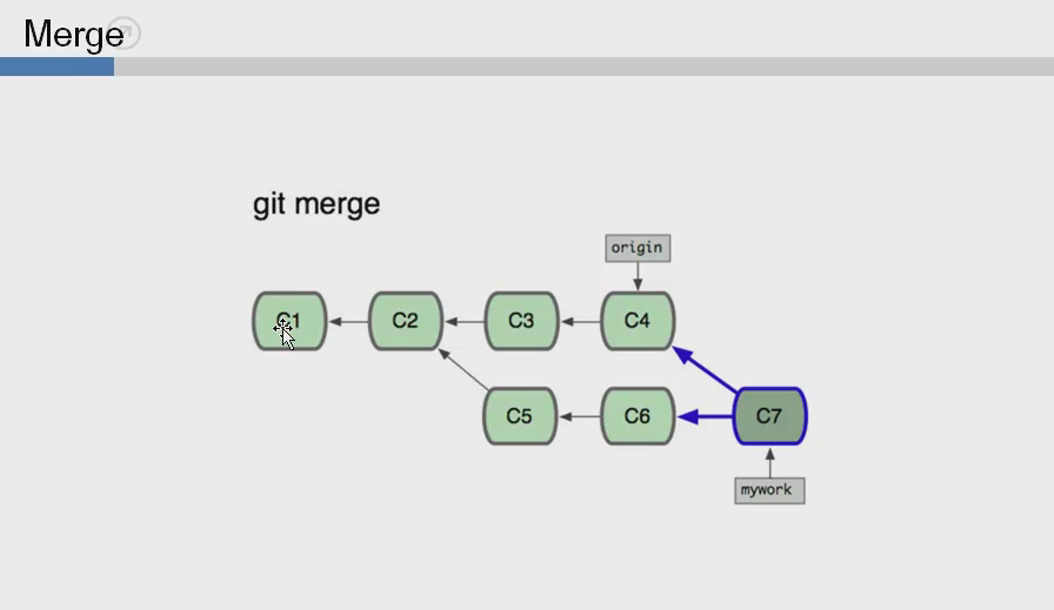
git merge    #融合分支

git log

git stash    #做一个暂存区

git tag        #打标记
创建一个分支
[root@git test]# git branch about

[root@git test]# git branch

  about

* master
查看状态可发现还在master
[root@git test]# git status

On branch master

Untracked files:

  (use "git add <file>..." to include in what will be committed)

	news.html

	pay.html

nothing added to commit but untracked files present (use "git add" to track)
切换到about分支
[root@git test]# git checkout about

Switched to branch 'about'

[root@git test]# git status

On branch about

Untracked files:

  (use "git add <file>..." to include in what will be committed)

	news.html

	pay.html

nothing added to commit but untracked files present (use "git add" to track)
验证分支是否创建成功
[root@git test]# echo "about us" > about.html

[root@git test]# git add .

[root@git test]# git commit -m "about"

[about 2390a21] about

 3 files changed, 3 insertions(+)

 create mode 100644 about.html

 create mode 100644 news.html

 create mode 100644 pay.html

[root@git test]# git log

commit 2390a21f03a22ab4c9ae81de0736e1e9bbcdbebf

Author: chentiangang <chentiangang@yoho8.com>

Date:   Fri Aug 18 00:16:36 2017 +0800

    about

commit 145b100cd0e07a9e59e15cf71aad3338ed8a57a6

Author: chentiangang <chentiangang@yoho8.com>

Date:   Thu Aug 17 23:42:32 2017 +0800

    index.html
切回到master分支查看
[root@git test]# git log

commit 2390a21f03a22ab4c9ae81de0736e1e9bbcdbebf

Author: chentiangang <chentiangang@yoho8.com>

Date:   Fri Aug 18 00:16:36 2017 +0800

    about

commit 145b100cd0e07a9e59e15cf71aad3338ed8a57a6

Author: chentiangang <chentiangang@yoho8.com>

Date:   Thu Aug 17 23:42:32 2017 +0800

    index.html

[root@git test]# git checkout master

Switched to branch 'master'

[root@git test]# git log

commit 1cf6888d97b0a361a3daed01a06c67936bc4f241

Author: chentiangang <chentiangang@yoho8.com>

Date:   Thu Aug 17 23:49:27 2017 +0800

    first index:v2

commit 145b100cd0e07a9e59e15cf71aad3338ed8a57a6

Author: chentiangang <chentiangang@yoho8.com>

Date:   Thu Aug 17 23:42:32 2017 +0800

    index.html
融合分支
* 注意:如果是master想跟about融合,需要先切换到master然后执行命令
[root@git test]# git merge about

Merge branch 'about'

# Please enter a commit message to explain why this merge is necessary,

# especially if it merges an updated upstream into a topic branch.

#

# Lines starting with '#' will be ignored, and an empty message aborts

# the commit.

~

".git/MERGE_MSG" 7L, 248C written

Merge made by the 'recursive' strategy.

 about.html  | 1 +

 about2.html | 1 +

 news.html   | 1 +

 pay.html    | 1 +

 4 files changed, 4 insertions(+)

 create mode 100644 about.html

 create mode 100644 about2.html

 create mode 100644 news.html

 create mode 100644 pay.html
Git分支管理[三]的更多相关文章
- Git 分支管理是一门艺术
转载: Git 分支管理是一门艺术 1 要确保:团队成员从主分支(master)获得的都是处于可发布状态的代码,而从开发分支(develop)应该总能够获得最新开发进展的代码. 2 "辅助分 ...
- git分支管理与冲突解决(转载)
Git 分支管理和冲突解决 原文:http://www.cnblogs.com/mengdd/p/3585038.html 创建分支 git branch 没有参数,显示本地版本库中所有的本地分支名称 ...
- 团队项目的Git分支管理规范
原文地址: http://blog.jboost.cn/2019/06/17/git-branch.html 许多公司的开发团队都采用Git来做代码版本控制.如何有效地协同开发人员之间,以及开发.测试 ...
- Git工程开发实践(四)——Git分支管理策略
A successful Git branching model https://nvie.com/posts/a-successful-git-branching-model/ Git工程开发实践( ...
- 在Visual Studio 中使用git——分支管理-下(九)
在Visual Studio 中使用git--什么是Git(一) 在Visual Studio 中使用git--给Visual Studio安装 git插件(二) 在Visual Studio 中使用 ...
- Git 分支管理策略汇总
原文链接: Git 分支管理策略 最近,团队新入职了一些小伙伴,在开发过程中,他们问我 Git 分支是如何管理的,以及应该怎么提交代码? 我大概说了一些规则,但仔细想来,好像也并没有形成一个清晰规范的 ...
- GIT分支管理模型
GIT分支管理模型 link: git-branching-model 主分支(Main branches) 项目两个常驻分支: master 主干分支(锁定),仅用于发布新版本,平时不能在上面干活, ...
- Git 分支管理详解
大纲: 1.前言 2.创建分支 3.切换分支 4.合并分支(快速合并) 5.删除分支 6.分支合并冲突 7.合并分支(普通合并) 8.分支管理策略 9.团队多人开发协作 10.总结 注,测试机 Cen ...
- Git—分支管理
Git—分支管理 分支学习:branch称为分支,默认仅有一个名为master的分支.一般开发新功能流程为:开发新功能时会在分支dev上进行,开发完毕后再合并到master分支. branch相关常用 ...
随机推荐
- Nginx日常维护操作(3)
一.简明nginx常用命令 1. 启动 Nginx /sbin/nginx service nginx start 2. 停止 Nginx /sbin/nginx -s stop /sbi ...
- Effective Java 第三版——22. 接口仅用来定义类型
Tips <Effective Java, Third Edition>一书英文版已经出版,这本书的第二版想必很多人都读过,号称Java四大名著之一,不过第二版2009年出版,到现在已经将 ...
- 在mac下使用终端命令通过ssh协议连接远程linux系统,代替windows的putty
指令:ssh username@server.address.com 事例:wangmingdeMacBook-Pro:~ xxxxxxxxxx$ ssh root@XXXX.net The auth ...
- JavaSE(八)之集合练习一
前面把Collection家族给学习完毕了,接下来我们通过几个练习来巩固前面的知识. 一.产生10个1-20之间的随机数要求随机数不能重复 import java.util.HashSet; impo ...
- Logstash+Kibana部署配置
Logstash是一个接收,处理,转发日志的工具.支持系统日志,webserver日志,错误日志,应用日志,总之包括所有可以抛出来的日志类型. 典型的使用场景下(ELK): 用Elasticsearc ...
- 初识LINUX之常见命令
玩过Linux的人都会知道,Linux中的命令的确是非常多,但是玩过Linux的人也从来不会因为Linux的命令如此之多而烦恼,因为我们只需要掌握我们最常用的命令就可以了.当然你也可以在使用时去找一下 ...
- 从parcel.js打包出错,到拥抱nvm
去年年底发布的parcel.js在年底可谓是火了一把,短短一个多月的时间在GitHub热门排行榜上名列前茅.因其几乎零配置的易用性,相比Webpack的复杂配置收获了大量关注及好评,甚至有人预言未来大 ...
- redis3.0 集群在windows上的配置(转)
1. 安装Redis版本:win-3.0.501https://github.com/MSOpenTech/redis/releases页面有,我下载的是zip版本的:Redis-x64-3.0.50 ...
- [国嵌攻略][162][USB协议分析]
USB设备逻辑结构 在USB设备的逻辑组织中,包含设备.配置.接口和端点4个层次.设备通常有一个或多个配置,配置通常有一个或多个接口,接口通常有零个或多个端点. USB设备描述符 当我们把USB设备( ...
- css background之设置图片为背景技巧
css background之设置图片为背景技巧-css 背景 Background是什么意思,翻译过来有背景意思.同样在css里面作为css属性一成员同样是有背景意思,并且是设置背景图片.背景颜色. ...