
Hibernate框架_搭建第一个Hibernate框架
一、eclipse搭建
A.创建动态web项目
New-->Dynamic web project(web project)
B.导入jar包
1.数据库驱动包

2.hibernate开发必须jar包(去官网下载hibernate,解压后里面lib-->required,里面jar包是hibernate必须jar包)
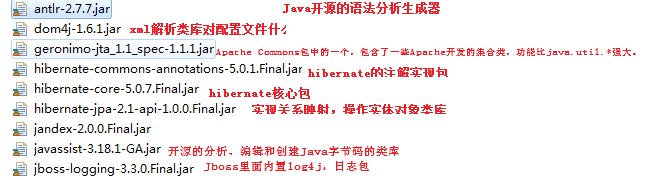
3.日志记录包
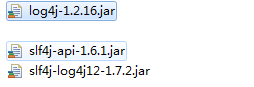
C.创建表(也可以不创建)
D.创建实体类(数据库中如一个客户表就是客户实体,用Java语言描述出来)
public class Customer {

    private Long cust_id;

    private String cust_name;

    private String cust_source;

    private String cust_industry;

    private String cust_level;

    private String cust_phone;

    private String cust_mobile;

    public Long getCust_id() {

        return cust_id;

    }

    public void setCust_id(Long cust_id) {

        this.cust_id = cust_id;

    }

    public String getCust_name() {

        return cust_name;

    }

    public void setCust_name(String cust_name) {

        this.cust_name = cust_name;

    }

    public String getCust_source() {

        return cust_source;

    }

    public void setCust_source(String cust_source) {

        this.cust_source = cust_source;

    }

    public String getCust_industry() {

        return cust_industry;

    }

    public void setCust_industry(String cust_industry) {

        this.cust_industry = cust_industry;

    }

    public String getCust_level() {

        return cust_level;

    }

    public void setCust_level(String cust_level) {

        this.cust_level = cust_level;

    }

    public String getCust_phone() {

        return cust_phone;

    }

    public void setCust_phone(String cust_phone) {

        this.cust_phone = cust_phone;

    }

    public String getCust_mobile() {

        return cust_mobile;

    }

    public void setCust_mobile(String cust_mobile) {

        this.cust_mobile = cust_mobile;

    }

    @Override

    public String toString() {

        return "Customer [cust_id=" + cust_id + ", cust_name=" + cust_name + ", cust_source=" + cust_source

                + ", cust_industry=" + cust_industry + ", cust_level=" + cust_level + ", cust_phone=" + cust_phone

                + ", cust_mobile=" + cust_mobile + "]";

    }

}
E.根据实体创建映射文件(统一一下文件命名规范:类名.hbm.xml。文件位置一般和实体类放在一起)
Customer.hbm.xml

<?xml version="1.0" encoding="UTF-8"?>

<!DOCTYPE hibernate-mapping PUBLIC

    "-//Hibernate/Hibernate Mapping DTD 3.0//EN"

    "http://www.hibernate.org/dtd/hibernate-mapping-3.0.dtd">

<hibernate-mapping>

    <class name="com.xxx.pojo.Customer" table="cst_customer">

        <id name="cust_id" column="cust_id">
        <!-- 主键生成策略 -->

            <generator class="native"></generator>

        </id>

        <property name="cust_name" column="cust_name"></property>

        <property name="cust_source" column="cust_source"></property>

        <property name="cust_industry" column="cust_industry"></property>

        <property name="cust_level" column="cust_level"></property>

        <property name="cust_phone" column="cust_phone"></property>

        <property name="cust_mobile" column="cust_mobile"></property>

    </class>

</hibernate-mapping>
标签及其属性所代表的含义:
class标签用来建立类和表的关系映射

            *name 表示该类的全路径(带包路径)

            *table 与该类映射的表名,如果表名和类名一致,表名可以省略不写

            *catalog:数据库名称,可以省略
 id标签用来建立类中属性域表中主键字段的对应

                *name 类中的属性名

                *column 表中的字段名,如果类中的属性名和表中的字段名一致,可以省略column

                *length:字段的长度,用于hibernate帮你建表时候指定表中字段的长度,默认为sql类型中长度最大值

                *type:类型,有三种写法:

                    java数据类型:如java.lang.String

                    hibernate类型: string  (type属性默认值)

                    sql类型: 如varchar
对于type扩展:
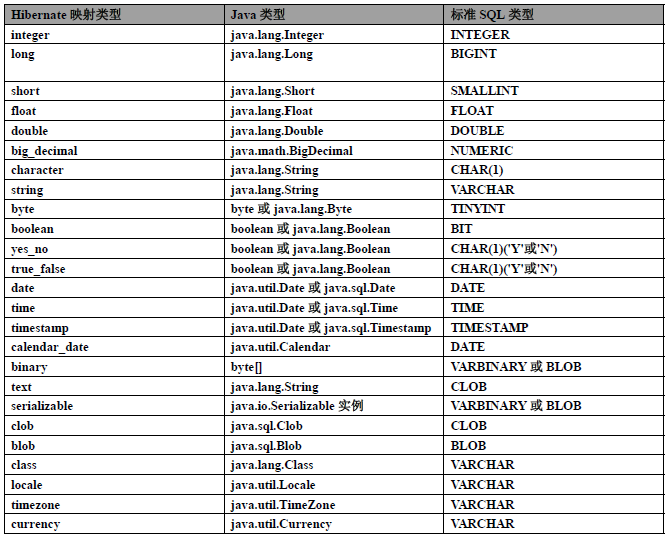
property标签:用来建立表中类的普通属性域表中普通字段的对应

                这里面也同样有四个属性,name,column,length,type,和上面id标签用法一样,只是多了not-null,unique,可以设置属性非空或者唯一
F.创建hibernate配置文件。(该文件命名为hibernate.cfg.xml)
<?xml version="1.0" encoding="UTF-8"?>
<!DOCTYPE hibernate-configuration PUBLIC
"-//Hibernate/Hibernate Configuration DTD 3.0//EN"
"http://www.hibernate.org/dtd/hibernate-configuration-3.0.dtd">
<hibernate-configuration>
<session-factory>
<!-- 配置连接数据库的基本信息 -->
<property name="hibernate.connection.driver_class">com.mysql.jdbc.Driver</property>
<property name="hibernate.connection.url">jdbc:mysql://localhost:3306/hibernate_crm?useUnicode=true&characterEncoding=UTF8</property>
<property name="hibernate.connection.username">root</property>
<property name="hibernate.connection.password">root</property>
<!-- 配置hibernate方言 -->
<property name="hibernate.dialect">org.hibernate.dialect.MySQLDialect</property>
<!-- hibernate显示发送sql语句 -->
<property name="hibernate.show_sql">true</property>
<!-- hibernate格式化sql语句 -->
<property name="hibernate.format_sql">true</property>
<!-- 数据定义语言,主要是对表的操作 -->
<property name="hibernate.hbm2ddl.auto">update</property>
<!-- hibernate映射文件加载 -->
<mapping resource="com/xxx/pojo/customer.hbm.xml"/>
</session-factory>
</hibernate-configuration>
对于hibernate.hbm2dd.autol属性,有四个值
- none:不用hibernate自动生成表
- create:每次运行hibernate都会创建一个新的表
- create-drop:每次创建都会创建一个新的表,执行程序结束后删除这个表
- update:如果数据库中有该表,使用数据库中原有的表,如果没有,hibernate会帮你创建一个新表,可以更新表的结构
- validate:只会使用原有的表。对映射关系进行校验
G.编写测试类
    /**

     * 插入数据

     * */

    @Test

    public void demo1() {

//        加载配置文件

        Configuration cfg = new Configuration().configure("hibernate.cfg.xml");

//        根据配置文件获取session工厂对象

        SessionFactory sessionFactory = cfg.buildSessionFactory();

//        从session工厂里面获取session对象

        Session session = sessionFactory.openSession();

//        开启事务

        Transaction tx = session.beginTransaction();

//        保存更新数据

        Customer cust = new Customer();

        cust.setCust_name("张三");

        cust.setCust_source("介绍");

        cust.setCust_phone("13085469875");

        Serializable uid = session.save(cust);

        System.out.println(uid);

//        提交事务

        tx.commit();

//        关闭资源

        session.close();

    }
至此,eclipse手动搭建的hibernate框架就创建好了。
二.MyEclipse自动创建hibernate框架
A.创建web项目
B.增加hibernate框架
右键项目名称 选择Configure facet--->install hibernate facet(安装hibernate方面)
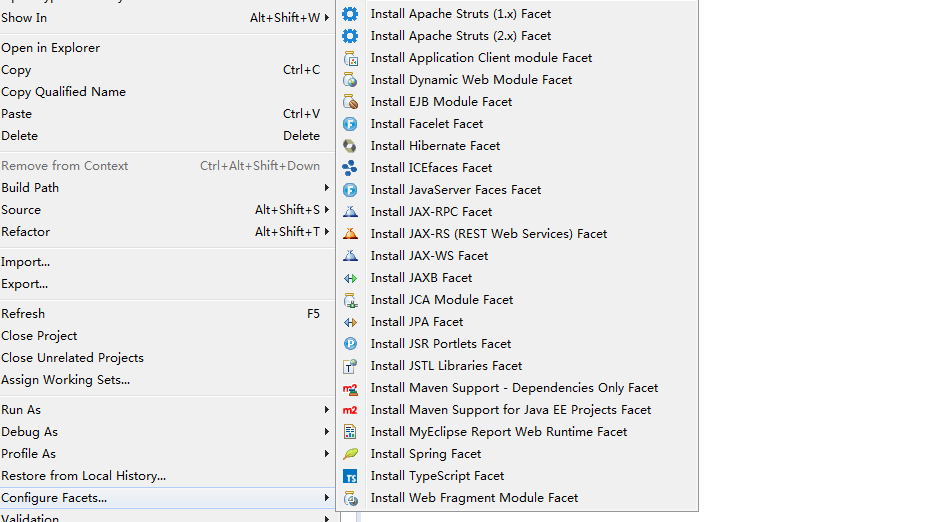
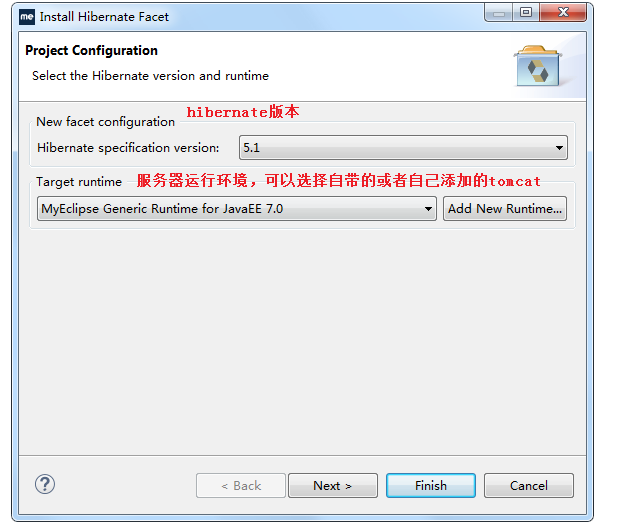
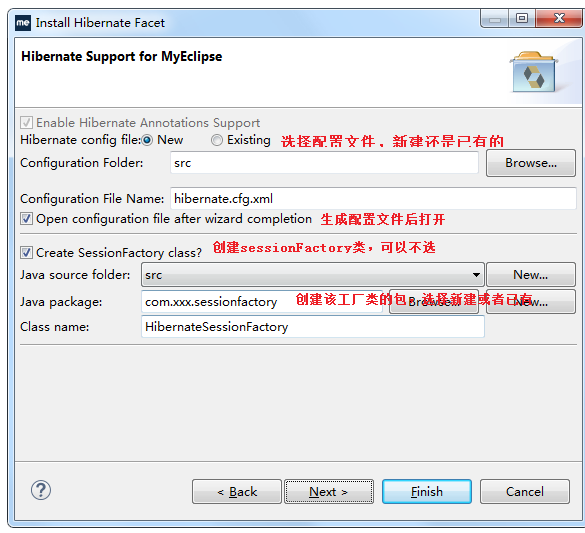
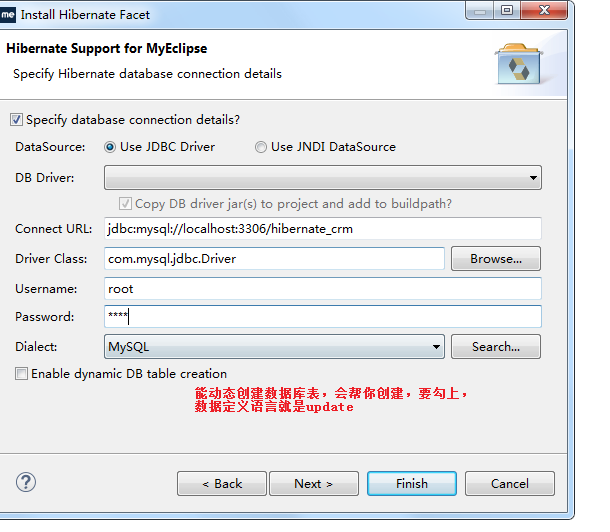
接下来直接finish。
c.生成hibernate映射文件(其实主要就是开启myeclipse数据库,利用数据库反转生成pojo)
https://blog.csdn.net/tuke_tuke/article/details/49803293
myeclipse创建hibernate就大致这样
Hibernate框架_搭建第一个Hibernate框架的更多相关文章
- 2015年3月26日 - Javascript MVC 框架DerbyJS DerbyJS 是一个 MVC 框架,帮助编写实时,交互的应用。
2015年3月26日 - Javascript MVC 框架DerbyJS DerbyJS 是一个 MVC 框架,帮助编写实时,交互的应用.
- 攻城狮在路上(壹) Hibernate(二)--- 第一个hibernate程序
1.直接通过JDBC API持久化实体域对象: A.java.sql常用接口和类: DriverManager:驱动程序管理器,负责创建数据库连接. Connection:代表数据库连接. State ...
- 分享知识-快乐自己:搭建第一个 Hibernate (Demo)
使用 Hibernate 完成持久化操作 七大 步骤: 1.读取并解析配置文件及映射文件: Configuration configuration=new Configuration().config ...
- Spring框架学习-搭建第一个Spring项目
步骤一:下载Spring开发包. 官网:https://spring.io/ 下载地址:https://repo.spring.io/libs-release-local/org/ ...
- Android Afinal框架学习(二) FinalActivity 一个IOC框架
框架地址:https://github.com/yangfuhai/afinal 相应的源代码: net.tsz.afinal.annotation.view.* FinalActivity Fina ...
- 【Hibernate】hibernate框架的搭建
1, Hibernate 是什么 Hibernate是java应用程序与数据库交互的开发的框架. Hibernate是一个开源,轻量级的ORM(对象关系映射)工具. 2,Hibernate框架的优点 ...
- Selenium自动化测试框架的搭建
说 起自动化测试,我想大家都会有个疑问,要不要做自动化测试? 自动化测试给我们带来的收益是否会超出在建设时所投入的成本,这个嘛别说是我,即便是高手也很难回答,自动化测试的初衷是美好的,而测 ...
- 一个小框架,基于rx_retrofit2_mvp
离职在即,也没什么事情做,就鼓捣了一下.任意搭建了一个小框架,看看以后能不能搞出自己的一个model,好了.不说别的,上代码 1,先上依赖库 compile 'io.reactivex:rxandro ...
- python webdriver 从无到有搭建混合驱动自动化测试框架的过程和总结
一步一步实现混合驱动自动化测试框架的搭建 混合驱动自动化测试框架,是一个非常高级的框架,非常好用,但也很难,不好掌握,需要多练习,就像搭建数据驱动框架一样,需要自己去一点一点的写,一边搭建一边做思路整 ...
随机推荐
- ELK入门使用-与springboot集成
前言 ELK官方的中文文档写的已经挺好了,为啥还要记录本文?因为我发现,我如果不写下来,过几天就忘记了,而再次捡起来必然还要经历资料查找筛选测试的过程.虽然这个过程很有意义,但并不总是有那么多时间去做 ...
- 七牛云免费对象存储,并绑定到cloudreve中
之前开通了腾讯云的对象存储COS并使用中,不过之前主要将它当作云盘使用,这两天再做博客系统时发现也可以将它作为网站的图库,这样对网站的访问效率也会提高. 今天了解到七牛云有免费的对象存储可以使用,于是 ...
- 基于tcp的套接字编程
一,基础版服务器端客户端(一收一发,只有一个客户端链接) 服务器端: #Author : Kelvin #Date : 2019/1/28 22:10 from socket import * ser ...
- XiaomiPushDemo【小米推送集成,基于V3.6.12版本】
版权声明:本文为HaiyuKing原创文章,转载请注明出处! 前言 这个Demo只是记录小米推送的集成,不能运行. 使用步骤 一.项目组织结构图 注意事项: 1. 导入类文件后需要change包名以 ...
- 结合JDK源码看设计模式——组合模式
前言: 相信大家都打开过层级很多很多的文件夹.如果把第一个文件夹看作是树的根节点的话,下面的子文件夹就可以看作一个子节点.不过最终我们寻找的还是文件夹中的文件,文件可以看做是叶子节点.下面我们介绍一种 ...
- Android resource compilation failed
报错:Android resource compilation failed D:\android\EasySports\app\build\intermediates\incremental\mer ...
- 项目中git分支管理策略
- WPF 通过透明度遮罩和变换制作倒影效果
倒影效果 代码 <Canvas xmlns="http://schemas.microsoft.com/client/2007" xmlns:x="http:/ ...
- 暖春许愿季丨i春秋给你送福利
没有一点点防备 也没有一丝顾虑 就这样出现——暖春许愿季 纳尼?这不是我的歌声里 是i春秋在搞活动 这次准备搞个大的 多大呢 看这里 你许下心愿 我帮你实现 这是一棵神奇的心愿树 是一个畅所欲言之地 ...
- 实现iframe高度自适应
iframe高度自适应使用场景是类似于微博,新闻等点击加载更多这种功能实现,要求iframe的高度能够跟随内容的变化而变化. 父html文件,也就是引用ifram的文件 src="blog/ ...