
【转载】inno setup 水波纹效果,检测安装vcredist_x86.exe等
以下inno setup脚本,实现了:1.水波纹效果 2.安装时检测是否安装其他版本,并在欢迎页面添加文字提示 4.检测安装vcredist_x86.exe 3.卸载时添加提示
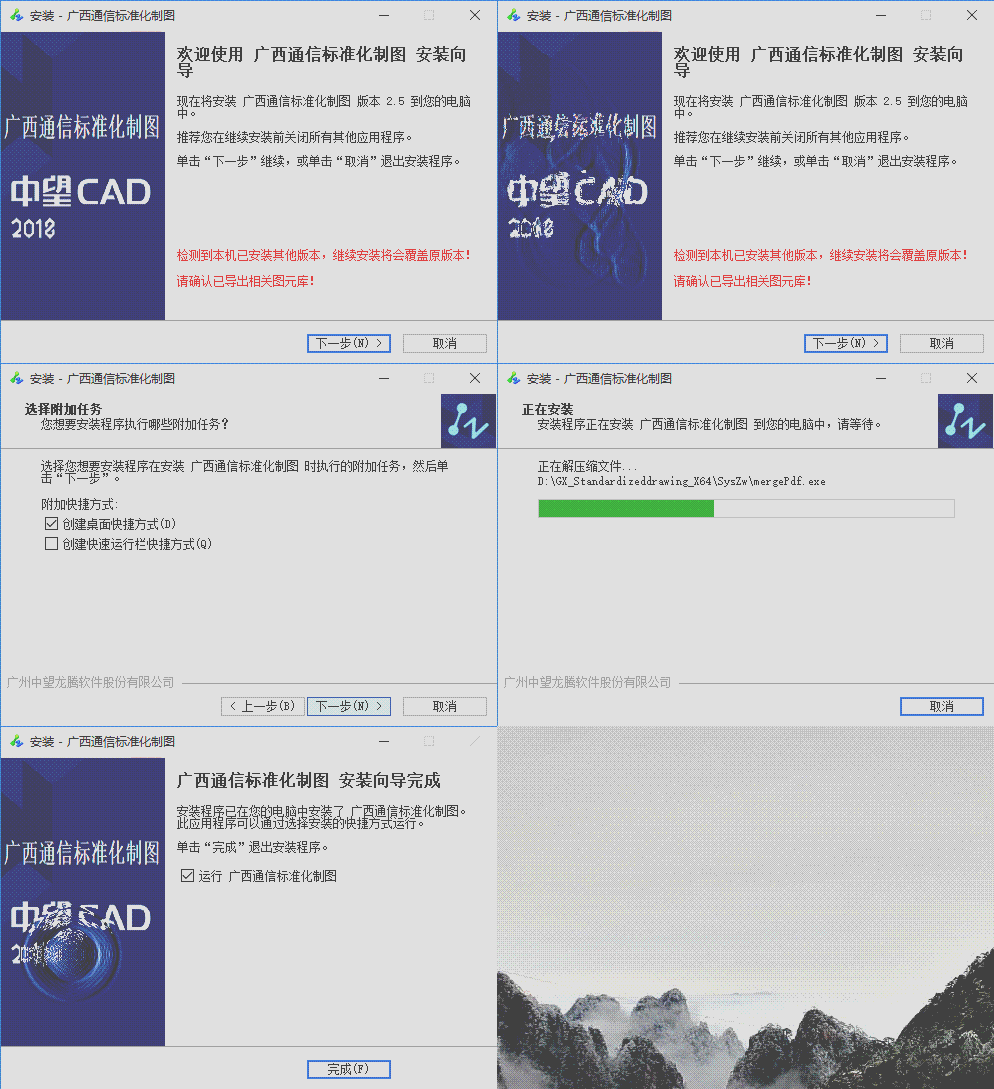
; 脚本由 Inno Setup 脚本向导 生成!

; 有关创建 Inno Setup 脚本文件的详细资料请查阅帮助文档!

#define MyAppName "GX_Standardizeddrawing_X64"

#define MyAppVersion "2.5"

#define MyAppPublisher "ZWSOFT"

#define MyAppURL "www.zwcad.com"

#define MyAppExeName "Gx_standardizeddrawing"

#define shortCutName "广西通信标准化制图"

[Setup]

; 注: AppId的值为单独标识该应用程序。

; 不要为其他安装程序使用相同的AppId值。

; (生成新的GUID,点击 工具|在IDE中生成GUID。)

AppId={{904DF7AD-D92A-4E81-A8ED-F0EB51701FFC}

AppName={#shortCutName}

AppVersion={#MyAppVersion}

;AppVerName={#MyAppName} {#MyAppVersion}

AppSupportURL={#MyAppURL}

AppUpdatesURL={#MyAppURL}

DefaultGroupName={#shortCutName}

OutputBaseFilename=广西通信插件_V2.

DefaultDirName=D:\{#MyAppName}

Compression=lzma

SolidCompression=yes

UseSetupLdr=yes

DisableWelcomePage=no

;WindowVisible=yes

;LicenseFile=E:\GitHub\SVN\Project\ZwRQY\ZWRQY_ZWCAD\license.txt

WizardImageFile=.\WizardImage.bmp

WizardSmallImageFile=.\WizardSmallImage.bmp

AppPublisher=ZWSOFT

AppPublisherURL=http://www.zwcad.com/

AppCopyright=Copyright (C) - zwsof, Inc.

OutputDir=.\

;管理员权限

PrivilegesRequired=admin

Uninstallable=yes

UninstallDisplayName={#shortCutName}

SetupIconFile = .\Setup\Setup\res\zwcad.ico

;覆盖安装

UsePreviousAppDir = yes

[Messages]

BeveledLabel=广州中望龙腾软件股份有限公司

[Languages]

Name: "Chinese"; MessagesFile: "compiler:Default.isl"

[Tasks]

Name: "desktopicon"; Description: "{cm:CreateDesktopIcon}"; GroupDescription: "{cm:AdditionalIcons}"; Flags: checkablealone; OnlyBelowVersion: ,8.1

Name: "quicklaunchicon"; Description: "{cm:CreateQuickLaunchIcon}"; GroupDescription: "{cm:AdditionalIcons}"; Flags: unchecked

[Files]

Source: "..\OUT\Bin\x64\Release\SysZw\Gx_standardizeddrawing.exe"; DestDir: "{app}\SysZw"; Flags: ignoreversion;  Permissions: authusers-full

Source: "..\OUT\Bin\x64\Release\*.*"; DestDir: "{app}"; Flags: ignoreversion recursesubdirs createallsubdirs; Permissions: authusers-full

Source: "waterctrl.dll"; Flags: dontcopy

Source: "WizardImage.bmp"; Flags: dontcopy

; 注意: 不要在任何共享系统文件上使用“Flags: ignoreversion”

[Icons]

Name: "{group}\{#shortCutName}"; Filename: "{app}\SysZw\{#MyAppExeName}"

Name: "{group}\{cm:UninstallProgram,{#shortCutName}}"; Filename: "{uninstallexe}"

Name: "{commondesktop}\{#shortCutName}"; Filename: "{app}\SysZw\{#MyAppExeName}"; Tasks: desktopicon

Name: "{userappdata}\Microsoft\Internet Explorer\Quick Launch\{#MyAppExeName}"; Filename: "{app}\SysZw\{#MyAppExeName}"; Tasks: quicklaunchicon

[Run]

Filename: "{app}\SysZw\vcredist_x86.exe"; Parameters: /q; WorkingDir: {tmp}; Flags: skipifdoesntexist;StatusMsg: "Installing Microsoft Visual C++ Runtime ..."; Check: NeedInstallVC9SP1

;Filename: "{app}\SysZw\AceRedist.msi"; Parameters: /q; WorkingDir: {tmp}; Flags: skipifdoesntexist; StatusMsg: "Installing Microsoft Access Database Engine  Redistributable ...";

Filename: "{app}\SysZw\msiexec.exe"; Parameters: "/i ""{app}\SysZw\AceRedist.msi"" /quiet";StatusMsg:"Installing Microsoft Access Database Engine  Redistributable ..."

Filename: "{app}\SysZw\{#MyAppExeName}"; Description: "{cm:LaunchProgram,{#StringChange(shortCutName, "&", "&&")}}"; Flags: nowait postinstall skipifsilent

[UninstallDelete]

Name: {app}; Type: filesandordirs;

[code]

 var

 vc9SP1Missing: Boolean;

 vc9SP2Missing: Boolean;

function InitializeSetup():boolean;

var

 // MykeynotExist:boolean;

 //ResultCode: Integer;

 // uicmd: String;

  version: Cardinal;

begin

  {检测是否安装vcredist_x86.exe}

  if RegQueryDWordValue(HKLM, 'SOFTWARE\Wow6432Node\Microsoft\Windows\CurrentVersion\Uninstall\{196BB40D-1578-3D01-B289-BEFC77A11A1E}', 'Version', version) = false

 then

   begin

     vc9SP1Missing := true;

   end;

  //MykeynotExist:= true;

  //if RegQueryStringValue(HKLM, 'SOFTWARE\Microsoft\Windows\CurrentVersion\Uninstall\{904DF7AD-D92A-4E81-A8ED-F0EB51701FFC}_is1', 'UninstallString', uicmd) then

  //begin

    {MyKeynotExist:= false;

    Exec(RemoveQuotes(uicmd), '', '', SW_SHOW, ewWaitUntilTerminated, ResultCode); }

  //  ResultCode := MsgBox('检测到本机已安装其他版本!继续安装将会覆盖本机已安装版本!是否继续安装?', mbConfirmation, MB_YESNO);

  //  if  ResultCode = IDNO then

  //  begin

  //  MyKeynotExist:= false;

  //  end;

  //  if  ResultCode = IDYES then

  //  begin

      {Exec(RemoveQuotes(uicmd), '/silent /verysilent /suppressmsgboxes', '', SW_HIDE, ewWaitUntilTerminated, ResultCode);}

  //    MyKeynotExist:= true;

  //  end;

  //end;

 // Result:= MykeynotExist

   Result:= true;

end;

function InitializeUninstall(): Boolean;

  begin

    Result:= true;

    if MsgBox('卸载将会清空安装目录,请确认已导出图元库!请确认已导出图元库!请确认已导出图元库!是否继续卸载?', mbConfirmation, MB_YESNO) = IDYES then

    begin

      Result:= true;

    end

    else

      Result:= false;

  end;

function NeedInstallVC9SP1(): Boolean;

begin

 Result := vc9SP1Missing;

end;

function NeedInstallVC9SP2(): Boolean;

begin

 Result := vc9SP2Missing;

end;

{实现水波纹效果}

function enablewater(ParentWnd: HWND; Left, Top: integer; Bmp: HBITMAP;

     WaterRadius, WaterHeight: integer): BOOL; external 'enablewater@files:waterctrl.dll stdcall';

//ParentWnd     放置特效窗口的父窗口句柄。

//Left          左位置

//Top           上位置

//Bmp           位图句柄。

//WaterRadius   水纹半径,会令到水纹看起来范围更广。

//WaterHeight   水纹高度,会令到水纹看起来更深。

//注意,水纹插件自动根据图片来设定高度和宽度,

//另外水纹底图必须是翻转的图片,显示的时候会翻转图片来显示。

function waterblob(x, y: integer; radius, height: integer): BOOL; external 'waterblob@files:waterctrl.dll stdcall';

// 在 x,y 点产生半径为radius, 高度为height 的水纹。

function flattenwater(): BOOL; external 'flattenwater@files:waterctrl.dll stdcall';

// 平伏所有水纹。

function disablewater(): BOOL; external 'disablewater@files:waterctrl.dll stdcall';

//释放水纹插件

function setwaterparent(ParentWnd: HWND): BOOL; external 'setwaterparent@files:waterctrl.dll stdcall';

//v2 新增,设置水纹插件的父句柄

var

  bmp: TBitmap;

procedure InitializeWizard();

var

  LabelDate: Tlabel;

  uicmd: String;

begin

  ExtractTemporaryFile('WizardImage.bmp');

  bmp := TBitmap.create;

  bmp.LoadFromFile(ExpandConstant('{tmp}\WizardImage.bmp'));

  enablewater(WizardForm.WelcomePage.Handle, , , bmp.Handle, , );

  {欢迎页面添加文字}

  WizardForm.WelcomeLabel2.Autosize := true;

  LabelDate := Tlabel.Create(WizardForm);

  LabelDate.Autosize := true;

  LabelDate.Caption := '本程序由中望应用研发制作!'####'了解更多ZWCAD信息请登录:https://www.zwcad.com/';

  if RegQueryStringValue(HKLM, 'SOFTWARE\Microsoft\Windows\CurrentVersion\Uninstall\{904DF7AD-D92A-4E81-A8ED-F0EB51701FFC}_is1', 'UninstallString', uicmd) then

  begin

     LabelDate.Font.Color := clred;    //修改文字颜色

     LabelDate.Caption := '检测到本机已安装其他版本,继续安装将会覆盖原版本!' ####'请确认已导出相关图元库!'

  end;

  LabelDate.Parent := WizardForm.WelcomePage;

  LabelDate.Left := WizardForm.WelcomeLabel2.Left;

  LabelDate.Top := WizardForm.WelcomeLabel2.Top +WizardForm.WelcomeLabel2.Height +;

end;

procedure CurPageChanged(CurPageID: Integer);

begin

  if CurPageID = wpWelcome then

  begin

    setwaterparent(WizardForm.WelcomePage.Handle);

    waterblob(, , , );

  end else

  if CurPageID = wpFinished then

  begin

    setwaterparent(WizardForm.FinishedPage.Handle);

    waterblob(, , , );

  end else

    flattenwater();

end;

procedure DeinitializeSetup();

begin

  disablewater();

  bmp.Free;

end;
————————————————
版权声明:本文为CSDN博主「wang161019」的原创文章,遵循 CC 4.0 BY-SA 版权协议,转载请附上原文出处链接及本声明。
原文链接:https://blog.csdn.net/wang161019/article/details/91491300
【转载】inno setup 水波纹效果,检测安装vcredist_x86.exe等的更多相关文章
- 以前编写的inno setup脚本,涵盖了自定义安装界面,调用dll等等应用 (转)
以前编写的inno setup脚本,涵盖了自定义安装界面,调用dll等等应用 (转) ; Script generated by the Inno Setup 脚本向导. ; SEE THE DOCU ...
- 在Unicode版Inno Setup中使用ISSkin给安装程序添加皮肤
原文 http://www.cnblogs.com/2356/archive/2009/10/27/1590565.html 在Unicode版Inno Setup中使用ISSkin给安装程序添加皮肤 ...
- Android自己定义控件系列五:自己定义绚丽水波纹效果
尊重原创!转载请注明出处:http://blog.csdn.net/cyp331203/article/details/41114551 今天我们来利用Android自己定义控件实现一个比較有趣的效果 ...
- jquery ripples水波纹效果( 涟漪效果)
这个效果是我从bootstrap-material-design上面分离下来的,bootstrap-material-design的一些组件样式我不太不喜欢,但是非常喜欢这个水波纹效果,所以就有了这篇 ...
- 如何使用 HTML5 Canvas 制作水波纹效果
今天,我们继续分享 JavaScript 实现的效果例子,这篇文章会介绍使用 JavaScript 实现水波纹效果.水波效果以图片为背景,点击图片任意位置都会触发.有时候,我们使用普通的 Javasc ...
- 兼容Android的水波纹效果
Android的水波纹效果只有高版本才有,我们希望自己的应用在低版本用低版本的阴影,高版本用水波纹,这怎么做呢?其实,只要分drawable和drawablev21两个文件夹就好了. 普通情况下的se ...
- android自定义控件(4)-自定义水波纹效果
一.实现单击出现水波纹单圈效果: 照例来说,还是一个自定义控件,观察这个效果,发现应该需要重写onTouchEvent和onDraw方法,通过在onTouchEvent中获取触摸的坐标,然后以这个坐标 ...
- 自定义view实现水波纹效果
水波纹效果: 1.标准正余弦水波纹: 2.非标准圆形液柱水波纹: 虽说都是水波纹,但两者在实现上差异是比较大的,一个通过正余弦函数模拟水波纹效果,另外一个会运用到图像的混合模式(PorterDuffX ...
- Android 颜色渲染(七) RadialGradient 环形渲染实现水波纹效果
利用环形渲染我们可以做到什么? 其实很多都是非常常见的,比如上一篇实现的帮帮糖效果, 彩色的热气球,比如这里要讲到的水波纹效果,或者也可以理解为扩散色渲染效果 首先看一下效果图: 轻触屏幕,即可看到对 ...
随机推荐
- VMware虚拟机中CentOS/redhat设置固定IP
你的笔记本中的VMware中redhat或centOS系统,如果想在上面建站,而又如果你需要在家里和公司都能访问该站(至少希望你自己的笔记本能访问),那么就需要将虚拟机IP设置为固定IP了.以下介绍两 ...
- 第三小节之Java API
1.String类和StringBuffer类 字符串中可以包含任意字符,这些字符必须包含在一对双引号” “之内 1.1String类 String a=null与String a="&qu ...
- 关闭mmu和cache
处理器内部寄存器,访问速度最快,但是数量少 TCM:紧耦合存储器(Cache.主存储器) 辅助存储器(Flash.SD等) Cache是一种容量小但是存取速度非常快的存储器 它保存最近用到的存储器中的 ...
- RHEL6查看运行级别和grub加密阻止进入单用户模式
1.查看当前运行级别 [root@cluster01 ~]# cat /etc/redhat-release Red Hat Enterprise Linux Server release 6.5 ( ...
- mysql之innodb存储引擎
mysql之innodb存储引擎 innodb和myisam区别 1>.InnoDB支持事物,而MyISAM不支持事物 2>.InnoDB支持行级锁,而MyISAM支持表级锁 3>. ...
- python2 'ascii'编码问题
UnicodeDecodeError: 'ascii' codec can't decode byte 0xe4 in position 223: ordinal not in range(128) ...
- PAT Basic 1091 N-自守数 (15 分)
如果某个数 K 的平方乘以 N 以后,结果的末尾几位数等于 K,那么就称这个数为“N-自守数”.例如 3,而 2 的末尾两位正好是 9,所以 9 是一个 3-自守数. 本题就请你编写程序判断一个给定的 ...
- Monty 大厅问题(Monty Hall Problem)也称作三门问题,出自美国大型游戏节目 Let's Make a Deal。
Monty 大厅的问题陈述十分简单,但是它的答案看上去却是有悖常理.该问题不仅引起过很多争议,也经常出现在各种考试题中. Monty 大厅的游戏规则是这样的,如果你来参加这个节目,那么 (1)Mont ...
- springCloud——Dalston.SR5升级到Greenwich.SR2
老项目: SpringBoot 版本 :1.5.13.RELEASE SpringCloud 版本:Dalston.SR5 项目升级: SpringBoot 版本 :2.1.6.RELEASE Spr ...
- ansible-乱
工作机制:ssh 无客户端 工作方式: 1,CMDB 2,公有云私有云API 3,使用ad-hoc 4,ansible-playbook ansible 执行命令,底层调用传输连接模块,将命令或文件传 ...