
Spring基础17——使用注解来配置Bean
1.组件扫描
组件扫描(component scanning):Spring能够从classpath下自动扫描,侦测和实例化具有特定的注解的组件。
特定组件包括:
—@Component:基本注解,标识了一个受Spring管理的组件
—@Respository:标识持久层组件,具有将数据库操作抛出的原生异常翻译转化为Spring的持久层异常的功能。
—@Service:标识服务层(业务层)组件
—@Controller:标识表示层组
对于扫描到的组件,Spring有默认的命名策略:使用非限定类名,第一个字母小写,也可以在注解中通过value属性表示组件的名称@Repository(value = "userRepository")。比如UserService创建Bean默认的名字就是userService。
2.具体实现
下面来编写具体的实现代码:
TestObject类使用@Compent注解:
 @Component

 public class TestObject {

 }
UserService类使用@Service注解
 @Service

 public class UserService {

     public void add() {

         System.out.println("UserService add...");

     }

 }
UserRepository接口
 public interface UserRepository {

     public void save();

 }
UserRepositoryImpl实现类使用@Repository
 @Repository

 public class UserRepositoryImpl implements UserRepository {

     public void save() {

         System.out.println("UserRepository Save。。。。");

     }

 }
UserController使用@Controller
 @Controller

 public class UserController {

     public void execute() {

         System.out.println("UserController execute....");

     }

 }
在类上加完注解之后,SpringIOC容器并不能直接去管理我们的bean,因为注解本身和xml一样只是起一个配置作用,Spring需要对指定类路径下的包进行扫描:
<context:component-scan base-package="com.wzy.annotation"/>
编写一个测试类,来测试标识了这些注解的类是否被添加到SpringIOC容器中:
 public static void main(String[] args) {

     ApplicationContext ctx = new ClassPathXmlApplicationContext("beans-annotation.xml");

     UserController userController = (UserController) ctx.getBean("userController");

     System.out.println(userController);

     UserService userService = (UserService) ctx.getBean("userService");

     System.out.println(userService);

     UserRepository userRepository = (UserRepository) ctx.getBean("userRepositoryImpl");

     System.out.println(userRepository);

     TestObject testObject = (TestObject) ctx.getBean("testObject");

     System.out.println(testObject);

 }
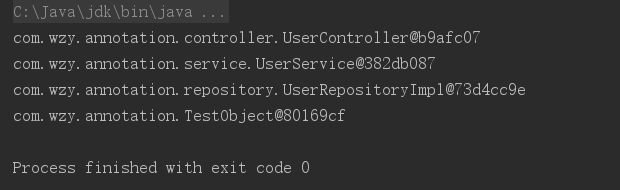
输出结果:我们可以观察到可以打印出这些bean,并且也可以验证他们的bean的id确实是,类的名字第一个字母小写。
在使用<context:component-scan>注意一下几个关键点:
—base-package属性指定一个需要扫描的基类包,Spring容器将会扫描这个基类包里及其子包中的所有类。
—当需要扫描多个包时,可以使用逗号分隔。
—如果仅希望扫描特定的类而非基类包下的所有类,可以使用resource-pattern属性过滤特定的类。
 <context:component-scan base-package="com.wzy.annotation" resource-pattern="repository/*.class">

 </context:component-scan>
3.包含和移除bean(过滤)
在<context:component-scan>标签下有两个子标签:<context:include-filter>和<context:exclude-filter>:
<context:include-filter> :子节点表示要包含的目标类
<context:exclude-filter>: 子节点表示要排除在外的目标类
<context:component-scan>下可以拥有若干个<context:include-filter> <context:exclude-filter> 子节点,两个子标签支持多种类型的过滤表达式,以下五种模式:最常用的是前两种。
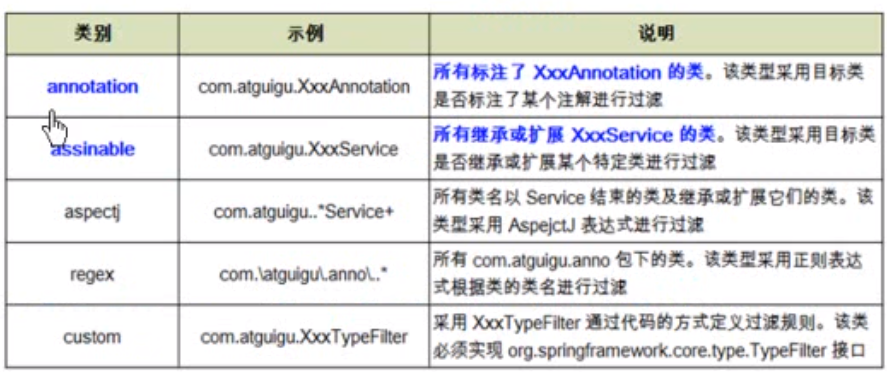
首先来看annotation过滤表达式的用法,首先看这个表达式的名字,说明它过滤的是注解,也就包含或者不包含某种注解,这里要注意的是指定包含哪些子节点的组件,该子节点需要user-default-filters 配合使用,否则是使用默认的过滤器,会扫描全部的组件。
 <!--不包含什么: <context:exclude-filter子节点指定排除哪些指定表达式的组件-->

 <context:component-scan base-package="com.wzy.annotation">

     <!--不包含repository-->

     <context:exclude-filter type="annotation" expression="org.springframework.stereotype.Repository"/>

 </context:component-scan>

 <!--<context:include-filter 指定包含哪些子节点的组件,该子节点需要user-default-filters 配合使用,否则是使用默认的过滤器,会扫描全部的组件-->

 <context:component-scan base-package="com.wzy.annotation"

         use-default-filters="false">

     <!--包含repository-->

     <context:include-filter type="annotation" expression="org.springframework.stereotype.Repository"/>

 </context:component-scan>
下面来看assignable表达式的用法,它过滤的是某个类以及它的子类,如果设置没有扫描某种bean,我们依然从容器中获取,那么就会抛出异常。
  <context:component-scan base-package="com.wzy.annotation">

         <!--不包含repository-->

         <context:exclude-filter type="assignable" expression="com.wzy.annotation.repository.UserRepository"/>

     </context:component-scan>

     <context:component-scan base-package="com.wzy.annotation" use-default-filters="false">

         <!--只包含repository-->

         <context:include-filter type="assignable" expression="com.wzy.annotation.repository.UserRepository"/>

     </context:component-scan>
Spring基础17——使用注解来配置Bean的更多相关文章
- 跟着刚哥学习Spring框架--通过注解方式配置Bean(四)
组件扫描:Spring能够从classpath下自动扫描,侦测和实例化具有特定注解的组件. 特定组件包括: 1.@Component:基本注解,识别一个受Spring管理的组件 2.@Resposit ...
- spring学习笔记 星球日two - 注解方式配置bean
注解要放在要注解的对象的上方 @Autowired private Category category; <?xml version="1.0" encoding=" ...
- Spring框架学习(6)使用ioc注解方式配置bean
内容源自:使用ioc注解方式配置bean context层 : 上下文环境/容器环境 applicationContext.xml 1 ioc注解功能 注解 简化xml文件配置 如 hibernate ...
- Spring--通过注解来配置bean【转】
Spring通过注解配置bean 基于注解配置bean 基于注解来配置bean的属性在classpath中扫描组件 组件扫描(component scanning):Spring能够从classpat ...
- Spring--通过注解来配置bean
Spring通过注解配置bean 基于注解配置bean 基于注解来配置bean的属性 在classpath中扫描组件 组件扫描(component scanning):Spring能够从classpa ...
- spring:自定义限定符注解@interface, 首选bean
spring:自定义限定符注解@interface, 首选bean 1.首选bean 在声明bean的时候,通过将其中一个可选的bean设置为首选(primary)bean能够避免自动装配时的歧义性. ...
- Spring基础18——通过注解配置bean之间的关联关系
1.组件装配 <context:component-scan>元素还会自动注册AutowiredAnnotaionBeanPostProcessor实例,这是一个bean的后置处理器,该实 ...
- spring笔记--通过注解(annotation)配置Bean
Spring能够在classpath下自动扫描,侦测和实例化具有特定注解的组件,这在Spring中成为组件扫描(Component scanning). 特定组件的注解包括: @Component:基 ...
- MyBatis学习(二):与Spring整合(非注解方式配置MyBatis)
搭建SpringMVC的-->传送门<-- 一.环境搭建: 目录结构: 引用的JAR包: 如果是Maven搭建的话,pom.xml的配置如下: <?xml version=" ...
随机推荐
- [CSP-S模拟测试]:括号密码(贪心)
题目描述 在“无限神机”的核心上,有一个奇怪的括号密码,密码初始已经有一个括号序列,有$n$个限制条件,每个限制条件描述为$l_i$和$r_i$,表示区间$[l_i,r_i]$的括号序列必须合法.调整 ...
- springboot 配置访问本地图片
spring.mvc.static-path-pattern=/image/** spring.resources.static-locations=file:D://image/
- leetcode-easy-array-1 two sum
mycode 33.91% class Solution: def twoSum(self, nums: List[int], target: int) -> List[int]: for i ...
- 安装mysql数据库要注意的
只安装基本功能即可,以后要的话可以加 需要配置环境变量 最好不要将数据存放在c盘,默认在 C:\ProgramData\MySQL\MySQL Server 5.6 里面存放建的表和存放的数据
- Web.Config全攻略
一.认识Web.config文件 Web.config 文件是一个xml文本文件,它用来储存 asp.NET Web 应用程序的配置信息(如最常用的设置asp.NET Web 应用程序的身份验证方 ...
- 阶段3 1.Mybatis_07.Mybatis的连接池及事务_3 mybatis连接池的分类
2.mybatis中的连接池 mybatis连接池提供了3种方式的配置: 配置的位置: 主配置文件SqlMapConfig.xml中的dataSourc ...
- 阶段3 1.Mybatis_07.Mybatis的连接池及事务_2 连接池介绍
- Anaconda版本
1. Anaconda各种版本 https://mirrors.tuna.tsinghua.edu.cn/anaconda/archive/ 2. 多个Python环境 conda info -e c ...
- rename批量修改文件名
批量改名: 如文件,批量修改,把hello去掉[root@localhost wang]# ll-rw-r--r-- 1 root root 0 5月 14 02:36 a.hello.txt-rw- ...
- Java第四周总结+实验报告
实验二 Java简单类与对象 实验目的 掌握类的定义,熟悉属性.构造函数.方法的作用,掌握用类作为类型声明变量和方法返回值: 理解类和对象的区别,掌握构造函数的使用,熟悉通过对象名引用实例的方法和属性 ...