
将ibatis迁移到mybatis3的过程记录
将ibatis迁移到mybatis3的过程记录
场景:有些以前的老项目是使用ibatis开发的,现在有转换成mybatis3的需求。
环境准备:需要安装Ant,以下是本人的安装版本,具体怎么安装不再赘述,就是下载解压配环境变量,和maven等安装过程类似,可百度。

工具:ibatis2mybatis 地址:https://github.com/mybatis/ibatis2mybatis
注意下载最新的版本。不要下载release版本,最新版本功能多一点
该工具可以帮你将ibatis 2.x sqlmap文件转换为myBatis 3.x mapper文件,该工具是使用了Ant构建任务进行XSTL转换和一些语法文字替换
该工具下载下来使用非常简单,把你要转换的所有sqlmap文件放到source文件夹,然后在当前目录直接运行ant命令即可,转换成功的mapper文件放在了destination文件夹下。


当然,还需要进行一些个性化配置。
比如根据自己的需要在build.xml文件中配置转换类型;
|
<!-- replace #id:NUMERIC# to #id,jdbcType=NUMERIC# etc. --> <replace dir="destination" includes="*.xml" token=":NUMERIC#" value=",jdbcType=NUMERIC#" encoding="UTF8"/> <replace dir="destination" includes="*.xml" token=":TIMESTAMP#" value=",jdbcType=TIMESTAMP#" encoding="UTF8"/> <replace dir="destination" includes="*.xml" token=":VARCHAR#" value=",jdbcType=VARCHAR#" encoding="UTF8"/> <replace dir="destination" includes="*.xml" token=":BLOB#" value=",jdbcType=BLOB#" encoding="UTF8"/> <replace dir="destination" includes="*.xml" token=":TIME#" value=",jdbcType=TIMESTAMP#" encoding="UTF8"/> <replace dir="destination" includes="*.xml" token=":FLOAT#" value=",jdbcType=FLOAT#" encoding="UTF8"/> <replace dir="destination" includes="*.xml" token=":INTEGER#" value=",jdbcType=INTEGER#" encoding="UTF8"/> <replace dir="destination" includes="*.xml" token=":CLOB#" value=",jdbcType=CLOB#" encoding="UTF8"/> <replace dir="destination" includes="*.xml" token=":DECIMAL#" value=",jdbcType=DECIMAL#" encoding="UTF8"/> <replace dir="destination" includes="*.xml" token=":VARCHAR2#" value=",jdbcType=VARCHAR#" encoding="UTF8"/> <!-- add any needed jdbc type here (for example :CLOB#, :FLOAT#, :REAL#, :BIT#, :INTEGER#, :DECIMAL#, :DATE#, :TIME#, .... ) <replace dir="destination" includes="*.xml" token=":???#" value=",jdbcType=???#" encoding="UTF8"/> |
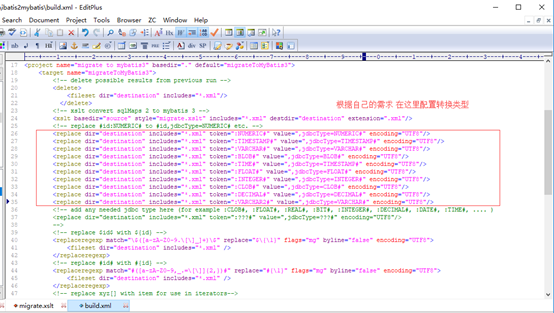
还有需要在migrate.xstl文件中做一些个性化配置,具体可以查阅XSLT相关语法。
比如针对dynamic做一些处理,当前面有where 1=1 和没有where 1=1 存在时转换方法是不一样的。

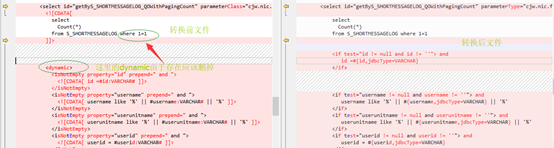
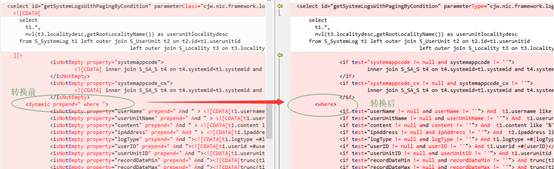
|
<xsl:template match="dynamic"> <xsl:choose> <xsl:when test="contains(@prepend, 'where')"> <xsl:element name="where"> <xsl:apply-templates/> </xsl:element> </xsl:when> <xsl:otherwise > <xsl:apply-templates/> </xsl:otherwise> </xsl:choose> </xsl:template> |

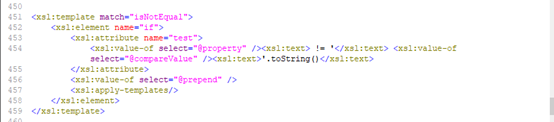
还有针对isNotEqual的处理要自己补充:
|
<xsl:template match="isNotEqual"> <xsl:element name="if"> <xsl:attribute name="test"> <xsl:value-of select="@property" /><xsl:text> != '</xsl:text> <xsl:value-of select="@compareValue" /><xsl:text>'.toString()</xsl:text> </xsl:attribute> <xsl:value-of select="@prepend" /> <xsl:apply-templates/> </xsl:element> </xsl:template> |
当出现如下情况时isEmpty isNotEmpty分为两种情况,一种是多参数时的转换,一种是只有一个默认参数时的转换,一个参数时的情况如下

需要配置如下代码:
|
<xsl:template match="isNotEmpty"> <xsl:element name="if"> <xsl:attribute name="test"> <xsl:if test="substring-before(@property, '.')"> <xsl:value-of select="substring-before(@property, '.')" /><xsl:text> != null and </xsl:text> </xsl:if> <xsl:choose> <xsl:when test="not(@property)"> <xsl:text>_parameter</xsl:text> </xsl:when> <xsl:otherwise > <xsl:value-of select="@property" /> </xsl:otherwise> </xsl:choose> <xsl:text> != null and </xsl:text> <xsl:choose> <xsl:when test="not(@property)"> <xsl:text>_parameter</xsl:text> </xsl:when> <xsl:otherwise > <xsl:value-of select="@property" /> </xsl:otherwise> </xsl:choose> <xsl:text> != ''</xsl:text> </xsl:attribute> <xsl:value-of select="@prepend" /> <xsl:apply-templates/> </xsl:element> </xsl:template> <xsl:template match="isEmpty"> <xsl:element name="if"> <xsl:attribute name="test"> <xsl:if test="substring-before(@property, '.')"> <xsl:value-of select="substring-before(@property, '.')" /><xsl:text> != null and </xsl:text> </xsl:if> <xsl:choose> <xsl:when test="not(@property)"> <xsl:text>_parameter</xsl:text> </xsl:when> <xsl:otherwise > <xsl:value-of select="@property" /> </xsl:otherwise> </xsl:choose> <xsl:text> == null or </xsl:text> <xsl:choose> <xsl:when test="not(@property)"> <xsl:text>_parameter</xsl:text> </xsl:when> <xsl:otherwise > <xsl:value-of select="@property" /> </xsl:otherwise> </xsl:choose> <xsl:text> == ''</xsl:text> </xsl:attribute> <xsl:value-of select="@prepend" /> <xsl:apply-templates/> </xsl:element> </xsl:template> |
Xstl中关于是否是null的判断语法格式如下:
|
<xsl:if test=" USERNAME "> USERNAME is not null </xsl:if> <xsl:if test="not(USERNAME)"> USERNAME is null </xsl:if> <xsl:if test="USERNAME =''"> USERNAME is empty string </xsl:if> <xsl:if test="USERNAME!=''"> USERNAME is not empty string </xsl:if> |
另外遇到mybatis中传参数的几个小问题:
1 当MyBatis 判断条件为等于的时候,常量需要加 .toString() 来转换,因为mybatis会把' '解析为Char,而传入的是String类型,java是强类型语言,所以不等。
以下8,2,3,4,5均可以,6 直接报语法错误,也不会执行。
|
<if test='tblx != null and tblx== "8" '> AND tblx = #{tblx,jdbcType=VARCHAR} </if> <if test="unitId!=null and unitId == '1' "> AND unit_id=#{unitId,jdbcType=INTEGER} </if> <if test="jctbisreturn!=null and jctbisreturn == '2'.toString()" > AND jctbisreturn=#{jctbisreturn,jdbcType=INTEGER} </if> <if test="userId!=null and userId == 3 "> AND user_id=#{userId,jdbcType=INTEGER} </if> <if test="townCode!=null and townCode!='4'.toString()"> AND town_code=#{townCode,jdbcType=VARCHAR} </if> <if test="xzqdm!=null and xzqdm=='5'.toString()"> AND xzqdm=#{xzqdm,jdbcType=VARCHAR} </if> <if test="xmc!=null and xmc==6.toString()"> AND xmc=#{xmc,jdbcType=VARCHAR} </if> <if test="jcbh != null and jcbh == '7' "> AND jcbh = #{jcbh,jdbcType=VARCHAR}, </if> <if test="townCode!=null and townCode!='9'"> AND town_code=#{townCode,jdbcType=VARCHAR} </if> |
另外:
|
<if test="townCode!=null and townCode==''"> AND town_code=#{townCode,jdbcType=VARCHAR} </if> <if test="townCode!=null and townCode==''.toString()"> AND town_code=#{townCode,jdbcType=VARCHAR} </if> 当输入 String townCode="" 上面的两个语句都可以执行,当为空字符串时可以不用''.toString(),可以简写为''即可 |
2 MyBatis在使用单个参数进行if条件判断的时候,如果直接使用参数本身,则会报出:There is no getter for property named ... 的异常,比如
|
<select id="testStringParam2" resultMap="BaseResultMap"> SELECT * FROM j_jctb <where> <if test="tblx!= null and tblx!= ''"> AND tblx = #{value,jdbcType=VARCHAR} </if> </where> </select> |
正确的方法是应该用"_parameter"来代替需要判断的参数:
|
<select id="testStringParam2" resultMap="BaseResultMap"> SELECT * FROM j_jctb <where> <if test="_parameter != null and _parameter != ''"> AND tblx = #{value,jdbcType=VARCHAR} </if> </where> </select> |
当然,还有一种方法就是在Mapper接口中给定参数名,如:
|
JJctb testStringParam2(String tblx) throws Exception ; 改为: JJctb testStringParam2(@Param("tblx") String tblx) throws Exception ; |
中途遇到关于mybatis传递多个实体参数的问题,可采用如下写法:以@Param绑定,以对象名.(点)对象属性名的方式调用就可以了。
|
abstract JJctb testStringParam3( @Param("jctb") JJctb jctb , @Param("yuser") YUser yuser, @Param("tblx") String tblx) throws Exception ; <select id="testStringParam3" resultMap="BaseResultMap"> SELECT * FROM j_jctb <where> <if test="jctb.jcbh != null and jctb.jcbh != ''"> AND jcbh = #{jctb.jcbh,jdbcType=VARCHAR} </if> <if test="yuser.username != null and yuser.username != ''"> AND username = #{yuser.username,jdbcType=VARCHAR} </if> <if test="tblx != null and tblx != ''"> AND tblx = #{tblx,jdbcType=VARCHAR} </if> </where> </select> |
参考博文:http://blog.csdn.net/lanxuezaipiao/article/details/52902074
http://blog.csdn.net/shenzhenNBA/article/details/46673327
将ibatis迁移到mybatis3的过程记录的更多相关文章
- 金蝶Apusic中间件适配JetSpeed2过程记录
金蝶Apusic中间件适配JetSpeed2过程记录: 1.安装金蝶并配置域,确保域运行正常. 2.参考<JetSpeed2部署至Apusic操作步骤记录>进行应用迁移. https:// ...
- 升级Windows 10 正式版过程记录与经验
升级Windows 10 正式版过程记录与经验 [多图预警]共50张,约4.6MB 系统概要: 预装Windows 8.1中文版 64位 C盘Users 文件夹已经挪动到D盘,并在原处建立了符号链接. ...
- 双系统Ubuntu分区扩容过程记录
本人电脑上安装了Win10 + Ubuntu 12.04双系统.前段时间因为在Ubuntu上做项目要安装一个比较大的软件,导致Ubuntu根分区的空间不够了.于是,从硬盘又分出来一部分空间,分给Ubu ...
- .NET 4.5+项目迁移.NET Core的问题记录
.NET 4.5+项目迁移.NET Core的问题记录 这几天试着把目前的开发框架迁移到新的.net core平台,中间遇到的问题在这里简单记录一下. 迁移过程遇到的最大的问题IOC容器.我目前使用的 ...
- SVN迁移到Git的过程(+ 一些技巧)
SVN迁移到Git的过程(+ 一些技巧) 李顺利 Key Words SVN,Git,Clone,Conversion,Tips,VCS,Pro Git 关于在VCS中SVN和Git之间的迁移(Clo ...
- CentOS 5.5 下安装Countly Web Server过程记录
CentOS 5.5 下安装Countly Web Server过程记录 1. 系统更新与中文语言包安装 2. 基本环境配置: 2.1. NodeJS安装 依赖项安装 yum -y install g ...
- linux-i386(ubuntu)下编译安装gsoap_2.8.17过程记录
过程记录 : 1.下载gsoap_2.8.17.zip 并 解压 : $unzip gsoap_2.8.17.zip 2.进入解压后的目录gsoap-2.8 3.自动配置编译环境: $ ...
- 【转】android 最新 NDK r8 在window下开发环境搭建 安装配置与使用 详细图文讲解,完整实际配置过程记录(原创)
原文网址:http://www.cnblogs.com/zdz8207/archive/2012/11/27/android-ndk-install.html android 最新 NDK r8 在w ...
- 升级到 ExtJS 5的过程记录
升级到 ExtJS 5的过程记录 最近为公司的一个项目创建了一个 ExtJS 5 的分支,顺便记录一下升级到 ExtJS 5 所遇到的问题以及填掉的坑.由于 Sencha Cmd 的 sencha ...
随机推荐
- nodepad++如何多行同时编辑
notepad++ 可以选中alt按键进行选择 支持同时编辑多行
- 浅谈Java集合体系及底层实现原理
集合加载因子 https://blog.csdn.net/qq_34627002/article/details/79769261 底层原理: https://blog.csdn.net/qq_258 ...
- 对vue的api的研究
Vue.config 是一个对象,包含 Vue 的全局配置.可以在启动应用之前修改下列属性: silent 类型:boolean 默认值:false 用法: Vue.config.silent = t ...
- Linux学习-基于CentOS7的ProxySQL实现读写分离
一.实验环境 主机:3台,一台ProxySQL(192.168.214.37),两台主从复制,master(192.168.214.17),slave(192.168.214.27) 系统:CentO ...
- IDEA git 合并多个commit
当前三个commit,demo1,demo2,demo3 选择demo1右键 选择action 跟着指示操作,最后合并 时间线: Log 框时间线:是从上到下,越来越早. 弹出框时间线:是从上到下,越 ...
- 测量TSQL语句的性能
你怎样确定你的应用程序执行的怎么样?你可以使用什么工具?每一个开发人员需要确定每一条应用程序TSQL语句是最优的.通过调整每一个查询你可以确定你的应用程序运行得尽可能的高效.你使用开发环境时更容易对应 ...
- IP地址的分类及各类IP的最大网络数、网络号范围和最大主机数
总结自谢希仁老师的<计算机网络>第五版 每一类网络地址都由两部分组成:网络号net-id+主机号host-id.IP地址的分类可以参看下图: 可以看到各个类别的区别,同时,所有的类别都是3 ...
- innobackupex对MySQL做热备份,报错mysql库下数据字典表损坏
[root@node1 op]#mysql -Vmysql Ver 14.14 Distrib 5.6.29innobackupex热备份MySQL报错,报错信息:[root@node1 op]#in ...
- MySQL5.6多实例安装
MySQL-5.6.36.tar.gz多实例安装 查看官方安装说明 more INSTALL-SOURCE 安装cmake及相关依赖包 yum install -y cmake gcc [root@v ...
- Linux_Bash常用脚本
目录 目录 从用户列表中过滤用户名并创建用户 awktrcut 指令的文本处理 tr指令 cut指令 awk指令 备份文件 测试LFTPServer权限设定 开启Httpd 安装Httpd 批量创建用 ...