
centos7下安装storm步骤
前言
真是后知后觉,最近忙也要学习,把以前丢的都要拾起来。原理懂不懂也把环境搭起来学习。
环境
centos7
jdk 1.8
zookeeper 3.4.13
storm 1.2.2
安装
1.zookeeper安装
我装了三台虚拟机,配置如下:
jdk配置
vi /etc/profile

#java config

export JAVA_HOME=/opt/jdk/jdk1..0_201

export JRE_HOME=$JAVA_HOME/jre

export CLASSPATH=$JAVA_HOME/lib:$JRE_HOME/lib:$CLASSPATH

export PATH=$JAVA_HOME/bin:$JRE_HOME/bin:$PATH
设置静态ip
vi /etc/sysconfig/network-scripts/ifcfg-ens33

TYPE=Ethernet

PROXY_METHOD=none

BROWSER_ONLY=no

BOOTPROTO=static

DEFROUTE=yes

IPV4_FAILURE_FATAL=no

IPV6INIT=yes

IPV6_AUTOCONF=yes

IPV6_DEFROUTE=yes

IPV6_FAILURE_FATAL=no

IPV6_ADDR_GEN_MODE=stable-privacy

NAME=ens33

UUID=--454f--d09dfde88267

DEVICE=ens33

ONBOOT=yes

IPADDR=192.168.5.201/202/203

GATEWAY=192.168.5.1

DNS1=114.114.114.114

DNS2=8.8.8.8
设置hosts,方便使用
vi /etc/hosts

192.168.5.201 centos01

192.168.5.202 centos02

192.168.5.203 centos03
机器配置好了,我们开始安装zookeeper
vi zoo.cfg

# The number of milliseconds of each tick

tickTime=

# The number of ticks that the initial

# synchronization phase can take

initLimit=

# The number of ticks that can pass between

# sending a request and getting an acknowledgement

syncLimit=

# the directory where the snapshot is stored.

# do not use /tmp for storage, /tmp here is just

# example sakes.

dataDir=/opt/zookeeper/data

# the port at which the clients will connect

clientPort=

# the maximum number of client connections.

# increase this if you need to handle more clients

#maxClientCnxns=

#

# Be sure to read the maintenance section of the

# administrator guide before turning on autopurge.

#

# http://zookeeper.apache.org/doc/current/zookeeperAdmin.html#sc_maintenance

#

# The number of snapshots to retain in dataDir

#autopurge.snapRetainCount=

# Purge task interval in hours

# Set to "" to disable auto purge feature

#autopurge.purgeInterval=

server.=centos01::

server.=centos02::

server.=centos03::
vi /etc/profile

# zookeeper

export ZK_HOME=/opt/zookeeper/zookeeper-3.4.

export PATH=$ZK_HOME/bin:$PATH
2.storm安装
nimbus上的配置
########### These MUST be filled in for a storm configuration

storm.zookeeper.servers:

     - "centos01"

     - "centos02"

     - "centos03"

#

# nimbus.seeds: ["host1", "host2", "host3"]

#

#

# ##### These may optionally be filled in:

storm.local.dir: "/usr/data/storm"

supervisor.slots.ports:

     - 6700

     - 6701

     - 6702

nimbus.host: "centos01"

## List of custom serializations

# topology.kryo.register:

#     - org.mycompany.MyType

#     - org.mycompany.MyType2: org.mycompany.MyType2Serializer

#

## List of custom kryo decorators

# topology.kryo.decorators:

#     - org.mycompany.MyDecorator

#

## Locations of the drpc servers

drpc.servers:

     - "centos01"

#     - "server2"

worker.childopts: "-Xmx2048m"
supervisor上的配置
########### These MUST be filled in for a storm configuration

storm.zookeeper.servers:

     - "centos01"

     - "centos02"

     - "centos03"

#

# nimbus.seeds: ["host1", "host2", "host3"]

#

#

# ##### These may optionally be filled in:

storm.local.dir: "/usr/data/storm"

supervisor.slots.ports:

     - 6700

     - 6701

     - 6702

nimbus.host: "centos01"

## List of custom serializations

# topology.kryo.register:

#     - org.mycompany.MyType

#     - org.mycompany.MyType2: org.mycompany.MyType2Serializer

#

## List of custom kryo decorators

# topology.kryo.decorators:

#     - org.mycompany.MyDecorator

#

## Locations of the drpc servers

drpc.servers:

     - "centos01"

#     - "server2"

worker.childopts: "-Xmx2048m"

## Metrics Consumers

## max.retain.metric.tuples

## whitelist / blacklist

## - you can specify multiple whitelist / blacklist with regular expression

## expandMapType: expand metric with map type as value to multiple metrics

## - set to true when you would like to apply filter to expanded metrics

## - default value is false which is backward compatible value

## - only effective when expandMapType is set to true

# topology.metrics.consumer.register:

     - "centos02"

     - "centos03"

#

# nimbus.seeds: ["host1", "host2", "host3"]

#

#

# ##### These may optionally be filled in:

storm.local.dir: "/usr/data/storm"

supervisor.slots.ports:

     - 6700

     - 6701

     - 6702

nimbus.host: "centos01"

## List of custom serializations

# topology.kryo.register:

#     - org.mycompany.MyType

#     - org.mycompany.MyType2: org.mycompany.MyType2Serializer

#

## List of custom kryo decorators

# topology.kryo.decorators:

#     - org.mycompany.MyDecorator

#

## Locations of the drpc servers

drpc.servers:

     - "centos01"

#     - "server2"

worker.childopts: "-Xmx2048m"
vi /etc/profile

# storm

export STORM_HOME=/opt/apache-storm-1.2.

export PATH=${STORM_HOME}/bin:$PATH
配置好后,我们开始启动吧!
先启动zookeeper
zkServer.sh start

[root@centos03 bin]# zkServer.sh status

ZooKeeper JMX enabled by default

Using config: /opt/zookeeper/zookeeper-3.4./bin/../conf/zoo.cfg

Mode: leader
再启动storm
nimbus上启动

./storm nimbus >> /dev/null &

storm drpc >> /dev/null &

storm ui >> /dev/null &

supervisor上启动

storm supervisor >> /dev/null &
在我实体电脑上访问http://192.168.5.201:8080时找不到网页,是防火墙的事
firewall-cmd --zone=public --add-port=/tcp --permanent
firewall-cmd --reload
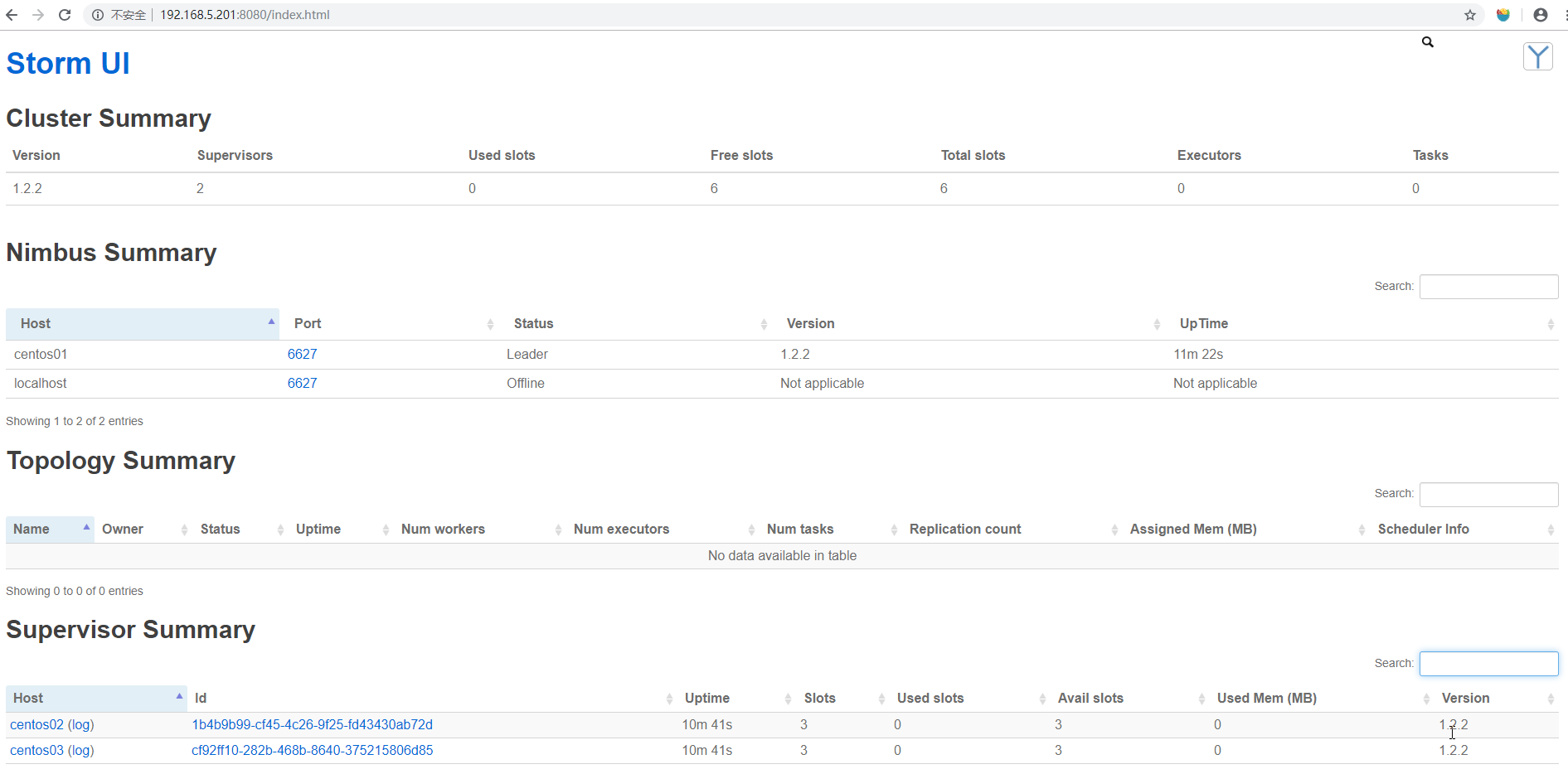
好了!
centos7下安装storm步骤的更多相关文章
- linux系统,在centos7环境下安装jdk步骤
记录一下安装jdk1.8版本的出错过程: 按照这个博客内容安装的,以及修改文件权限博客 [Linux]CentOS7下安装JDK详细过程 [Linux]目录文件权限的查看和修改[转] 1.安装的jdk ...
- centOS7下安装GUI图形界面
1.如何在centOS7下安装GUI图形界面 当你安装centOS7服务器版本的时候,系统默认是不会安装GUI的图形界面程序,这个需要手动安装CentOS7 Gnome GUI包. 2.在系统下使用命 ...
- docker(一) Centos7下安装docker
docker(一) Centos7下安装dockerdocker(二) windows10下安装dockerdocker(三) 镜像和容器常用命令 docker(四) 使用Dockerfile构建镜像 ...
- centos7下安装指定版本mysql5.7.23
现在mysql版本已经到MySQL 8.0(GA)稳定版本了,所以需求是想简单又快速在centos7下安装指定版本例如MySQL 5.7(GA)版本有下面这种方法 首先需要到mysql官网这里下载对应 ...
- CentOS7 下安装 iSCSI Target(tgt) ,使用 Ceph rbd
目录 一.iSCSI 介绍 1. iSCSI 定义 2. 几种常见的 iSCSI Target 3. 优缺点比较 二.安装步骤 1. 关闭防火墙 2. 关闭selinux 3. 通过 yum 安装 t ...
- Docker学习之Centos7下安装
Docker学习之Centos7下安装 centos7 64下直接使用yum安装docker环境,步骤如下: 卸载旧版本docker sudo yum remove docker docker-com ...
- 【python3】——centos7下安装
centos7下安装python3总步骤分三步: 一.依赖解决: 1.安装依赖包: yum install zlib-devel bzip2-devel openssl-devel ncurses-d ...
- centos7下安装zookeeper&zookeeper集群的搭建
一.centos7下安装zookeeper 1.zookeeper 下载地址 https://mirrors.tuna.tsinghua.edu.cn/apache/zookeeper/ 2.安装步骤 ...
- CentOS7 下 安装 supervisor以及使用
CentOS7 下 安装 supervisor 以及使用 手动安装 [注] linux环境必须安装 python 1.获取supervisor包:[https://pypi.python.org/py ...
随机推荐
- linux 执行shell文件
执行的时候总是报错 安装软件: yum install dos2unix chmod +x test.sh dos2unix test.sh 这样执行sh文件不会报一下异常,主要是因为windows中 ...
- Vue.js的列表数据的同步更新方法
这次给大家带来Vue.js的列表数据的同步更新方法,Vue.js列表数据同步更新方法的注意事项有哪些,下面就是实战案例,一起来看一下. 数组的 push(),pop(),shift(),unshift ...
- Vagrant 手册之 box - box 的文件格式
原文地址 过去,box 只是 VirtualBox 导出的 tar 文件.由于 Vagrant 现在支持多个 provider 和版本控制,box 文件稍微复杂一些. 用于 Vagrant 1.0.x ...
- Optimal Subsequences(主席树)
题意: 给定一个序列,长度为n(<=2e5),有m(<=2e5)个询问,每个询问包含k和pos,要从原序列中选出一个长度为k的子序列,要求是这个序列的和是所有长度为k的序列中最大的,且是字 ...
- Python 学习笔记21 CMD执行测试用例
使用CMD命令执行测试用例 当我们在ride中设计好测试用例后,我们可以使用ride的界面工具来选择和运行测试用例. 系统也会提供比较好的报告和日志的浏览功能. 但是这样的自动化,毕竟是需要手工介入的 ...
- Java负整数的左移、右移、无符号右移
转自 Java负整数的左移.右移.无符号右移 Java负整数的左移.右移.无符号右移.正数的位移没有涉及到符号,而且正数的原码.反码.补码都是一样的,所以相对简单,但是对于负整数的位移,往往容易混淆 ...
- 卷积神经网络CNN原理以及TensorFlow实现
在知乎上看到一段介绍卷积神经网络的文章,感觉讲的特别直观明了,我整理了一下.首先介绍原理部分. [透析] 卷积神经网络CNN究竟是怎样一步一步工作的? 通过一个图像分类问题介绍卷积神经网络是如何工作的 ...
- Intellij IDEA插件
1.lombok 通过注解的形式生成GET/SET等方法 2.FindBugs-IDEA 检测代码中可能的bug及不规范的位置 3.Maven Helper 一键查看maven依赖,查看冲突的依赖,一 ...
- 对OpenStack运维架构的总结(转)
这里,仅从技术角度出发,谈谈OpenStack云平台在部署.架构和运维实施等方面的感想. 缘起,在2014年大二首次接触到OpenStack,当时国内外资料远没有当前这么丰富,为安装一个OpenSta ...
- sass-RGB颜色函数-RGBA()函数
rgba() 函数主要用来将一个颜色根据透明度转换成 rgba 颜色. 其语法有两种格式: rgba($red,$green,$blue,$alpha) //将一个rgba颜色转译出来,和未转译的值一 ...