
C# .net中获取台式电脑中串口设备的名称
来源:http://www.cnblogs.com/hshuzhao/p/4028856.html?utm_source=tuicool&utm_medium=referral
、情境:
做项目的时候要打开串口然后进行一些库函数的调用来操作目标板。串口使用的是usb转串口,板子插进拔出的,每次都使用不一样的usb口,debug的时候懒得每次改com口,又不想在UI上加上一个选择
com口的combox,于是就使用了下面这个方法。
2、环境:
win7 64、vs2010
3、目标:
获取下图的设备到底使用的是com几。
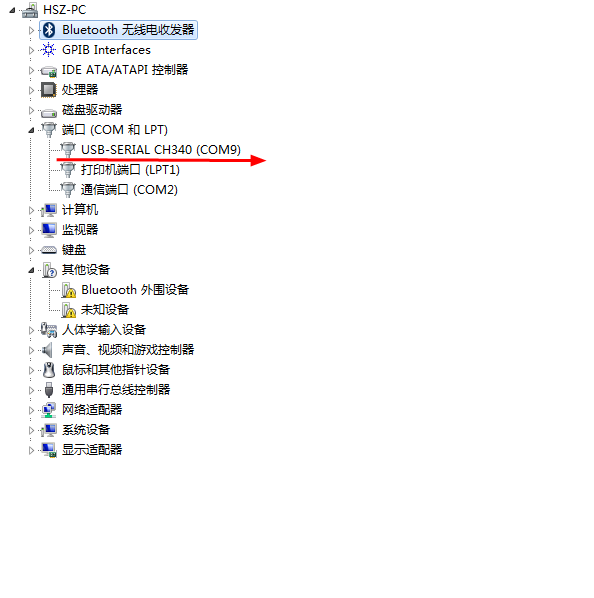
4、source codery>

  1         /// <summary>

  2         /// Get the target com num.

  3         /// </summary>

  4         /// <returns></returns>

  5         public static int GetComNum()

  6         {

  7             int comNum = -1;

  8             string[] strArr = GetHarewareInfo(HardwareEnum.Win32_PnPEntity, "Name");

  9             foreach (string s in strArr)

 10             {

 11                 Debug.WriteLine(s);

 12

 13                 if (s.Length >= 23 && s.Contains("CH340"))

 14                 {

 15                     int start = s.IndexOf("(") + 3;

 16                     int end = s.IndexOf(")");

 17                     comNum = Convert.ToInt32(s.Substring(start + 1, end - start - 1));

 18                 }

 19             }

 20

 21             return comNum;

 22

 23         }

 24

 25         /// <summary>

 26         /// Get the system devices information with windows api.

 27         /// </summary>

 28         /// <param name="hardType">Device type.</param>

 29         /// <param name="propKey">the property of the device.</param>

 30         /// <returns></returns>

 31         private static string[] GetHarewareInfo(HardwareEnum hardType, string propKey)

 32         {

 33

 34             List<string> strs = new List<string>();

 35             try

 36             {

 37                 using (ManagementObjectSearcher searcher = new ManagementObjectSearcher("select * from " + hardType))

 38                 {

 39                     var hardInfos = searcher.Get();

 40                     foreach (var hardInfo in hardInfos)

 41                     {

 42                         if (hardInfo.Properties[propKey].Value != null)

 43                         {

 44                             String str = hardInfo.Properties[propKey].Value.ToString();

 45                             strs.Add(str);

 46                         }

 47

 48                     }

 49                 }

 50                 return strs.ToArray();

 51             }

 52             catch

 53             {

 54                 return null;

 55             }

 56             finally

 57             {

 58                 strs = null;

 59             }

 60         }//end of func GetHarewareInfo().

 61

 62     /// <summary>

 63     /// 枚举win32 api

 64     /// </summary>

 65     public enum HardwareEnum

 66     {

 67         // 硬件

 68         Win32_Processor, // CPU 处理器

 69         Win32_PhysicalMemory, // 物理内存条

 70         Win32_Keyboard, // 键盘

 71         Win32_PointingDevice, // 点输入设备,包括鼠标。

 72         Win32_FloppyDrive, // 软盘驱动器

 73         Win32_DiskDrive, // 硬盘驱动器

 74         Win32_CDROMDrive, // 光盘驱动器

 75         Win32_BaseBoard, // 主板

 76         Win32_BIOS, // BIOS 芯片

 77         Win32_ParallelPort, // 并口

 78         Win32_SerialPort, // 串口

 79         Win32_SerialPortConfiguration, // 串口配置

 80         Win32_SoundDevice, // 多媒体设置,一般指声卡。

 81         Win32_SystemSlot, // 主板插槽 (ISA & PCI & AGP)

 82         Win32_USBController, // USB 控制器

 83         Win32_NetworkAdapter, // 网络适配器

 84         Win32_NetworkAdapterConfiguration, // 网络适配器设置

 85         Win32_Printer, // 打印机

 86         Win32_PrinterConfiguration, // 打印机设置

 87         Win32_PrintJob, // 打印机任务

 88         Win32_TCPIPPrinterPort, // 打印机端口

 89         Win32_POTSModem, // MODEM

 90         Win32_POTSModemToSerialPort, // MODEM 端口

 91         Win32_DesktopMonitor, // 显示器

 92         Win32_DisplayConfiguration, // 显卡

 93         Win32_DisplayControllerConfiguration, // 显卡设置

 94         Win32_VideoController, // 显卡细节。

 95         Win32_VideoSettings, // 显卡支持的显示模式。

 96

 97         // 操作系统

 98         Win32_TimeZone, // 时区

 99         Win32_SystemDriver, // 驱动程序

100         Win32_DiskPartition, // 磁盘分区

101         Win32_LogicalDisk, // 逻辑磁盘

102         Win32_LogicalDiskToPartition, // 逻辑磁盘所在分区及始末位置。

103         Win32_LogicalMemoryConfiguration, // 逻辑内存配置

104         Win32_PageFile, // 系统页文件信息

105         Win32_PageFileSetting, // 页文件设置

106         Win32_BootConfiguration, // 系统启动配置

107         Win32_ComputerSystem, // 计算机信息简要

108         Win32_OperatingSystem, // 操作系统信息

109         Win32_StartupCommand, // 系统自动启动程序

110         Win32_Service, // 系统安装的服务

111         Win32_Group, // 系统管理组

112         Win32_GroupUser, // 系统组帐号

113         Win32_UserAccount, // 用户帐号

114         Win32_Process, // 系统进程

115         Win32_Thread, // 系统线程

116         Win32_Share, // 共享

117         Win32_NetworkClient, // 已安装的网络客户端

118         Win32_NetworkProtocol, // 已安装的网络协议

119         Win32_PnPEntity,//all device

120     }
6、结果:
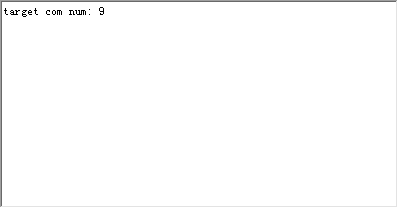
正确获得对应的com口号,达到了随便插哪个口程序都可以跑的目的。
C# .net中获取台式电脑中串口设备的名称的更多相关文章
- 记录一次bug解决过程:velocity中获取url中的参数
一.总结 在Webx的Velocity中获取url中参数:$rundata.getRequest().getParameter('userId') 在Webx项目中,防止CSRF攻击(Cross-si ...
- 在SQL SERVER中获取表中的第二条数据
在SQL SERVER中获取表中的第二条数据, 思路:先根据时间逆排序取出前2条数据作为一个临时表,再按顺时排序在临时表中取出第一条数据 sql语句如下: select top 1 * from(se ...
- js中获取URL中指定的查询字符串
js中获取URL中指定的搜索字符串,主要利用location对象实现,废话少说,上代码. function getSearchString(key) { // 获取URL中?之后的字符 var str ...
- Flex中获取RadioButtonGroup中的RadioButton的值
Flex中获取RadioButtonGroup中的RadioButton的值 1.设计源码 <?xml version="1.0" encoding="utf-8& ...
- Sql中获取表结构(字段名称,类型,长度,说明)
Sql中获取表结构(字段名称,类型,长度,说明) SELECT TableName = OBJECT_NAME(c.object_id), ColumnsName = c.name, Descript ...
- 父窗口中获取iframe中的元素
js 在父窗口中获取iframe中的元素 1. 格式:window.frames["iframe的name值"].document.getElementById("ifr ...
- 在iframe窗体内 获取父级的元素;;在父窗口中获取iframe中的元素
在iframe中获取父窗口的元素 $(‘#父窗口中的元素ID’, parent.document).click(); 在父窗口中获取iframe中的元素 $(“#iframe的ID”).content ...
- 在弹框中获取foreach中遍历的id值,并传递给地址栏(方法2)
1.php有时候我们需要再弹框中获取foreach中遍历的数据(例如id),在弹框中点击按钮并传递给地址栏跳转.那么应该怎么做呢.第二种方法. 2. 可以在弹框中给出一个input hidden 点击 ...
- 在弹框中获取foreach中遍历的id值,并传递给地址栏。
1.php有时候我们需要再弹框中获取foreach中遍历的数据(例如id),在弹框中点击按钮并传递给地址栏跳转.那么应该怎么做呢. 2. 点击取现按钮,如果没有设置密码->弹框 3. 点击去设置 ...
随机推荐
- instr函数
在Oracle/PLSQL中,instr函数返回要截取的字符串在源字符串中的位置. 语法如下:instr( string1, string2 [, start_position [, nth_appe ...
- coreseek实战(三):全文搜索在php中应用(使用api接口)
coreseek实战(三):全文搜索在php中应用(使用api接口) 这一篇文章开始学习在php页面中通过api接口,使用coreseek全文搜索. 第一步:综合一下前两篇文章,coreseek实战( ...
- SMTP的相关命令
SMTP是Simple Mail Transfer Protocol的简写. 邮件是日常工作.生活中不能缺少的一个工具,下面是邮件收发的流程. Image 邮件的发送,主要是通过SMTP协议来实现的. ...
- python 生产者消费者模型
import time def consumer(name): print("%s开始吃包子了"%name) while True: ret = yield time.sleep( ...
- PHP中想过获取系统内置的所有常量吗?
print_r(get_defined_constants(true)); OK!这样就可以了,赶紧去试试吧
- 基于ticket的rw锁
代码: wiredtiger-2.8.0/src/os_posix/os_mtx_rw.c rw锁结构 struct { uint16_t writers; // Now serving for wr ...
- .android:allowTaskReparenting 等Activity 的task属性
转自http://blog.csdn.net/javayinjaibo/article/details/8855678 1.android:allowTaskReparenting 这个属性用来标记一 ...
- 6.9 Android 优缺点
Android N主要在运行时和图形处理上做了更新. 运行时间上,Android N对编译器进行了优化,软件的运行时间提升了3-6倍.引入了一个全新的JIT编译器,使得App安装速度快了75%,编译代 ...
- Google Chrome: Make the Bookmarks Bar Display as Icons Only
By reducing your bookmarks to show only the icons, you can access more of them from the Bookmarks ba ...
- 腾讯DBA官方博客开通了,欢迎交流
腾讯DBA官方博客开通了,欢迎交流哈..麻烦给放到首页一下 http://tencentdba.com 腾讯互娱游戏DBA团队一直致力于为游戏提供稳定.高效的DB运营服务,这是我们团队的使 ...