
【读书笔记《Android游戏编程之从零开始》】4.Android 游戏开发常用的系统控件(EditText、CheckBox、Radiobutton)
3.4 EditText
EditText类官方文档地址:http://developer.android.com/reference/android/widget/EditText.html
EditText继承TextView,所以EditText具有TextView的属性特点,下面主要介绍一些EditText的特有的输入法的属性特点
android:layout_gravity="center_vertical":设置控件显示的位置:默认top,这里居中显示,还有bottom
android:hin:Text为空时显示的文字提示信息,可通过textColorHint设置提示信息的颜色。
android:singleLine:设置单行输入,一旦设置为true,则文字不会自动换行。
android:gray="top" :多行中指针在第一行第一位置et.setSelection(et.length());:调整光标到最后一行
android:autoText :自动拼写帮助。这里单独设置是没有效果的,可能需要其他输入法辅助才行
android:capitalize :设置英文字母大写类型。设置如下值:sentences仅第一个字母大写;words每一个单词首字母大小,用空格区分单词;characters每一个英文字母都大写。
android:digits :设置允许输入哪些字符。如“1234567890.+-*/%\n()”
android:singleLine :是否单行或者多行,回车是离开文本框还是文本框增加新行android:numeric :如果被设置,该TextView接收数字输入。有如下值设置:integer正整数、signed带符号整数、decimal带小数点浮点数。
android:inputType:设置文本的类型
android:password :密码,以小点”.”显示文本
android:phoneNumber :设置为电话号码的输入方式。
android:editable :设置是否可编辑。仍然可以获取光标,但是无法输入。
android:autoLink=”all” :设置文本超链接样式当点击网址时,跳向该网址
android:textColor = "#ff8c00":字体颜色
android:textStyle="bold":字体,bold, italic, bolditalic
android:textAlign="center":EditText没有这个属性,但TextView有
android:textColorHighlight="#cccccc":被选中文字的底色,默认为蓝色
android:textColorHint="#ffff00":设置提示信息文字的颜色,默认为灰色
android:textScaleX="1.5":控制字与字之间的间距
android:typeface="monospace":字型,normal, sans, serif, monospace
android:background="@null":空间背景,这里没有,指透明
android:layout_weight="1":权重在控制控件显示的大小时蛮有用的。
android:textAppearance="?android:attr/textAppearanceLargeInverse":文字外观,这里引用的是系统自带的一个外观,?表示系统是否有这种外观,否则使用默认的外观。
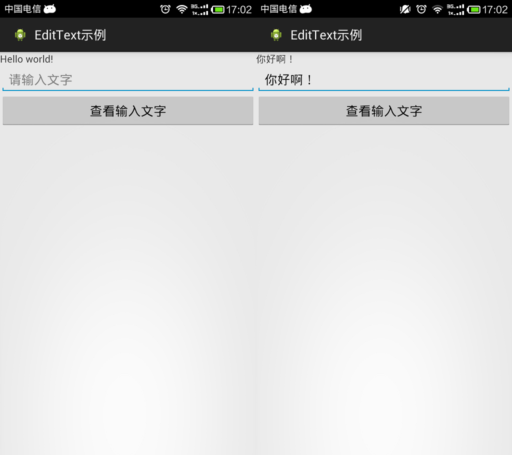
<?xml version="1.0" encoding="utf-8"?>

<LinearLayout xmlns:android="http://schemas.android.com/apk/res/android"

    android:layout_width="match_parent"

    android:layout_height="match_parent"

    android:orientation="vertical" >

    <TextView

        android:id="@+id/tv"

        android:layout_width="match_parent"

        android:layout_height="wrap_content"

        android:text="@string/hello_world" />

    <EditText

        android:id="@+id/et"

        android:layout_width="match_parent"

        android:layout_height="wrap_content"

        android:hint="@string/txt_hint" />

    <Button

        android:id="@+id/btn"

        android:layout_width="match_parent"

        android:layout_height="wrap_content"

        android:text="@string/btn_GetEditTextStr" />

</LinearLayout>
public class MainActivity extends Activity {

    private EditText et; // 创建一个文本编辑器对象

    private Button btn;

    private TextView tv;

    @Override

    protected void onCreate(Bundle savedInstanceState) {

        // TODO Auto-generated method stub

        super.onCreate(savedInstanceState);

        setContentView(R.layout.activity_main);

        et = (EditText) findViewById(R.id.et);

        btn = (Button) findViewById(R.id.btn);

        tv = (TextView) findViewById(R.id.tv);

        btn.setOnClickListener(new OnClickListener() {

            @Override

            public void onClick(View v) {

                // TODO Auto-generated method stub

                // 获取EditText中的文本内容

                String str = et.getText().toString();

                // 让TextView将获取到的EditText内容str显示出来

                tv.setText(str);

            }

        });

    }

}
3.5 CheckBox
CheckBox类官方文档地址:http://developer.android.com/reference/android/widget/CheckBox.html
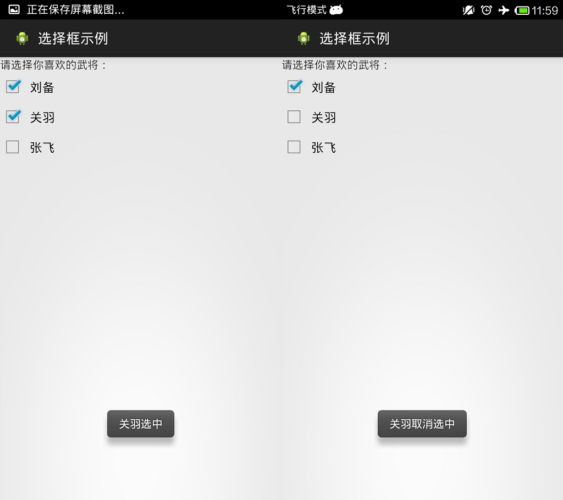
<?xml version="1.0" encoding="utf-8"?>

<LinearLayout xmlns:android="http://schemas.android.com/apk/res/android"

    android:layout_width="match_parent"

    android:layout_height="match_parent"

    android:orientation="vertical" >

    <TextView

        android:layout_width="match_parent"

        android:layout_height="wrap_content"

        android:text="@string/hello_world" />

    <CheckBox

        android:id="@+id/cb1"

        android:layout_width="match_parent"

        android:layout_height="wrap_content"

        android:button="@drawable/checkboxstyle"

        android:text="@string/checkbox1" />

    <CheckBox

        android:id="@+id/cb2"

        android:layout_width="match_parent"

        android:layout_height="wrap_content"

        android:button="@drawable/checkboxstyle"

        android:text="@string/checkbox2" />

    <CheckBox

        android:id="@+id/cb3"

        android:layout_width="match_parent"

        android:layout_height="wrap_content"

        android:button="@drawable/checkboxstyle"

        android:text="@string/checkbox3" />

</LinearLayout>
import android.app.Activity;

import android.os.Bundle;

import android.widget.CheckBox;

import android.widget.CompoundButton;

import android.widget.CompoundButton.OnCheckedChangeListener;

import android.widget.Toast;

public class MainActivity extends Activity implements OnCheckedChangeListener {

    private CheckBox cb1, cb2, cb3;

    @Override

    protected void onCreate(Bundle savedInstanceState) {

        // TODO Auto-generated method stub

        super.onCreate(savedInstanceState);

        setContentView(R.layout.activity_main);

        // 实例化3个CheckBox

        cb1 = (CheckBox) findViewById(R.id.cb1);

        cb2 = (CheckBox) findViewById(R.id.cb2);

        cb3 = (CheckBox) findViewById(R.id.cb3);

        cb1.setOnCheckedChangeListener(this);

        cb2.setOnCheckedChangeListener(this);

        cb3.setOnCheckedChangeListener(this);

    }

    // 重写监听器的抽象函数

    /*

     * onCheckedChanged(CompoundButton buttonView, boolean isChecked)

     * 第一个参数确定哪一个CheckBox状态发生改变 第二个参数确定改变的CheckBox的具体状态值,true为勾选,false为未勾选。

     */

    @Override

    public void onCheckedChanged(CompoundButton buttonView, boolean isChecked) {

        // buttonView 选中状态发生改变的那个按钮

        // isChecked 表示按钮新的状态(true/false)

        if (cb1 == buttonView || cb2 == buttonView || cb3 == buttonView) {

            if (isChecked) {

                // 显示一个提示消息

                toastDisplay(buttonView.getText() + "选中");

            } else {

                toastDisplay(buttonView.getText() + "取消选中");

            }

        }

    }

    private void toastDisplay(String str) {

        /*

         * Toast.makeText(Context context, CharSequence text,int duration);

         * 第一个参数是上下文对象 第二个参数是显示的文本内容

         * 第三个参数是显示提示消息的持续时间;其值有2个参数LENGTH_SHORT(短暂持续)和LENGTH_LONG(略长持续):

         * 最后,使用Toast对象调用show()方法即可

         */

        Toast.makeText(this, str, Toast.LENGTH_SHORT).show();

    }

}
CheckBox样式修改:

在res/drawable中添加checkbox自定义样式的xml文件。
<?xml version="1.0" encoding="utf-8"?>

<selector xmlns:android="http://schemas.android.com/apk/res/android">

<!-- 选中状态样式 -->

    <item android:drawable="@drawable/checkbox_checked" android:state_checked="true"></item>

    <!-- 未选中状态样式 -->

    <item android:drawable="@drawable/checkbox_normol" android:state_checked="false"></item>

</selector>
然后在布局文件中引用就可以了。
<CheckBox

        android:id="@+id/cb1"

        android:layout_width="match_parent"

        android:layout_height="wrap_content"

        android:button="@drawable/checkboxstyle"

        android:text="@string/checkbox1" />
3.6 Radiobutton
Radiobutton类官方文档地址:http://developer.android.com/reference/android/widget/RadioButton.html
RadioButton与CheckBox监听步骤类似,但RadioButton监听需要注意三点:
1.RadioButton与CheckBox使用的监听器不同。
2.RadioButton绑定监听的时候,不是每个RadioButton都去绑定,因为所有的RadioButton都被放在了RadioGroup单选组中,所以只需要将RadioGroup绑定上监听器即可。
3.重写监听器函数onCheckedChanged(RadioGroup group, int checkedId),这个函数的第一个参数是单选组,注意第二个参数,这里的checkedId不是RadioGroup单选组中的每个RadioButton的下标,而是发生状态改变的RadioButton的内存ID。所以在进行判断哪个RadioButton发生状态改变的时候,可以利用RadioButton.getID来与checkedId进行对比
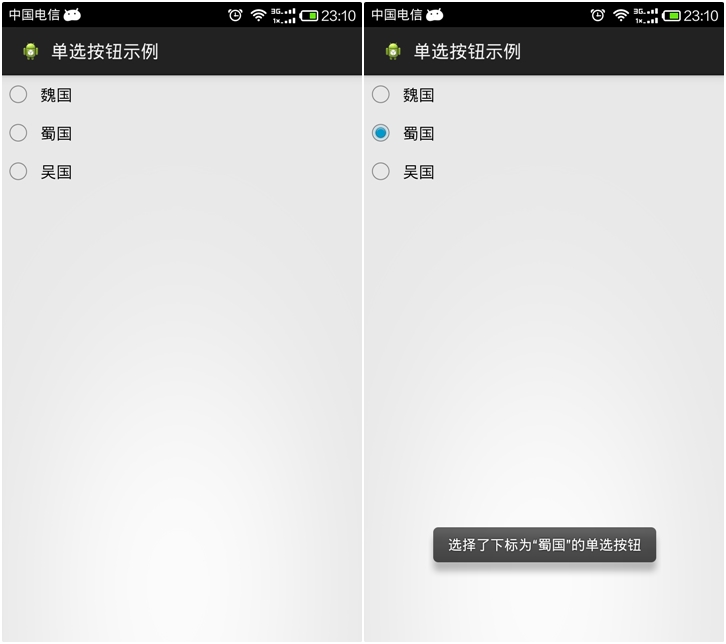
<?xml version="1.0" encoding="utf-8"?>

<LinearLayout xmlns:android="http://schemas.android.com/apk/res/android"

    android:layout_width="match_parent"

    android:layout_height="match_parent"

    android:orientation="vertical" >

    <RadioGroup

        android:id="@+id/radGrp"

        android:layout_width="wrap_content"

        android:layout_height="wrap_content" >

        <RadioButton

            android:id="@+id/rb1"

            android:layout_width="match_parent"

            android:layout_height="wrap_content"

            android:text="@string/rb1" />

        <RadioButton

            android:id="@+id/rb2"

            android:layout_width="match_parent"

            android:layout_height="wrap_content"

            android:text="@string/rb2" />

        <RadioButton

            android:id="@+id/rb3"

            android:layout_width="match_parent"

            android:layout_height="wrap_content"

            android:text="@string/rb3" />

    </RadioGroup>

</LinearLayout>
import android.app.Activity;

import android.os.Bundle;

import android.widget.RadioButton;

import android.widget.RadioGroup;

import android.widget.RadioGroup.OnCheckedChangeListener;

import android.widget.Toast;

public class MainActivity extends Activity implements OnCheckedChangeListener {

    private RadioButton rb1, rb2, rb3;

    private RadioGroup rg;

    @Override

    protected void onCreate(Bundle savedInstanceState) {

        super.onCreate(savedInstanceState);

        setContentView(R.layout.activity_main);

        rb1 = (RadioButton) findViewById(R.id.rb1);

        rb2 = (RadioButton) findViewById(R.id.rb2);

        rb3 = (RadioButton) findViewById(R.id.rb3);

        rg = (RadioGroup) findViewById(R.id.radGrp);

        rg.setOnCheckedChangeListener(this);// 将单选组绑定监听器

    }

    // 重写监听器函数

    /*

     * onCheckedChanged(RadioGroup group, int checkedId) 第一个参数是单选组

     * 第二个参数这里的checkedId发生改变的RadioButton的内存ID。

     * 在进行判断哪个RadioButton发生状态改变的时候,可以利用RadioButton.getID来与checkedId进行对比

     */

    @Override

    public void onCheckedChanged(RadioGroup group, int checkedId) {

        if (group == rg)

        {

            String rbName = null;

            if (checkedId == rb1.getId()) {

                rbName = rb1.getText().toString();

            } else if (checkedId == rb2.getId()) {

                rbName = rb2.getText().toString();

            } else if (checkedId == rb3.getId()) {

                rbName = rb3.getText().toString();

            }

            Toast.makeText(this, "选择了下标为“" + rbName + "”的单选按钮",

                    Toast.LENGTH_SHORT).show();

        }

    }

}
【读书笔记《Android游戏编程之从零开始》】4.Android 游戏开发常用的系统控件(EditText、CheckBox、Radiobutton)的更多相关文章
- 【读书笔记《Android游戏编程之从零开始》】6.Android 游戏开发常用的系统控件(TabHost、ListView)
3.9 TabSpec与TabHost TabHost类官方文档地址:http://developer.android.com/reference/android/widget/TabHost.htm ...
- 【读书笔记《Android游戏编程之从零开始》】5.Android 游戏开发常用的系统控件(ProgressBar、Seekbar)
3.7 ProgressBar ProgressBar类官方文档地址:http://developer.android.com/reference/android/widget/ProgressBar ...
- 【读书笔记《Android游戏编程之从零开始》】3.Android 游戏开发常用的系统控件(Button、Layout、ImageButton)
3.1 Button Button这控件不用多说,就是一个按钮,主要是点击后进行相应事件的响应. 给组件添加ID属性:定义格式为 android:id="@+id/name",这里 ...
- 【读书笔记《Android游戏编程之从零开始》】8.Android 游戏开发常用的系统控件(系统控件常见问题)
Android 中常用的计量单位Android有时候需要一些计量单位,比如在布局Layout文件中可能需要指定具体单位等.常用的计量单位有:px.dip(dp).sp,以及一些不常用的pt.in.mm ...
- 【读书笔记《Android游戏编程之从零开始》】7.Android 游戏开发常用的系统控件(Dialog)
在Android应用开发中,Dialog(对话框)创建简单且易于管理因而经常用到,对话框默认样式类似创建样式的Activity.首先介绍android.app.AlertDialog下的Builder ...
- Windows游戏编程之从零开始d
Windows游戏编程之从零开始d I'm back~~恩,几个月不见,大家还好吗? 这段时间真的好多童鞋在博客里留言说或者发邮件说浅墨你回来继续更新博客吧. woxiangnifrr童鞋说每天都在来 ...
- Java并发编程的艺术读书笔记(2)-并发编程模型
title: Java并发编程的艺术读书笔记(2)-并发编程模型 date: 2017-05-05 23:37:20 tags: ['多线程','并发'] categories: 读书笔记 --- 1 ...
- Java并发编程的艺术读书笔记(1)-并发编程的挑战
title: Java并发编程的艺术读书笔记(1)-并发编程的挑战 date: 2017-05-03 23:28:45 tags: ['多线程','并发'] categories: 读书笔记 --- ...
- 《Essential C++》读书笔记 之 C++编程基础
<Essential C++>读书笔记 之 C++编程基础 2014-07-03 1.1 如何撰写C++程序 头文件 命名空间 1.2 对象的定义与初始化 1.3 撰写表达式 运算符的优先 ...
随机推荐
- java之StringBuilder类详解
StringBuilder 非线程安全的可变字符序列 .该类被设计用作StringBuffer的一个简易替换,用在字符串缓冲区被单个线程使用的时候(这种情况很普遍).如果可能,建议优先采用该类,因为在 ...
- Docker有什么好处?
Docker背后的想法是创建软件程序可移植的轻量容器,让其可以在任何安装了Docker的机器上运行,而不用关心底层操作系统,类似船舶使用的集装箱,野心勃勃的他们成功了. Docker可以解决虚拟机能够 ...
- 使用WCF对外提供接口
本篇将通过WCF以webservices的方式对外提供接口.同时使用NUnit对webservices中的方法进行单元测试. 开发契约 contract Contract项目为类库项目,该项目下会包含 ...
- 本地Git服务器的搭建及使用
本地Git服务器的搭建及使用 Git本地服务器环境搭建 搭建好的本地git服务器的局域网ip是192.168.1.188,用户名是RSCSVN 教程链接:http://blog.csdn.net/cc ...
- jQuery.makeArray() 函数详解
jQuery.makeArray()函数用于将一个类数组对象转换为真正的数组对象. 所谓"类数组对象"就是一个常规的Object对象,但它和数组对象非常相似:具备length属性, ...
- SharePoint 2013 删除母版页报错“This file may not be moved, deleted, renamed, or otherwise edited”
在使用SharePoint 2013母版页的时候,我复制了一个seattle.master页面,然后想重命名一下发现报错,删除也报错,spd.页面分别试过签入签出以后均报错,错误如下: 尝试找了一下错 ...
- Lync 客户端:无法登陆到Lync,验证服务器中的证书时遇到问题
安装完Lync客户端后,运行时Lync客户端时,报出如下错误: [原因解析] Lync客户端没有正确安装CA证书链. [解决办法] 第一种方法:将计算机加入域. 第二种方法:不加入域的处理方法: 1. ...
- Objective-C
1.OC基础 第一个OC的类 Objective-C: 字符串NSString与NSMutableString iOS开发的入门总结的第一篇 iOS开发的入门总结的第二篇
- xib命名注意事项--防止被其他控制器意外地 当做默认的 view了
注意: 1.创建的xib如果不是想给指定的控制器做view的话,命名就要注意了! 2.最好是不要命名和控制器名字相关的xib. 如下举例说明一下: - (void)touchesBegan:(NSSe ...
- 记OC迁移至swift中笔记20tips
写久了OC后来写swift,总感觉写着是swift的皮毛,但是实际上是OC的核心,这里整理了OC迁移至swift中的一些小细节. 1 在当前类中,实例方法调用属性以及方法都可以将self省略掉,而且是 ...