
Web Component--01. 简介
Web Components 是什么?
Web Components是W3C定义的新标准,它给了前端开发者扩展浏览器标签的能力,可以自由的定制组件,更好的进行模块化开发,彻底解放了前端开发者的生产力。
Web Components 架构
Web Components在 W3C 规范中的发展有几个模块:
- 模板元素
- Html Import
- Shadow DOM
- 自定义元素
- 装饰器
目前前四个模块足以支撑 Web Component,装饰器还没有一个完整的规范。
template 模板元素
创建一个template的 html 标签,通过 javascript 获取节点的模板内容
<template id="test">

test template

</template>

<h1 id="message"></h1>

<script type="text/javascript">

    var template = document.getElementById("test");

    console.log(template.content);

</script>
模板默认不显示,需要激活模板,通过以下两种方法来激活节点
克隆节点
var templateContent  = template.content;

var activeNode = templateContent.cloneNode(true);

document.body.appendChild(activeNode);
导入节点
var templateContent  = template.content;

var activeNode = document.importNode(templateContent,true);

document.body.appendChild(activeNode);
Html Import
Html Import 可以将外部的 HTML 文档嵌入到当前文档中,提供很好的资源共享。
带有import属性的link 支持两个事件
onload:文件成功引入页面会触发
onerror: 文件加载失败会触发
<script type="text/javascript">
function importTest(message){
console.log(message);
}
</script>
Shadow DOM
在 Web Component 规范出来之前,关于 HTML、CSS、Javascript 构建 Web 应用程序的程序的争论一直不断。主要质疑有几种:
- 样式覆盖:文档的样式会影响Web Component
- 脚本替换:文档的Javascript会覆盖Web Component的部分代码
- 重复的 ID:文档出现重复 ID 会导致解析异常
Shadow DOM的引入就是为了解决封装机制作用域的问题。
浏览器通常情况下是看不到Shadow DOM节点的,Google 开发工具可以帮我审查这些元素,需要做如下设定:
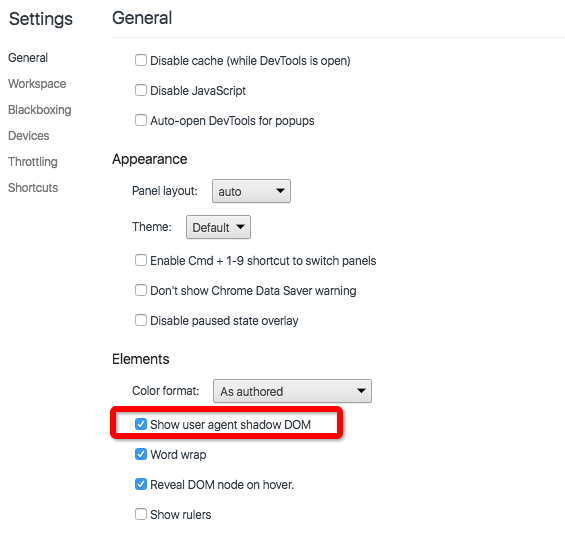
创建Shadow DOM : 通过 createShadowRoot 函数对一个 DOM 元素(宿主元素)创建一个 Shadow DOM 子树
<div id="box"></div><!--容器-->

<template id="test">

<style>

:host h1{color:red};

</style>

<h1>Test</h1>

</template>

<script type="text/javascript">

    var box = document.getElementById("box");

    var shadowRoot = box.createShadowRoot();

    var template = document.getElementById("test");

    var templateContent  = template.content;

    var activeNode = document.importNode(templateContent,true);

    shadowRoot.appendChild(activeNode);

</script>
自定义元素
开发一个自定义元素需要五个步骤:
创建对象:
var objectProto = Object.create(HTMLElement.prototype);
定义对象属性:
//定义单个属性

Object.defineProperty(objectProto,'title',{

    writable : true,

})

//定义单个多个

Object.defineProperties(objectProto,{

    height: {writable : true},

    width: {writable : true}

})
定义生命周期方法:
//成功创建对象

objectProto.createdCallback = function(){

    console.log('created');

}

//对象插入DOM中

objectProto.attachedCallback = function(){

    console.log('attached');

}
注册新元素
document.registerElement('test',{

        prototype : objectProto

});
输入24px 的 HelloWorld:
<my-name title="HelloWorld" fontsize="2"></my-name>

<script type="text/javascript">

    var objectProto = Object.create(HTMLElement.prototype);

    Object.defineProperties(objectProto,{

        title: {writable : true},

        fontsize: {writable : true}

    })

    objectProto.createdCallback = function(){

        this.innerText = this.attributes.title.value;

        this.style.fontSize = this.attributes.fontsize.value * 12 + 'px';

    }

    document.registerElement('my-name',{

        prototype : objectProto

    });

</script>
时钟应用
- test.html :通过import方式加载Clock Component
- clock-elemect.html:负责倒计时的实现
test.html
<link rel="import" href="clock-element.html"/>

<digital-clock></digital-clock>
clock-elemect.html
<template id="clockTemplete">

    <style>

    :host::shadow .clock{

        display: inline-flex;

        justify-content: space-around;

        background:white;

        font-size: 8rem;

        box-shadow: 2px 2px 4px -1px grey;

        border: 1px solid green;

        font-family: sans-serif;

        width: 100%;

    }

    :host::shadow .clock .hour,

    :host::shadow .clock .minute,

    :host::shadow .clock .second{

        color: orange;

        padding: 1.5rem;

        text-shadow: 0px 2px black;

    }

    </style>

    <div class="clock">

        <div class="hour">HH:</div>

        <div class="minute">MM:</div>

        <div class="second">SS</div>

    </div>

</template>

<script type="text/javascript">

(function(){

    var selfDoucment = document.currentScript.ownerDocument;

    var objectProto = Object.create(HTMLElement.prototype);

    objectProto.createdCallback = function(){

        var shadow = this.createShadowRoot();

        var templateContent = selfDoucment.querySelector('#clockTemplete').content;

        var templateNode = selfDoucment.importNode(templateContent,true);

        shadow.appendChild(templateNode);

        var hourElement = shadow.querySelector('.hour');

        var minuteElement = shadow.querySelector('.minute');

        var secondElement = shadow.querySelector('.second');

        window.setInterval(function(){

            var date = new Date();

            hourElement.innerText = date.getHours()+':';

            minuteElement.innerText = date.getMinutes()+':';

            secondElement.innerText = date.getSeconds();

        },1000);

    };

    document.registerElement('digital-clock',{

        prototype : objectProto

    });

})();

</script>
Web Component--01. 简介的更多相关文章
- amazeui学习笔记二(进阶开发2)--Web组件简介Web Component
amazeui学习笔记二(进阶开发2)--Web组件简介Web Component 一.总结 1.amaze ui:amaze ui是一个web 组件, 由模板(hbs).样式(LESS).交互(JS ...
- Node.js 教程 01 - 简介、安装及配置
系列目录: Node.js 教程 01 - 简介.安装及配置 Node.js 教程 02 - 经典的Hello World Node.js 教程 03 - 创建HTTP服务器 Node.js 教程 0 ...
- Web Component 文章
周末无意中了解了Web Component的概念. http://blog.amowu.com/2013/06/web-components.html http://www.v2ex.com/t/69 ...
- 示例可重用的web component方式组织angular应用模块
在online web应用中,经常有这样的需求,能够让用户通过浏览器来输入代码,同时能够根据不同的代码来做语法高亮.大家已知有很多相应的javascript库来实现语法高亮的功能,比如codemirr ...
- (转)Web Service入门简介(一个简单的WebService示例)
Web Service入门简介 一.Web Service简介 1.1.Web Service基本概念 Web Service也叫XML Web Service WebService是一种可以接收从I ...
- Web Component总结
Web Component 一个Web组件通常由四个部分组成:模板.Shadow DOM.自定义元素与打包,其中Shadow DOM解决了组件在页面中的封装问题 Shadow DOM 有shadow ...
- Salesforce知识整理(一)之Lightning Web Component Tools
目录 LWC知识整理(一) 工具 Salesforce CLI Visual Studio Code(VS Code) Developer Hub(Dev Hub) 开启Dev Hub 相关资料 茶余 ...
- Web Component
前言 Web Component不是新东西,几年前的技术,但是受限于浏览器兼容性,一直没有大规模应用在项目里,直到现在(2018年年末),除IE仍不支持之外,其它主流浏览器都支持Web Compone ...
- Web Service入门简介(一个简单的WebService示例)
Web Service入门简介 一.Web Service简介 1.1.Web Service基本概念 Web Service也叫XML Web Service WebService是一种可以接收从I ...
- Web Component探索
概述 各种网站往往需要一些相同的模块,比如日历.调色板等等,这种模块就被称为“组件”(component).Web Component就是网页组件式开发的技术规范. 采用组件进行网站开发,有很多优点. ...
随机推荐
- IOS—静态方法(类方法)和实例方法
1.实例方法/动态方法 a).标识符:- b).调用方式:(实例对象 函数) c).实例方法在堆栈上. 2.静态方法/类方法 a).标识符:+ b).调用方式:(类 函数) c).静态方法 ...
- java利用16进制来辨别png格式的图片
很多人知道利用.png的字符串结尾可以判断前端传入的图片是否为png格式,但是这只是潜意识的判断!那么如何利用png读写的特殊内容来深意识地判断图片格式呢?最近在做东西的时候遇到了点问题,在加载图片的 ...
- 结构体快排回顾(sort)
一般来说,我做竞赛的时候排序一般用快排 很快很方便 普通sort(从小到大) sort(a,a+n); 直接贴一段代码吧,包含了vector,sort,结构体等简单东西综合 #include < ...
- Xcode 重新下载项目配置文件
配置文件保存在: ~/Library/MobileDevice/Provisioning Profiles 可以按修改日期排序移走没用的配置文件或者干脆将目录重命名,备份好旧的配置文件后,到Xcode ...
- iPhone屏幕尺寸、分辨率及适配
转:http://blog.csdn.net/phunxm/article/details/42174937 目录(?)[+] 1.iPhone尺寸规格 设备 iPhone 宽 Width 高 H ...
- Java反序列化漏洞执行命令回显实现及Exploit下载
原文地址:http://www.freebuf.com/tools/88908.html 本文原创作者:rebeyond 文中提及的部分技术.工具可能带有一定攻击性,仅供安全学习和教学用途,禁止非法使 ...
- Ubuntu “无法获得锁”解决方案(E: 无法获得锁 /var/cache/apt/archive
Ubuntu “无法获得锁”解决方案(E: 无法获得锁 /var/cache/apt/archive 现象一: E: 无法获得锁 /var/lib/dpkg/lock - open (11: 资源 ...
- 【转】Log4net用法
Log4net用法 http://www.cnblogs.com/hfliyi/archive/2012/05/20/2510783.html
- 分享一个web应用程序池管理工具
因为项目在联调阶段由于各种各样的原因需要重启应用程序池,而调试服务器基本都需要远登操作.同样的情况也会发生在线上,如果公司权限控制得比较严格,每次都要多部门的服务器权限申请的话有点麻烦, 所以抽点时间 ...
- centos 7 中 tomcat 安装
一. 安装 jdk [root@iZm5ei4m ~]# /usr/local/tomcat/bin/startup.sh 一.安装 jdk 二.设置环境变量 #################### ...