
CREATE A ENERGY / HEALTH BAR HUD
1. Open the Play scene which you had created in the previous post. If you've not created the Play scene, create a New Scene and save it as Play, of course you can name it whatever you want.
2. Once you open the scene, you should have a Main Camera, I would suggest you toPosition it at (0, 1, -15)
3. Add a Directional Light to the scene by navigating to Gameobject->Light->Directional Light. Position it at (0, 1, -15) as well.
4. Add a Cube to the scene from Gameobject->3D Object->Cube. Rename it as Player. Position it at (-1, 1, -10). Add a Rigidbody component to this Player and uncheck the Use Gravity checkbox.
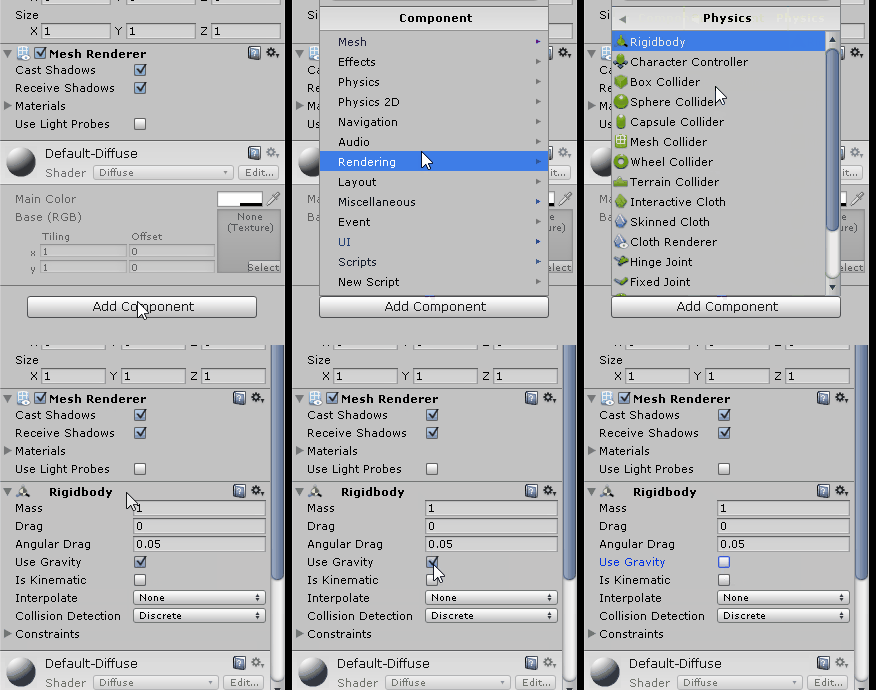
5. Create another Cube object and rename it as Fire. Position it at (2, 1, -10). Check the Is Trigger checkbox of the Fire's Box Collider component.

You can add a material to this Fire if you want, just like I did.
6. It is now time to add a Text UI component named Health, to indicate a Health Bar HUD.
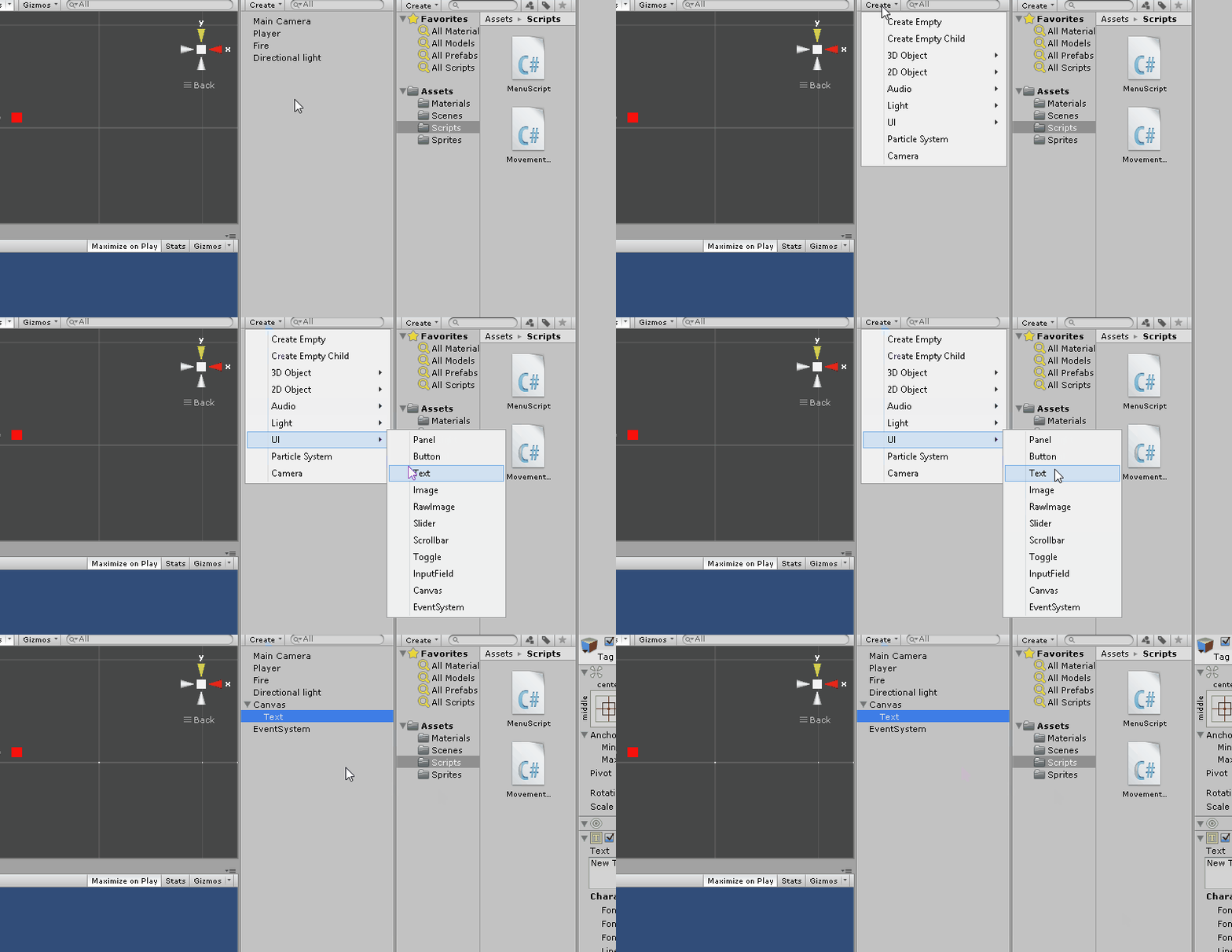
7. Place the text so that it is visible on the top left corner of the Game screen. Make sure you move the anchor points with the text as well.

The above image shows you the things that I configured. You can follow it if you like or you can configure it the way you want.
1 signifies the position of the Health text
2 I have renamed the Text to HealthText.
3 Signifies the Position of the HelathText Rect Transform and also it's Anchor's min maxpositions. Also the Text content is changed to Health.
4 Best Fit is checked so as to make the Text dynamic. Max and Min size are set. Color of the font has been changed to White.
(Overlook the error in the console)
8. Create another Text element under the Canvas named GameOver. Position it wherever you want to with the anchor points placed at the four corners. Also check the Best Fitcheckbox. Change the font color if you want to.

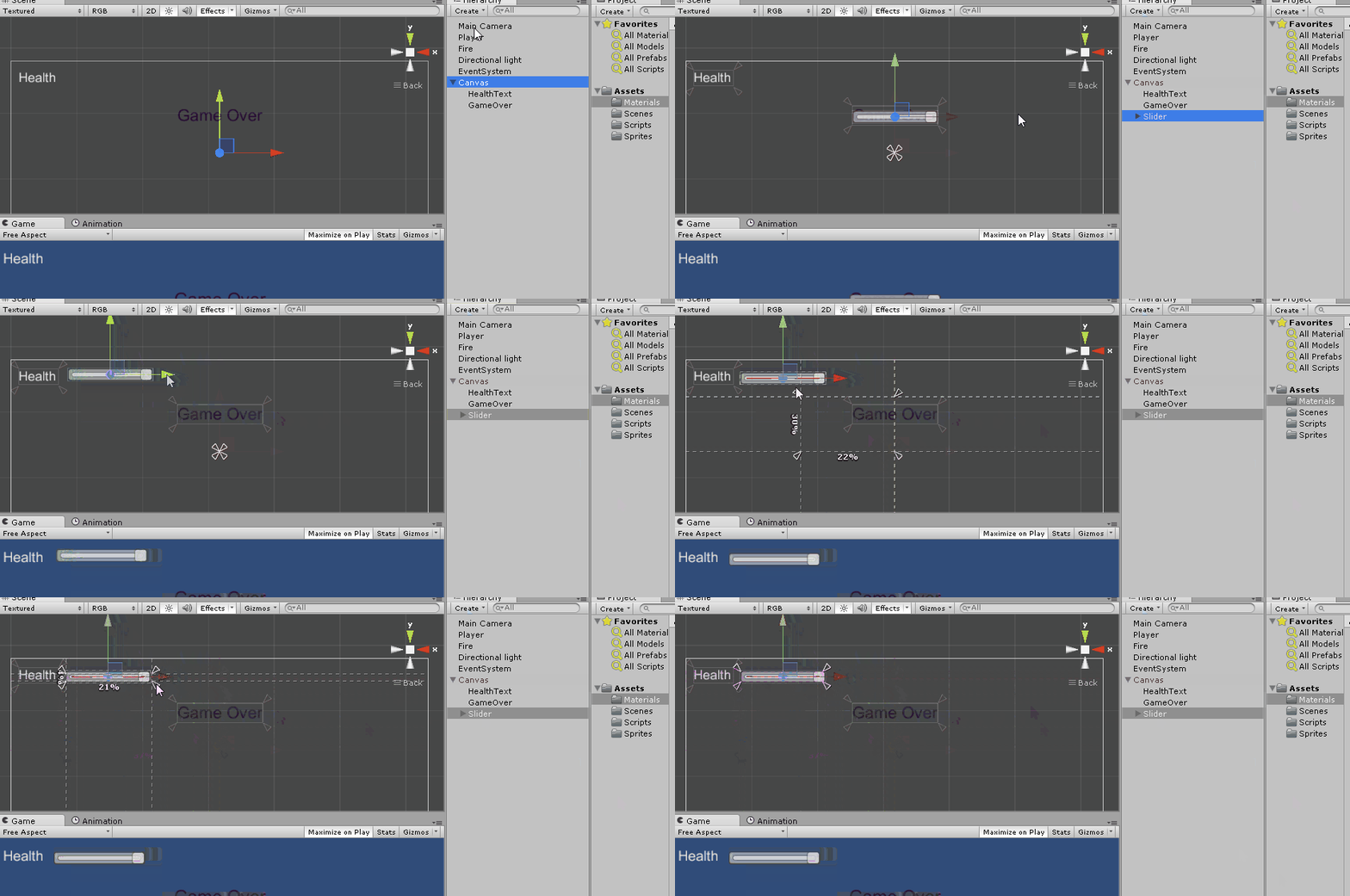
9. It is time to add a Slider, which will be used to indicate the Health of the Player. Place it besides the Health text and resize it as per your needs with the anchors placed around the corners.
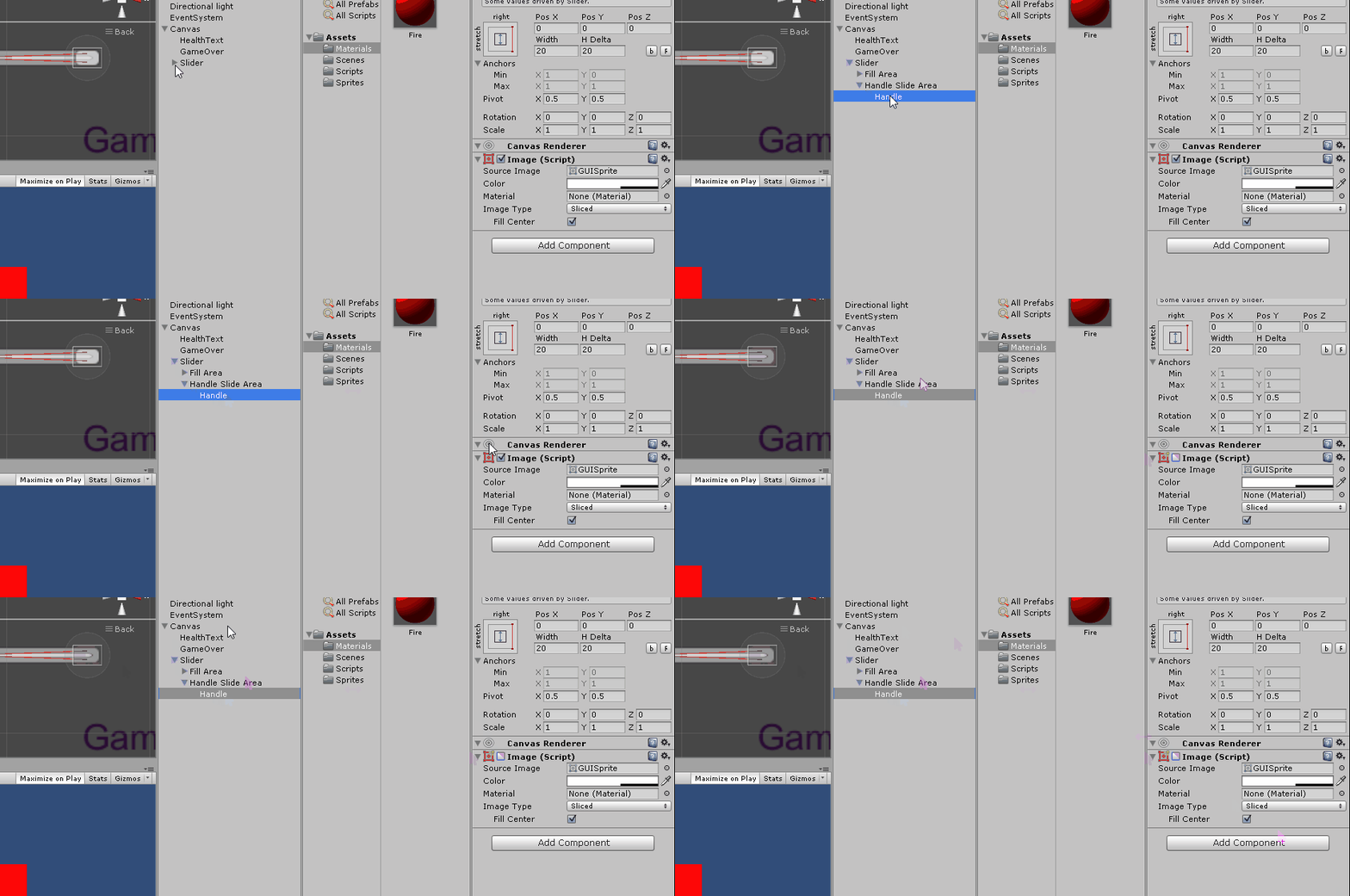
10. We will disable the slider handle as we don't need it.
11. Change the Slider Fill color to Green
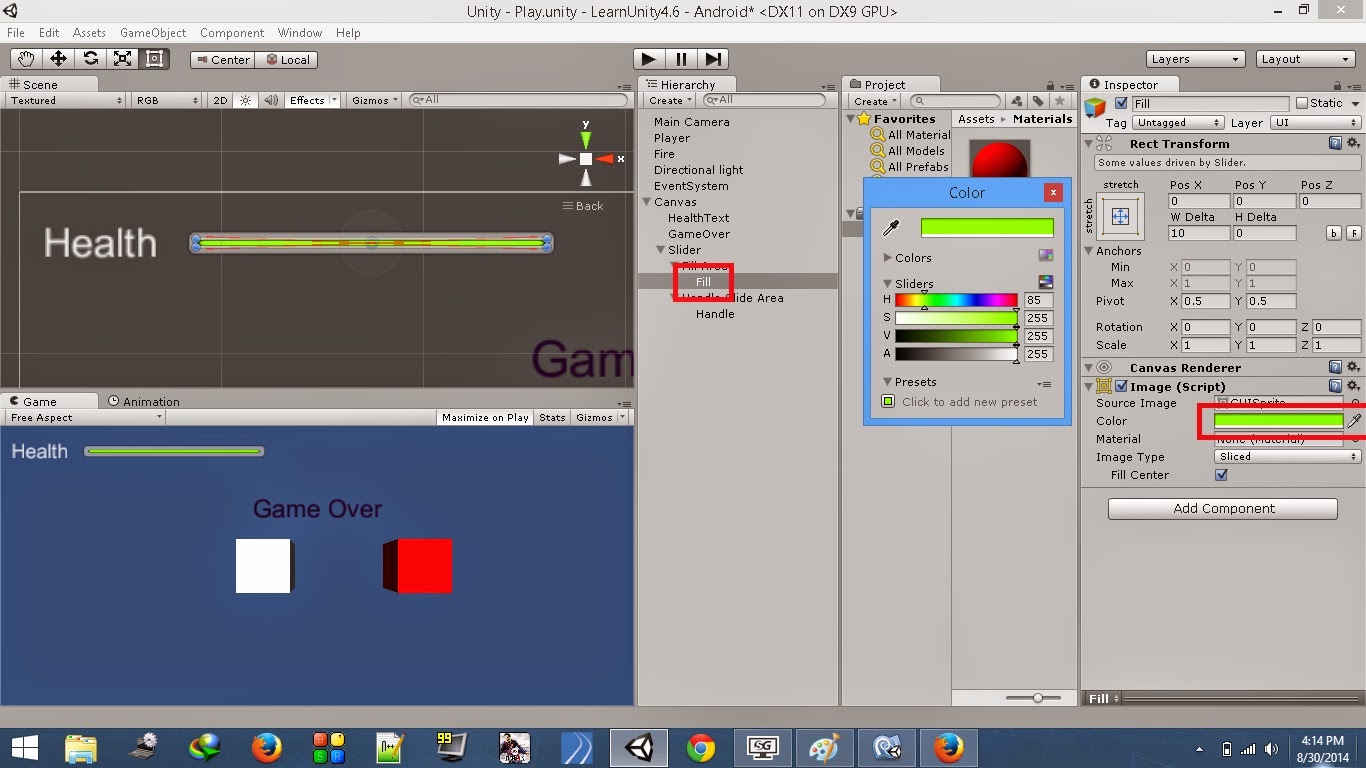
12. Create a C# script named MovementScript in the Scripts folder. Attach it to the PlayerGameObject. Open this script and add the below code to it.
using UnityEngine;

using System.Collections;

using UnityEngine.UI;

public class MovementScript : MonoBehaviour {

 public Slider healthBarSlider;  //reference for slider

 public Text gameOverText;   //reference for text

 private bool isGameOver = false; //flag to see if game is over

 void Start(){

  gameOverText.enabled = false; //disable GameOver text on start

 }

 // Update is called once per frame

 void Update () {

  //check if game is over i.e., health is greater than 0

  if(!isGameOver)

   transform.Translate(Input.GetAxis("Horizontal")*Time.deltaTime*10f, 0, 0); //get input

 }

 //Check if player enters/stays on the fire

 void OnTriggerStay(Collider other){

  //if player triggers fire object and health is greater than 0

  if(other.gameObject.name=="Fire" && healthBarSlider.value>0){

   healthBarSlider.value -=.011f;  //reduce health

  }

  else{

   isGameOver = true;    //set game over to true

   gameOverText.enabled = true; //enable GameOver text

  }

 }

}
- In the Start function we disable the GameOver text as we need it to be displayed only when the health is zero.
- The code above is very simple. The Update function gets input from the keyboard as long as the isGameOver flag is false. Press Right Arrow to move the Player to Right and Left Arrow to move it Left.
- OnTriggerStay function checks for contact between the Player and Fire object as long as the slider value is greater than zero. If the Player is in contact with the Fire, it's health will reduce at a rate of 0.01 units/frame. This value is reflected on the Slider. If the health value is zero, we will enable the GameOver text.
(Note: The slider value is set to 1 by default)

13. Save the script and return to Unity. Add the Slider and GameOver text elements to the script reference fields as below:
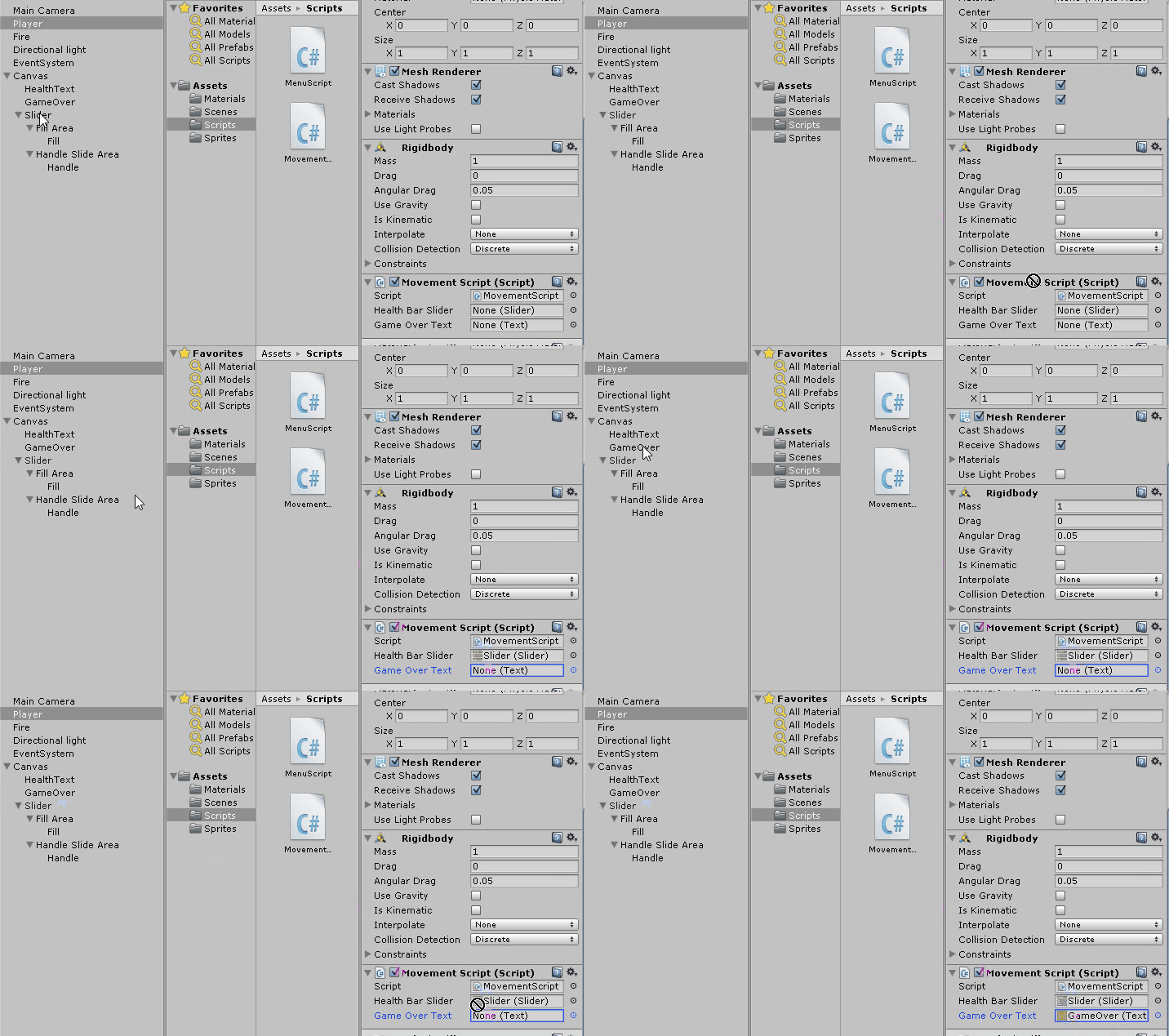
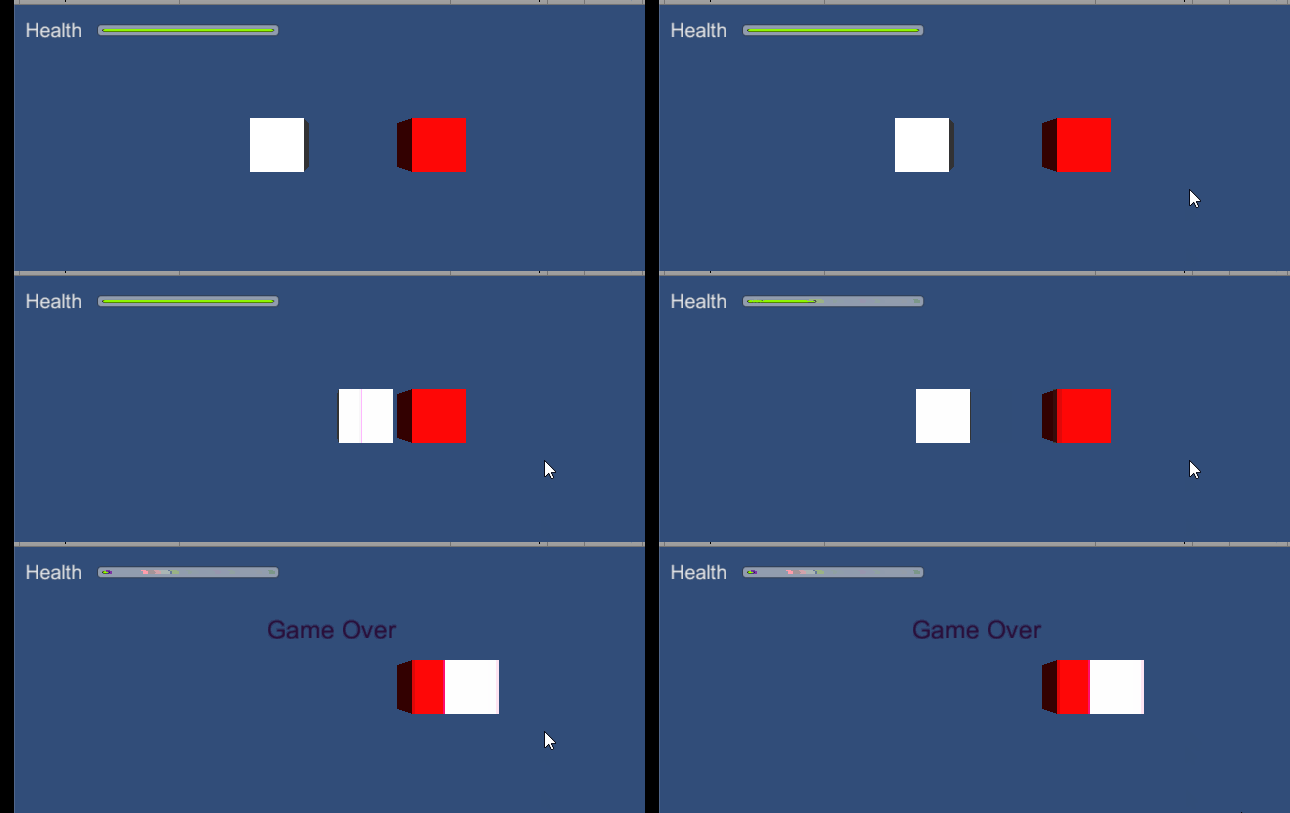
Now, your Health Bar HUD is all ready to be tested. Press the Play button to test your scene. Use the left and right arrow keys to move the Player.
See you around.
Also check out,
Unity 4.6 New GUI - Create a Blinking / Flashing Text
Dynamic Canvas Using Canvas Scaler / Reference Resolution - New Unity 4.6 GUI
Unity 4.6 GUI - Create A Dynamic Menu With The New UI
Unity 4.6 GUI - Create A Health Bar HUD
Unity 4.6 GUI - Create A Level Select Scroll Menu
CREATE A ENERGY / HEALTH BAR HUD的更多相关文章
- Create a “% Complete” Progress Bar with JS Link in SharePoint 2013
Create a “% Complete” Progress Bar with JS Link in SharePoint 2013 SharePoint 2013 has a lot new fea ...
- how to create a ring progress bar in web skills
how to create a ring progress bar in web skills ring progress bar & circle progress bar canvas j ...
- UI相关教程:HUD、UMG和Widget
转自:http://aigo.iteye.com/blog/2258612 蓝图脚本来处理 ================================================== 用UM ...
- 12岁的少年教你用Python做小游戏
首页 资讯 文章 频道 资源 小组 相亲 登录 注册 首页 最新文章 经典回顾 开发 设计 IT技术 职场 业界 极客 创业 访谈 在国外 - 导航条 - 首页 最新文章 经典回顾 开发 ...
- Ceph常用命令
目录 [1.环境准备] [2.部署管理] [3.集群扩容] [4.用户管理] [5.密钥环管理] [6.块设备管理] [7.快照管理] [8.参考链接] 简要说明: 最近心血来潮,对分布式存储感兴趣, ...
- PIXI 宝物猎人(7)
介绍 ,本实例来自官网 代码结构 打开 treasureHunter.html 文件,你将会看到所有的代码都在一个大的文件里.下面是一个关于如何组织所有代码的概览: //Setup Pixi and ...
- Unity 2018 Cookbook (Matt Smith 著)
1. Displaying Data with Core UI Elements (已看) 2. Responding to User Events for Interactive UIs (已看) ...
- Python制作的射击游戏
如果其他朋友也有不错的原创或译文,可以尝试推荐给伯乐在线.] 你有没有想过电脑游戏是怎样制作出来的?其实它没有你想象的那样复杂! 在这个教程里,你要学做一个叫<兔子和獾>的塔防游戏,兔子作 ...
- Website's Game source code
A Darkroom by doublespeakgames <!DOCTYPE html> <html itemscope itemtype="https://schem ...
随机推荐
- Jenkins2 - 下载与启动
文章来自:http://www.ciandcd.com 文中的代码来自可以从github下载: https://github.com/ciandcd 本文将引导jenkins初学者安装和配置jenki ...
- 【转】关于KDD Cup '99 数据集的警告,希望从事相关工作的伙伴注意
Features From: Terry Brugger Date: 15 Sep 2007 Subject: KDD Cup '99 dataset (Network Intrusion) cons ...
- SVG的路径动画效果
使用SVG animateMotion实现的一个动画路径效果,相关代码如下. 在线调试唯一地址:http://www.gbtags.com/gb/debug/c88f4099-5056-4ad7-af ...
- paip.提升性能----jvm参数调整.txt
paip.提升性能----jvm参数调整.txt 作者Attilax 艾龙, EMAIL:1466519819@qq.com 来源:attilax的专栏 地址:http://blog.csdn.n ...
- paip.enhes efis 自动获取文件的中文编码
paip.enhes efis 自动获取文件的中文编码 ##为什么需要自动获取文件的中文编码 提高开发效率,自动获取文件的中文编码 .不需要手动设置编码...轻松的.. ##cpdetector 可 ...
- paip.调试js 查看元素事件以及事件断点
paip.调试js 查看元素事件以及事件断点 ff 26 +firebug 查看不出来.. 360 ,虽然也是chrome 基础,但是开发工具烂阿,也是显示不出来.. 作者Attilax 艾龙, ...
- iOS开发-友盟分享使用(2)
1.友盟SDK提供功能:分享喜欢的东西到新浪微博.qq空间.为微信朋友圈等等等等社交圈. 2.友盟分享前期准备 (1)注册账号 去官网 (2)创建应用获取appkey 类似5556a53667e*** ...
- python元类
第一个实例: # coding=utf8 # 手动创建,返回一个类对象 MyShinyClass = type('MyShinyClass', () ,{}) print(MyShinyClass) ...
- maven源码分析- mvn.bat分析
第一次知道MAVEN是在2008年,当时想分析geoserver这个开源项目,发现该项目采用了maven进行项目管理,当时粗略的学习了一下.真正在工作中使用是在09年下半年,个人感觉使用起来还是非常好 ...
- Tomcat之web项目部署
Tomcat一般用于部署JavaWeb项目. 遇到的问题 Linux操作系统中,在tomcat中部署项目时,一般只需要把项目war包:demo.war放到webapps下,然后启动tomcat即可.这 ...