
Java使用JDBC连接SQL Server数据库|实现学生成绩信息系统
Java实验四 JDBC
使用SQL Server数据库或者MySQL数据库各自的客户端工具,完成如下任务:
(1)创建数据库students;
(2)在数据students中创建表scores,包括如下字段:学号、姓名、性别、得分,字段类型自行定义。学号为主键。
接着使用JDBC编写Java程序,完成如下任务:
(1)在表格scores插入5条记录,代表5个学生,三位男生二位女生,各字段内容自定(“得分”字段填入自定分数);
(2)显示5位学生的所有信息;
(3)将三位男生的得分减去5分,将两位女生的成绩加上3分;
(4)从键盘输入不同学号,根据学号显示相应学生的所有信息。
做成了窗口,界面是这样的

1.安装JDBC,配置SqlServer
可以参考之前写的博客:Java使用JDBC连接SQL Server数据库
注意Java的版本,java7、8、12要安装不同的包。
记得重启电脑。
2.写代码
文件目录是这样的
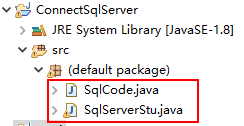
两个文件,
SqlCode.java
SqlCode.java存放静态SQL代码
/*

 * 这里放的是 静态Sql代码

*/

public class SqlCode {

	// 在数据students中创建表scores

	static String createTable = ""

			+ "USE students;"

			+ "\n"

			+ "CREATE TABLE scores"

			+ "("

			+ "sno int not null,"

			+ "name varchar(20) not null,"

			+ "ssex varchar(10) CHECK(ssex IN('boy','girl')),"

			+ "score int not null,"

			+ "PRIMARY KEY(sno),"

			+ ")";

	//在表格scores插入5条记录

	static String insertValues = ""

			+ "USE students"

			+ "\n"

			+ "INSERT INTO scores(sno,name,ssex,score) VALUES(1,'DaWang','boy','61')"

			+ "\n"

			+ "INSERT INTO scores(sno,name,ssex,score) VALUES(2,'ErWang','girl','62')"

			+ "\n"

			+ "INSERT INTO scores(sno,name,ssex,score) VALUES(3,'SanWang','boy','63')"

			+ "\n"

			+ "INSERT INTO scores(sno,name,ssex,score) VALUES(4,'siWang','girl','65')"

			+ "\n"

			+ "INSERT INTO scores(sno,name,ssex,score) VALUES(5,'wuWang','girl','66')";

	//显示5位学生的所有信息

	static String queryString = ""

			+ "USE students"

			+ "\n"

			+ "SELECT TOP 5 * FROM scores";

	//将三位男生的得分减去5 tucao:男生真累

	static String updateScoreBoy = ""

			+ "USE students"

			+ "\n"

			+ "UPDATE scores "

			+ "\n"

			+ "SET score = score - 5"

			+ "\n"

			+ "WHERE ssex = 'boy'"

			+ "\n";

	//将两位女生的成绩加上3分

	static String updateScoreGirl = ""

			+ "USE students"

			+ "\n"

			+ "UPDATE scores "

			+ "\n"

			+ "SET score = score + 3"

			+ "\n"

			+ "WHERE ssex = 'girl'"

			+ "\n";

	//删除某个学号 自己测试数据用的

	static String deleteByIdSql = "USE students"

			+ "\n"

			+ "DELETE FROM scores WHERE sno = ";

}
SqlServerStu.java
SqlServerStu.java文件就是主文件,使用JDBC来操作数据库了,最后还是做成了花里胡哨的窗口。。一共450行 (´ཀ`」 ∠)
class sqlServer{

	private Connection connection = null; //连接接口实例

	private Statement statmment = null; //执行静态sql的接口实例

	private PreparedStatement preStatement = null; //执行动态sql的接口实例

	private ResultSet resSet = null; // sql查询的返回数据集合

	String dbName = "students"; //数据库名

	String tbName = "scores"; //数据表名 没必要其实

	String url = "jdbc:sqlserver://127.0.0.1:1433"; //sqlserver连接地址url

	String userName = "sa";  //sqlserver的账号名 要在SMSS安全性里面设置

	String passWord = "root"; //sqlserver的账号的密码 要在SMSS安全性里面设置

	//下面就是按课题要求写的一些静态代码(String字符串类型,在SqlCode.java文件中的全局变量)

	String createTableSql = SqlCode.createTable;

	String insertSql = SqlCode.insertValues;

	String queryAllSql = SqlCode.queryString;

	String updateBoySql = SqlCode.updateScoreBoy;

	String updateGrilSql = SqlCode.updateScoreGirl;

	String delByIdSql = SqlCode.deleteByIdSql;

	//无参构造函数 初始化建立连接

	public sqlServer() {

		// TODO Auto-generated constructor stub

		try {

			//加载数据库驱动

			Class.forName("com.microsoft.sqlserver.jdbc.SQLServerDriver");

			//DriverManager接口获取连接

			this.connection = DriverManager.getConnection(url,userName,passWord);

			//获取 执行数据库静态SQL语法的接口

			this.statmment = connection.createStatement();

			if(connection != null) {

				System.out.println("连接成功!");

			}

		} catch (SQLException e) {

			// TODO Auto-generated catch block

			e.printStackTrace();

		} catch (ClassNotFoundException e) {

			// TODO Auto-generated catch block

			e.printStackTrace();

		}

	}

	//有参构造函数 urlParam初始化建立连接

	public sqlServer(String urlParam) {

		// TODO Auto-generated constructor stub

		try {

			Class.forName("com.microsoft.sqlserver.jdbc.SQLServerDriver");

			this.connection = DriverManager.getConnection(urlParam);

			this.statmment = connection.createStatement();

			if(connection != null) {

				System.out.println("连接成功!");

			}

		} catch (SQLException e) {

			// TODO Auto-generated catch block

			e.printStackTrace();

		} catch (ClassNotFoundException e) {

			// TODO Auto-generated catch block

			e.printStackTrace();

		}

	}

	//关闭连接

	public void close() throws SQLException {

		if(resSet != null) {

			resSet.close();

		}

		if(statmment != null) {

			statmment.close();

		}

		if(preStatement != null) {

			preStatement.close();

		}

		if(connection != null) {

			System.out.println("关闭连接!");

			connection.close();

		}

	}

	//打印输出 ResultSet集合中的数据

	public void rsPrint(ResultSet rS) throws SQLException {

		if(rS == null) return;

		System.out.println("");

		System.out.println("sno"+"|   name"+"   | ssex"+"  | score");

		while(rS.next()) {

			int sno = rS.getInt("sno");

			String name = rS.getString("name");

			String ssex = rS.getString("ssex");

			int score = rS.getInt("score");

			System.out.println(sno+"  |  "+name+"  |  "+ssex+"  |  "+score);

		}

	}

	//返回ResultSet集合

	public ResultSet queryBySno(int snoId) throws SQLException {

		String queryByIdString = ""

				+ "USE students"

				+ "\n"

				+ "SELECT * FROM scores"

				+ "\n"

				+ "WHERE scores.sno = ?"

				+ "";

		this.preStatement = connection.prepareStatement(queryByIdString);

		preStatement.setInt(1, snoId);

		return preStatement.executeQuery();

	}

	//查询全部

	public ResultSet queryAll(String querySql) throws SQLException {

		return statmment.executeQuery(querySql);

	}

	//创建数据库

	public void generalExc(String sql) throws SQLException {

		preStatement = connection.prepareStatement(sql);

		preStatement.executeUpdate();

	}

	//创建数据库

	public void createDataBase(String dbName) throws SQLException {

		String createSql = "CREATE DATABASE "+dbName;

		preStatement = connection.prepareStatement(createSql);

//		preStatement.setString(1, dbName);

		preStatement.executeUpdate();

		System.out.println("创建数据库"+dbName+"成功!");

	}

	//删除数据库

	public void delDataBase(String dbName) throws SQLException {

		String deleteSql = "DROP DATABASE "+dbName;

		preStatement = connection.prepareStatement(deleteSql);

//		preStatement.setString(1, dbName);

		preStatement.executeUpdate();

		System.out.println("删除数据库"+dbName+"成功!");

	}

	//通过sno学号删除 数据表中的记录

	public void delById(int sno) throws SQLException {

		preStatement = connection.prepareStatement(delByIdSql + sno);

		preStatement.executeUpdate();

		System.out.println("删除记录"+"成功!");

	}

	//创建数据表

	public void createTable(String createSql) throws SQLException {

		statmment.execute(createSql);

		System.out.println("创建数据表"+"成功!");

	}

	//插入数据到数据表

	public void insertValue(String insertSql) throws SQLException {

		statmment.execute(insertSql);

		System.out.println("删除数据表"+"成功!");

	}

	//更新数据表中的数据

	public void updateValue(String updateSql) throws SQLException {

		statmment.execute(updateSql);

		System.out.println("更新完成!");

	}

	//scanner输入指定学号,查询学生信息

	public void inputSnoAndQuery() throws SQLException {

		Scanner inputScanner = new Scanner(System.in);

		int snoId = inputScanner.nextInt();

		rsPrint(queryBySno(snoId));

	}

	//返回值:把ResultSet集合中的数据转换成String类型  (因为后面展示到窗口文本域需要string类型)

	public String returnString(ResultSet rS) throws SQLException {

		// TODO Auto-generated method stub

		StringBuffer myBuffer = new StringBuffer();

		int line = 0;

		while(rS.next()) {

			if(line == 0) {

				line++;

				myBuffer.append("查询结果如下: "+"\n");

//				myBuffer.append("sno"+"|   name"+"   | ssex"+"  | score"+"\n");

			}

			int sno = rS.getInt("sno");

			String name = rS.getString("name");

			String ssex = rS.getString("ssex");

			int score = rS.getInt("score");

			myBuffer.append(sno+"  |  "+name+"  |  "+ssex+"  |  "+score+"\n");

		}

		if(line == 0) myBuffer.append("");

		return myBuffer.toString();

	}

}

class window{

	//组件

	public JFrame sqlWindowFrame;

	public JPanel PanelSouth;

	public JPanel PanelNorth;

	public JTextArea textArea;

	public JScrollPane scrollPane;

	public JTextField inpuTextField;

	//一系列按钮

	public JButton customQueryBtn; //执行自定义sql代码的查询按钮

	public JButton noResultBtn; //执行没有返回值的sql代码的按钮 比如:create insert delete 这些

	public JButton createDBBtn; //创建数据库按钮

	public JButton createTBBtn; //创建数据表按钮

	public JButton insertBtn; //添加数据按钮

	public JButton showBtn; //展示5个学生数据的按钮

	public JButton updateBtn; //更新数据的按钮 男-5 女+3

	public JButton querySnoBtn; //通过学号查询的按钮

	public JLabel labelSouth; //底部标签

	public JLabel labelNorth; //顶部标签

	public sqlServer myServer; //把sqlServer作为内部类

	//窗口构造函数  主要用来初始化组件

	public window() {

		// TODO Auto-generated constructor stub

		this.sqlWindowFrame = new JFrame("by fishers _(´ཀ`」 ∠)_"); //设置窗体 名字为notePad

		this.sqlWindowFrame.setLayout(new BorderLayout()); //边界布局方式

		this.sqlWindowFrame.setDefaultCloseOperation(JFrame.EXIT_ON_CLOSE); //设置关闭框

		this.sqlWindowFrame.setSize(800,500);

		this.textArea = new JTextArea();

		this.scrollPane = new JScrollPane(textArea);

		this.inpuTextField = new JTextField(30);

		this.customQueryBtn = new JButton("执行查询");

		this.noResultBtn = new JButton("执行无返回值的sql");

		this.createDBBtn = new JButton("创建数据库");

		this.createTBBtn = new JButton("创建数据表");

		this.insertBtn = new JButton("添加数据");

		this.showBtn = new JButton("展示数据");

		this.updateBtn = new JButton("更新数据");

		this.querySnoBtn = new JButton("查询学号");

		this.PanelSouth = new JPanel();

		this.PanelNorth = new JPanel();

		this.labelSouth = new JLabel("输入sql语法: ");

		this.labelNorth = new JLabel("内置功能区: ");

		this.myServer = new sqlServer();

		textArea.setFont(new Font("宋体",Font.PLAIN,20));

		textArea.setEditable(false); //设置文本域组件不可以编辑

		itemAdd();

		addListen();

	}

	//添加组件都写在这里

	public void itemAdd() {

		PanelSouth.add(labelSouth);

		PanelSouth.add(inpuTextField);

		PanelSouth.add(customQueryBtn);

		PanelSouth.add(noResultBtn);

		PanelSouth.add(noResultBtn);

		PanelNorth.add(labelNorth);

		PanelNorth.add(createDBBtn);

		PanelNorth.add(createTBBtn);

		PanelNorth.add(insertBtn);

		PanelNorth.add(showBtn);

		PanelNorth.add(updateBtn);

		PanelNorth.add(querySnoBtn);

		sqlWindowFrame.add(scrollPane,BorderLayout.CENTER);

		sqlWindowFrame.add(PanelSouth,BorderLayout.SOUTH);

		sqlWindowFrame.add(PanelNorth,BorderLayout.NORTH);

		sqlWindowFrame.setVisible(true);

	}

	//监听方法都写在这里

	public void addListen() {

		//监听自定义查询按钮

		customQueryBtn.addActionListener(new ActionListener() {

			@Override

			public void actionPerformed(ActionEvent e) {

				// TODO Auto-generated method stub

				String textString = inpuTextField.getText();

				System.out.println(textString);

				if(textString != null) {

					try {

//						myServer.rsPrint(myServer.queryAll(textString));

						String queryAns = myServer.returnString(myServer.queryAll(textString));

						System.out.println(queryAns);

						textArea.setText(queryAns);

					} catch (SQLException e1) {

						// TODO Auto-generated catch block

						e1.printStackTrace();

					}

				}

			}

		});

		//监听没有返回值的按钮

		noResultBtn.addActionListener(new ActionListener() {

			@Override

			public void actionPerformed(ActionEvent e) {

				// TODO Auto-generated method stub

				String textString = inpuTextField.getText();

				System.out.println(textString);

				if(textString != null) {

					try {

						myServer.generalExc(textString);

						textArea.setText("执行完成!");

					} catch (SQLException e1) {

						// TODO Auto-generated catch block

						e1.printStackTrace();

					}

				}

			}

		});

		//监听创建数据库按钮

		createDBBtn.addActionListener(new ActionListener() {

			@Override

			public void actionPerformed(ActionEvent e) {

				// TODO Auto-generated method stub

				try {

					myServer.createDataBase("students");

					textArea.setText("创建数据库完成!");

				} catch (SQLException e1) {

					// TODO Auto-generated catch block

					textArea.setText("创建数据库失败,请检查语法是否正确!或当前连接已经存在该数据库!");

					e1.printStackTrace();

				}

			}

		});

		//监听创建数据表的按钮

		createTBBtn.addActionListener(new ActionListener() {

			@Override

			public void actionPerformed(ActionEvent e) {

				// TODO Auto-generated method stub

				try {

					myServer.createTable(myServer.createTableSql);

					textArea.setText("创建数据表完成!");

				} catch (SQLException e1) {

					textArea.setText("创建数据表失败,请检查语法是否正确!或当前数据库中已经存在该数据表!");

					e1.printStackTrace();

				}

			}

		});

		//监听插入数据的按钮

		insertBtn.addActionListener(new ActionListener() {

			@Override

			public void actionPerformed(ActionEvent e) {

				// TODO Auto-generated method stub

				try {

					myServer.insertValue(myServer.insertSql);

					textArea.setText("添加数据完成!");

				} catch (SQLException e1) {

					textArea.setText("添加数据失败,请检查语法是否正确!或当前数据库中已经存在该数据!");

					e1.printStackTrace();

				}

			}

		});

		//监听展示数据的按钮

		showBtn.addActionListener(new ActionListener() {

			@Override

			public void actionPerformed(ActionEvent e) {

				// TODO Auto-generated method stub

				try {

					String queryAns = myServer.returnString(myServer.queryAll(myServer.queryAllSql));

					System.out.println(queryAns);

					textArea.setText(queryAns);

				} catch (SQLException e1) {

					e1.printStackTrace();

				}

			}

		});

		//监听更新数据的按钮

		updateBtn.addActionListener(new ActionListener() {

			@Override

			public void actionPerformed(ActionEvent e) {

				// TODO Auto-generated method stub

				try {

					myServer.updateValue(myServer.updateBoySql);

					myServer.updateValue(myServer.updateGrilSql);

					textArea.setText("更新数据完成!");

				} catch (SQLException e1) {

					// TODO Auto-generated catch block

					textArea.setText("更新数据失败,请检查语法是否正确!");

					e1.printStackTrace();

				}

			}

		});

		//监听通过学号查询数据的按钮

		querySnoBtn.addActionListener(new ActionListener() {

			@Override

			public void actionPerformed(ActionEvent e) {

				// TODO Auto-generated method stub

				try {

					int sno = Integer.valueOf(inpuTextField.getText());

					String queryAns = myServer.returnString(myServer.queryBySno(sno));

//					if(queryAns == " " || queryAns == null) queryAns = "未查到该学生信息";

//					System.out.println(queryAns);

					textArea.setText(queryAns);

				} catch (SQLException e1) {

					// TODO Auto-generated catch block

					textArea.setText("查询失败,请检查语法是否正确");

					e1.printStackTrace();

				}

			}

		});

	}

}

//主进程启动

public class SqlServerStu {

	public static void main(String []args) throws SQLException {

//		String urlParam = "jdbc:sqlserver://127.0.0.1:1433?user=sa&password=root"; //这个连接url好像不能用啊

//		sqlServer myServer = new sqlServer();

//		myServer.createDataBase("students"); //创建数据库

//		myServer.createTable(myServer.createTableSql); //创建数据表

//		myServer.insertValue(myServer.insertSql); //增

//		myServer.rsPrint(myServer.queryAll(myServer.queryAllSql)); //查

//		myServer.rsPrint(myServer.queryBySno(2)); //查

//		myServer.updateValue(myServer.updateBoySql); //改

//		myServer.delById(1); //删

//		myServer.rsPrint(myServer.queryAll(myServer.queryAllSql)); //查

//		myServer.delDataBase("students"); //删

//		myServer.close(); //关闭连接

//		myServer.inputSnoAndQuery();

//		myServer.updateValue(myServer.updateBoySql);

//		myServer.delDataBase("students");

//		myServer.createDataBase("qwertest12");

		window myWindow = new window(); //最后还是做成了窗口 orz

	}

}

//凑够450行
做数据库实验也是可以的??
Java使用JDBC连接SQL Server数据库|实现学生成绩信息系统的更多相关文章
- Java使用JDBC连接SQL Server数据库
Java使用JDBC连接SQL Server数据库 1.下载驱动 1.下载Microsoft SQL Server JDBC 驱动程序 https://docs.microsoft.com/zh-cn ...
- 编写Java程序,使用JDBC连接SQL Server数据库
返回本章节 返回作业目录 需求说明: 使用JDBC连接SQL Server数据库 SQL Server数据库位于192.168.2.101. 所需连接的数据库为eshop_db,用户名为test,密码 ...
- JDBC连接sql server数据库及其它
JDBC连接sql server数据库的步骤如下: 1.加载JDBC驱动程序: 在连接数据库之前,首先要加载想要连接的数据库的驱动到JVM(Java虚拟机), 这通过java.lang.Class类的 ...
- JDBC连接sql server数据库的详细步骤和代码
JDBC连接sql server数据库的详细步骤和代码 JDBC连接sql server数据库的步骤如下: 1.加载JDBC驱动程序: 在连接数据库之前,首先要加载想要连接的数据库的驱动到JVM(Ja ...
- JDBC连接sql server数据库的详细步骤和代码 转
JDBC连接sql server数据库的步骤如下: 1.加载JDBC驱动程序(只做一次): 在连接数据库之前,首先要加载想要连接的数据库的驱动到JVM(Java虚拟机), 这通过java.lang.C ...
- Java通过JDBC连接SQL Server
下载Microsoft JDBC Driver 4.0 for SQL Server 在这里下载:http://www.microsoft.com/zh-cn/download/details.asp ...
- Java通过JDBC连接SQL Server2017数据库
一.需要明白的基础知识 数据库名 驱动jar(x表示版本号) 具体驱动类 连接字符串(ip地址,端口号,名字) Oracle ojdbc-x.jar oracle.jdbc.oracleDriver ...
- JDBC连接SQL Server数据库
测试环境 数据库:SQL Server 2008 R2,创建数据库名:TestDemo,表:User,字段如下: 字段 字段 id UName UPass sqljdbc.jar下载地址:依赖的J ...
- JDBC连接sql server数据库操作
1.首先,先创建一个连接数据库的工具类: package gu.db.util; import java.sql.Connection; import java.sql.DriverManager; ...
随机推荐
- SpringBoot源码篇:Spring5内置tomcat实现code-based的web.xml实现
一.简介 上篇文章讲了SpingBoot诞生的历史背景和技术演进背景,并通过源码说明了SpringBoot是如何实现零配置的包括如何省去web.xml配置的原理.本文接上一篇文章,通过demo演示Sp ...
- 移动端H5页面开发,碰到一个字体变大的BUG
移动端H5页面开发,碰到一个字体变大的BUG webkit内核下,对不定高宽的元素可能会放大其字体.那么,就可以设置一个max-width:或者使用-webkit-text-size-adjust: ...
- 精通awk系列(15):awk数据类型和字面量
回到: Linux系列文章 Shell系列文章 Awk系列文章 数据类型 gawk有两种基本的数据类型:数值和字符串.在gawk 4.2.0版本中,还支持第三种基本的数据类型:正则表达式类型. 数据是 ...
- Consul初探-在深交之前先认识
Consul 是什么? Consul 官方站点:https://www.consul.io/ 首先,官方介绍是:Consul 是一种服务网格的解决方案,在 Consul 中,提供了服务发现.配置.分段 ...
- GO汇总
1.基础 GO语言介绍以及开发环境配置 Go-包 Go-数据类型以及变量,常量 Go-获取变量数据类型 GO-数组与切片 GO-切片拷贝以及赋值 Go-函数 Go-闭包 GO-逻辑判断(if,else ...
- Ligg.WinOa-000: Windows运维自动化编程实战--前言
本开源项目Ligg.WinOa是一个基于Ligg.EasyWinApp的Windows运维自动化应用.通过Ligg.EasyWinForm生成2个功能界面:管理员工具箱和用户工具箱:通过Lig ...
- JS---DOM---为元素绑定事件的引入,为元素绑定多个代码,兼容代码
1. 为元素绑定事件的引入: 用src直接绑定多个,只实现最后一个(programmer2.js) <input type="button" value="按钮&q ...
- 微信wxid搜索用户不存在,怎么加好友?
点击上方↑↑↑蓝字[协议分析与还原]关注我们 " 根据wxid微信号找到用户的方法及周边资料大全." 最近经常会收到好友请求的消息提醒,但却不是通过搜索好友和群聊来添加的,因此研究 ...
- Oracle VirtualBox安装CentOS 8
1.下载CentOS CentOS下载地址: https://wiki.centos.org/Download 这里以CentOS8为例 选择一个比较快的地址,这里以jdcloud mirror为例 ...
- 推荐一个好用的行内可编辑的table组件 vxe-table
项目中有一个需要用户点击table单元格可编辑的需求,由于博主用的是elementUI,element组件内实现可编辑,用过的小伙伴都知道,非常麻烦,后来博主在浏览组件的时候发现了 一款非常好用的ta ...